 Maurice Kherlakian
How We Made Payload Search 60x Faster in ClickHouse
At Hookdeck, we process hundreds of millions of webhooks daily. Every request that flows through our platform carries a payload — a JSON body, HTTP headers, query parameters — and our users need to search through all of it. "Show me every event where the body contained order_id: 12345" is a query that needs to come back fast, even when you're looking across millions of payloads.
For a while, it didn't.
Our payload search was built on ClickHouse, which we chose specifically for its analytical query performance. But as our data grew, search queries started taking 30+ seconds — and sometimes they simply timed out. Users reported that searching payloads in the dashboard would spin indefinitely. This wasn't a minor inconvenience; payload search is one of the most critical debugging tools our users have when a webhook fails.
We needed to fix this. The result was two complementary techniques that brought our average search latency down to ~400ms, with p99 under 1.4 seconds — a roughly 60x improvement. Here's how we got there.
The problem with searching semi-structured data
Webhook payloads are, by nature, semi-structured — they follow a format like JSON, but with no consistent schema across providers. A Stripe webhook looks nothing like a Shopify webhook. A single Hookdeck team might receive payloads with hundreds of different key structures, nested objects, arrays of varying depth. We need to let users search across all of that — by key-value pair, by header value, by a freeform search term.
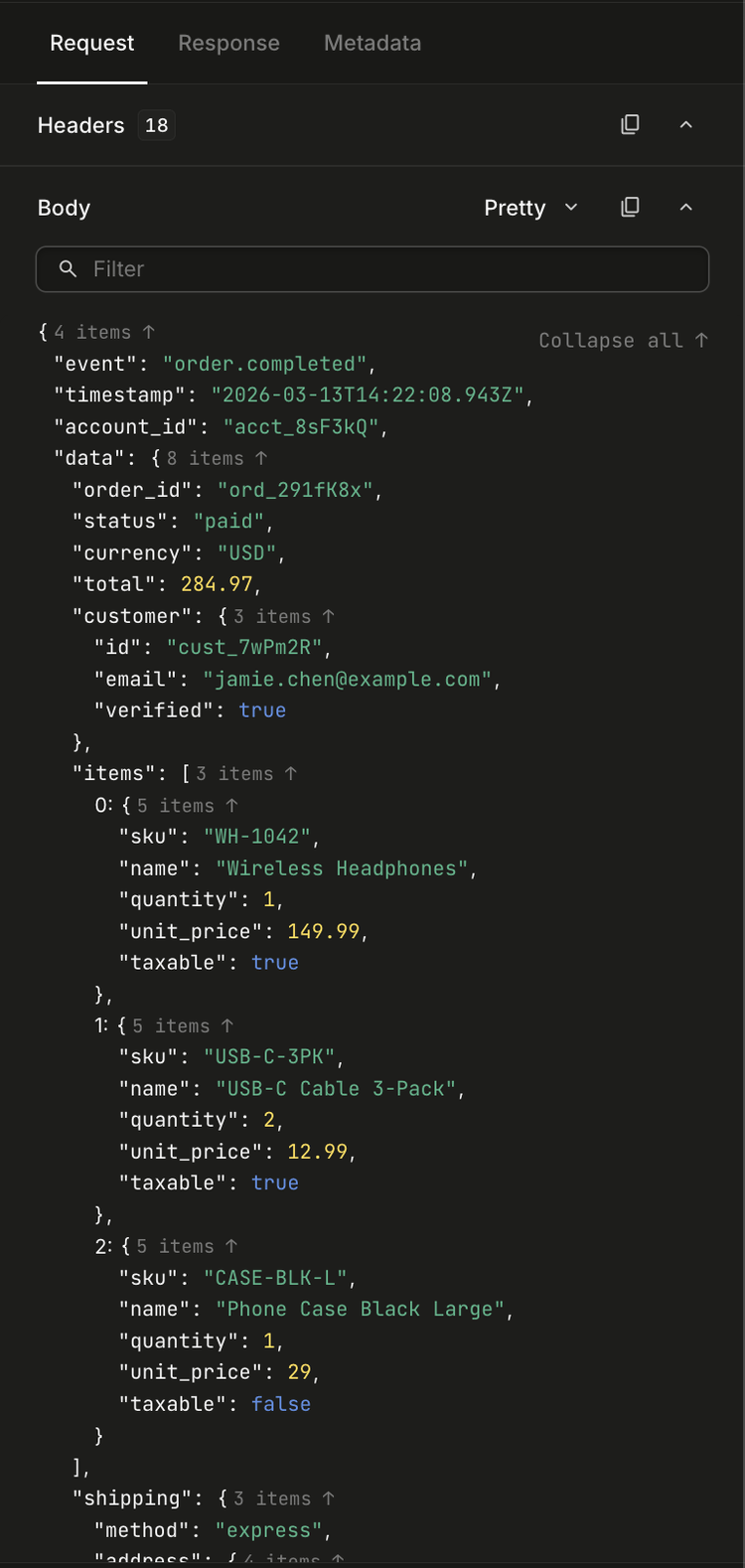
Our original approach stored searchable payload data in a ClickHouse table called searchable_payloads. The schema looked like this:
CREATE TABLE searchable_payloads (
  team_id     String,
  payload_id  String,
  req_evt_id  String,
  created_at  DateTime64(6),
  terms       String,            -- all content concatenated and tokenized
  body        Map(String, String),
  headers     Map(String, String),
  query       Map(String, String),
  path        String,
  ttl         DateTime64(3),

  INDEX sp_terms_bloom_n terms TYPE tokenbf_v1(135000, 3, 0) GRANULARITY 1,
  INDEX sp_bloom_body_keys mapKeys(body) TYPE bloom_filter() GRANULARITY 1,
  INDEX sp_bloom_body_values mapValues(body) TYPE bloom_filter() GRANULARITY 1,
  -- ... similar bloom filters for headers, query, path
)
Three problems compounded here:
1. Fat Map columns. Each payload's entire body was flattened into a single Map(String, String) column. When a user searched for body.order_id = "12345", ClickHouse had to read the entire body Map for every row that passed the Bloom filter. For teams with large payloads (common with e-commerce webhooks), this meant reading megabytes of irrelevant key-value pairs per row.
2. A massive Bloom filter on a kitchen-sink column. The terms column concatenated everything — body values, header values, query params, path — into one giant string. The Bloom filter on it was 135,000 bits, and it still produced false positives at scale. A freeform search for "stripe" would pass the Bloom filter on almost every row for a team that exclusively receives Stripe webhooks, defeating the purpose entirely.
3. Single-shot unbounded queries — made worse by deduplication. Unlike typical analytics workloads where data is append-only, our data is stateful. Webhook events have lifecycle states (pending, successful, failed, retried) that change over time. We replicate this state from Redis through Kafka into ClickHouse, which means the same event can produce multiple rows as its state evolves. ClickHouse doesn't natively support updates, so we deduplicate at query time using GROUP BY to collapse these rows down to the latest version of each event.
This is what made unbounded queries so punishing. You might think a search could simply be SELECT * FROM ... WHERE ... LIMIT 25 — scan until you find 25 matches and stop. But because we need to deduplicate, the query is actually closer to SELECT ... GROUP BY (team_. ClickHouse's query engine has to process all matching rows to correctly group them before it can apply the LIMIT — it can't short-circuit after finding 25 matches because it doesn't know whether later rows might belong to the same groups. Firing that across a 30-day retention window with millions of events meant ClickHouse was forced to scan and deduplicate everything before returning even a single page of results.
(This is a known limitation in ClickHouse — optimizing GROUP BY with LIMIT to avoid processing all groups is an open area of improvement: #5329, #72610, #78553.)
The foundation: a unified timestamp
Before we could implement either technique, we needed to solve a prerequisite problem. Our data lives across multiple ClickHouse tables — events, requests, payloads — each with its own created_at timestamp in the primary key. Historically, these timestamps could drift slightly because each resource was inserted independently.
We standardized created_at to be identical across all related resources. When a webhook arrives, the request, its events, and the searchable payload all share the exact same created_at value. This is a natural fit — these resources are created at the same time (with rare exceptions that we handle separately).
This seemingly small constraint unlocked everything. In ClickHouse, data is physically sorted by the primary key — in our case (team_. When we search the payload table for matches within a time window, the results come back as (team_ tuples. Because the event and request tables share the exact same primary key structure and the same created_at values, we can look up matching rows using a tuple IN clause that hits the primary index directly — no full scans, no expensive range joins. ClickHouse resolves these lookups in logarithmic time against sorted data. If the timestamps had drifted even slightly between tables, we'd lose this alignment and fall back to scanning entire time ranges to find matching rows.
This consistency is maintained by our state store, built on a pattern we call the ConcurrencyController — a distributed concurrency control layer that replicates state from Redis through Kafka into ClickHouse with microsecond-precision timestamps. How it works is a topic for another blog post, but the key point is: created_at is set once at entity creation and never changes, so the same value propagates reliably through requests, events, and payloads. That gave us confidence to build a time-windowed search system on top of it.
Technique 1: Hash-bucketed payload storage
We were inspired by Sentry's approach to querying unstructured span data, where they distribute attributes across bucketed Map columns using a hash function. The core insight is simple: if you hash keys into N buckets, each column holds roughly 1/Nth of the data, and a targeted query only needs to read one column instead of all of them.
Sentry hashes on the key name (e.g., fnv_). This works well for their use case — span attributes where the same keys appear across most rows, and queries filter by key name.
We hash on the value instead. Here's why: our search pattern is almost always exact-match on a specific value. A user searching for body.order_id = "12345" knows the exact value they're looking for. By hashing the value, we ensure that the target bucket contains only rows where that specific value exists — regardless of which key it's associated with. This gives us better bucket distribution for our access pattern, because values have much higher cardinality than keys.
Our new schema distributes data across 102 bucket columns — 50 for strings, 50 for numbers, and 2 for booleans. We experimented with different bucket counts; too few and individual buckets stay fat, too many and you pay overhead in column metadata and sparse Maps. 50 string buckets hit a sweet spot for our payload sizes — which, as it turns out, is the same number Sentry landed on independently. Different hashing strategies, same bucket count; it seems like 50 is just a good number for this kind of workload. Since boolean values only have two possible states, two buckets (one per value) are a natural fit:
CREATE TABLE search_payloads_bucketed (
  team_id        String,
  created_at     DateTime64(6),
  payload_id     String,
  source_id      String,
  -- ... metadata columns ...

  -- 50 string buckets
  string_bucket_0   Map(String, String),
  string_bucket_1   Map(String, String),
  -- ... through string_bucket_49

  -- 50 numeric buckets
  numeric_bucket_0  Map(String, Float64),
  -- ... through numeric_bucket_49

  -- 2 boolean buckets
  boolean_bucket_0  Map(String, UInt8),
  boolean_bucket_1  Map(String, UInt8)
)
How insertion works
When a payload arrives, we flatten the entire JSON structure into dot-notation key-value pairs, preserving types:
bucketFlattenObject({
  order: { id: "12345", items: [{ sku: "ABC", qty: 2 }] }
})
// => {
//   "order.id": "12345",
//   "order.items.0.sku": "ABC",
//   "order.items.0.qty": 2
// }
Each key-value pair is then routed to a bucket based on the hash of its value:
function hashValueToBucket(key: string, bucket_count: number): number {
  const hash_buffer = XXHash3.hash(Buffer.from(key));
  const hash_value = hash_buffer.readBigUInt64BE(0);
  return Number(hash_value % BigInt(bucket_count));
}

// "12345" hashes to, say, bucket 17
// So the pair "order.id" => "12345" goes into string_bucket_17
We use XXHash3 for the hash function — it's extremely fast (important since we're hashing on the hot ingestion path) and produces well-distributed output.
The full bucketing logic distributes flattened key-value pairs by type. Strings go into one of 50 string buckets, numbers into 50 numeric buckets, and booleans into 2 boolean buckets (one for true, one for false):
const bucketizeForInsert = (
  full_payload: Record<string, string | number | boolean>
): StringBuckets & NumericBuckets & BooleanBuckets => {
  const buckets = createBuckets();

  for (const [key, value] of Object.entries(full_payload)) {
    if (typeof value === 'string') {
      const bucket_index = hashValueToBucket(value, STRING_BUCKET_COUNT);
      buckets[`string_bucket_${bucket_index}`][key] = value;
    } else if (typeof value === 'number') {
      const bucket_index = hashValueToBucket(value.toString(), NUMERIC_BUCKET_COUNT);
      buckets[`numeric_bucket_${bucket_index}`][key] = value;
    } else if (typeof value === 'boolean') {
      const bucket_index = value ? 1 : 0;
      buckets[`boolean_bucket_${bucket_index}`][key] = value;
    }
  }

  return buckets;
};
How queries work
When a user searches for body.order_id = "12345", we:
- Hash the value
"12345"to get the bucket index - Generate a targeted query against only that single bucket:
SELECT event_pks
FROM search_payloads_bucketed
WHERE team_id = 'tm_abc'
  AND created_at >= '2026-03-01'
  AND created_at <= '2026-03-13'
  AND mapContains(string_bucket_17, 'body.order_id')
  AND string_bucket_17['body.order_id'] = '12345'
Instead of reading all 50 string columns, ClickHouse reads exactly one. That's a ~50x reduction in data scanned for the search columns alone.
For keyless searches (the user just types a value without specifying a key), we target the single bucket that value hashes to and scan its values:
AND has(mapValues(string_bucket_17), '12345')
This is still dramatically faster than the old approach of scanning the entire terms column — we're searching one Map column with ~1/50th of the keys instead of a monolithic concatenated string.
One important detail: we always check mapContains() to verify the key exists before accessing the value. Without this, accessing a non-existent key returns ClickHouse's default value (empty string for strings, 0 for numbers), which can cause false positives — especially when searching for values like false or 0.
Handling arrays and nested structures
Webhook payloads frequently contain arrays. When a user searches for an item inside an array (e.g., "find events where body.items contains an object with sku = ABC"), the array indices at insert time won't match the query because the user doesn't know which index the matching element is at.
We handle this with wildcard patterns. At query time, array paths become patterns with % wildcards:
body.items.% → matches body.items.0, body.items.1, etc.
These translate to regex-based arrayExists queries:
arrayExists(
  (k, v) -> match(k, '^body\.items\.[^.]+\.sku$') AND v = 'ABC',
  mapKeys(string_bucket_23),
  mapValues(string_bucket_23)
)
The regex [^.]+ ensures we match exactly one path segment — body.items.0.sku matches, but body.items.0.details.sku doesn't. This is handled by a simple conversion function:
function patternKeyToRegex(key: string): string {
  const parts = key.split('%');
  const escaped_parts = parts.map((part) =>
    part.replace(/[.*+?^${}()|[\]\\]/g, '\\$&')
  );
  return '^' + escaped_parts.join('[^.]+') + '$';
}
Technique 2: Variable-window iterative scanning
The bucketed schema solved the "reading too much data per row" problem. But we still had the "scanning too many rows" problem — and crucially, the deduplication cost that comes with it. Because every row scanned has to be grouped and deduplicated before results can be returned, reducing the scan range doesn't just mean less I/O — it means a dramatically smaller deduplication surface. A GROUP BY ... LIMIT 25 over 30 minutes of data is a fundamentally different operation than the same query over 30 days.
The insight: most of the time, what the user wants is recent. If you're debugging a failed webhook, you're looking at something that happened in the last few hours, not last month. And even when users do need to go further back, they want to see something quickly — the first page of results — not wait for the full scan to complete.
We implemented what we call variable-window iterative scanning with adaptive granularity. Instead of one query across the full date range, we issue a series of queries with progressively expanding time windows:
Iteration 1: Search the last 30 minutes
Iteration 2: Search the last 1 hour
Iteration 3: Search the last 6 hours
Iteration 4: Search the last 1 day
Iteration 5: Search the last 7 days
Iteration 6: Search the last 30 days
As soon as we have enough results to fill a page, we stop. For most queries, this means returning results after just the first or second iteration — covering a tiny fraction of the total data.
In code, the progression is defined as a simple array of time windows:
const GRANULARITY_PROGRESSION: GranularityConfig[] = [
  { interval_value: 30, interval_unit: 'minute' },
  { interval_value: 1,  interval_unit: 'hour' },
  { interval_value: 6,  interval_unit: 'hour' },
  { interval_value: 1,  interval_unit: 'day' },
  { interval_value: 7,  interval_unit: 'day' },
  { interval_value: 30, interval_unit: 'day' },
];
Adaptive granularity with hysteresis
The window sizes aren't static. The iterative scanner has several controls — maximum query duration limits, result count thresholds, early termination conditions — but the most impactful one is adaptive granularity. The system adjusts its time window size based on how long each iteration's query takes:
const GRANULARITY_STEP_DOWN_THRESHOLD_MS = 2000; // Fast: widen the window
const GRANULARITY_STEP_UP_THRESHOLD_MS = 8000;   // Slow: narrow the window

function getGranularityAdjustment(query_time_ms: number): number {
  if (query_time_ms < 2000) return 1;   // Step to coarser granularity
  if (query_time_ms > 8000) return -1;  // Step to finer granularity
  return 0;                              // Stay at current level
}
If a 30-minute window query comes back in 500ms, the system steps to a wider window next time. If a 6-hour window takes 9 seconds, it steps back to a narrower one. This creates a feedback loop that automatically tunes the scanning speed to the data density of each team.
We use the term "hysteresis" because the system has a dead zone between 2–8 seconds where it stays at the current granularity — preventing oscillation between window sizes when query times are borderline.
Probe queries: don't scan where there's nothing
Before starting the iterative scan, we run lightweight "probe" queries to find the boundaries of matching data:
-- Where's the most recent match in the search table?
SELECT max(created_at) as probe_time
FROM search_payloads_bucketed
WHERE team_id = 'tm_abc'
  AND mapContains(string_bucket_17, 'body.order_id')
  AND string_bucket_17['body.order_id'] = '12345'
If the most recent match was 3 days ago, we start our scan there instead of from now — skipping days of empty iteration windows. These probes are simple aggregations with no GROUP BY, so they typically complete in tens of milliseconds. That's a small upfront cost for what can save entire seconds of wasted iteration over empty time ranges.
We also run a fast-path optimization that checks the last hour first before falling back to a full-range probe, since most matching data tends to be recent.
Progressive loading for the UI
The iterative approach naturally lends itself to progressive loading. Instead of waiting for a full page of results, the API supports a progressive mode where each iteration returns its results immediately.
The pagination cursor carries the scan state:
interface CursorPayload {
  c?: string;  // last row's created_at
  i?: string;  // last row's id
  d: 'next' | 'prev';
  // Progressive fields:
  n?: number;  // accumulated results so far
  w?: string;  // where the time window scan left off
  g?: number;  // current granularity index (0-5)
}
The frontend receives partial results and renders them immediately while requesting the next batch. From the user's perspective, results start appearing almost instantly, with more filling in as the scan continues.
The results
The combination of bucketed storage and variable-window scanning transformed our search performance:
- Average latency: From 30+ seconds (when queries completed at all) to ~400ms
- p99 latency: Under 1.4 seconds (previously queries would simply time out)
- Reliability: Zero timeout-related search failures, down from a regular occurrence
The two techniques complement each other well. Bucketing reduces the data read per row (column pruning), while variable-window scanning reduces the number of rows scanned (time-range pruning). Together, they attack both dimensions of the problem.
What we learned
Hash on what you filter on. Sentry's approach of hashing on keys works for their OLAP workload where they aggregate across many spans. Our exact-match workload benefits from hashing on values instead. The right bucketing strategy depends on your query pattern.
Start small, expand. The iterative scanning approach is a bet that most queries find results in recent data. For our workload, that bet pays off overwhelmingly. But it's the adaptive granularity — the hysteresis — that makes it robust. Without it, edge cases (high-volume teams, rare search terms) would still degrade.
Probe before you scan. The lightweight probe queries add a round-trip but save potentially dozens of wasted iterations. For searches where the matching data is sparse or clustered in a specific time period, probes are the difference between milliseconds and seconds.
Progressive loading changes the UX contract. When you can show some results in 200ms instead of all results in 30 seconds, the perceived performance improvement is even larger than the raw numbers suggest. Users start their debugging workflow immediately instead of waiting.