 Gareth Wilson
How to Solve Grafana Webhook Timeout Errors
Grafana is one of the most popular open-source observability platforms, enabling teams to visualize metrics, create dashboards, and set up alerting for their infrastructure. A critical component of Grafana's alerting system is its webhook integration, which sends HTTP POST requests to external services like PagerDuty, Slack, or Microsoft Teams, when alerts fire.
However, developers can encounter frustrating timeout errors that can cause missed alerts, system instability, and hours of debugging. For a broader overview of the platform's webhook capabilities, see our guide to Grafana webhooks features and best practices. In this guide, we'll explore the most common Grafana webhook timeout errors and show you how Hookdeck can solve them.
The Problem: Grafana's 30-Second Timeout Limit
Grafana enforces a hard 30-second timeout limit on webhook notifications. When your endpoint takes longer than 30 seconds to respond, whether due to processing time, network latency, or downstream dependencies, Grafana will fail the delivery with a context deadline exceeded error.
Common Error Messages
When Grafana webhook deliveries fail, you'll typically see these errors in your logs:
level=error msg="Failed to send webhook" error="context deadline exceeded"
level=error msg="Failed to send webhook" error="Client.Timeout exceeded while awaiting headers"
level=error msg="notify retry canceled due to unrecoverable error after 1 attempts"
Why This Happens
The 30-second timeout becomes problematic in several scenarios:
High alert volume: When multidimensional alert rules trigger many alerts simultaneously, your processing endpoint may need more time to handle the batch.
Slow downstream services: If your webhook endpoint calls external APIs (databases, third-party services), those dependencies can push processing past the timeout.
Serverless cold starts: Functions deployed on Lambda, Cloud Functions, or similar platforms may experience cold starts that consume precious seconds.
Complex processing logic: Alert enrichment, correlation, or routing logic can extend processing time.
Network latency: Geographically distributed systems may suffer from variable network conditions.
The Retry Storm Problem
Making matters worse, Grafana's default retry behavior can cause cascading failures. When webhooks fail, Grafana attempts retries, but if your endpoint is already overwhelmed, these retries create a feedback loop that can destabilize your entire alerting pipeline.
Users have reported scenarios where webhook failures to external services trigger waves of retries that saturate the Grafana instance, making it inaccessible and causing HTTP 429 (Too Many Requests) errors from the destination.
Additional Pain Points with Grafana Webhooks
Beyond timeout errors, developers face several other challenges:
No Configurable Timeout
Grafana doesn't allow you to configure the webhook timeout through its UI. This has been a long-standing feature request, leaving teams without a straightforward solution.
Payload Format Incompatibilities
Grafana's webhook payload format has changed between versions. A webhook endpoint built for v8 may break when you upgrade to v9 due to structural changes like the addition of a values field.
No Built-in Queue
When your endpoint experiences downtime or slowdowns, Grafana has no native queuing mechanism. Alerts fire and fail immediately, with limited retry capabilities.
How Hookdeck Solves These Problems
Hookdeck's Event Gateway sits between Grafana and your destination endpoints, providing the reliability infrastructure that Grafana's native webhooks lack.
Extended Timeout Handling
Hookdeck provides a 60-second timeout for webhook deliveries, double Grafana's limit. More importantly, if your endpoint times out, Hookdeck queues the event and automatically retries according to your configured policy.
Since Hookdeck acknowledges Grafana's webhook immediately, Grafana never sees a timeout. Your alerts are safely queued regardless of how long your processing takes.
Configurable Retry Policies
Unlike Grafana's inflexible retry behavior, Hookdeck gives you full control:
- Retry attempts: Up to 50 automatic retries over a week
- Retry strategy: Choose linear or exponential backoff
- Status code filtering: Configure which HTTP status codes trigger retries
- Custom scheduling: Use
Retry-Afterheaders from your endpoint for precise control
With exponential backoff, Hookdeck will retry at 10 minutes, 20 minutes, 40 minutes, and so on, giving your downstream services time to recover without overwhelming them.
Rate Limiting to Prevent Overload
When alert storms hit, Hookdeck's delivery rate limiting prevents your endpoints from being overwhelmed:
Events exceeding your rate limit are queued and delivered at a sustainable pace. Your endpoint stays healthy even during major incidents that trigger thousands of alerts.
Guaranteed Delivery with Queueing
Hookdeck's persistent queue ensures no alert is lost:
- Spike absorption: Traffic spikes are buffered and released at a safe pace
- Downtime protection: If your endpoint goes down, events queue automatically
- Manual pause: Pause delivery during maintenance windows, then resume
When your endpoint recovers, you can use Hookdeck's bulk retry feature to reprocess all failed deliveries at once, so no manual intervention is required.
Payload Transformation
If you need to modify Grafana's webhook payload for compatibility with different services, Hookdeck's JavaScript transformations let you reshape the data on the fly. For example:
addHandler('transform', (request, context) => {
  const grafanaPayload = request.body;

  return {
    body: {
      alert_name: grafanaPayload.alerts[0]?.labels?.alertname,
      status: grafanaPayload.status,
      severity: grafanaPayload.alerts[0]?.labels?.severity,
      summary: grafanaPayload.alerts[0]?.annotations?.summary,
      timestamp: new Date().toISOString()
    }
  };
});
Filtering and Routing
Not every alert needs to go to every destination. Hookdeck's filters let you route alerts based on their content:
{
  "body": {
    "status": "firing",
    "alerts": {
      "0": {
        "labels": {
          "severity": "critical"
        }
      }
    }
  }
}
This filter only forwards critical firing alerts, reducing noise and ensuring your on-call team only gets paged for what matters.
Complete Observability
Hookdeck provides end-to-end visibility into your webhook pipeline:
- Request tracing: See the full lifecycle from Grafana to destination
- Error categorization: Issues are grouped by connection and status code
- Delivery metrics: Monitor success rates, latency, and retry patterns
- Alerting: Get notified on first failure or after all retries are exhausted
Setting Up Hookdeck with Grafana
Step 1: Create a Hookdeck Connection

- Sign up for Hookdeck and create a new Connection
- Copy your unique Hookdeck URL (e.g.,
https://hkdk.events/your-source-id) - Create a Destination pointing to your actual webhook endpoint
- Configure your retry and rate limiting rules
Step 2: Configure Grafana Contact Point
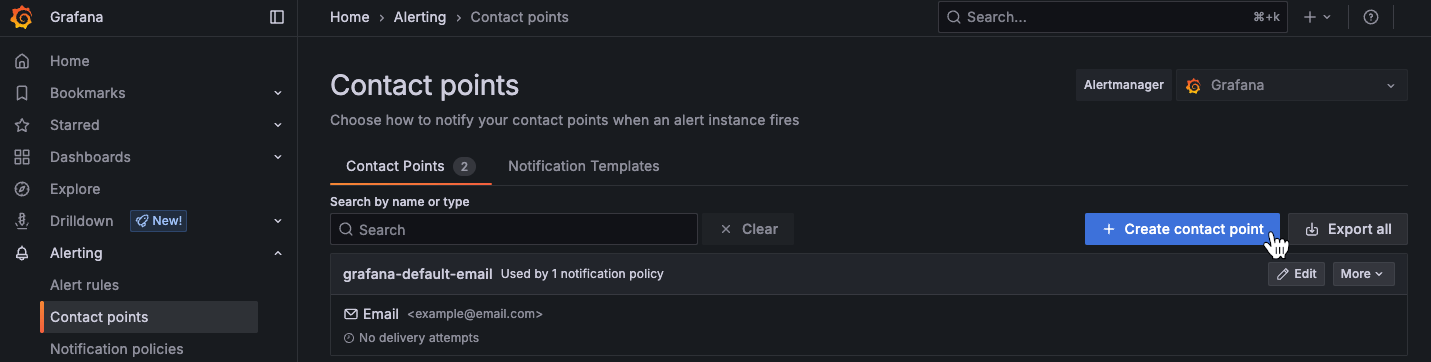
- Navigate to Alerting > Contact points in Grafana
- Click Create contact point
- Select Webhook as the integration type
- Paste your Hookdeck URL in the URL field
- Configure optional authentication if needed
Step 3: Test the Integration
- Click Test in Grafana to send a test alert
- Check Hookdeck's dashboard to see the event received
- Verify delivery to your destination endpoint
- Review the complete request/response trace
Example: Solving the Microsoft Teams Timeout Problem
A commonly reported issue is with sending Grafana alerts to Microsoft Teams. Teams webhooks can be slow, and combined with Grafana's 30-second timeout, alerts frequently fail.
Before Hookdeck:
Grafana → Teams Webhook (slow response) → context deadline exceeded
        → Retry storm → Grafana instability → HTTP 429 errors
After Hookdeck:
Grafana → Hookdeck (instant ack) → Queue → Teams Webhook (rate limited)
        ↳ Retry on failure (exponential backoff)
        ↳ Full observability and alerting
With Hookdeck in the middle:
- Grafana never times out (Hookdeck acknowledges immediately)
- Teams receives alerts at a sustainable rate
- Failed deliveries retry automatically without overwhelming Teams
- You have full visibility into delivery status
Conclusion
Grafana's webhook system is powerful but limited by its timeout and basic retry logic. When you're building production alerting pipelines, these limitations can cause missed alerts and system instability.
Hookdeck provides the reliability layer that Grafana webhooks need: extended timeouts, intelligent retries, rate limiting, queueing, and complete observability. By placing Hookdeck between Grafana and your destinations, you get enterprise-grade webhook infrastructure without building it yourself.
Key benefits:
- Never miss an alert due to timeout errors
- Protect your endpoints from alert storms
- Gain complete visibility into your alerting pipeline
- Transform and route alerts without code changes
Additional Resources
