 Gareth Wilson
How to Solve Zapier Webhook Rate Limit Errors
If you're using Zapier's Webhooks trigger to receive events from external platforms like Stripe, GitHub, or Shopify, you may have encountered HTTP 429 errors. These rate limit errors occur when too many webhook requests hit your Zap in a short time window, causing Zapier to reject incoming events.
This guide explains why these errors happen, what Zapier's specific rate limits are, and how you can use Hookdeck to buffer and control webhook traffic so you never lose an event. You may also find our guide on how to receive and replay external webhooks in Zapier with Hookdeck useful.
Understanding Zapier's Webhook Rate Limits
Zapier's webhook endpoints aren't designed for high-throughput or bursty traffic. When too many requests hit a Zapier webhook in a short time, Zapier responds with HTTP 429 (Too Many Requests). Here are the specific limits you need to know:
| Limit Type | Threshold | Response |
|---|---|---|
| Per-second limit | 30 requests/second | HTTP 429 |
| Per-user limit | 20,000 requests/5 min | HTTP 429 |
| Legacy webhook limit | 1,000 requests/5 min per Zap | HTTP 429 |
| Private apps (Team/Enterprise) | 5,000 requests/60 sec | HTTP 429 |
Per-Second Limits
Each individual webhook will return a 429 status code after 30 requests per second. This applies to both subscription webhooks and REST Hooks. The limit encourages smooth delivery of hooks instead of massive bursts that could overwhelm your workflows.
Per-5-Minute Limits
- 20,000 requests every 5 minutes per user across all Zaps
- 1,000 requests every 5 minutes per Zap (for legacy webhook routes without a Zapier user ID in the URL)
- Zaps with instant triggers will also encounter 429 errors if they exceed 20,000 requests every 5 minutes per user
High Traffic Behavior
During periods of high webhook activity, Zapier may return a 200 status code but delay webhook processing by several minutes. This can cause confusion because the webhook appears to succeed, but your Zap doesn't run immediately.
Why Rate Limit Errors Are Problematic
When Zapier returns a 429 error, the webhook event is rejected. Because webhook requests originate from external platforms (like Stripe, GitHub, or Shopify), Zapier cannot retry the request on your behalf. Once rejected, the event is lost unless the sending platform is configured to retry on 429 responses.
This puts the burden on the webhook sender to manage retries and rate adjustments, which may not always be configurable or reliable. For business-critical workflows, this can mean:
- Missed payment notifications from Stripe
- Lost order updates from Shopify
- Missing CI/CD triggers from GitHub
- Failed customer support ticket syncs
The Solution: Use Hookdeck as a Webhook Gateway
Hookdeck's webhook infrastructure acts as an intermediary between webhook providers and your Zapier workflows. The Hookdeck Event Gateway sits between the webhook producer and Zapier, acting as a buffer, queue, and traffic controller. It ensures Zapier only receives traffic it can handle.
Key Features for Solving Rate Limit Errors
Rate Limiting: Hookdeck smooths out traffic spikes by controlling the delivery rate. You can set a maximum requests-per-second to stay safely under Zapier's 30 req/sec limit.
Queueing: Events are stored in a persistent queue and released at a safe pace. During traffic spikes, events wait in the queue rather than being rejected.
Automatic Retries: If Zapier becomes temporarily unavailable or returns an error, Hookdeck will automatically retry delivery. You can configure up to 50 retry attempts over a week.
Guaranteed Ingestion: All webhook events are captured and processed, even if Zapier is temporarily overwhelmed. No events are lost.
How to Set Up Hookdeck with Zapier
Setting up Hookdeck to protect your Zapier webhooks takes just a few minutes. Here's a step-by-step guide:
Step 1: Create Your Zap with a Webhook Trigger
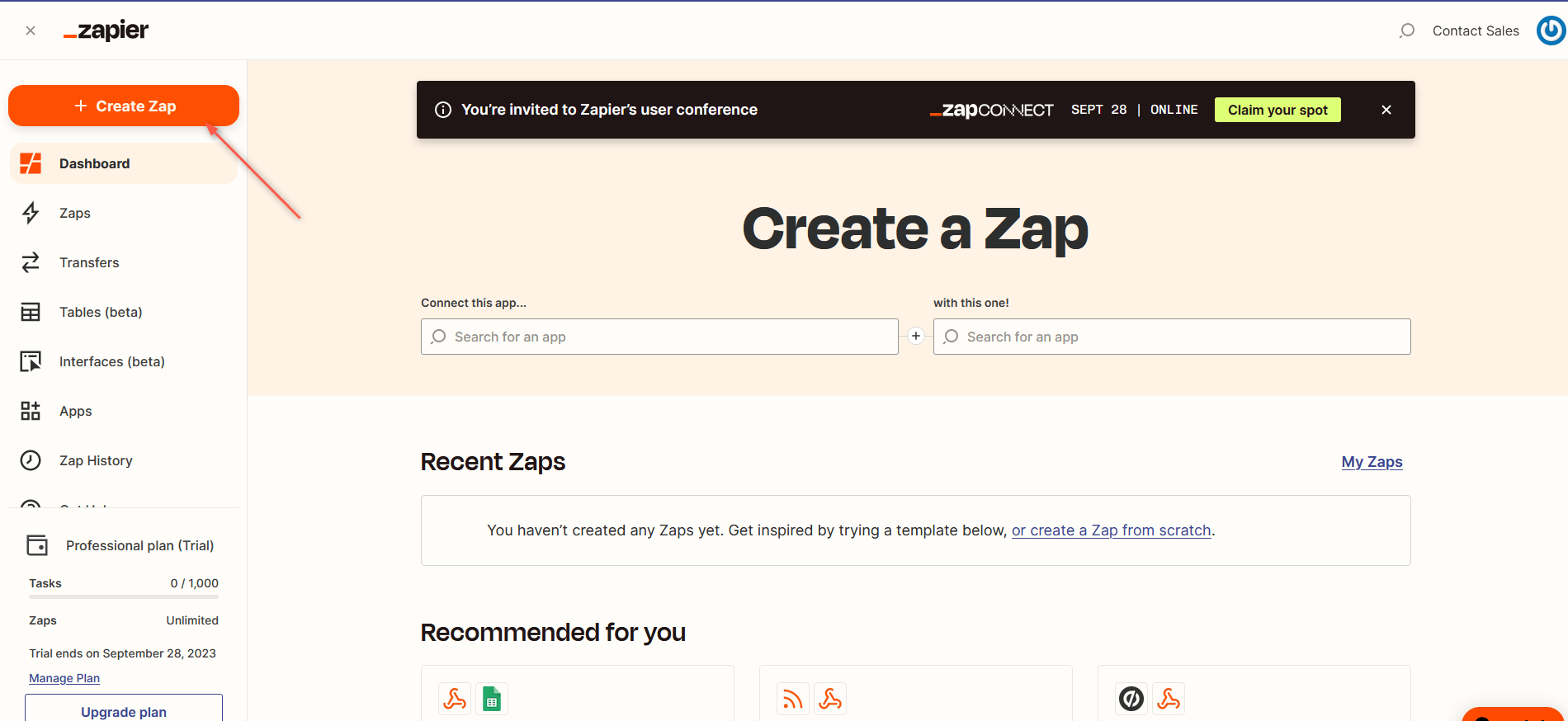
- Sign in to your Zapier account and click + Create Zap in the top left corner.
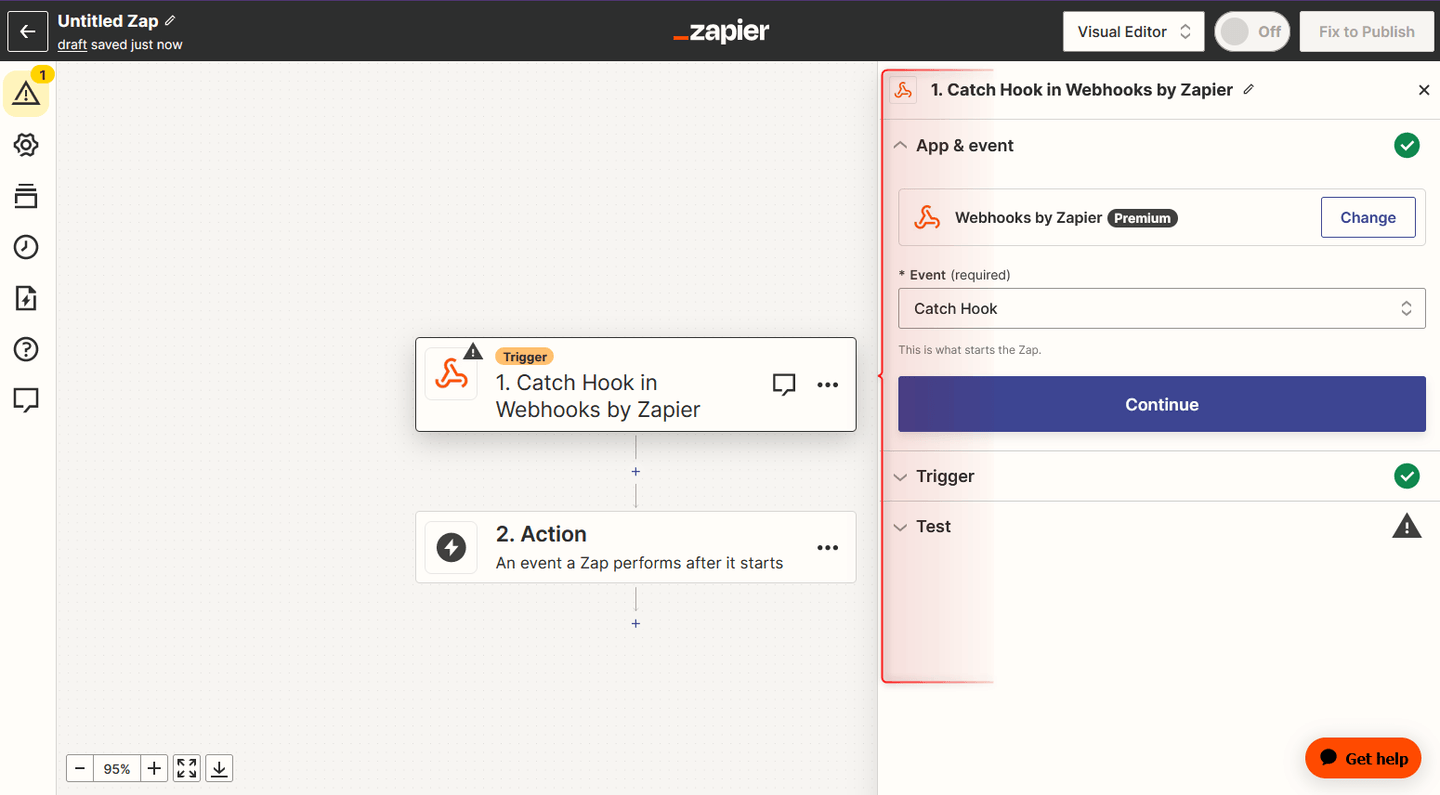
- For the trigger, search for and select Webhooks by Zapier.
- Choose Catch Hook as the event type.
- Copy the webhook URL that Zapier generates. You'll need this for Hookdeck.
Step 2: Create a Hookdeck Connection
- Sign up or log in at hookdeck.com.
- Go to the Connections section and click + New Connection.

- Configure the connection:
- Source: Give it a name that identifies where webhooks are coming from (e.g., "Stripe", "GitHub", "Shopify")
- Destination URL: Paste the Zapier webhook URL you copied in Step 1
- Save the connection. Hookdeck will generate a unique URL for your Source.
Step 3: Configure Rate Limiting
This is the key step that prevents 429 errors:
- In your Hookdeck connection settings, find the Rate Limiting option.
- Enable delivery rate limiting and set a value below Zapier's limits. We recommend 20-25 requests per second to leave a safety margin below the 30 req/sec limit.
- Configure automatic retries if desired. The default settings work well for most use cases.
Step 4: Update Your Webhook Provider
- Copy the Hookdeck Source URL generated in Step 2.
- Go to your webhook provider's settings (Stripe Dashboard, GitHub repository settings, Shopify admin, etc.).
- Replace your old Zapier webhook URL with the Hookdeck Source URL.
That's it! Hookdeck now acts as an intermediary, receiving webhooks from your provider, queuing them, and delivering them to Zapier at a controlled rate.
Testing Your Setup
Hookdeck provides a Console where you can simulate webhooks from popular sources. You can also use the Console to:
- View all incoming webhook events in real-time
- See delivery attempts and any errors
- Manually retry failed events
- Replay historical events for testing or recovery
Benefits of Using Hookdeck with Zapier
- Never lose a webhook: All events are captured and queued, even during traffic spikes
- Avoid 429 errors: Rate limiting ensures Zapier never sees more traffic than it can handle
- Automatic recovery: Retries handle temporary failures without manual intervention
- Full visibility: Debug and troubleshoot webhook issues with detailed logging
- Event replay: Recover from issues by replaying historical events
Conclusion
Zapier's webhook rate limits exist to ensure platform stability, but they can cause problems for workflows that receive high volumes of events. By placing Hookdeck between your webhook providers and Zapier, you get a resilient buffer that handles traffic spikes, retries failures, and ensures no events are lost.
The setup takes just a few minutes and requires no infrastructure on your part. Hookdeck's free tier is generous enough for many use cases, making it an easy way to add reliability to your Zapier workflows.
Resources
