 Phil Leggetter
Build Real-Time Order Notifications for Shopify with Webhooks and Ably WebSockets
Real-time order notifications let storefront visitors see what products others are purchasing. For comprehensive Shopify webhook guidance, see our definitive guide to Shopify webhooks with Hookdeck. This creates opportunities for product discovery and highlights trending items. In this tutorial, you'll build a notification system that displays live order updates on your Shopify storefront using webhooks and WebSockets.
This architecture provides production-grade reliability, observability, and developer experience through Hookdeck's event gateway. You'll use the event gateway to handle webhook ingestion from Shopify and queue events to Ably, a Remix application to transform data and remove Personally Identifiable Information (PII), and Ably WebSockets to deliver notifications to browsers in real-time.
Architecture overview
This system uses the event gateway to ensure reliability and observability at every stage of the notification pipeline.
The complete flow:
Shopify Order (Webhook)
    ↓
Hookdeck Event Gateway (Inbound Source)
    ↓ [Reliable Ingestion + Verification]
Remix Application (Local/Deployed)
    ↓ [Transformation: Remove PII]
Hookdeck Event Gateway (Outbound Queue)
    ↓ [Retry Logic + Observability]
Ably (WebSocket Connection)
    ↓ [Persistent Connection]
Browser Client (Theme Extension)
    ↓ [Display Notification Popup]
Services used:
- Shopify: Emits
orders/createwebhooks when customers place orders - Hookdeck Event Gateway: Provides infrastructure and tooling to build and manage event-driven applications
- Ably: Real-time messaging platform that maintains WebSocket connections and delivers events to browsers
- Remix: Full-stack web framework (using the Shopify Remix app template) to handle webhook processing and data transformation
Why Hookdeck Event Gateway in both directions?
The key advantage is end-to-end observability in a single dashboard.
Inbound (Shopify → App):
- Instant acknowledgment prevents webhook timeouts
- Automatic Shopify signature verification
- Retry logic if your app is temporarily down
- Receive webhooks on localhost via the Hookdeck CLI
Outbound (App → Ably):
- See every event published to Ably in the same dashboard
- Track the complete journey: webhook received → transformed → published → delivered
- Guaranteed delivery with exponential backoff on failures
- Debug failures at any point in the pipeline
When debugging "why didn't a notification appear?", you have one place to check the entire flow. Did Shopify send it? ✓ Did your app receive it? ✓ Was PII removed? ✓ Did it publish to Ably? ✓ This unified visibility is invaluable for monitoring production systems.
Prerequisites
Before starting, you'll need:
Accounts:
- Shopify Partner account (required for building Shopify apps)
- Free Hookdeck account
- Free Ably account
Tools:
- Node.js 18+ installed
- Hookdeck CLI installed
- Git for cloning the example repository
Knowledge:
- Basic understanding of webhooks and Pub/Sub
- Familiarity with React/Remix (or similar framework)
Estimated completion time: 30-45 minutes
Get the application running
Let's start by getting the application code and dependencies installed.
Clone and install dependencies
Clone the example repository and install dependencies:
git clone https://github.com/hookdeck/shopify-festive-notifications.git
cd shopify-festive-notifications

npm install
The project structure includes:
app/routes/webhooks.orders.create.tsx- Webhook handler for Shopify ordersapp/helpers/hookdeck-publisher.ts- PII removal and publishing logicextensions/live-notifications/- Shopify theme extension for browser notificationsscripts/setup-hookdeck.ts- Automated Hookdeck connection setup
This is an extension-only app that provides real-time notifications through a theme extension.
Configure environment variables
Copy the example environment file:
cp .env.example .env
Update the .env file with your credentials:
# Hookdeck Configuration
HOOKDECK_API_KEY=your_hookdeck_api_key

# Ably Configuration
ABLY_API_KEY=your_ably_api_key

# Shopify Configuration (from your Shopify Partner Dashboard app)
SHOPIFY_API_KEY=your_shopify_api_key
SHOPIFY_API_SECRET=your_shopify_api_secret
Where to find each credential:
HOOKDECK_API_KEY: Get from Hookdeck Dashboard → Settings → Project → API KeysABLY_API_KEY: Get from Ably Dashboard → Your App → API Keys (format:appId.keyId:keySecret)SHOPIFY_API_KEYandSHOPIFY_API_SECRET: Create a Shopify app in your Partner Dashboard → Apps → Create App
Set up Hookdeck connections
Run the automated setup script to create both inbound and outbound Hookdeck connections:
npm run setup
This script creates two connections:
1. Shopify Inbound Connection (Shopify → Hookdeck → App):
- Source:
shopify-webhookswith Shopify signature verification - Destination: CLI path
/webhooks/orders/create - Retry rules: 5 retries with exponential backoff
2. Ably Outbound Connection (App → Hookdeck → Ably):
- Source:
shopify-notifications-publish(Publish API) - Destination:
ably-rest-apiathttps://rest.ably.io/channels/shopify-notifications/messages - Authentication: Basic Auth with your Ably API key
The script automatically updates your shopify.app.toml with the generated Hookdeck source URL.
Verify the connections in the Hookdeck Dashboard.

Start the development environment and install the app
You'll need two terminal windows running simultaneously.
Terminal 1: Start the Remix application
npm run dev
When you run this command for the first time, you'll be prompted to:
- Select or create a development store
- Install the app on that store
The command will then start the Remix app on localhost:3000. The orders/create webhook will be automatically registered to send events to your Hookdeck source URL.
Terminal 2: Start Hookdeck CLI
hookdeck listen 3000 shopify-webhooks
This creates a tunnel from Hookdeck sources to your local application. The CLI will show output like:
●── HOOKDECK CLI ──●

Listening on 1 source • 1 connection • [i] Collapse

shopify-webhooks
│  Requests to → https://hkdk.events/{id}
└─ Forwards to → http://localhost:3000/webhooks/orders/create (shopify-orders-create)

💡 View dashboard to inspect, retry & bookmark events: https://dashboard.hookdeck.com/events/cli?{id}

Events • [↑↓] Navigate ──────────────────────────────────────────────────────────────────────────

○ Connected. Waiting for events...
The Hookdeck source URL (https://hkdk.events/{id}) is already configured in your shopify.app.toml file by the setup script.
Enable the theme extension
After installation, enable the notification extension in your theme:
- Navigate to your development store's admin → Online Store → Themes
- Click "Customize" on your active theme
- In the theme editor, click the theme settings icon (☰)
- Go to "App embeds"
- Find "Live Notifications" and toggle it ON
- Click "Save"
The extension is now active and will display notifications when orders are created.
Understanding the code
Let's walk through the key components that make this notification system work.
Webhook handler (Inbound)
The webhook handler receives order creation events from Shopify via Hookdeck. Located in app/routes/webhooks.orders.create.tsx:
import type { ActionFunctionArgs } from "@remix-run/node";
import { authenticate } from "../shopify.server";
import { publishOrderNotification } from "../helpers/hookdeck-publisher";

export const action = async ({ request }: ActionFunctionArgs) => {
  // Shopify's authenticate.webhook verifies the signature and extracts webhook data
  const { topic, shop, admin, payload } = await authenticate.webhook(request);

  try {
    // Transform payload and publish to Hookdeck
    const result = await publishOrderNotification(payload, shop, admin);
    console.log("Order notification published successfully", result);

    return new Response();
  } catch (error) {
    console.error("Error publishing notification", error);

    // Re-throw to trigger Hookdeck retry
    throw error;
  }
};
authenticate.webhook(request): Shopify's built-in authentication verifies signatures and extracts the webhook topic, shop domain, GraphQL admin client, and payloadadminparameter: Used to fetch product images via GraphQL; may be undefined for test webhooks- Error handling: Re-throwing errors triggers Hookdeck's automatic retry logic for transient failures
Data transformation and PII removal
The transformation logic removes all personally identifiable information before publishing to the public real-time channel. Located in app/helpers/hookdeck-publisher.ts:
async function transformOrderToNotification(
  order: any,
  shopDomain?: string,
  admin?: any,
): Promise<OrderNotification> {
  // Extract line items without PII
  const lineItems: OrderNotificationLineItem[] = await Promise.all(
    (order.line_items || []).map(async (item: any) => {
      let image: string | undefined;

      // Fetch product image if admin client is available and product_id exists
      if (admin && item.product_id) {
        image = await fetchProductImage(admin, item.product_id);
      }

      return {
        name: item.name,
        title: item.title,
        quantity: item.quantity,
        price: item.price,
        sku: item.sku,
        product_id: item.product_id,
        variant_id: item.variant_id,
        vendor: item.vendor,
        image,
      };
    }),
  );

  // Calculate total item count
  const itemCount = lineItems.reduce((sum, item) => sum + item.quantity, 0);

  // Build notification object with all non-PII data
  const notification: OrderNotification = {
    created_at: order.created_at,
    currency: order.currency,
    total_price: order.total_price,
    subtotal_price: order.subtotal_price,
    total_tax: order.total_tax,
    total_discounts: order.total_discounts,
    item_count: itemCount,
    line_items: lineItems,
    shop: shopDomain || order.shop_domain || "",
    test: order.test || false,
  };

  return notification;
}
What's excluded:
- Customer names, emails, phone numbers
- Shipping/billing addresses
- Order numbers (potential PII)
- IP addresses
- Payment details
What's included:
- Order metadata (timestamps, currency, test flag)
- Financial data (prices, tax, discounts)
- Product information (names, quantities, SKUs, images)
- Shop information
This ensures notifications can be safely displayed to all storefront visitors without exposing sensitive customer data.
Publishing to Hookdeck queue
After transformation, events are published to Hookdeck's Publish API, which queues them for delivery to Ably:
export async function publishToHookdeck(
  sourceName: string,
  data: any,
  headers?: Record<string, string>,
): Promise<HookdeckPublishResponse> {
  const url = "https://hkdk.events/v1/publish";

  const apiKey = process.env.HOOKDECK_API_KEY;
  if (!apiKey) {
    throw new Error("HOOKDECK_API_KEY environment variable is not set");
  }

  const response = await fetch(url, {
    method: "POST",
    headers: {
      "Content-Type": "application/json",
      Authorization: `Bearer ${apiKey}`,
      "X-Hookdeck-Source-Name": sourceName,
      ...headers,
    },
    body: JSON.stringify({ data }),
  });

  if (!response.ok) {
    const errorText = await response.text();
    throw new Error(
      `Hookdeck publish failed: ${response.status} ${response.statusText} - ${errorText}`,
    );
  }

  return await response.json();
}

export async function publishOrderNotification(
  order: any,
  shopDomain?: string,
  admin?: any,
): Promise<HookdeckPublishResponse> {
  // Transform order to remove PII and fetch product images
  const notification = await transformOrderToNotification(
    order,
    shopDomain,
    admin,
  );

  // Publish to Hookdeck
  const result = await publishToHookdeck(
    "shopify-notifications-publish",
    notification,
  );

  console.log("Order notification published successfully:", result.id);
  return result;
}
Why publish through Hookdeck instead of directly to Ably?
- Retry logic: Automatic retries on failures with exponential backoff
- Observability: Track both webhook ingestion AND outbound publishing in one dashboard
- Debugging: See the complete event journey from Shopify → App → Ably
- Rate limiting protection: Hookdeck queues events if Ably rate limits are hit
The X-Hookdeck-Source-Name header tells Hookdeck which source to publish to. The shopify-notifications-publish source is configured to forward events to the Ably REST API.
Browser client subscription
The browser-side code subscribes to the Ably channel and displays notifications when events arrive. Located in extensions/live-notifications/assets/notifications.js:
const createNotification = (orderData) => {
  console.log("Creating notification with data:", orderData);

  // Get the first line item for display
  const item = orderData.line_items && orderData.line_items[0];
  if (!item) {
    console.warn("No line items in order data");
    return;
  }

  // Create notification element
  const notification = document.createElement("div");
  notification.className = "order-notification";

  notification.innerHTML = `
    <button class="notification-close" onclick="this.parentElement.remove()">×</button>
    <div class="notification-header">🎉 New Order!</div>
    <div class="notification-content">
      ${item.image ? `<img src="${item.image}" alt="${item.name}" class="notification-image">` : ""}
      <div class="notification-details">
        <div class="notification-product">${item.name}</div>
        <div class="notification-price">
          ${orderData.currency} $${item.price} × ${item.quantity}
        </div>
        <div class="notification-shop">
          ${orderData.shop}
        </div>
      </div>
    </div>
  `;

  document.body.appendChild(notification);

  // Auto-remove after 10 seconds
  setTimeout(() => {
    notification.style.animation = "slideIn 0.3s ease-out reverse";
    setTimeout(() => notification.remove(), 300);
  }, 10000);
};

const connectAbly = async () => {
  const ably = new Ably.Realtime("YOUR_ABLY_API_KEY");

  ably.connection.once("connected", () => {
    console.log("Connected to Ably!");
  });

  const channel = ably.channels.get("shopify-notifications");
  await channel.subscribe((message) => {
    console.log("Message received:", message);

    const orderData = message.data;
    console.log("Order data:", orderData);

    if (orderData) {
      createNotification(orderData);
    }
  });
};

document.addEventListener("DOMContentLoaded", () => {
  connectAbly();
});
- Ably connection lifecycle: Initialize once when DOM loads, clean up on page unload
- Channel naming: Must match the channel configured in the Hookdeck outbound connection (
shopify-notifications) - Order data: The order data is retrieved from the
message.dataproperty - Auto-dismiss: Notifications automatically remove themselves after 10 seconds
- Security note: In production, use token authentication instead of embedding API keys in browser code
The notification styling uses CSS animations for the slide-in effect. See extensions/live-notifications/assets/notifications.css for the complete styling.
Testing the complete flow
Now that everything is set up, let's test the end-to-end notification system.
Create a test order
Create an order manually in your development store:
- Navigate to your store's online store
- Add a product to cart
- Complete checkout with test payment information
This ensures a real orders/create webhook is triggered with product data also available.
Verify in Hookdeck Dashboard
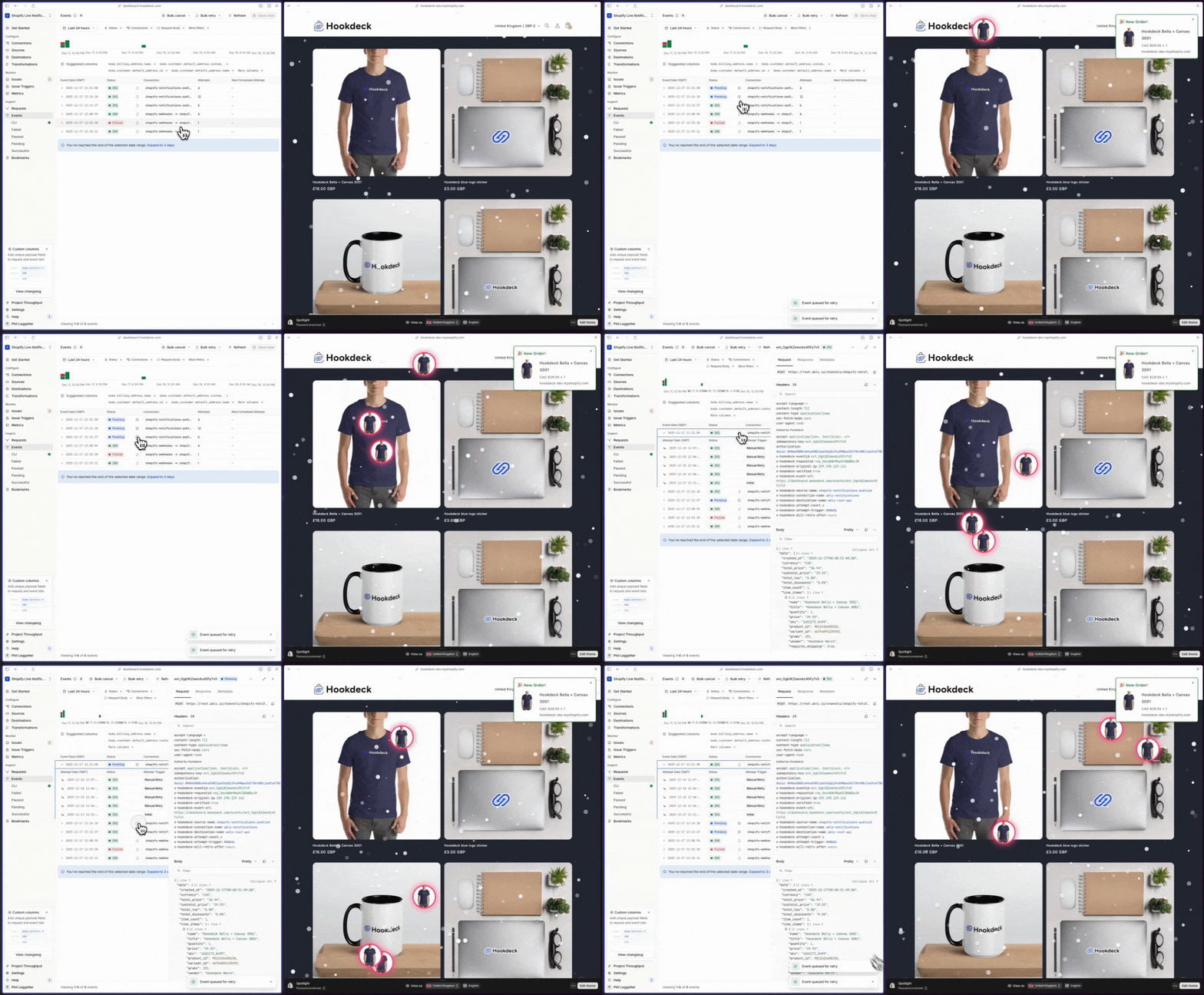
Open the Hookdeck Events dashboard to see the complete event flow.
What to look for:
Inbound event from Shopify: Look for an event from the
shopify-webhookssource- Click on the event to inspect the payload
- Check the "Attempts" tab to see successful delivery to your app
- Verify the status is "Delivered"
Outbound event to Ably: Look for an event from the
shopify-notifications-publishsource- This is the event your app published after transformation
- Check the payload to verify PII was removed
- Verify it was successfully delivered to the
ably-rest-apidestination
This dual visibility is the key value of using Hookdeck in both directions. You can trace the complete journey of every order notification from Shopify → Your App → Ably → Browser.
Verify in browser
Open your storefront in a web browser. You should see:
Browser console logs:
Connected to Ably!
Message received: {...}
Order data: {...}
Creating notification with data: {...}
Notification popup: A notification should slide in from the side of the screen showing:
- Product name
- Product image (if available)
- Price and quantity
- Shop name
Auto-dismiss: The notification should automatically disappear after 10 seconds
Deployment considerations
When you're ready to move from local development to production, you'll need to update your Hookdeck connections and deploy your application.
Deployment checklist
- Deploy Remix application to hosting provider (Vercel, Fly.io, Railway)
- Update Hookdeck connections for production (see below)
- Set all environment variables in production environment
- Configure Ably token authentication for browser clients (security best practice)
- Test complete webhook flow in production
- Verify notifications appear in storefront
Update Hookdeck connections for production
During development, you used CLI destinations. For production, you have two options:
Option 1: Update existing destination
You can update the existing shopify-orders-create-cli destinations to be of type HTTP and point to your production endpoint. This is quick but mixes dev and prod environments.
Option 2: Create new connections in a new Project (Recommended)
For better separation between development and production environments, create a new Hookdeck project for production. This gives you:
- Isolated environments for dev and prod
- Separate API keys and credentials
- Independent monitoring and metrics
- Clear separation of test vs. live data
To create new connections in production:
- Create a new Hookdeck project for production
- Update the
HOOKDECK_API_KEYwith the new project's API key - Re-run the setup script in your production repository
- Configure the connections in the Hookdeck dashboard to use HTTP destinations for your deployed Remix app URL
The source URL will need to be updated in your Shopify webhook configuration when switching projects.
Production security notes
For browser-side Ably connection:
Don't expose your Ably API key in browser code. Instead, create a token authentication endpoint. See Ably's token authentication docs for detailed implementation.
Next steps
You've built a production-grade real-time notification system using Shopify webhooks, Hookdeck Event Gateway, and Ably WebSockets. The event gateway provides end-to-end observability in a single dashboard, making it easy to debug issues and monitor your notification pipeline.
Extend the system:
- Add more webhook event types (inventory updates, product launches, etc.)
- Implement notification personalization based on user behavior
- Customize the notification UI to match your brand
- Add analytics to track notification effectiveness
Related resources:
- Example repository
- Definitive Guide to Shopify Webhooks - Shopify-specific webhook patterns
- Webhook Security Guide - Security best practices
- Hookdeck Projects - Managing multiple environments
- Hookdeck CLI - Local development workflow
- Ably documentation - Real-time messaging platform
- Shopify webhooks reference - Complete webhook API documentation
