 Phil Leggetter
Making your developer platform agent-ready
AI agents are already using your developer platform — your API, your CLI, your docs. The practical question is: have you designed your platform so they can succeed?
We've spent the last few months making the Hookdeck platform work well for agents. This is written for teams building developer tools and platforms, where your docs, API, CLI, and MCP surface are all part of the product experience. Below is a practical checklist you can use today. We're still learning: the AI landscape is moving fast, and this page is a living document that will evolve as agent practices mature.
You don't need to cover every item. But it helps to see the full picture, so you can make deliberate choices about what to prioritize.
Making a platform agent-ready
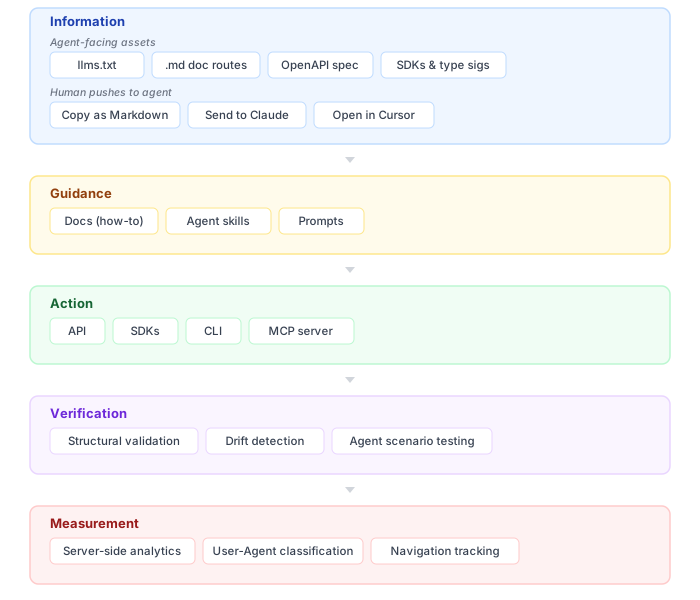
This is the model we use to think about making a platform agent-ready: a layered stack where each part builds on the last. In our experience, guidance only works if the information is there first: agents need to reliably find and read your content before guidance can steer them. They need guidance before they can act effectively through your APIs, CLI, or MCP. And it all breaks down if you can't verify that it works or measure whether agents are using what you shipped.
The checklist below starts with progressive disclosure — cross-cutting, not a sixth layer in the diagram — then walks the five layers in order. Each block has a short overview and a set of items you can check against your own platform. Where it helps, we use what we ship at Hookdeck as a running example.
The developer platform agent-ready checklist
Progressive disclosure
Progressive disclosure is how you work with agents overall: index-first discovery, fetch detail only when needed. It applies across docs, skills, tools, and MCP, so agents load only what they need for the task — not the whole surface at once.
- Entry points are lightweight — index first, detail on demand
- Skills and tools expose small entry points (metadata, descriptions) before loading full content or wide tool surfaces
- Large content (API reference, CLI reference) is split into focused, independently fetchable pages
Information
Make your content discoverable and machine-readable. Publish an index, so agents know what exists. Serve docs as clean text, not HTML. Expose your API spec at a stable URL. Where you ship SDKs, give agents language-native types and method signatures to code against; where you don't, make sure integrating from your OpenAPI spec and raw HTTP works just as well. Add actions to your doc pages, so developers can push content straight into an agent's context.
- A discoverable index (
llms.txt) exists at a stable URL, pointing to.mdversions of your docs - Docs are available as markdown at fetchable URLs, served with
Content-Type: text/markdown - Canonical page URLs support
Accept: text/markdowncontent negotiation - Doc pages offer actions to send content to agents (Copy as Markdown, Send to Claude, Open in Cursor)
- OpenAPI spec is published at a stable, fetchable URL
- An API catalog lists each public API with links to its spec, docs, and health
- A skill discovery index lists published skills with description, fetch URL, and digest
- SDKs expose types and method signatures agents can code against
- Reference content lives in one canonical place — skills and READMEs link to it, not duplicate it
Guidance
Reference tells agents what things are. Guidance tells them what to do — task-oriented content focused on a specific goal, not syntax. The forms include how-to docs, agent skills, and prompts.
- Skills and how-to docs provide prescriptive, goal-focused workflows — linking to reference, not restating it
- Prompts compose multiple surfaces (docs, skills, CLI, MCP) into guided workflows
Action
Give agents programmatic interfaces they can invoke: APIs and SDKs, CLI, and MCP. The type information side of APIs and SDKs is covered under Information — here we're talking about the runtime interfaces agents write code against. Scope each tool deliberately. If the boundary between them isn't clear, agents won't know which to reach for.
API and SDKs
CLI
- Core workflows are exposed via CLI, not just the dashboard
- CLI supports structured output (
--output jsonor equivalent) - Error messages tell the agent what to do next, not just what went wrong
MCP
- MCP tools are scoped deliberately — decide what agent context you're serving (investigation, creation, querying) and design around that
- The boundary between MCP and CLI is explicit — agents know which tool is for what
- A help or catch-all tool bridges agents from MCP to skills and CLI when they hit the boundary
- Tool surface is small, error messages are actionable, and tools are tested with real LLM agents
Verification
Prove your agent-facing surface works. Validate code examples against your actual CLI, spec, and schemas. Detect drift between docs and the content that references them. Run agent evals — realistic tasks scored against a rubric — including degraded paths.
- Code examples in docs and skills are validated structurally (CLI flags vs
--help, API requests vs OpenAPI spec, JSON vs schemas) - A mechanism detects drift between docs and the skills that reference them
- Agent evals run realistic tasks and score against a rubric — including degraded paths (no skill installed, no SDK for the language, docs-only)
Measurement
Find out if agents are actually using what you've published. Prefer server-side analytics over client-side JS: what's being accessed, by what, how often. Mapping activity back to a specific user is still unsolved — but whether agents are hitting your content at all is answerable today.
- Server-side analytics capture
.md,llms.txt, and API spec access (not just client-side JS) - User-Agent strings are classified to identify agent traffic
- Agent navigation paths across assets are trackable
- You know what you can't measure yet (user identity behind the agent) and aren't overclaiming
Progressive disclosure: don't overload the context window
Cross-cutting practice — applies across all five layers.
Agents have finite context. A monolithic 50-page API reference dumped into a single .md file doesn't help — it burns through the context window and forces the agent to work with far more information than it needs for any given task.
Progressive discovery as a design principle
Start with lightweight entry points, then load detail on demand. This applies to docs, skills, and tool surfaces alike. Give the agent a small starting surface (an index, metadata, concise tool descriptions), let it decide what to load next, and keep each piece right-sized. The same idea shows up in how skills load: metadata first, full SKILL.md when the task matches, reference files on demand — see Guidance.
Split large content into focused, fetchable pages
Once entry points are in place, shape larger references into focused pages. If a section is big — a full API reference, a comprehensive CLI guide — break it into focused pages with clear headings and cross-references. Each page should be a self-contained unit an agent can fetch independently.
In practice: Our API reference is large. Rather than serving it as a single massive .md file, we chunk it into sections — one per resource area. An agent fetching /docs/llms.txt sees entries like:
## API Reference

- [API Reference (Overview)](/docs/api.md)
- [API: Connections](/docs/api/connections.md)
- [API: Destinations](/docs/api/destinations.md)
- [API: Sources](/docs/api/sources.md)
- [API: Transformations](/docs/api/transformations.md)
...
It pulls only the section it needs — not a single monolithic API reference page. We talked through this on the DevRel Show.
Information: give agents text they can actually consume
Agents work with text. If your docs are only available as rendered HTML with embedded JavaScript, client-side routing, and DOM manipulation, an agent has to scrape and parse to get anything useful. That's fragile and lossy. The starting point is giving agents a way to discover what you have and fetch it cleanly.
Publish a discoverable index (llms.txt)
An agent needs to know what exists before it can fetch what it needs. An llms.txt file at a stable URL gives agents a lightweight map of your doc surface — sections, page titles, and links to the individual pages. It's the entry point: an agent's first fetch gives it a table of contents it can selectively drill into.
The key detail: llms.txt should point to the markdown versions of your pages, not the HTML. The spec itself recommends this — its example links to .md URLs. This way, when an agent follows a link from your index, it lands on clean, parseable text rather than HTML it has to strip.
Concrete example — llms.txt: We publish scoped indexes at three levels: the {root}/llms.txt, /docs/llms.txt, and /docs/outpost/llms.txt (the Outpost product specifically). Each is scoped to its context. The docs-level index points to the .md versions of every page, so following any link gives the agent structured markdown immediately.
A note on llms-full.txt. A community convention has emerged where sites publish an llms-full.txt that concatenates all documentation into a single file. Data from Mintlify (with traffic analysis by Profound) reports llms-full.txt was fetched more often than llms.txt across their sample (a median of 79 fetches over 7 days vs 14 for llms.txt), likely because it's one request instead of many (source). But it still works against progressive disclosure: you hand the agent your entire doc surface in one go, burning context with content irrelevant to the current task. We'd rather agents fetch the index and then pull only the pages they need. If you do publish llms-full.txt, keep it alongside llms.txt, not instead of it.
Serve markdown versions of your docs
The pages your llms.txt points to should be available as markdown at fetchable URLs. An agent fetching /docs/connections.md gets clean, structured content — headings, code blocks, links — without HTML navigation chrome, JavaScript, or layout markup.
One practical detail that matters: serve your .md URLs with Content-Type: text/markdown. Tools like Claude Code's WebFetch will skip their HTML-to-markdown conversion step when they receive this content type, passing the content through directly and without summarization. Serving HTML means the agent's tooling has to strip and convert it, which is lossy. Serving markdown with the right content type means lossless passthrough.
Markdown alongside HTML: Every documentation content page under /docs/... has a corresponding .md URL — built from our Markdoc sources at build time, with Markdoc components (tabs, callouts, and so on) converted to markdown. Our llms.txt index links to those .md URLs and other agent-facing routes (blog posts, product pages, and more). Listing pages such as /docs itself use the index, not a content .md. Even this post has one: hookdeck.com/blog/developer-platform-agent-ready.md.
Negotiate markdown on canonical URLs
Explicit .md URLs work, but agents shouldn't have to rewrite every link from your index. Content negotiation lets them request the same canonical URL with Accept: text/markdown and receive markdown — HTML stays the default when that header is absent. Set Content-Type: text/markdown on the negotiated response; include Vary: Accept so caches don't mix formats. An x-markdown-tokens header (token estimate for the body) helps agents budget context — recommended in the markdown-negotiation skill and easy to add when you control the response.
You don't have to negotiate markdown for every page on day one. Prioritize docs and reference content first; leave paths HTML-only until curated markdown is worth the effort. The homepage is often the tricky case — a normal visit to / still serves HTML, but Accept: text/markdown on that same URL can return a short curated markdown page instead of scraping the marketing site. Keep llms.txt as the full index. Resend follows the same pattern: curl -H 'Accept: text/markdown' https://resend.com/ returns curated markdown, not their marketing homepage.
If you're on Cloudflare, zones can enable negotiation at the edge without application changes. Scan your site with isitagentready.com to check checks.contentAccessibility.markdownNegotiation. Negotiation on your own origin keeps one URL space for humans and agents, but you don't have to host every asset yourself — discovery entries can point at raw.githubusercontent.com when that suits you; we link Outpost's OpenAPI that way in the API catalog.
Concrete example: On hookdeck.com, Vercel Routing Middleware checks Accept: text/markdown, fetches the matching .md URL for the canonical path (e.g. /docs/connections → /docs/connections.md), and returns it with the right headers. Browsers without the header still get HTML; paths without an explicit .md route stay HTML even when the header is sent. We generate markdown at build time — Markdoc pipelines for docs and reference, curated serializers for high-value marketing pages — with no HTML scrape fallback. On /, negotiation returns curated markdown (products, llms.txt, MCP, skills, API catalog): fetch hookdeck.com/index.md directly, or curl -H 'Accept: text/markdown' https://hookdeck.com/ for the same content.
Help humans push content to agents
Not every agent interaction starts with the agent discovering your docs on its own. Often a developer is reading your docs and wants to hand the current page to an agent they're already working with. Adding actions to your doc pages — Copy as Markdown, Send to Claude, Open in Cursor — bridges that gap. The developer stays in your docs; the agent gets clean content in its context.
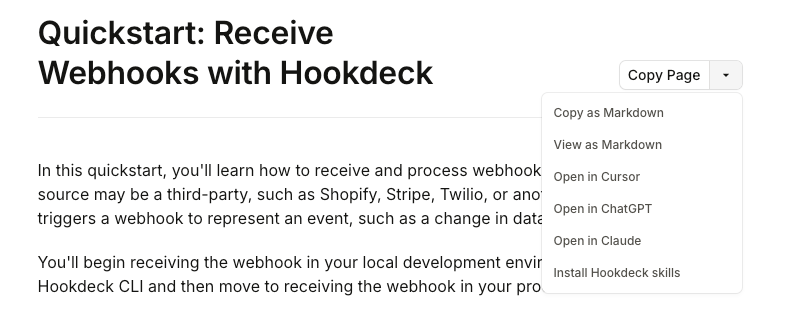
These actions are lightweight to implement (they're links or clipboard operations) but they change how your docs get used. Instead of the developer copying and pasting snippets, or the agent having to fetch and parse your HTML, the content arrives in the agent's context in the right format with one click.
Docs dropdown: In the Hookdeck docs, we have a dropdown component that supports multiple actions: Copy as Markdown fetches the current page's markdown URL in the browser and writes the body to the clipboard (no separate "copy" URL). View as Markdown is the markdown URL itself. Open in ChatGPT, Open in Claude, and Open in Cursor are deep links whose query string embeds Read plus the full markdown URL, URL-encoded.
For example, if the markdown for a page lives at https://hookdeck.com/docs/connections.md, the patterns look like this (backticks, so you see the literal strings, not clickable links):
- View as Markdown:
https://hookdeck.com/docs/connections.md - Open in ChatGPT:
https://chatgpt.com/?q=Read+https%3A%2F%2Fhookdeck.com%2Fdocs%2Fconnections.md&hints=search - Open in Claude:
https://claude.ai/new?q=Read+https%3A%2F%2Fhookdeck.com%2Fdocs%2Fconnections.md - Open in Cursor:
https://cursor.com/link/prompt?text=Read+https%3A%2F%2Fhookdeck.com%2Fdocs%2Fconnections.md
Swap in your own origin and path; the encoded segment is always encodeURIComponent of the full https://…/path/to/page.md URL.
Publish your API spec at a stable, fetchable URL
Your OpenAPI (or equivalent) spec is an agent-facing asset, not just a build artifact. When an agent needs to construct an API call, a well-structured spec gives it endpoints, parameters, types, and validation constraints directly — no guesswork, no hallucinated field names.
Public spec: The Event Gateway's OpenAPI spec is published at api.hookdeck.com/latest/openapi and linked from the docs index and llms.txt. Because the Event Gateway has no SDKs, this spec is the primary contract agents code against.
One thing we haven't done yet: the spec is a single file. For a large API (about 409 KB minified, 83 endpoints, 116 operations), that works against progressive disclosure — an agent fetching it gets the entire surface at once. OpenAPI's $ref mechanism lets you split a spec into smaller, independently fetchable files. That's on our list.
Publish an API catalog
llms.txt indexes your docs. OpenAPI describes one API's contract. If you publish more than one API — or APIs on different hosts — agents still need a single place to learn which APIs you expose and where each spec, doc set, and health check lives. RFC 9727 defines a well-known URL for that: /.well-known/api-catalog, returning a small machine-readable list with links to each API's spec, documentation, and status.
Concrete example: We publish hookdeck.com/.well-known/api-catalog with entries for Event Gateway (api.hookdeck.com/latest, OpenAPI at /latest/openapi, docs at /docs/api and /docs/api.md) and Outpost (api.outpost.hookdeck.com/latest, spec on GitHub, docs at /docs/outpost/api and .md). A single-API catalog is valid too — the point is a stable discovery URL, not a minimum API count. Fetch the live file if you want the exact shape; we follow the Linkset format the RFC recommends.
Publish a skill discovery index
Docs and API specs aren't the only assets agents need to find. If you ship agent skills, agents still need a stable entry point to learn which skills you publish and where to fetch each one. The Agent Skills Discovery RFC v0.2.0 defines a well-known URL for that: /.well-known/agent-skills/index.json — a small JSON catalog with each skill's name, description, type, url, and digest.
The RFC supports more than one distribution shape. A skill can be a single markdown file (type: "skill-md") or a bundled archive (type: "archive") — typically .tar.gz with SKILL.md, references/, and optional examples/. Index entries can point at any fetchable URL; pointing at raw.githubusercontent.com is valid. We host on hookdeck.com instead: agents and sandboxes often hit GitHub rate limits on unauthenticated requests, archives bundle runnable examples that SKILL.md links to without extra fetches, and a single origin at install time avoids discovery succeeding but a follow-up fetch failing.
Concrete example: We publish hookdeck.com/.well-known/agent-skills/index.json with three platform skills from hookdeck/agent-skills — hookdeck (routes to the right product skill), event-gateway, and outpost — each as type: "archive" with a path-absolute .tar.gz URL and SHA-256 digest. GitHub remains source of truth; the website build packages skills at deploy time (same pattern as Outpost docs). Merges to main under those skill paths trigger a redeploy via the same Hookdeck → Vercel hook we use for docs. Provider-specific skills stay in webhook-skills and install via npx skills add — not every skill needs to be in your index.
Give agents types to code against
SDKs sit in the Information layer (as well as the Action layer) because they're a type information asset, not just a convenience wrapper. When an agent has access to typed method signatures, parameter types, and return shapes, it writes more reliable code than when it's constructing HTTP requests from your OpenAPI spec without a client library. Types give the agent something to pattern-match against — fewer hallucinated field names, fewer malformed requests.
The language choices are a product decision: match the languages your users actually build with. But you can't cover every language, so the spec-driven path — OpenAPI plus raw HTTP — needs to work just as well. Design for the gap.
SDK and spec paths: Outpost ships SDKs in Go, TypeScript, and Python — chosen to match the languages teams typically build SaaS platforms and APIs with. The Event Gateway doesn't have SDKs yet, so agents use the OpenAPI spec and raw HTTP with worked examples in the docs. Both paths get scenario-tested (more on that in Verification).
One source of truth
Reference material — API syntax, CLI flags, parameter schemas — should live in one canonical place (your docs and spec). Skills, SDK READMEs, and tutorials should link to that source, not duplicate it. When reference content is copied into multiple places, it drifts, and agents end up working with stale or contradictory information.
Guidance: goal-oriented workflows for agents
The Information layer gives agents the raw material — what your API accepts, what flags your CLI takes, what your spec says. Guidance is where you package that into task-oriented content: workflows, decision trees, step-by-step instructions focused on a specific goal. This is the same distinction the Diátaxis framework makes for human docs — reference tells you what things are; how-to guides tell you what to do. For agents, the formats are different — how-to docs, agent skills, and prompts — but the principle holds.
The shared principles across all three: focus on a task or problem, assume the agent already has access to reference material, describe a logical sequence of actions, and link to reference for detail rather than restating it.
Teach workflows, link to reference
Agent skills are the machine-readable form of a how-to guide — prescriptive, goal-focused, action-oriented. A skill should guide an agent through a specific task: decision trees, staged workflows, "if you're doing X, start with Y." It should not restate your API reference or duplicate your docs. When a skill needs to reference a specific API call or CLI command, it links to the canonical docs page. This keeps skills focused and prevents the drift that comes with maintaining the same content in multiple places.
Two skill repos: We maintain webhook-skills (16 provider-specific skills for discovery, e.g. "how do I receive Stripe webhooks?") and agent-skills (3 platform skills with a staged workflow). The platform skills use a 01→02→03→04 structure where each stage builds on the previous one, and a composition skill at stage 02-scaffold pulls in the right provider skill when needed. None of them duplicate the API reference — they link to it.
For how skills load in stages — metadata first, full content when relevant — see Progressive disclosure.
Prompts as guidance
A well-crafted prompt can compose multiple surfaces — docs, skills, CLI, MCP — into a single guided workflow. Where a skill teaches an agent how to do one thing well, a prompt orchestrates: it tells the agent what order to work in, which surfaces to use at each step, and what the end state looks like. This applies to onboarding, migrations, complex integrations — anywhere the agent needs to coordinate across multiple parts of your platform.
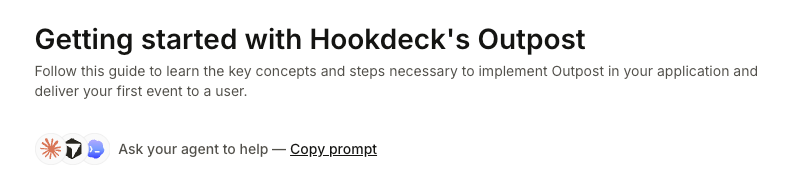
Prompt-first design: For Outpost, we're designing onboarding around a prompt-first approach — a single prompt that guides an agent from reading the docs through to running working integration code. The prompt references skills and docs but doesn't duplicate them; it's the orchestration layer.
Action: APIs, SDKs, CLI, and MCP
The Action layer is where agents interact with your platform at runtime — calling your API, using your SDKs, running CLI commands, invoking MCP tools. The type information and discoverability side of APIs and SDKs is covered under Information. Here we're focused on what happens when agents write and run code against these interfaces.
APIs and SDKs: standard practices, same bar
Good API and SDK design doesn't change because an agent is writing the code instead of a human. Consistent error responses, clear validation messages, predictable response shapes, sensible defaults — these matter regardless of who's calling. If your API returns a 422 with a message that says which field is missing and what format it expects, both a human and an agent can act on that. If it returns a bare 400 Bad Request, neither can.
So far, we haven't changed anything in our APIs or the Outpost SDKs for agents. The agent-specific effort went into how agents find and read these contracts (covered under Information) — not into the contracts themselves. If your APIs and SDKs already follow standard design practices, that foundation carries over.
What an actionable error looks like: Our API validation errors (422) follow a consistent envelope — code, status, message, and a data array of human-readable constraint failures:
{
  "code": "UNPROCESSABLE_ENTITY",
  "status": 422,
  "message": "Unprocessable Entity",
  "data": ["filters is required"]
}
The data array carries one entry per failed constraint, so an agent can act on the specific field rather than parsing free-form prose. When multiple constraints fail, multiple strings appear in data.
Give agents a CLI
Agents need programmatic interfaces. A dashboard or web UI is invisible to them. A CLI is one of the most effective tools you can give an agent: structured input, predictable output, tight feedback loops (run → see result → adjust).
Expose key workflows via CLI
If a developer can do it in your dashboard, an agent should be able to do it from a terminal. The CLI doesn't have to cover every edge case, but the core workflows — setup, configuration, querying, common operations — should be there.
CLI coverage: The Hookdeck CLI's gateway namespace covers all the core Event Gateway resource areas except issue triggers. You can browse the command surface in the CLI reference and compare it with the API reference.
Design CLI output for both humans and machines
Default to human-readable output, but support structured formats (like --output json) for machine consumption. Agents parsing CLI output need predictable structure. Clear error messages matter too — when an agent hits an error, the message should tell it what to do next, not just what went wrong.
Structured output and errors: Commands support --output json for structured output. Error messages include actionable context — if authentication fails, the error tells the agent to run hookdeck login.
hookdeck gateway events list --output json 2>&1 | head -20
{
  "models": [
    {
      "id": "evt_akRY5MKBT7LQL1p9cs",
      "status": "SUCCESSFUL",
      "webhook_id": "web_IhP4QhZNWgfs",
      "source_id": "src_gvdlujfwemeh2l",
      "destination_id": "des_h8mgwmepXbTq",
      "request_id": "req_Xgn2St2Diasrl2t2Q238",
      "attempts": 1,
      "response_status": 200,
      "event_data_id": "edt_DvI7mIjkPg44H3rhwbYs",
      "created_at": "2026-05-01T09:48:11.264Z",
      "updated_at": "2026-05-01T09:48:11.399Z",
      "successful_at": "2026-05-01T09:48:11.382Z",
      "last_attempt_at": "2026-05-01T09:48:11.298Z",
      "team_id": "tm_a8kwsrxk8lx2wwk"
    },
    ...
One observation from watching agents work: they tend to reach for the CLI before the MCP server when building things. gh, sentry, hookdeck CLI — agents default to CLIs for construction tasks. MCP servers fill a different role (more on that below).
Tools for agents: MCP
If you've got a CLI, you might wonder whether you also need an MCP server. The answer depends on what you want agents to do and what your platform does. The important thing is to scope your MCP deliberately around a specific agent context rather than trying to expose everything.
Scope your MCP around a specific agent context
Think about what agents most need to do with your platform, and design the MCP around that. For a design tool, that might be creation. For a database, querying. For an event infrastructure platform like Hookdeck, the most valuable context is investigation — what's failing, which connection is affected, what did the destination return. These are questions agents can't answer from a model alone or from a dashboard screenshot.
The general principle: pick the context where MCP adds the most value, scope tightly around it, and expand later based on what agents actually use.
Why MCP is narrow here: The product surface is async and stateful — webhooks and event delivery — where debugging questions dominate. So the MCP server (shipped in CLI v2, started via hookdeck gateway mcp) is scoped around investigation. As documented in Available tools, it exposes 11 always-on tools (hookdeck_projects, hookdeck_connections, hookdeck_sources, hookdeck_destinations, hookdeck_transformations, hookdeck_requests, hookdeck_events, hookdeck_attempts, hookdeck_issues, hookdeck_metrics, hookdeck_help) plus a conditional hookdeck_login tool when not authenticated. The scope is read operations and lightweight actions like pausing a connection. Write operations (create, update, delete) are handled by the CLI and skills, not the MCP.
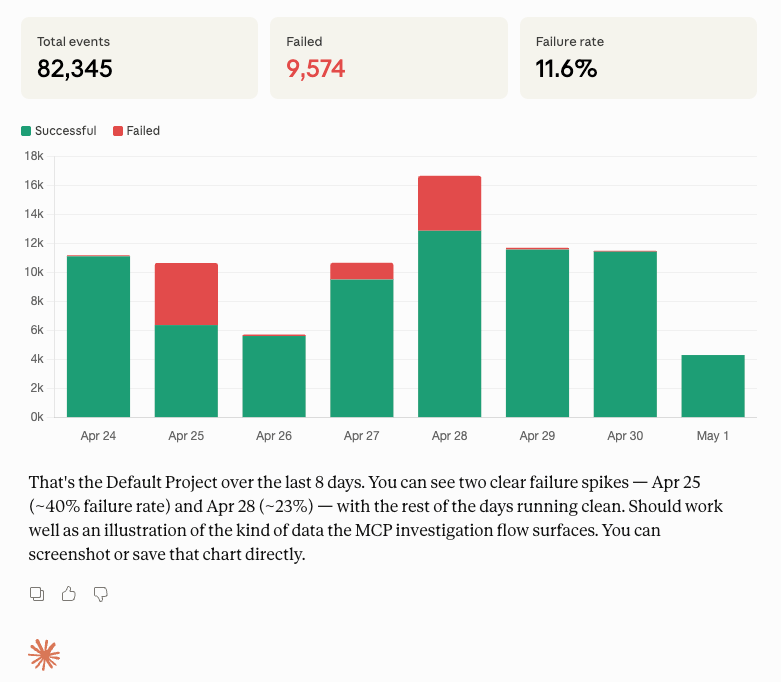
A concrete example: a PagerDuty integration is failing. An agent using the MCP server can check metrics to spot the elevated failure rate, filter events by status to find which ones are failing, inspect the connection to localize the issue, examine delivery attempts to see what the destination returned, and arrive at a root cause — all within a single investigation session.
Make the boundary between MCP and CLI explicit
If your MCP is scoped to one context (like investigation) and your CLI covers another (like building and configuration), agents need to know where one ends and the other begins. When an agent hits the boundary of what MCP can do — "I've diagnosed the issue, now I need to create a new connection to fix it" — it needs a path forward.
help as a bridge: The MCP's help tool is explicitly designed for this. When an agent asks for something outside the MCP's scope, help points it to the right skill or CLI command. The agent doesn't hit a dead end — it transitions from investigating in MCP to building with the CLI.
Design for non-deterministic callers
Agents hallucinate parameters. They confuse tool actions. They'll pass an event ID where a connection ID belongs. Anthropic's guidance on writing tools for agents covers the principles in detail — the short version is: keep your tool surface small, use actionable error messages, design for retries, and test with real LLM agents, not just unit tests.
Compound tools: Instead of exposing separate tools — list_events, get_event, get_event_body, list_connections, get_connection, and so on — we use one tool name per resource with an action parameter:
hookdeck_events(action: "list", status: "FAILED")
hookdeck_events(action: "get", id: "evt_abc123")
hookdeck_events(action: "raw_body", id: "evt_abc123")
The agent picks from 11 tools instead of 30+, and the action enum constrains what it can do within each. Fewer tools means fewer selection errors.
Idempotency: Agents retry. They lose state mid-task, restart from a checkpoint, or fire the same call twice because they're not sure whether the first one succeeded. Tools that aren't idempotent turn those retries into duplicate resources or 409 Conflict errors.
Our CLI's upsert commands take a resource name and converge — create if it doesn't exist, update if it does. The agent doesn't have to track IDs or check existence first:
hookdeck gateway connection upsert "my-connection" \
  --source-name "stripe-prod" --source-type STRIPE \
  --destination-name "my-api" --destination-type HTTP \
  --destination-url "https://api.example.com/webhooks"
Run it once, run it ten times — the result is the same. The same applies to our API's PUT endpoints.
Verification and evaluation: prove it works
You're shipping content that agents consume and act on. If you're not testing whether that content actually works, you're guessing.
Verify code examples structurally
Every CLI command, cURL snippet, and code block in your docs and skills should be valid. Flags should match what --help actually reports. API requests should match your OpenAPI spec. JSON examples should validate against your schemas. If you can automate this in CI, do it — code examples rot fast.
Content CI: We run a multi-verifier pipeline on every content PR in our private website repo. A code block extractor pulls CLI, cURL, JSON, and handler snippets from both .md and .mdoc files. Each type gets its own verifier: CLI commands are checked against live --help output, cURL requests are validated against the OpenAPI spec via ajv, JSON blocks are matched to component schemas by heading context, and handler code gets a syntax check. All of it runs in CI.
Detect drift between your content and your product
Your docs changed. Did the skills that reference those docs also get updated? If a skill links to a doc page and that page's code examples have changed, the skill might now be teaching something that contradicts the reference. You need a way to catch that automatically.
Catching drift: A scheduled job in our website repo finds every hookdeck.com/docs/... URL in the skill markdown, fetches the live .md version of each page, extracts code blocks, and compares them against the skill's own code blocks — looking for CLI flag differences and cURL endpoint mismatches. When it finds a contradiction, it opens an issue on the agent-skills repo. This runs weekly and on manual trigger, not on every PR — it's a sweep that catches the drift that PR-level example verification misses.
Test with real agent runs
The strongest signal comes from agent evaluation: running a real agent against a realistic task and scoring the result. Install the skill (or don't — test the no-skill path too), give the agent a scenario prompt, and assess against a rubric.
Agent evals: We run agent evals via a custom runner built on the Claude Agent SDK (setup documented in TESTING.md). Scenarios in scenarios.yaml cover core skill workflows (e.g. receive webhooks end-to-end), provider composition (Stripe and others), metrics discovery without naming “metrics” in the prompt, and an Outpost managed quickstart. The rubric scores discovery, implementation stages, and code quality. Failures drive changes to the skills, the prompts, or the docs — when an agent fails because a doc page is misleading, that's a docs bug.
Each run drops a directory under test-results/ with report.md (heuristic checklist + scoring table), run.log (full agent transcript), generated project files, and optionally llm-score.json plus an LLM judge section when --judge is used — same shape as described in the agent scenario tester README. Below is a truncated, illustrative excerpt of report.md for the receive-webhooks scenario (Express); scores and checkboxes differ every run.
# Agent Test Results: receive-webhooks / express

**Date:** 4/30/2026, 10:15:30 AM
**Duration:** 412.3s
**Directory:** test-results/receive-webhooks-express-YYYYMMDDHHMMSS

## Automated assessment

**Total score: 14/17**

The checklist and scores below were filled by the tool from the generated files and run.log. Review and adjust if needed.

## Configuration

- **Scenario:** Receive Webhooks (basic)
- **Framework:** express

## Prompt

> Set up Hookdeck for my express app to receive webhooks. Create a webhook handler at /webhooks that verifies the Hookdeck signature. …

## Evaluation Checklist

### Skill discovery (2 pts)

- [x] Agent read SKILL.md or referenced event-gateway skill
- [x] Agent followed staged workflow order

### Stage 01 - Setup (3 pts)

- [x] Hookdeck CLI install in README: human-facing https://hookdeck.com/docs/cli URL …
- [x] hookdeck listen or hookdeck login used
- [x] Connection creation attempted

### Stage 02 - Scaffold (5 pts)

- [x] Webhook handler created
- [x] Hookdeck signature verification implemented
- [ ] Uses HMAC SHA-256 with base64 encoding
      …

## Scoring

| Criterion           | Points | Score |
| ------------------- | ------ | ----- |
| Skill discovery     | 2      | 2/2   |
| Stage 01 - Setup    | 3      | 3/3   |
| Stage 02 - Scaffold | 5      | 3/5   |

…
Evaluating prompts: The same approach applies to prompts. For Outpost, we run the onboarding prompt through 10 scenarios across three tiers — from basic curl exercises through to full integration apps in Next.js, FastAPI, and Go. The rubric scores whether the agent followed the prompt's guidance correctly and produced working code. What we're really evaluating isn't the prompt in isolation — it's whether the composed surface (prompt + skills + docs + SDK) leads the agent to a working result.
Critically: don't only test the ideal path where every tool is available. Test what happens when the agent doesn't have your skill installed. Test a language you don't ship an SDK for, where the agent falls back to the OpenAPI spec and raw HTTP. Test the docs-only path. Agents in the wild frequently work without the full toolkit, and those degraded paths are where the surprises are.
Measurement: find out if agents are actually using your content
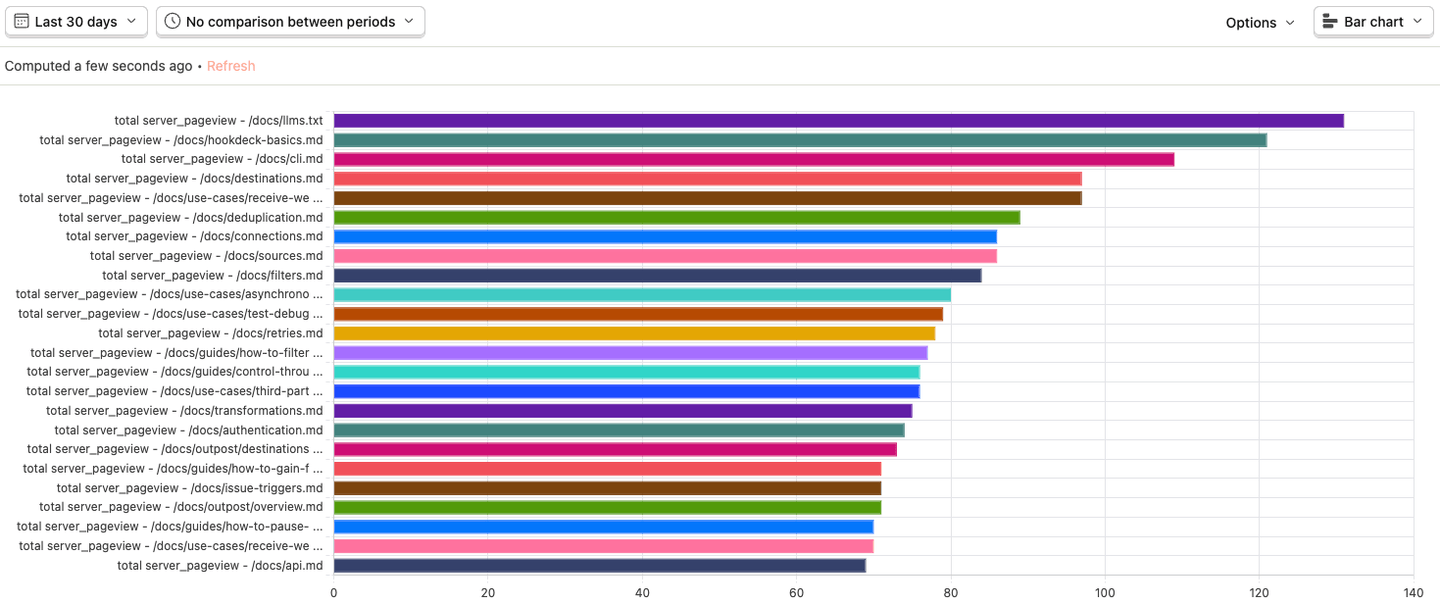
You've published .md routes, llms.txt, skills, an MCP server. Are agents accessing any of it? This isn't an unsolvable mystery — you just need server-side analytics instead of client-side JavaScript (which agents won't execute).
Analyze your server logs for agent traffic
Client-side analytics tools (PostHog's JS snippet, Google Analytics) won't capture agent requests — agents typically don't run JavaScript. But your server sees every request. If you can pipe your server access logs into an analytics tool, you can filter for .md and llms.txt fetches, inspect User-Agent strings (e.g. Mozilla/... ChatGPT), and build a picture of what agents are accessing and how often.
Drains → analytics: We deploy on Vercel, which exposes server access logs as webhooks via Drains. We pipe those into our own Event Gateway — a Filter rule keeps only batches containing .md or llms.txt requests, a Transform rule reshapes the payload into PostHog's batch event format, and PostHog ingests the events. The result is a dashboard showing which agent-facing pages are being accessed, by what User-Agent, and how frequently. It's the same pipeline we describe for customers: docs traffic through the product. Full write-up: "Track AI Agent Traffic to Your Docs with Vercel Log Drains, Hookdeck, and PostHog". Most platforms have an equivalent primitive — Cloudflare Logpush, GCP Cloud Logging sinks — so the pattern is portable even if the name differs.
Track agent navigation across assets
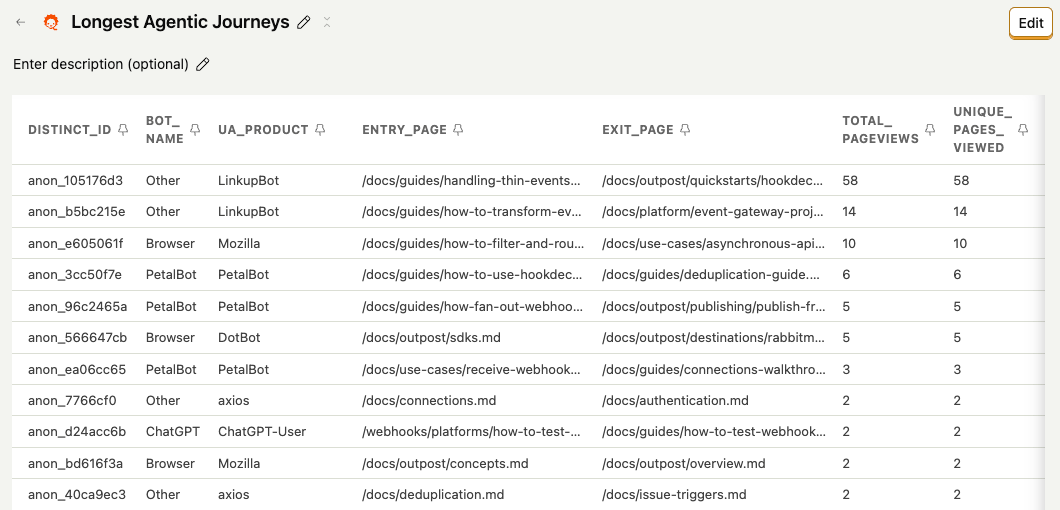
One thing we found in the server log data: you can hash certain request attributes to follow an agent's navigation path across multiple assets in a single session. If an agent fetches llms.txt, then connections.md, then events.md, you can see that sequence. That tells you which entry points are working and which content agents drill into after the index. The hashing approach and entry/exit analysis — which is definitely still experimental — are covered in detail in the log drains write-up.
Be honest about what you can't measure yet
Server logs tell you what's being accessed and by what client. What they don't tell you is which user is behind the agent. If an agent fetches your docs, you know an agent fetched your docs — you don't know whose agent it was, or whether that person went on to sign up. Mapping agent sessions back to the user who triggered them is still unsolved. We've been thinking about approaches (like letting agents sign up for a pre-authenticated account and mapping that to a real user when someone takes ownership), but that's open work, not a solved pattern.
What's next?
The specifics of building an agent-ready developer platform will vary for every product, but the shape holds: progressive disclosure so agents pull detail only when needed; information they can consume; guidance that steers them; action through APIs, CLI, and MCP; verification that it works; and measurement, so you know what's landing.
You don't need all five layers at once. Pick the one you're weakest on, ship one concrete improvement, and let the others wait. The compounding comes from doing one well before stacking the next.
Everything in this checklist assumes the developer is still in the loop — reading docs, choosing tools, pointing the agent at a task. That's where most platforms are today. But the trajectory is toward agents operating more autonomously across platforms. Cloudflare just shipped the ability for agents to create accounts, buy domains, and deploy — the full provisioning lifecycle, not just querying or building within an existing account. That's the shape of what's coming: a developer has a prompt, the agent goes and discovers services, signs up, tries them out, builds a proof of concept, and reports back. The user steps in to take ownership of the account and review the work, not to drive every step.
When that happens, the layers in this checklist don't go away — they get more important. An agent operating without a human directing every action needs even better information to discover your platform, clearer guidance to use it correctly, more robust action interfaces, and tighter verification. And the measurement gap we flagged — mapping agent sessions back to the user who triggered them — only gets harder when the agent is the one signing up.
Over time, this checklist will keep changing as we learn — adding lines, revising or dropping them — while some of this hardens into shared practice across the industry. The next pieces go into practical detail: how we structured our docs for agents, how our skills guide without duplicating reference, what we learned building both a CLI and an MCP server for different agent contexts, how we test that our agent-facing content actually works, and how we track whether agents are using any of it.
Have questions, or want to see something covered in more depth? Drop me a note on LinkedIn or X.