 Phil Leggetter
GitHub agent automation: Hookdeck, Trigger.dev, and Claude
GitHub fires webhooks for pull requests, issues, and pushes — but turning those into AI-powered agent automation means handling signature verification, retries, payload transformation, routing, and durable task execution. That is a lot of infrastructure for what should be application logic.
Hookdeck and Trigger.dev split that problem cleanly. Hookdeck is the webhook edge: it accepts GitHub’s signed webhooks, verifies them, transforms payloads, retries failed deliveries, and gives you full observability over every event. Trigger.dev is the task runtime: it runs durable tasks with automatic retries, typed payloads, and a dashboard that traces every step of execution. Together, they let you focus on application logic. In this tutorial, that means three Claude-powered automations: PR code reviews, issue labeling, and deployment summaries posted to Slack.
You will build the integration step by step: deploy Trigger.dev tasks, wire Hookdeck to deliver GitHub events, register the webhook, and trigger real activity on your repo. You will start with a Trigger.dev task router — one Hookdeck connection delivering every event to a single router task that fans out to child tasks in code. Once that works, you will level up to Hookdeck connection routing — separate Hookdeck connections with header filters so each event type is delivered straight to the right task, with routing managed at the edge rather than in code.
What you will have by the end:
- A GitHub webhook reliably delivering events through Hookdeck to Trigger.dev
- An AI-powered PR reviewer, issue labeler, and push-to-Slack summarizer — all running as durable Trigger.dev tasks
- Understanding of two routing patterns and when each fits
- Full observability in both the Hookdeck dashboard and Trigger.dev dashboard
See the Hookdeck documentation and Trigger.dev documentation for deeper reference.
Prefer to watch the full flow first? This walkthrough covers the same demo end to end.
Architecture overview
Every path in this tutorial starts the same way: GitHub posts a signed webhook to a Hookdeck Source URL. Hookdeck verifies the signature, transforms the payload, and delivers it to a Trigger.dev task trigger URL (POST /api/v1/tasks/{taskIdentifier}/trigger, Bearer token). Trigger.dev runs the task durably — with automatic retries and full run tracing.
Why Hookdeck in front of Trigger.dev?
Trigger.dev’s REST task trigger endpoint is an authenticated HTTPS POST on Trigger’s API (Bearer token). Webhook providers like GitHub sign requests with their own scheme (HMAC) and post to a URL they configure. Without a gateway, you would run your own server to accept the POST, verify the signature, reshape the body, and forward to Trigger with the Bearer token. Hookdeck replaces that hop — it exposes the ingress URL, verifies the sender, transforms the payload, and delivers to Trigger with authentication, plus retries, queues, and observability.
Services and roles
- GitHub — Sends signed webhooks (
pull_request,issues,push) to the Hookdeck source URL. - Hookdeck — Accepts webhooks, verifies the sender with GitHub HMAC (Source Authentication), applies transforms and filters, retries failed deliveries, and delivers to destinations. Full event observability in the dashboard.
- Trigger.dev — Runs durable tasks with automatic retries, typed payloads, fan-out via
tasks.trigger(), and a run dashboard that traces each step of execution. - Anthropic (Claude) — Powers code review summarization and issue classification inside the tasks (currently using
claude-sonnet-4-20250514). - Slack (optional) — Receives deployment summaries via an incoming webhook when
SLACK_WEBHOOK_URLis set.
Two routing patterns
This tutorial covers two ways to route events from the shared Hookdeck source to Trigger.dev tasks. With a Trigger.dev task router, a single Hookdeck connection delivers all events to one router task, which inspects the event type and fans out to child tasks in code. With Hookdeck connection routing, separate Hookdeck connections use header filters to deliver each event type directly to the matching task — routing happens at the edge, not in code. Both patterns use the same source, transform, and tasks; only the fan-out point differs. You will build the task router first, then move routing to the edge.
Prerequisites
- Hookdeck account and project API key (from the dashboard under project settings)
- Trigger.dev account and project; this demo uses a Production environment API key (
tr_prod_…) - GitHub repository you control (admin access to Settings → Webhooks)
- GitHub CLI (
gh) installed and authenticated (gh auth login); the tutorial registers the webhook viaghto stay CLI-first (alternatively you can use the GitHub UI — see Register the GitHub webhook) - Node.js 18+
- Hookdeck CLI v2.0.0+ — authenticated (
hookdeck ci --api-key <your-key>orhookdeck login) - Trigger.dev CLI — authenticated (
npx trigger.dev@latest login) - Anthropic API key
- Optional: Slack incoming webhook for push summaries
Get the code
git clone https://github.com/hookdeck/hookdeck-demos.git
cd hookdeck-demos/trigger-dev/github-ai-agent
npm install
Source tree on GitHub: hookdeck/hookdeck-demos — trigger-dev/github-ai-agent.
Project layout
Here is what you cloned. The tutorial follows data through these files.
trigger.config.ts             — Trigger.dev project config; syncs env vars to Production on deploy
trigger/
  github-webhook-handler.ts   — Task router: reads event type, dispatches to child tasks
  handle-pr.ts                — PR review: fetches diff, asks Claude, posts comment
  handle-issue.ts             — Issue labeler: classifies with Claude, applies labels
  handle-push.ts              — Push summary: synthesizes commits, posts to Slack
  lib/
    ai.ts                     — Claude calls via the Anthropic SDK
    github.ts                 — GitHub API helpers (diffs, comments, labels)
    slack.ts                  — Slack incoming webhook with console fallback
hookdeck/
  trigger-wrapper.js          — Hookdeck transform: wraps payload for Trigger.dev, extracts event type
scripts/
  setup.sh                    — Interactive setup (env, deploy, Hookdeck + GitHub resources)
  setup-hookdeck.sh           — Idempotent Hookdeck connection creation (both routing patterns)
  setup-github-webhook.sh     — GitHub webhook registration via gh CLI
Configure environment variables
Copy the example file and edit values in your editor. Gather API keys and refs from the Hookdeck dashboard, Trigger.dev dashboard, GitHub, and Anthropic console.
cp .env.example .env
Fill every variable below (comments match .env.example).
Hookdeck
| Variable | Description |
|---|---|
HOOKDECK_API_KEY | Project API key from Hookdeck Dashboard → Project Settings → API Keys. |
GITHUB_WEBHOOK_SECRET | A secret you choose and set in both places: here, and on the GitHub webhook. GitHub uses it to sign deliveries; Hookdeck uses it to verify them. Generate one with openssl rand -hex 32 or use any strong random string. |
Trigger.dev (this demo uses Production only)
| Variable | Description |
|---|---|
TRIGGER_SECRET_KEY | Production secret (tr_prod_…). Hookdeck sends this as a Bearer token to Trigger.dev HTTP triggers. |
TRIGGER_PROJECT_REF | Project ref from Trigger.dev (e.g. proj_xxxx). |
GitHub (tasks and webhook script)
| Variable | Description |
|---|---|
GITHUB_REPO | Target repo, e.g. hookdeck/hookdeck-demos. |
GITHUB_ACCESS_TOKEN | Personal access token with repo scope for API calls from tasks. |
GITHUB_LABELS | Optional CSV of allowed labels for the issue labeler. |
Anthropic
| Variable | Description |
|---|---|
ANTHROPIC_API_KEY | From the Anthropic console. |
Slack (optional)
| Variable | Description |
|---|---|
SLACK_WEBHOOK_URL | Incoming webhook URL; if unset, push summaries may only log to the task run. |
Optional behavior
| Variable | Description |
|---|---|
GITHUB_ | If true, push summaries only for the repo default branch; if unset or false, any branch can trigger the Slack summary (useful for demos). |
Deploy Trigger.dev tasks (before Hookdeck)
Hookdeck destinations need stable HTTP trigger URLs to deliver to, so deploy tasks first. See Trigger.dev deployment.
If you have not authenticated the Trigger.dev CLI yet, do that first:
npx trigger.dev@latest login
Then from the project root:
npm run deploy
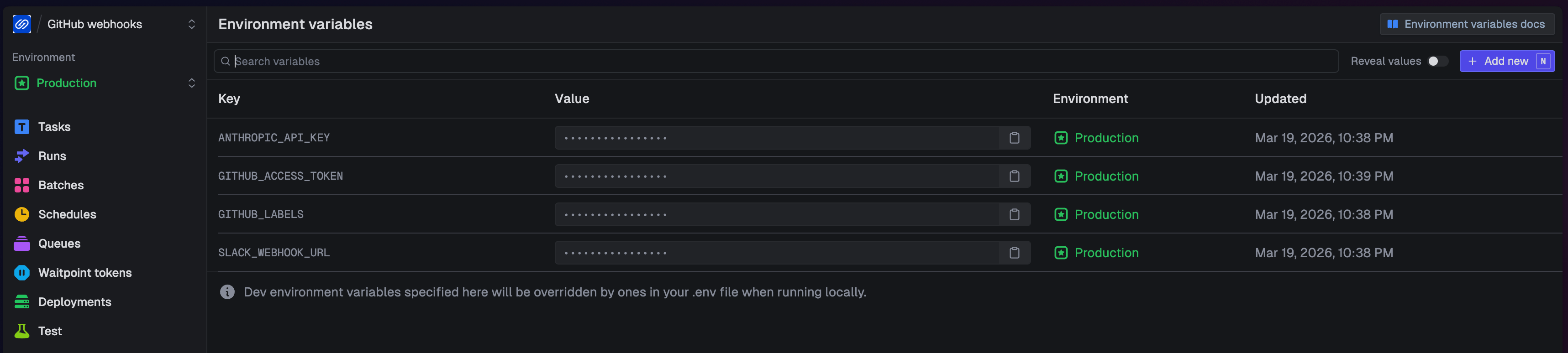
This runs trigger.dev deploy --env prod with --env-file .env. Trigger.dev deploys your task code and syncs environment variables to Production in one step — trigger.config.ts declares which keys to sync (ANTHROPIC_API_KEY, GITHUB_ACCESS_TOKEN, GITHUB_LABELS, SLACK_WEBHOOK_URL), so you do not need to set them separately in the Trigger.dev dashboard.
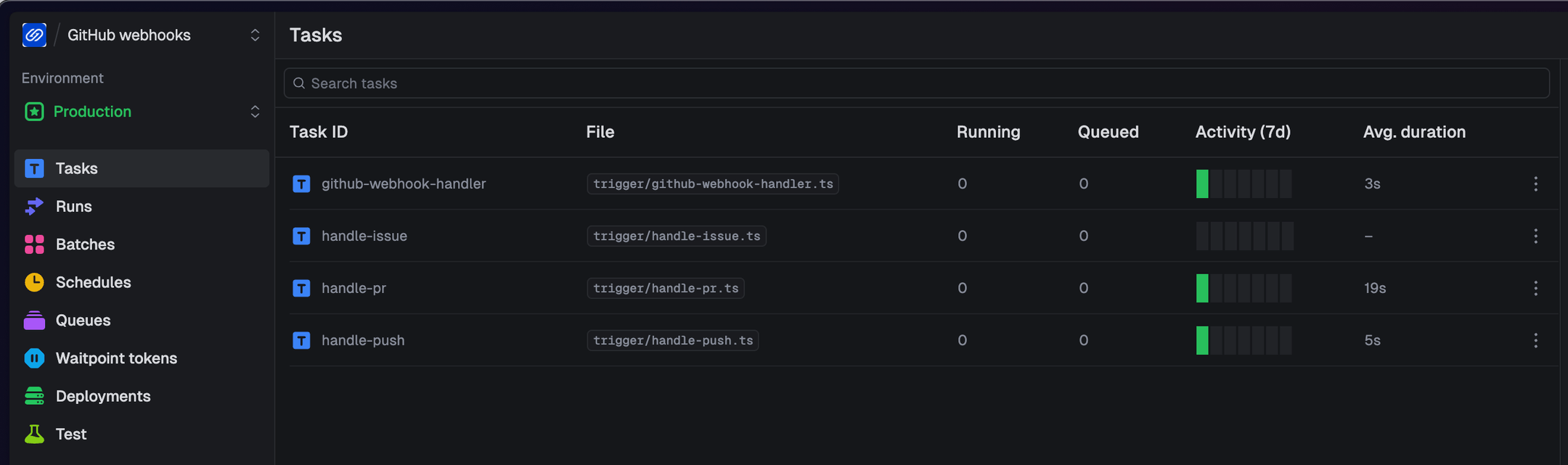
After deploying, open the Trigger.dev dashboard and confirm you see four tasks in your Production environment: github-webhook-handler, handle-pr, handle-issue, and handle-push. Each task has a stable HTTP trigger URL that Hookdeck will deliver to.
Trigger.dev task router
One Hookdeck connection delivers all GitHub events to a single router task, which fans out to child tasks in code.
GitHub posts to the Hookdeck source, which verifies the HMAC signature. A single connection (github-to-main-handler) applies the trigger-wrapper transform (reshapes the payload for Trigger.dev) and delivers to the trigger-dev-main destination with your Trigger.dev Bearer token. The github-webhook-handler task reads the event type and dispatches to the appropriate child task (handle-pr, handle-issue, or handle-push) using tasks.trigger().
Do not create the three filtered Hookdeck-routed connections yet — this keeps routing unambiguous while you learn the router path.
Create the Hookdeck connection
Load your .env variables into the shell, authenticate the Hookdeck CLI, and read the transformation code:
set -a && source .env && set +a

hookdeck ci --api-key "$HOOKDECK_API_KEY"

TRANSFORM_CODE=$(cat hookdeck/trigger-wrapper.js)
hookdeck ci binds the CLI to the specific project that owns the API key. Alternatively, hookdeck login opens an interactive browser flow that authenticates your full account and lets you navigate across all your projects — see the CLI docs.
Now create the single task router connection with connection upsert. The destination URL is Trigger.dev’s REST task trigger for github-webhook-handler (POST /api/v1/tasks/github-webhook-handler/trigger with Bearer auth). See the Hookdeck CLI and connection command for flags.
TRIGGER_BASE_URL="https://api.trigger.dev/api/v1/tasks"

hookdeck gateway connection upsert "github-to-main-handler" \
  --source-name "github" \
  --source-type GITHUB \
  --source-webhook-secret "$GITHUB_WEBHOOK_SECRET" \
  --source-allowed-http-methods "POST" \
  --destination-name "trigger-dev-main" \
  --destination-type HTTP \
  --destination-url "$TRIGGER_BASE_URL/github-webhook-handler/trigger" \
  --destination-auth-method bearer \
  --destination-bearer-token "$TRIGGER_SECRET_KEY" \
  --rule-transform-name "trigger-wrapper" \
  --rule-transform-code "$TRANSFORM_CODE" \
  --rule-retry-count 5 \
  --rule-retry-strategy linear \
  --rule-retry-interval 60000
Copy the source URL from the CLI output (for example Source URL: https://hkdk.events/...). You will paste it into GitHub in the next step.
If you plan to use the optional gh script below, you can save the URL to .hookdeck-source-url on one line (the script reads this file):
echo 'https://hkdk.events/YOUR_SOURCE_ID' > .hookdeck-source-url
Why GitHub Source Authentication matters
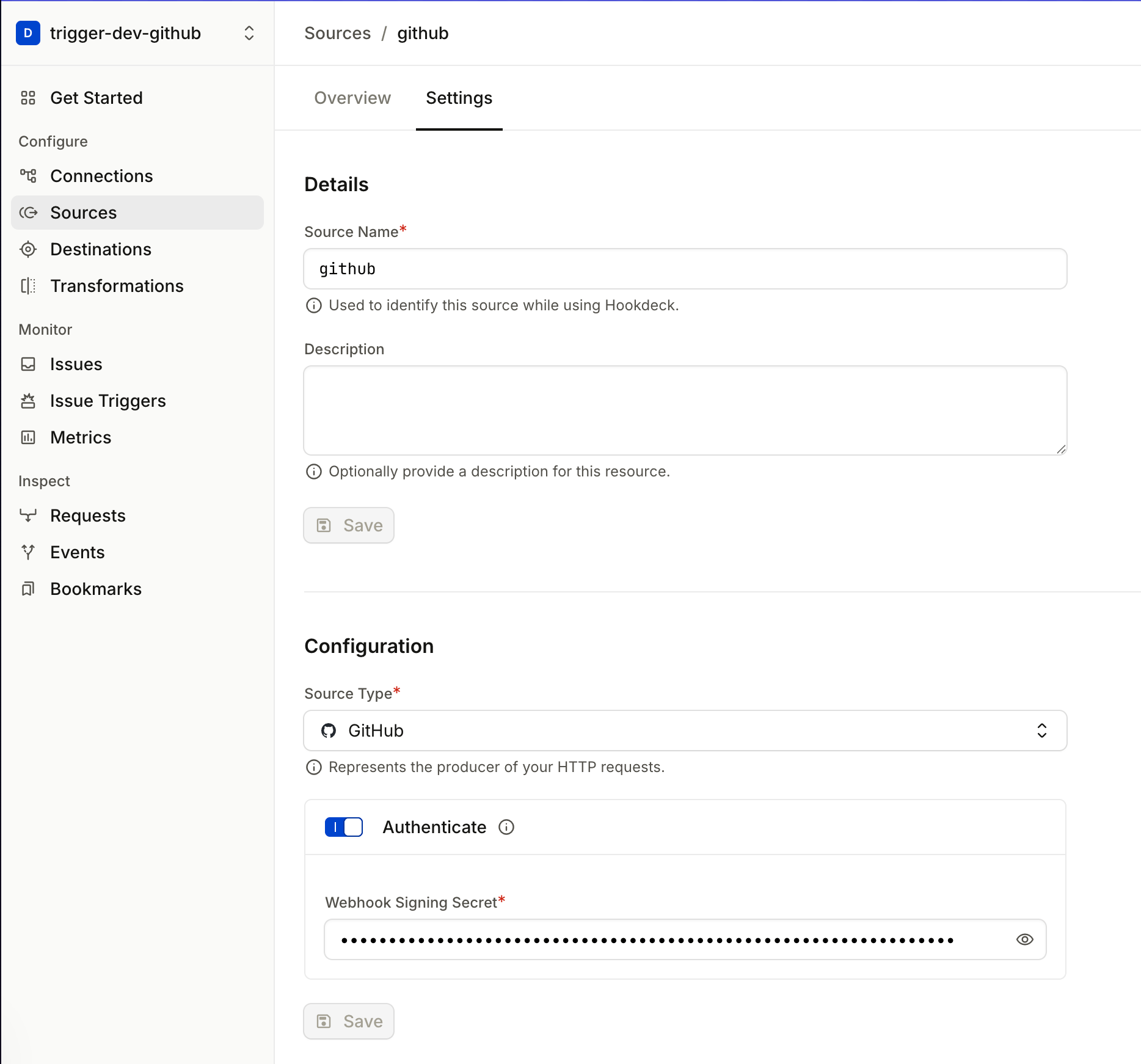
Look at the --source-type GITHUB and --source-webhook-secret flags in the command you just ran. These configure Source Authentication for your Hookdeck Source so GitHub’s HMAC signatures are verified on ingress.
The Hookdeck source URL is public — anyone who discovers it could POST a payload. Without Source Authentication, Hookdeck would accept that request, transform it, and deliver it to Trigger.dev using your Bearer token. The task would run on attacker-supplied data.
With --source-type GITHUB and --source-webhook-secret set, Hookdeck verifies GitHub's HMAC signature on every inbound request. Requests with invalid or missing signatures are rejected before they reach the transform or any destination.
The verification chain has two layers: Hookdeck verifies the GitHub signature at the source (proving the webhook came from GitHub), and Trigger.dev requires a valid Bearer token on every delivery (proving the request came from an authorized caller — here, Hookdeck). Together, these ensure that only legitimate GitHub events reach your tasks.
What the transform does
Hookdeck stores transformations by name in your project. This demo uses one transformation named trigger-wrapper (from hookdeck/trigger-wrapper.js). The task router connection upsert passes --rule-transform-name and --rule-transform-code so Hookdeck creates or updates that definition. The filtered connections you add later pass --rule-transform-name "trigger-wrapper" only — they reuse the same named transformation, not a second copy of the script. After you edit the file, re-run the first upsert (for example npm run setup:hookdeck in the demo repo, which always upserts github-to-main-handler with fresh code); every connection that references trigger-wrapper then uses the updated logic.
That transform runs inside Hookdeck on every matching delivery and does three things. First, Trigger.dev’s REST task trigger expects the body wrapped in { payload: { ... } } — the transform applies that shape. Second, because Hookdeck delivers to Trigger.dev via an HTTP API call, GitHub's original request headers don't automatically appear in the task payload; they exist only on the delivery request itself. The transform copies X-GitHub-Event into payload.event so task code can branch on it, and X-GitHub-Delivery into payload.github_. That delivery value is a new UUID for every webhook POST from GitHub (webhook headers) — stable for the same logical delivery when Hookdeck retries — and feeds Trigger.dev idempotency: the demo uses it in tasks.trigger on the router path, and you can map it to options.idempotencyKey on the REST trigger body for direct HTTP triggers.
function header(headers, name) {
  if (!headers) return undefined;
  const lower = name.toLowerCase();
  for (const key of Object.keys(headers)) {
    if (key.toLowerCase() === lower) return headers[key];
  }
  return undefined;
}

addHandler("transform", (request, context) => {
  request.body = {
    payload: {
      ...request.body,
      event: header(request.headers, "x-github-event"),
      action: request.body.action,
      github_delivery_id: header(request.headers, "x-github-delivery"),
    },
  };
  return request;
});
What GitHub sends (simplified):
// Headers include: X-GitHub-Event, X-GitHub-Delivery (unique per delivery), X-Hub-Signature-256, …
{
  "action": "opened",
  "pull_request": { "number": 42, "title": "Add feature X", "...": "..." }
}
What Trigger.dev receives (after the transform wraps the payload):
{
  "payload": {
    "action": "opened",
    "pull_request": { "number": 42, "title": "Add feature X", "...": "..." },
    "event": "pull_request",
    "github_delivery_id": "b54d9e5c-81bf-463c-9788-xxxxxxxxxxxx"
  }
}
The transform wraps the original body inside { payload: { ... } } (the shape the REST task trigger expects), sets event and github_delivery_id from headers (after the spread so JSON cannot spoof them), and keeps the rest of the GitHub body. The transform runs inside Hookdeck — no server to deploy — and the source code lives in the repo at hookdeck/trigger-wrapper.js, versioned alongside your task code.
Register the GitHub webhook
Point your repository’s webhook at the Hookdeck source URL. You can do this with the GitHub CLI or through the GitHub UI.
Option A: GitHub CLI (gh)
Run the following in the same terminal where you loaded your .env variables (or ensure GITHUB_REPO, GITHUB_WEBHOOK_SECRET, and the Hookdeck source URL are set).
HOOKDECK_SOURCE_URL=$(cat .hookdeck-source-url)

gh api "repos/$GITHUB_REPO/hooks" \
  --method POST \
  -f "name=web" \
  -f "config[url]=$HOOKDECK_SOURCE_URL" \
  -f "config[content_type]=json" \
  -f "config[secret]=$GITHUB_WEBHOOK_SECRET" \
  -f "events[]=pull_request" \
  -f "events[]=issues" \
  -f "events[]=push" \
  -F "active=true"
This creates a webhook on $GITHUB_REPO that sends pull_request, issues, and push events to your Hookdeck source URL, signed with $GITHUB_WEBHOOK_SECRET. See Creating webhooks and Webhook events in the GitHub docs.
Option B: GitHub UI
- Open your repo on GitHub → Settings → Webhooks → Add webhook.
- Payload URL: paste the Hookdeck source URL from the previous step.
- Content type:
application/json. - Secret: the same value as
GITHUB_WEBHOOK_SECRETin your.env(GitHub signs deliveries with this; Hookdeck verifies using the source webhook secret). - Which events: choose “Let me select individual events” and enable at least Issues, Pull requests, and Pushes.
- Save the webhook.
See the task router path in action
On the repo in GITHUB_REPO:
- Open a pull request — expect an AI review comment from
handle-pr(via the router). - Open an issue — expect labels from
handle-issue. - Push to a branch — if Slack is configured, expect a summary (subject to
GITHUB_).PUSH_ SUMMARY_ DEFAULT_ BRANCH_ ONLY
Trace the event through Hookdeck
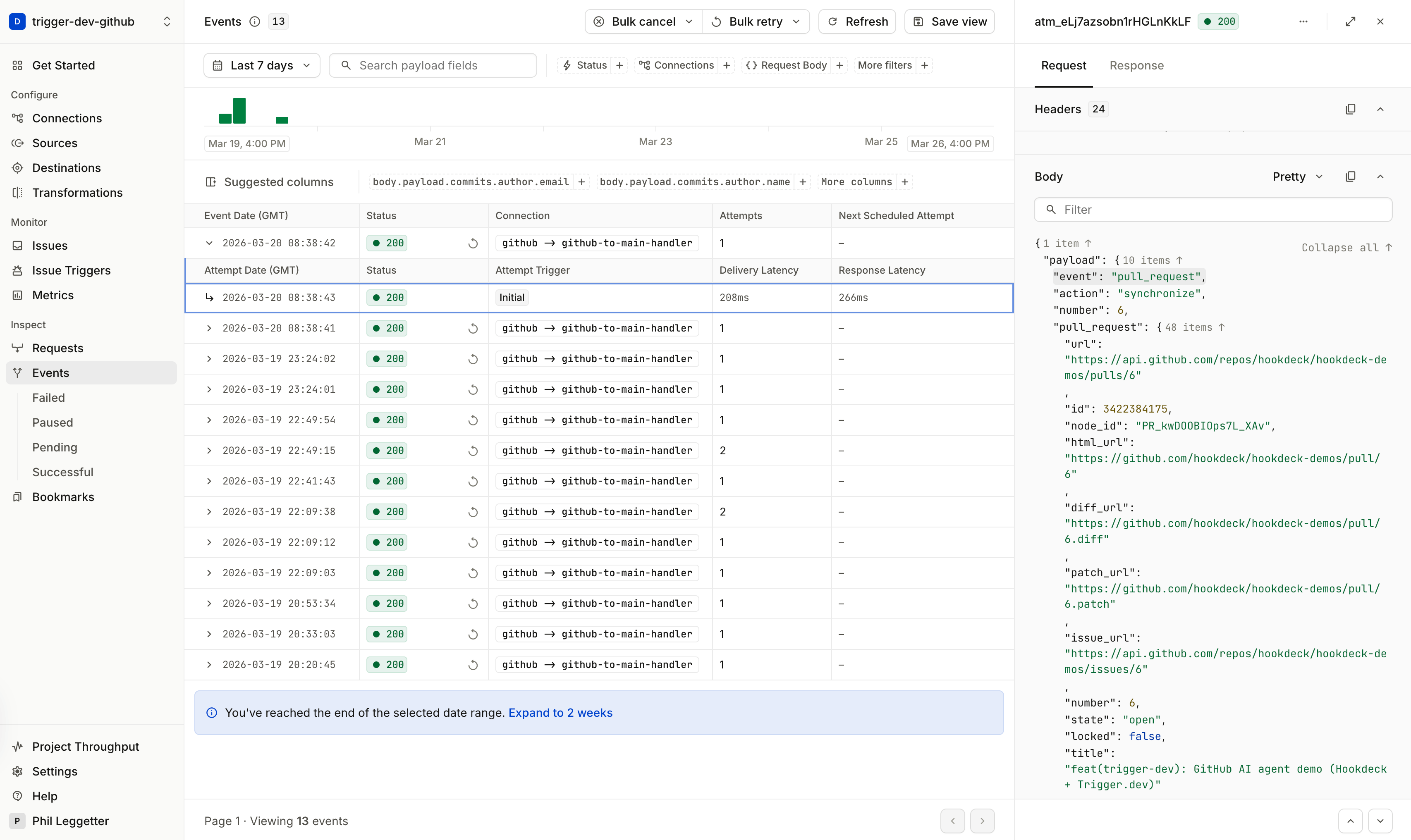
Open the Hookdeck dashboard and find the event for github-to-main-handler. Click into the event detail to see three things: the original GitHub payload as received, the transformed payload that was delivered to Trigger.dev (with the event field extracted from the header), and the delivery status (expect a 2xx response from Trigger.dev).
Now imagine that delivery had failed — a transient Trigger.dev timeout, for example. You could click Retry on this event and Hookdeck would re-deliver the exact same payload without GitHub needing to re-send the webhook. The original event is queued and available for replay. This is the core value of having Hookdeck at the edge: webhook providers fire once, but you get retries, replay, and full delivery history.
Trace the run through Trigger.dev
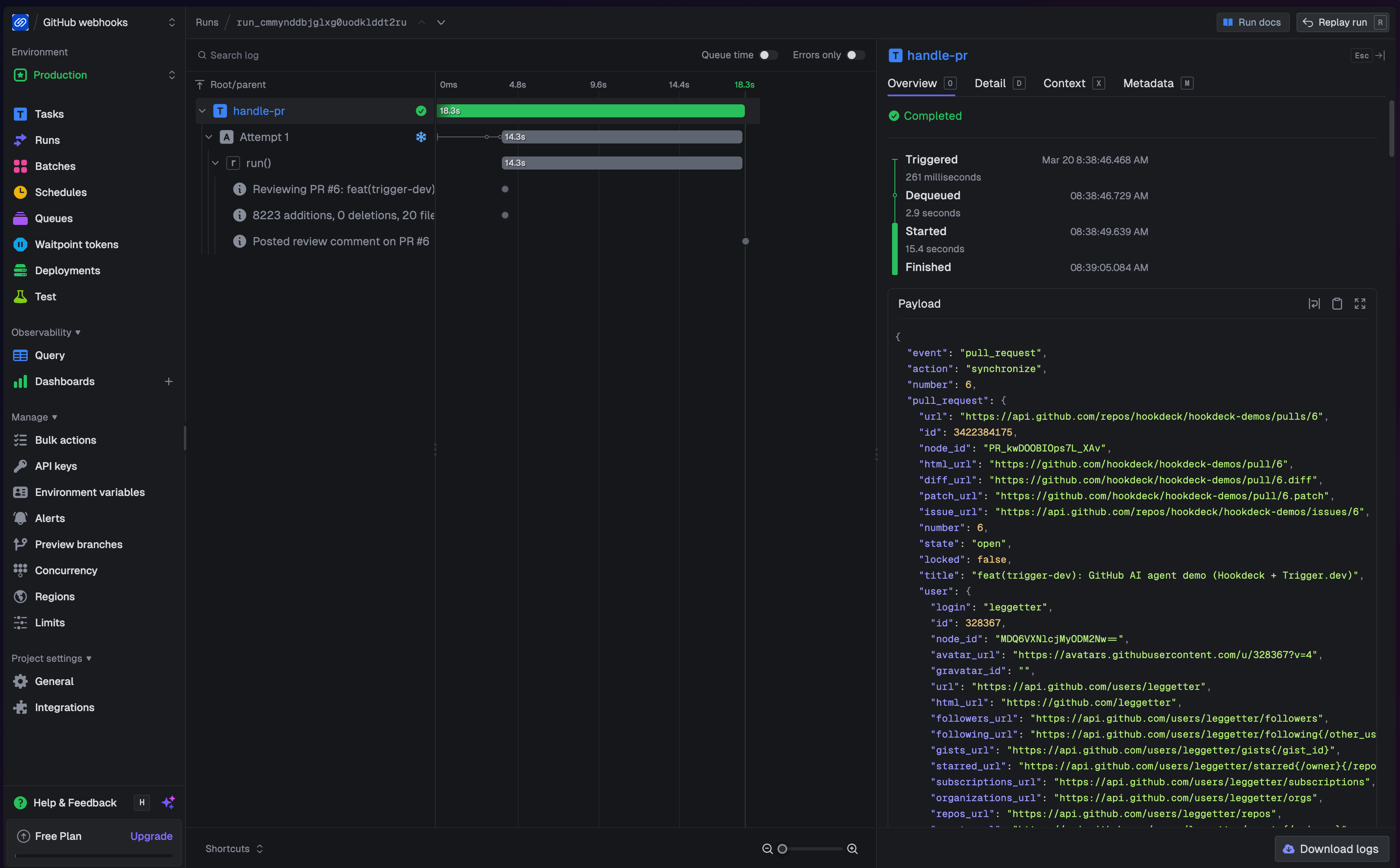
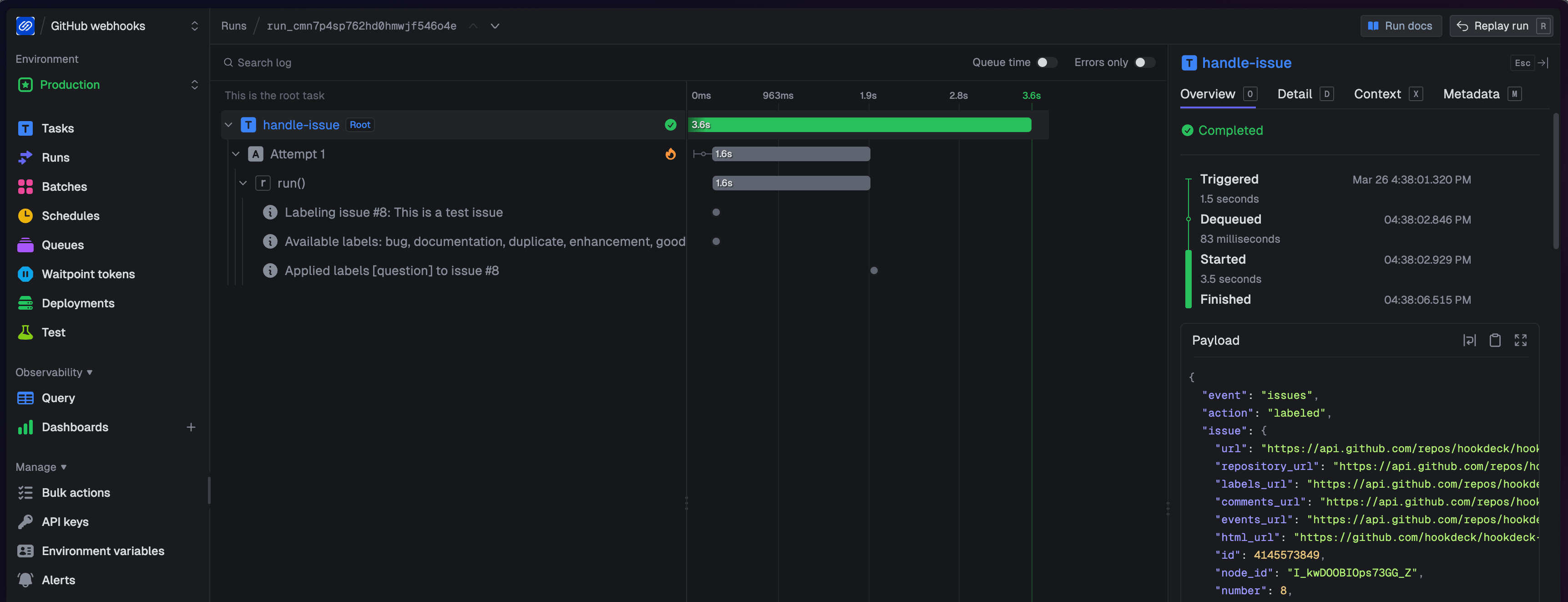
Open the Trigger.dev dashboard and find the run for github-webhook-handler. Notice it spawned a child run — click into the child (for example, handle-pr if you opened a PR). Inside the child run, you can see each step: the Claude API call with its timing, the GitHub comment post, and the final result. If the Claude call had timed out, Trigger.dev would have retried the task automatically (up to 3 attempts with exponential backoff, as configured in trigger.config.ts). This is durable execution — the task runs reliably even when downstream services are flaky.
Follow the data flow in code (task router)
You have seen events flow through Hookdeck and Trigger.dev in the dashboards. Now map that to the task code — starting with the router entrypoint and then the three event tasks it dispatches to.
Router entrypoint: github-webhook-handler.ts
This task is invoked by the task router destination URL. It reads payload.event (from X-GitHub-Event) and branches on payload.action when GitHub includes it — push payloads omit a top-level action, while pull_request and issues include one — then calls tasks.trigger() for the matching child task.
The only extra structure is guard once, then trigger: the transform must copy X-GitHub-Delivery into github_delivery_id (see What the transform does); the router trims it and throws if it is missing or empty. That is intentional fail-fast behaviour — the HTTP payload is an external boundary, so a runtime check is appropriate, and proceeding without a delivery id would mean children run without idempotency keys and could duplicate work when Trigger.dev or Hookdeck retries the same delivery. A small helper builds the same global key for every branch (idempotencyKeys.create with scope: "global", then tasks.trigger). The full file in the demo adds logging; the important part is the guard, the helper, and the switch that maps event (and sometimes action) to a child task.
import { idempotencyKeys, task, tasks } from "@trigger.dev/sdk";

interface GitHubWebhookPayload {
  event: string;
  action?: string;
  github_delivery_id: string;
  [key: string]: unknown;
}

async function triggerChildTask(
  taskId: "handle-pr" | "handle-issue" | "handle-push",
  payload: GitHubWebhookPayload,
  deliveryId: string
): Promise<void> {
  const idempotencyKey = await idempotencyKeys.create(`${deliveryId}-${taskId}`, { scope: "global" });
  await tasks.trigger(taskId, payload, { idempotencyKey });
}

export const githubWebhookHandler = task({
  id: "github-webhook-handler",
  run: async (payload: GitHubWebhookPayload) => {
    const deliveryId =
      typeof payload.github_delivery_id === "string" ? payload.github_delivery_id.trim() : "";
    if (!deliveryId) {
      throw new Error(
        "github_delivery_id is required (GitHub X-GitHub-Delivery). Update hookdeck/trigger-wrapper.js and re-upsert the Hookdeck connection transform."
      );
    }

    switch (payload.event) {
      case "pull_request":
        if (payload.action === "opened" || payload.action === "synchronize") {
          await triggerChildTask("handle-pr", payload, deliveryId);
        }
        break;
      case "issues":
        if (payload.action === "opened") {
          await triggerChildTask("handle-issue", payload, deliveryId);
        }
        break;
      case "push":
        await triggerChildTask("handle-push", payload, deliveryId);
        break;
      default:
        // Other GitHub event types are ignored in this demo.
        break;
    }
  },
});
Key idea: with the task router, fan-out happens in Trigger.dev using tasks.trigger(). Each child task runs as an independent, durable execution — with its own retry policy, timing, and run trace in the dashboard. The router task completes immediately after dispatching; it does not wait for child tasks to finish.
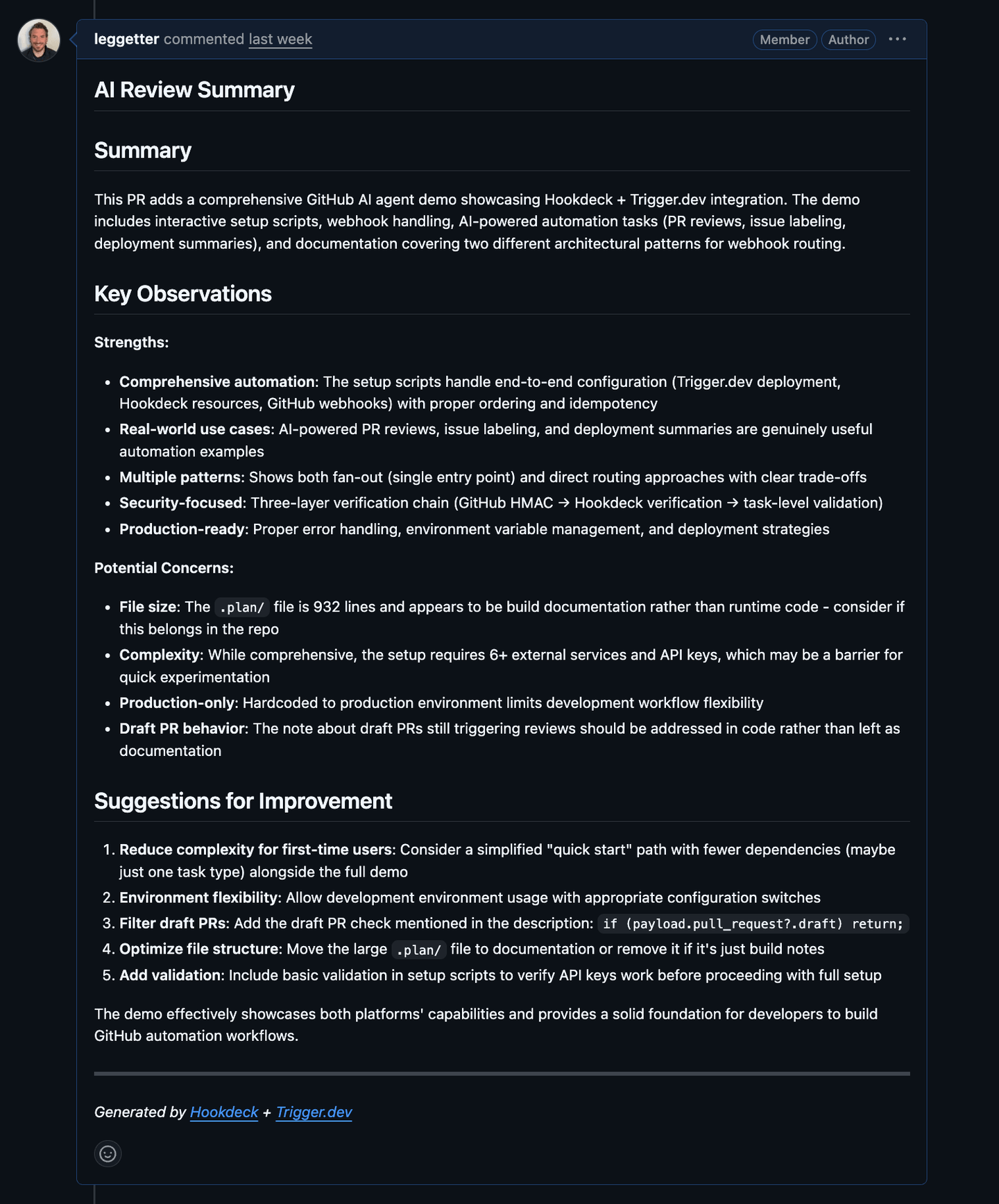
Task: handle-pr.ts (PR review summary)
For PR events, this task fetches the PR diff, asks Claude for a concise review summary, and posts or updates a single PR comment. The comment body starts with an HTML comment line (<!-- ai-review-summary -->). GitHub does not show that line in the rendered thread, but it is stored in the comment’s markdown and returned by the API. The task lists existing PR comments (paginated), finds the first one whose body contains that marker, and updates it with PATCH; if none match, it creates one with POST.
const diff = await getPRDiff(owner, repo, prNumber);
const review = await ask(prompt, 1500);
const comment = `${REVIEW_MARKER}
## AI Review Summary

${review}

---
*Generated by [Hookdeck](https://hookdeck.com) + [Trigger.dev](https://trigger.dev)*`;

const existing = await findExistingComment(owner, repo, prNumber, REVIEW_MARKER);
if (existing) {
  await updateComment(owner, repo, existing.id, comment);
} else {
  await postComment(owner, repo, prNumber, comment);
}
Task: handle-issue.ts (Issue labeler)
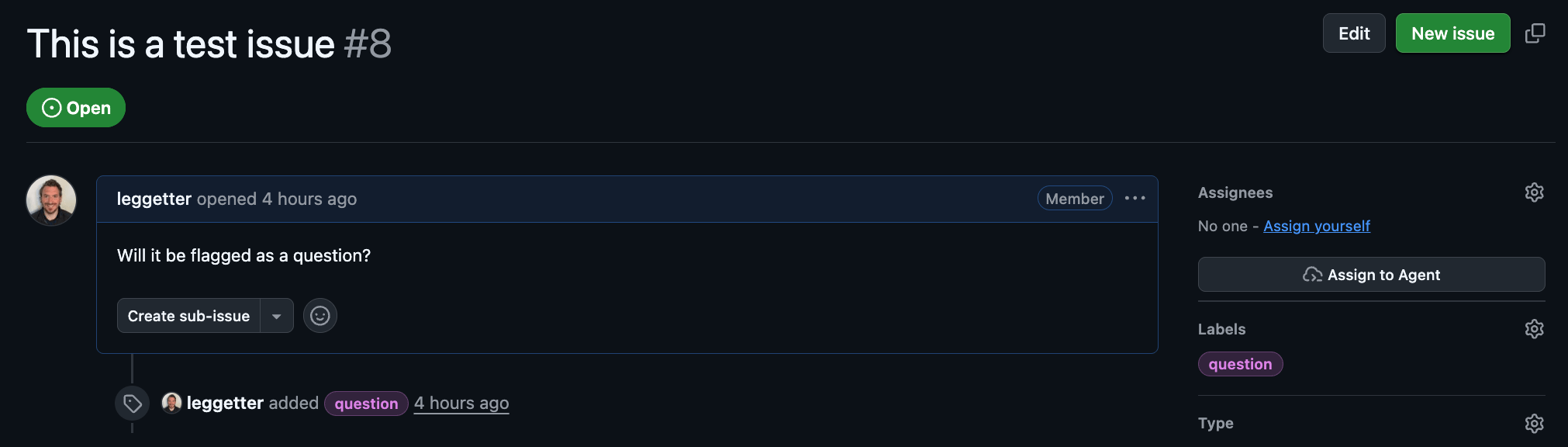
For newly opened issues, this task classifies the title/body into one-or-more labels using Claude, then applies those labels on GitHub.
const response = await ask(prompt, 100);
labels = JSON.parse(response.trim());
await addLabels(owner, repo, issue.number, labels);
Task: handle-push.ts (Deployment summary to Slack)
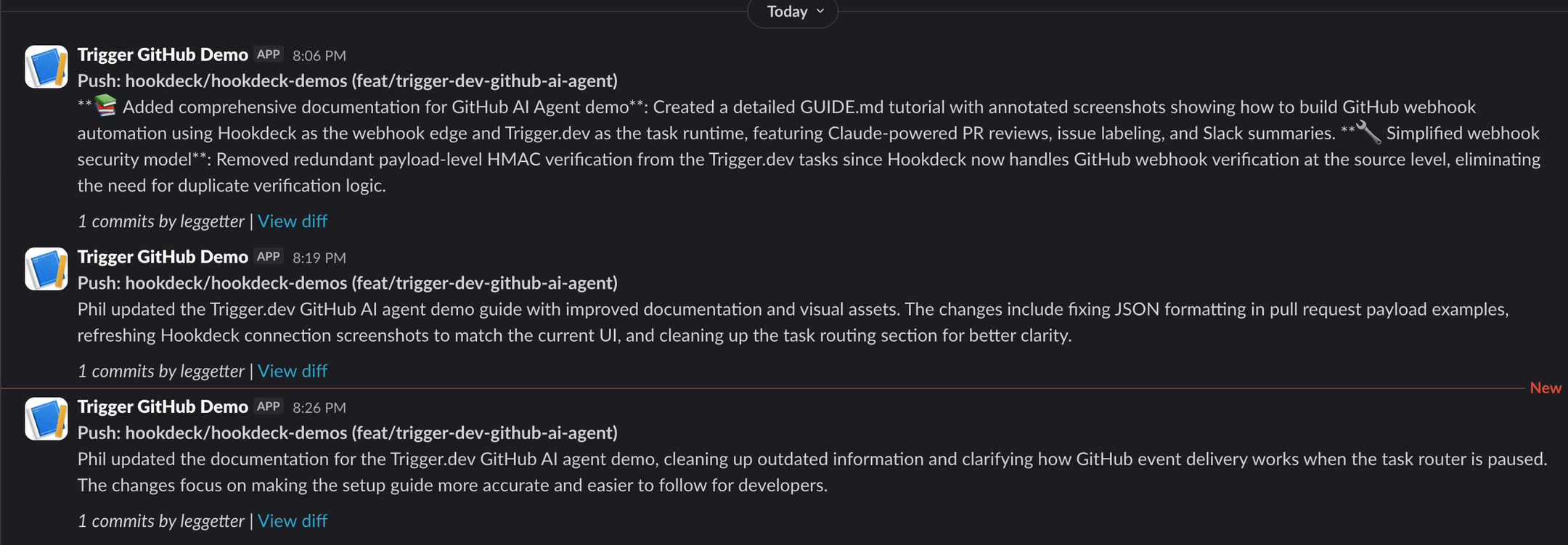
On push, this task synthesizes a short summary of the commits and posts it to Slack. It reads the branch name and the repository's default branch from the GitHub payload (payload.ref and payload.repository.default_) and can be configured to skip non-default branches.
const defaultBranchOnly =
  process.env.GITHUB_PUSH_SUMMARY_DEFAULT_BRANCH_ONLY === "true" ||
  process.env.GITHUB_PUSH_SUMMARY_DEFAULT_BRANCH_ONLY === "1";

if (defaultBranchOnly && branch !== defaultBranch) {
  return { skipped: true, branch, defaultBranch };
}

const summary = await ask(prompt, 300);
await postToSlack(slackMessage);
Helper modules
The tasks above rely on shared helpers in trigger/lib/. Each has a focused role: github.ts handles GitHub API calls (fetching PR diffs, listing issue comments with pagination, posting and updating comments, applying labels) using fetch with Bearer authentication. ai.ts wraps the Anthropic SDK to call Claude (claude-sonnet-4-20250514) with a prompt and max-token limit. slack.ts posts to a Slack incoming webhook, falling back to console output if SLACK_WEBHOOK_URL is not set.
The guide’s focus is the wiring — which task runs, which event/action gates the work, and which external systems get called — so we will not walk through the helper implementations in detail.
Routing at the edge: Hookdeck connection routing
Now that you have the task router working, you can see how the same tasks work with a different entry path. Instead of one connection to a router task with a switch statement, you will create separate Hookdeck connections with header filters so each event type is delivered straight to the right task — routing moves out of application code and into the infrastructure layer.
The same GitHub source and verification, but three connections filter on the X-GitHub-Event header. Each connection delivers only matching events to a dedicated destination and task. Routing moves from your code to the Hookdeck edge — giving you per-event-type observability, independent retry policies, and the ability to pause or replay one event type without affecting the others.
Pause the task router connection
Pause the task router connection so events stop flowing through github-webhook-handler:
hookdeck gateway connection pause "github-to-main-handler"
GitHub still posts to the same source URL, but events are instead queued and are no longer delivered to github-webhook-handler.

The filtered connections you create next own delivery to Trigger.dev.
Create the three filtered connections
From the project root, with Hookdeck CLI auth as before (these upserts reference the existing trigger-wrapper transform; they do not pass --rule-transform-code again):
TRIGGER_BASE_URL="https://api.trigger.dev/api/v1/tasks"

hookdeck gateway connection upsert "github-to-handle-pr" \
  --source-name "github" \
  --source-type GITHUB \
  --destination-name "trigger-dev-pr" \
  --destination-type HTTP \
  --destination-url "$TRIGGER_BASE_URL/handle-pr/trigger" \
  --destination-auth-method bearer \
  --destination-bearer-token "$TRIGGER_SECRET_KEY" \
  --rule-filter-headers '{"x-github-event":{"$eq":"pull_request"}}' \
  --rule-transform-name "trigger-wrapper" \
  --rule-retry-count 5 \
  --rule-retry-strategy linear \
  --rule-retry-interval 60000

hookdeck gateway connection upsert "github-to-handle-issue" \
  --source-name "github" \
  --source-type GITHUB \
  --destination-name "trigger-dev-issues" \
  --destination-type HTTP \
  --destination-url "$TRIGGER_BASE_URL/handle-issue/trigger" \
  --destination-auth-method bearer \
  --destination-bearer-token "$TRIGGER_SECRET_KEY" \
  --rule-filter-headers '{"x-github-event":{"$eq":"issues"}}' \
  --rule-transform-name "trigger-wrapper" \
  --rule-retry-count 5 \
  --rule-retry-strategy linear \
  --rule-retry-interval 60000

hookdeck gateway connection upsert "github-to-handle-push" \
  --source-name "github" \
  --source-type GITHUB \
  --destination-name "trigger-dev-push" \
  --destination-type HTTP \
  --destination-url "$TRIGGER_BASE_URL/handle-push/trigger" \
  --destination-auth-method bearer \
  --destination-bearer-token "$TRIGGER_SECRET_KEY" \
  --rule-filter-headers '{"x-github-event":{"$eq":"push"}}' \
  --rule-transform-name "trigger-wrapper" \
  --rule-retry-count 5 \
  --rule-retry-strategy linear \
  --rule-retry-interval 60000
These connections share the existing github source — the webhook secret and verification were configured when you created the task router connection above. You do not need to set --source-webhook-secret again.
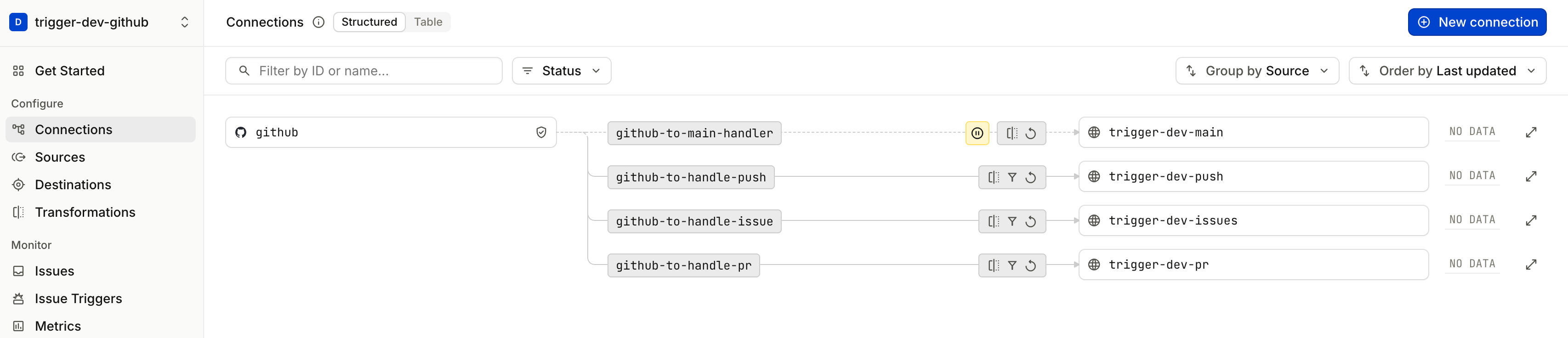
See Hookdeck connection routing in action
Repeat the same GitHub actions (open a PR, open an issue, push to a branch).
In the Hookdeck dashboard, open Connections. You should see each event type flowing through only the matching github-to-handle-* connection, with github-to-main-handler still paused. Each connection has its own delivery history — try pausing github-to-handle-pr temporarily and notice that issue and push events continue unaffected. This per-connection independence is the operational advantage of routing at the edge.
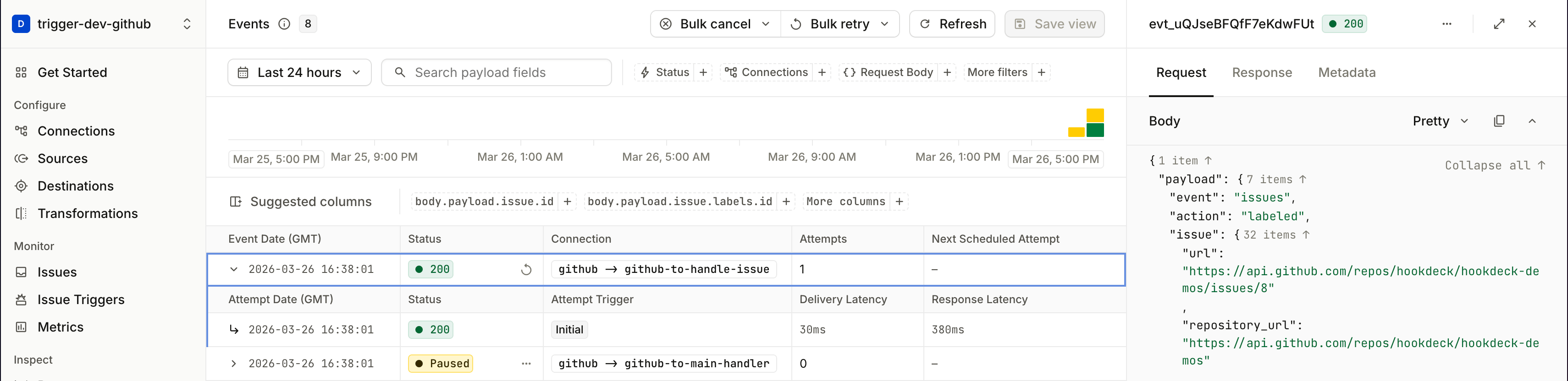
In the Trigger.dev dashboard, notice that handle-issue is marked as a Root task — it was invoked directly by the Hookdeck connection, not spawned as a child of github-webhook-handler. This is the key difference from the task router path, where child tasks always appear under the router's parent run.
Task router vs Hookdeck connection routing
Now that you have used both patterns, here is how to choose between them. Both use the same Hookdeck source, transform, and Trigger.dev tasks — the difference is where you branch on event type.
| Consideration | Trigger.dev task router | Hookdeck connection routing |
|---|---|---|
| Hookdeck resources | One connection + destination | One connection per event family |
| Same-delivery idempotency | Demo: parent passes keys into each tasks.trigger() (github_delivery_id + child task id). | Same REST trigger accepts options.idempotencyKey in the POST body — set it from the transform (e.g. github_delivery_id) for equivalent dedupe on Hookdeck retries/replays. This demo does not; optional extras: Hookdeck deduplication, checks in task code. |
| Where routing lives | switch in task code | Hookdeck header filters |
| Adding a new event type | Change code and deploy | Add a connection in Hookdeck |
| Observability | All deliveries on one connection | Per-event-type metrics and logs |
| Retries | One retry policy for all events | Independent retry policy per connection |
| Operational control | Pause/replay affects all events | Pause/replay per event type |
When the task router fits well: You have one primary provider with a small set of event types, and you want all branching logic in TypeScript next to your task code. One Hookdeck connection, minimal gateway configuration.
When Hookdeck connection routing fits well: You want operators to change routes without a code deploy. You need per-event-type observability, independent retry policies, or the ability to pause one event type without affecting others. You plan to send the same ingress to multiple destinations (Trigger.dev for automation, plus a logging endpoint, a serverless function, or another service). You have several webhook sources (GitHub, Stripe, Twilio) and want type separation at the edge rather than one oversized router task.
Neither pattern replaces the reason Hookdeck sits in front of Trigger.dev (see the architecture overview): providers post to Hookdeck’s URL, Hookdeck verifies and delivers to Trigger’s authenticated API. The choice here is only how you fan out to tasks after that ingress.
Troubleshooting
No events appear in Hookdeck. When a request fails to reach Hookdeck — because the payload URL is wrong, the content type is not application/json, or GitHub cannot connect — Hookdeck creates a Request failure issue in the dashboard. Open Monitor → Issues to see what was rejected and why. The most common cause is a mismatch between the Hookdeck source URL and what was registered on the GitHub webhook.
Hookdeck delivers but Trigger.dev returns 401. Your TRIGGER_SECRET_KEY does not match the Production secret in the Trigger.dev dashboard. Verify the key starts with tr_prod_ and that you are viewing the Production environment in Trigger.dev, not Development.
Hookdeck rejects the webhook with a verification failure. The GITHUB_WEBHOOK_SECRET on the Hookdeck source does not match the secret configured on the GitHub webhook. Re-run the connection upsert command with the correct --source-webhook-secret value, then update the GitHub webhook to use the same secret.
Task runs but the Claude call fails. ANTHROPIC_API_KEY is not set in Trigger.dev's Production environment. The trigger.config.ts file syncs env vars on deploy — re-run npm run deploy after confirming the key is in your .env, then check Environment Variables for Production in the Trigger.dev dashboard.
Duplicate task runs for the same GitHub event. Both the task router connection and the filtered connections are active, so the same event is delivered twice. Pause github-to-main-handler if you are using connection routing, or pause the three github-to-handle-* connections if you are using the task router.
Hookdeck replays and Trigger.dev idempotency. GitHub assigns a stable X-GitHub-Delivery per webhook POST; the transform copies it to github_delivery_id. On the task router path, the router turns that into Trigger.dev idempotency keys for each child tasks.trigger. For connection routing, the same delivery id can populate options.idempotencyKey on the REST trigger if you extend the transform — without it, a replay can enqueue a second root run. A genuinely new GitHub POST gets a new delivery id and correctly starts a new run.
Push summary does not appear in Slack. Confirm SLACK_WEBHOOK_URL is set in Trigger.dev's Production environment — it must be synced via npm run deploy, not just present in your local .env. If GITHUB_ is true, the push must be to the repository's default branch.
Tasks are not visible in the Trigger.dev dashboard after deploying. Make sure you are viewing the Production environment (not Development). The deploy command targets --env prod, so tasks only appear in Production.
Conclusion
You built a working pipeline from GitHub webhooks through Hookdeck to Trigger.dev — with AI-powered PR reviews, issue labeling, and Slack deployment summaries. You used the Trigger.dev task router to learn the full data flow with a single connection, then scaled up to Hookdeck connection routing for per-event-type observability and operational control.
The combination works because each tool owns a clear part of the problem: Hookdeck handles the webhook edge (verification, transformation, retries, observability), and Trigger.dev handles durable task execution (typed payloads, automatic retries, fan-out, run tracing). Where routing lives is a choice. Hookdeck can route on headers or on transformed payload fields (the transform runs before the filter), giving you per-event-type observability and independent retry policies at the edge. A Trigger.dev task router makes sense when routing requires external lookups, or when the logic is simple enough that a switch statement is all you need and the overhead of multiple connections is not worth it. Either way, your application code stays focused on the business logic — calling Claude, posting comments, applying labels, sending Slack summaries.
- Demo: hookdeck/hookdeck-demos —
trigger-dev/github-ai-agent - Hookdeck documentation: hookdeck.com/docs
- Hookdeck use case: AI Agents & LLMs
- Trigger.dev documentation: trigger.dev/docs
For questions or improvements to this guide, open an issue on the hookdeck-demos repository or reach out through your usual Hookdeck or Trigger.dev channels.
FAQs
Why deploy Trigger.dev before creating the Hookdeck connections?
Hookdeck destinations point to concrete Trigger.dev task URLs. If those tasks have not been deployed yet, Hookdeck's first delivery attempts will fail and create issues in the dashboard that you would need to replay. Deploying first means the destination is ready to receive when the first event arrives.
Can I run this in a development environment instead of Production?
Yes. This demo uses Production because it is the most self-contained setup — one Trigger.dev environment, one Hookdeck project, one set of credentials. But there is no technical reason it cannot run in development.
For a dev setup, swap TRIGGER_SECRET_KEY for your tr_dev_… key and run npx trigger.dev@latest dev to serve tasks locally instead of deploying. Use a separate Hookdeck project (or a separate source) to keep dev and prod traffic isolated — Hookdeck organises environments via projects. The Hookdeck connection commands are otherwise identical; only the destination URL and bearer token change.
What happens if Trigger.dev is temporarily unavailable?
Hookdeck stores the event and retries delivery according to the connection's retry policy (--rule-retry-count, --rule-retry-strategy, --rule-retry-interval). If all retries are exhausted, the event moves to a failed state in the Hookdeck dashboard where you can inspect it and replay it manually — without GitHub needing to re-send the webhook. This is the core durability guarantee: the webhook provider fires once, and Hookdeck ensures delivery.
Does the Hookdeck source URL change if I update connections or the transform?
No. The source URL is stable — it only changes if you delete and recreate the source itself. You can add, remove, or modify connections and transforms without updating the GitHub webhook registration.
How do I add support for a new GitHub event type?
Task router: add a case to github-webhook-handler.ts, create the new task file, and run npm run deploy. GitHub must also be configured to send the new event type — update the webhook in GitHub Settings or re-run the gh api command with the additional event.
Connection routing: add a new hookdeck gateway connection upsert with a --rule-filter-headers matching the new event type and a destination pointing to the new task's trigger URL. Then update the GitHub webhook to include the new event type.
How do you avoid duplicate Trigger.dev runs for the same webhook?
GitHub sends a unique X-GitHub-Delivery header on every webhook POST. The demo’s Hookdeck transform copies it into payload.github_delivery_id. On the task router path, github-webhook-handler throws if that field is missing, then passes a global Trigger.dev idempotency key (delivery id + child task id) into each tasks.trigger, so the same delivery does not enqueue duplicate child runs when the router retries or Hookdeck replays. With connection routing, tasks are triggered by the same REST task trigger — you can pass options.idempotencyKey in the JSON body (set it from github_delivery_id in the transform) for the same dedupe behavior; this demo omits that. Alternatives include Hookdeck deduplication or app-level checks inside the task.
I edited hookdeck/trigger-wrapper.js — why didn’t Hookdeck pick up the change?
Transforms are stored in Hookdeck by name. Editing the file locally does nothing until a connection upsert sends new --rule-transform-code for that definition. Re-run the task router upsert that created trigger-wrapper (in the demo, npm run setup:hookdeck refreshes github-to-main-handler with the latest script). Connections that only reference --rule-transform-name "trigger-wrapper" then use the updated logic automatically. See What the transform does.
