Transformations
A transformation runs your own JavaScript on every event before it's delivered. It can reshape the payload and headers, verify and enrich events, or decode and generate content such as PDFs, archives and images. The runtime is compatible with Node.js and runs npm libraries, so processing you would otherwise deploy as a separate function can run in Hookdeck, as long as it doesn't need network access.
What transformations are used for
Across the transformations running in Hookdeck projects, the most common job is changing headers, followed by reshaping the payload into the format a destination's API expects. Common uses include:
- Add, remove and rewrite headers: For example, adding an API key or
Authorizationheader, adding a header that names the event type, or removing headers the destination shouldn't receive. For a static API key, bearer token or basic auth, destination authentication does this without code. Use a transformation when the credential is derived from the request or the destination expects it somewhere else. - Sign or encrypt outgoing requests: For example, computing an HMAC of the body with
node:cryptowhen the destination verifies requests with its own signature scheme, or encrypting a payload before delivery - Post to chat tools: For example, turning a Stripe, GitHub or Shopify event into a Slack, Discord, Microsoft Teams or Telegram message
- Send notifications: For example, mapping an event to the request body Knock, SendGrid or Twilio expects, to send an in-app notification, email or SMS
- Trigger background jobs: For example, wrapping the payload in an Inngest event's
nameanddata, or in thepayloadof a Trigger.dev task, and setting the requestpathto the endpoint for that job - Unify models across sources: For example, conforming WooCommerce orders and Shopify orders to a single standard
- Remove fields: For example, dropping fields a destination rejects, or stripping personal data before an event leaves your stack
- Change payload formats: For example, converting XML to JSON, decoding MessagePack or protobuf into JSON, or turning a JSON payload into CSV or YAML
- Add additional properties to payloads: For example, to more clearly indicate the event type for use in a filter or in your own application logic
- Verify tokens: For example, decoding a JWT and checking its signature, expiry and audience before delivery
- Work with binary payloads and files: For example, decompressing a gzip or zip file, extracting data from a PDF, editing the files in a multipart upload, or generating an image
This transformation posts a Stripe event to a Slack incoming webhook:
addHandler('transform', (request) => {
  const { type, data } = request.body;
  request.body = { text: `Stripe event \`${type}\` for ${data.object.id}` };
  return request;
});
These guides walk through common transformations:
Extract Text and Data from a PDF
Turn an application/pdf request into a JSON event with bundled npm libraries.
Decode and Verify JWTs
Verify bearer tokens with Node.js crypto or jose, and filter out requests with invalid tokens.
Decompress Gzip and Zip Payloads
Turn compressed requests into JSON events, or compress payloads before delivery.
Transform Multipart File Uploads
Read, replace, add, and remove files in multipart/form-data requests.
Generate an Image from Text
Turn a JSON request into a PNG image delivered as image/png.
Limitations
Transformations have some important limitations to keep in mind.
- The transformation runtime cannot perform any IO, or access any external resources such as the network or file system.
fetchisn't available, and modules such asfs,http,netandchild_processcan be imported, but their functions throw. - Only Node.js built-in modules can be imported. To use npm libraries, bundle them into your code.
Each execution is also bounded by these limits. An execution that exceeds the time or memory limit is terminated.
| Limit | Value |
|---|---|
| Execution time | 1 second, including time spent awaiting |
| Memory | 128 MB per transformation |
| Code size, including bundled dependencies | 5 MB |
| Binary body exposed to the code | 20 MiB. Larger bodies arrive as null and are delivered unchanged. |
A single Buffer, or the output of one decompression call | 32 MiB |
| Input to one compression call | 8 MiB |
| Brotli compression at quality 10 or higher | 128 KiB of input. Node.js defaults to quality 11, so pass a lower BROTLI_PARAM_QUALITY for larger inputs. |
pbkdf2 | Iterations multiplied by output blocks up to 600,000 |
scrypt | 128 * N * r * p up to 64 MiB |
| RSA keys | Up to 8,192 bits, and up to 3,072 bits for key generation |
Large bundles take longer to load the first time they run, roughly 30 ms per MB of code. Minify bundles that include large libraries.
Transformations syntax
Transformations are written in JavaScript, as a classic script or as an ES module, and can import Node.js built-in modules.
Handler function
The transformation handler is used to apply changes to a request. For example, both versions of the transformation code below add a header containing a SHA-256 hash of the body.
A classic script registers its handler with addHandler, and imports modules with require:
const { createHash } = require('node:crypto');

addHandler('transform', (request, context) => {
  request.headers['x-body-sha256'] = createHash('sha256')
    .update(JSON.stringify(request.body))
    .digest('hex');
  return request;
});
Code with a top-level import or export runs as an ES module. Export the handler as export default { transform }, as a default function, or as a named transform function:
import { createHash } from 'node:crypto';

export default {
  transform(request, context) {
    request.headers['x-body-sha256'] = createHash('sha256')
      .update(JSON.stringify(request.body))
      .digest('hex');
    return request;
  },
};
Modules support top-level await, and import.meta.url is defined.
The handler can be async or return a promise. See async code and timers for the execution time limit.
Let's take a look at the handler function's component parts.
Request object
request is the request object received on the connection. Its structure is denoted below.
{
  headers: { [key: string]: string };
  body: string | boolean | number | object | Buffer | null;
  query: string;
  parsed_query: object;
  path: string;
}
JSON and form payloads arrive as parsed objects, and text payloads as strings.
Binary payloads, such as application/octet-stream, PDFs, images, archives, and requests sent with Content-Encoding: gzip, arrive as a Buffer. Binary bodies larger than 20 MiB arrive as null.
For binary-safe multipart requests, request.body contains parsed text fields and file metadata. Each file also has content, a Buffer holding its bytes, so you can read, replace, add, or remove files. See transform multipart file uploads.
Context object
context is an object containing the connection information. Its structure is denoted below.
{
  connection: Connection;
}
Where Connection is an object, as defined in the response of the GET /connections/:id endpoint.
Return value
The handler must return a valid request object, containing a valid content-type header.
The
parsed_queryobject in the returned request can safely be ignored – Hookdeck will recreate this parsed query on its own.
The type of the returned body, together with the content-type header, decides what Hookdeck delivers:
Returned body | Result |
|---|---|
Bytes: a Buffer, Uint8Array or ArrayBuffer | A binary payload, delivered byte for byte with the returned content-type, or application/octet-stream if there is none. This works for any request, including text, JSON and multipart requests. |
| A string | A text payload, delivered with the returned content-type. For text, JSON and multipart requests, any content type works, such as text/csv, application/yaml, application/javascript, application/graphql, or a vendor type. |
| An object or array | A JSON, form, or multipart payload, depending on the content-type. With any other content type, the transformation fails with Body must be a string for <type>. Serialize it yourself, return bytes (a Buffer) for a binary payload, or use a JSON content type. |
Bytes returned with a textual content-type (text/*, JSON, XML, application/x-www-form-urlencoded or application/jwt) become a text payload when they're valid UTF-8, and valid JSON for JSON types. Bytes that don't decode, that declare a charset other than UTF-8, or that are returned with a content-encoding header stay binary.
For a binary request:
- Returning the body unchanged, or
null, keeps the original bytes. - Returning a string or object converts the payload to text. Set a textual
content-typewith it, such asapplication/jsonortext/plain; leaving a binary content type fails the transformation.
For example, this transformation turns a JSON list of orders into CSV:
addHandler('transform', (request) => {
  const rows = request.body.orders.map((order) => `${order.id},${order.total}`);
  request.body = ['id,total', ...rows].join('\n');
  request.headers['content-type'] = 'text/csv';
  return request;
});
The following transformation formats an order based on its source:
const formatOrder = (order, type) => {
  if (type === 'shopify') {
    // Format for shopify here
    return order;
  } if (type === 'woocommerce') {
    // Format for WooCommerce here
    return order;
  }
}

// Handle that formats the order from Shopify and Woocommerce
addHandler('transform', (request, context) => {
  const { body, headers, path, query } = request;
  const { connection } = context;
  return {
    body: formatOrder(body, connection.source.name),
    headers,
    path,
    query
  };
});
Environment variables
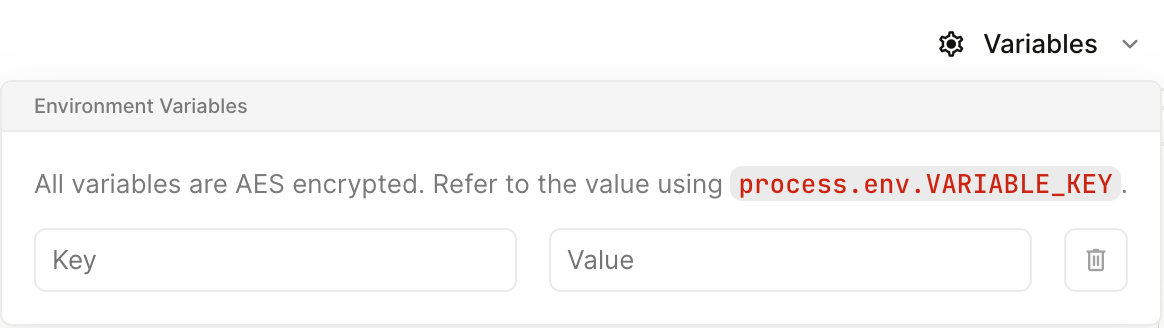
Transformations support environment variables for storing secrets. Access your variable on the process.env object. For example, to access a variable called TEST use process.env.TEST.
Environment variables are managed in the transformations editor via the drop down.
Pass --env as comma-separated KEY=value pairs when you create or update the transformation:
hookdeck gateway transformation upsert add-event-type-header \
  --code-file transform.js \
  --env TEST=value
{
  "name": "example",
  "code": "addHandler('transform', (request, context) => request);",
  "env": {
    "FOO": "BAR"
  }
}{
"id": "trs_3g5n4Sl0pCxcqc",
"team_id": "tm_lbhzBKgFOUnB",
"name": "example",
"code": "addHandler('transform', (request, context) => request);",
"updated_at": "2026-01-14T13:36:42.402Z",
"created_at": "2026-01-14T13:35:55.281Z",
"code_hash": "d0b47e9e392b05d7357ab1cab511f03648bf53cb",
"deleted_at": null,
"env": {
"FOO": "BAR"
}
}Set the env object when you create or update the transformation:
{
  "name": "add-event-type-header",
  "code": "addHandler('transform', (request, context) => request);",
  "env": {
    "TEST": "value"
  }
}
Create a transformation
Transformations are applied to a connection, just like any other rule. But unlike other rules, transformations can be shared between multiple connections.
Transformations and filters can be executed in any order. You can configure the execution order by dragging them in the UI or ordering them in the
rules[]array in the API.
How to Order Transformations & Filters
Learn how to control the order of transformations and filters in your connections.
To version control your transformations, consider creating them and updating your connections using the CLI, the API or the Hookdeck Terraform provider.
Open the connection rules configuration.
Click to add a transformation rule.
Click Create new transformation.
Configure the transformation using the supported transformation syntax in the right-hand pane.
Once written, test your transformation.
- The left pane's Input tab shows the request your transformation will be tested against. To change this request, click and select a recent payload, or edit the text directly.
- Click to test the transformation. Once run, the left pane's Output tab shows the resulting payload, whereas the Diff tab shows the difference between the test input and test output.
Name the transformation using the input field in the upper left, clicking to update the name.
Once satisfied with the transformation, click .
Make sure to click again on the connection form to apply your changes.
Write the transformation in a file, such as
transform.js, using the supported transformation syntax:addHandler('transform', (request, context) => { request.headers['x-event-type'] = request.body.type; return request; });Test the transformation against a sample request. The request must include
headers, and can includebody,pathandquery:hookdeck gateway transformation run --code-file transform.js \ --request '{"headers":{"content-type":"application/json"},"body":{"type":"order.created"}}'The output shows the transformed request.
Create the transformation:
hookdeck gateway transformation upsert add-event-type-header --code-file transform.jsThe output includes the transformation's ID, such as
trs_123456789.Add the transformation to a connection as a rule:
hookdeck gateway connection upsert my-connection \ --rules-file rules.jsonWhere
rules.jsoncontains:[ { "type": "transform", "transformation_id": "trs_123456789" } ]
To create a new transformation and add it to a connection in one command, pass the code with --rule-transform-name and --rule-transform-code:
hookdeck gateway connection upsert my-connection \
--rule-transform-name add-event-type-header \
--rule-transform-code "$(cat transform.js)"
See the CLI Transformation Commands and CLI Connection Commands references for all available options.
1. Test the transformation
{
"request": {
"headers": {
"content-type": "application/json"
},
"body": {
"example": true
},
"path": "/",
"query": "",
"parsed_query": {}
},
"code": "addHandler('transform', (request, context) => request);"
}{
"log_level": "info",
"console": [],
"request": {
"headers": {
"content-type": "application/json",
"content-length": "16"
},
"body": {
"example": true
},
"query": "",
"parsed_query": {},
"path": "/"
},
"transformation_run_time": {
"start": 1768397802428,
"end": 1768397802433
}
}Run the code against a sample request. The request must include headers, and can include body, path and query:
curl -X PUT "https://api.hookdeck.com/2026-09-01/transformations/run" \
-H "Authorization: Bearer YOUR_API_KEY" \
-H "Content-Type: application/json" \
-d '{
"code": "addHandler(\"transform\", (request, context) => { request.headers[\"x-event-type\"] = request.body.type; return request; });",
"request": {
"headers": { "content-type": "application/json" },
"body": { "type": "order.created" }
}
}'
The response contains the transformed request. Nothing is saved.
2. Create the transformation
{
"name": "example",
"code": "addHandler('transform', (request, context) => request);",
"env": {
"FOO": "BAR"
}
}{
"id": "trs_3g5n4Sl0pCxcqc",
"team_id": "tm_lbhzBKgFOUnB",
"name": "example",
"code": "addHandler('transform', (request, context) => request);",
"updated_at": "2026-01-14T13:36:42.402Z",
"created_at": "2026-01-14T13:35:55.281Z",
"code_hash": "d0b47e9e392b05d7357ab1cab511f03648bf53cb",
"deleted_at": null,
"env": {
"FOO": "BAR"
}
}This creates the transformation, or updates the transformation with the same name:
curl -X PUT "https://api.hookdeck.com/2026-09-01/transformations" \
-H "Authorization: Bearer YOUR_API_KEY" \
-H "Content-Type: application/json" \
-d '{
"name": "add-event-type-header",
"code": "addHandler(\"transform\", (request, context) => { request.headers[\"x-event-type\"] = request.body.type; return request; });"
}'
The response includes the transformation's id, such as trs_123456789.
3. Add the transformation to a connection
{
"name": "shopify-my-api",
"source": {
"name": "shopify"
},
"destination": {
"name": "my-api",
"config": {
"url": "https://mock.hookdeck.com/example"
}
}
}{
"id": "web_nbbweTiOtzsm",
"team_id": "tm_lbhzBKgFOUnB",
"updated_at": "2026-01-14T13:36:41.634Z",
"created_at": "2026-01-14T13:36:41.595Z",
"paused_at": null,
"name": "shopify-my-api",
"rules": [],
"description": null,
"destination": {
"id": "des_TU9ioCk5EHUU",
"team_id": "tm_lbhzBKgFOUnB",
"updated_at": "2026-01-14T13:36:41.615Z",
"created_at": "2026-01-14T13:35:55.263Z",
"name": "my-api",
"description": null,
"type": "HTTP",
"config": {
"url": "https://mock.hookdeck.com/example",
"delivery_policy": {
"rate": null,
"period": "second",
"groups": null
},
"http_method": null,
"path_forwarding_disabled": false,
"auth": {},
"auth_type": "HOOKDECK_SIGNATURE"
},
"disabled_at": null
},
"source": {
"id": "src_qa5626p6y5o79b",
"team_id": "tm_lbhzBKgFOUnB",
"updated_at": "2026-01-14T13:36:41.615Z",
"created_at": "2026-01-14T13:35:55.226Z",
"name": "shopify",
"description": null,
"type": "WEBHOOK",
"config": {
"allowed_http_methods": [
"POST",
"PUT",
"PATCH",
"DELETE"
],
"custom_response": null
},
"url": "http://localhost:8787/qa5626p6y5o79b",
"disabled_at": null,
"authenticated": false
},
"disabled_at": null,
"full_name": "shopify -> shopify-my-api"
}Reference the transformation by its id in a transform rule:
curl -X PUT "https://api.hookdeck.com/2026-09-01/connections" \
-H "Authorization: Bearer YOUR_API_KEY" \
-H "Content-Type: application/json" \
-d '{
"name": "my-connection",
"source": {
"name": "my-source"
},
"destination": {
"name": "my-destination"
},
"rules": [
{
"type": "transform",
"transformation_id": "trs_123456789"
}
]
}'
To create a new transformation and add it to a connection in one request, define it in the rule's transformation object instead of transformation_id:
{
"type": "transform",
"transformation": {
"name": "add-event-type-header",
"code": "addHandler(\"transform\", (request, context) => { request.headers[\"x-event-type\"] = request.body.type; return request; });"
}
}
From this point forward, events received on the connection are transformed prior to delivery to their destination.
Edit a transformation
Editing a transformation changes how payload data is transformed before delivery.
Open the connection rules configuration.
Next to the transformation rule, click Editor.
Configure the transformation using the supported transformation syntax in the right-hand pane.
Once written, test your transformation.
- The left pane's Input tab shows the request your transformation will be tested against. To change this request, click and select a recent payload, or edit the text directly.
- Click to test the transformation. Once run, the left pane's Output tab shows the resulting payload, whereas the Diff tab shows the difference between the test input and test output.
Optionally, you may rename the transformation using the input field in the upper left. Click to confirm the name change.
Once satisfied, click .
Make sure to click again on the connection form to apply your changes.
Update the code in your transformation file, then test it against a sample request:
hookdeck gateway transformation run --code-file transform.js \ --request '{"headers":{"content-type":"application/json"},"body":{"type":"order.created"}}'Upsert the transformation with the same name to update it. Add
--dry-runto preview the change first:hookdeck gateway transformation upsert add-event-type-header --code-file transform.js
See the CLI Transformation Commands reference for all available options.
1. Test the updated code
{
  "request": {
    "headers": {
      "content-type": "application/json"
    },
    "body": {
      "example": true
    },
    "path": "/",
    "query": "",
    "parsed_query": {}
  },
  "code": "addHandler('transform', (request, context) => request);"
}{
"log_level": "info",
"console": [],
"request": {
"headers": {
"content-type": "application/json",
"content-length": "16"
},
"body": {
"example": true
},
"query": "",
"parsed_query": {},
"path": "/"
},
"transformation_run_time": {
"start": 1768397802428,
"end": 1768397802433
}
}Send the updated code with a sample request, as shown in Create a transformation.
2. Update the transformation
{
  "code": "addHandler('transform', (request, context) => request);"
}{
"id": "trs_3g5n4Sl0pCxcqc",
"team_id": "tm_lbhzBKgFOUnB",
"name": "example",
"code": "addHandler('transform', (request, context) => request);",
"updated_at": "2026-01-14T13:36:42.416Z",
"created_at": "2026-01-14T13:35:55.281Z",
"code_hash": "65712742f42111c4f71c59d74fa37aac858389e7",
"deleted_at": null,
"env": {
"FOO": "BAR"
}
}Send the fields to change: code, name or env. You can also update a transformation by name with PUT /transformations.
Transformations are updated immediately, and any events received going forward are run through the updated transformation.
Keep in mind that updating a transformation affects every connection that uses it. To change the behavior for one connection only, create a new transformation and replace the transformation rule on that connection with it.
Delete a transformation
A transformation can only be deleted if it is not being used by any connections, so remove it from each connection's rules first.
To remove a transformation from a connection, follow the instructions for configuring connection rules and click the trash icon to remove the transformation from the connection rules.
Once a transformation has been removed from all connections, click on Transformations in the sidebar under Connections and select the transformation you wish to delete. Scroll to the bottom of the page and click . Confirm the deletion by clicking in the modal that appears.
Remove the transformation rule from each connection that uses it. Update the connection with a
rules.jsonthat contains the connection's other rules, or[]if the transformation was its only rule:hookdeck gateway connection update web_123456789 \ --rules-file rules.jsonDelete the transformation. Add
--forceto skip the confirmation prompt:hookdeck gateway transformation delete add-event-type-header
1. Remove the transformation from each connection
{
  "rules": [
    {
      "type": "retry",
      "count": 5,
      "interval": 3600000,
      "strategy": "linear"
    },
    {
      "body": {
        "type": "customer.subscription.updated"
      },
      "type": "filter"
    }
  ]
}{
"id": "web_FMKlTwAoGFRu",
"team_id": "tm_lbhzBKgFOUnB",
"updated_at": "2026-01-14T13:36:41.659Z",
"created_at": "2026-01-14T13:36:06.347Z",
"paused_at": null,
"name": "shopify-orders",
"rules": [
{
"type": "retry",
"count": 5,
"interval": 3600000,
"strategy": "linear",
"response_status_codes": null
},
{
"body": {
"type": "customer.subscription.updated"
},
"type": "filter"
}
],
"description": null,
"destination": {
"id": "des_TU9ioCk5EHUU",
"team_id": "tm_lbhzBKgFOUnB",
"updated_at": "2026-01-14T13:36:41.615Z",
"created_at": "2026-01-14T13:35:55.263Z",
"name": "my-api",
"description": null,
"type": "HTTP",
"config": {
"url": "https://mock.hookdeck.com/example",
"delivery_policy": {
"rate": null,
"period": "second",
"groups": null
},
"http_method": null,
"path_forwarding_disabled": false,
"auth": {},
"auth_type": "HOOKDECK_SIGNATURE"
},
"disabled_at": null
},
"source": {
"id": "src_qa5626p6y5o79b",
"team_id": "tm_lbhzBKgFOUnB",
"updated_at": "2026-01-14T13:36:41.615Z",
"created_at": "2026-01-14T13:35:55.226Z",
"name": "shopify",
"description": null,
"type": "WEBHOOK",
"config": {
"allowed_http_methods": [
"POST",
"PUT",
"PATCH",
"DELETE"
],
"custom_response": null
},
"url": "http://localhost:8787/qa5626p6y5o79b",
"disabled_at": null,
"authenticated": false
},
"disabled_at": null,
"full_name": "shopify -> shopify-orders"
}Send the connection's rules array without the transformation rule.
2. Delete the transformation
{
  "id": "trs_3g5n4Sl0pCxcqc"
}Deleting a transformation is permanent.
Troubleshoot a transformation
Execution logs are kept for every transformation, in order to facilitate troubleshooting.
Open the connection rules configuration.
Next to the transformation rule, click Editor.
Click .
Click an event to open its transformation execution.
- The Input tab shows the unmodified request received by Hookdeck.
- The Output tab shows the request after the transformation was applied.
- The Diff tab shows the difference between the input and output requests.
- The Console section shows any lines logged to the console in the course of applying the transformation.
List the transformation's executions. Filter them with --connection-id, --issue-id or --created-at:
hookdeck gateway transformation executions list add-event-type-header
The CLI shows each execution's ID and creation time. To see an execution's input, output and console logs, open it in the Dashboard or get it with the API.
1. List the executions
{
  "pagination": {
    "order_by": "ingested_at",
    "dir": "desc",
    "limit": 100
  },
  "count": 1,
  "models": [
    {
      "id": "reqt_WlhldMqr9R5ZEgVTd3",
      "team_id": "tm_lbhzBKgFOUnB",
      "created_at": "2026-01-14T13:36:36.022428Z",
      "updated_at": "2026-01-14T13:36:36.022428Z",
      "webhook_id": "web_u05hx7tvkvd8",
      "transformed_event_data_id": "edt_WlhldMqr9R5ZEgVTd3aC",
      "original_event_data_id": "edt_v5FblvaIn2WWrmEKbGvU",
      "transformation_id": "trs_3g5n4Sl0pCxcqc",
      "log_level": "info",
      "logs": []
    }
  ]
}Filter by webhook_id (the connection ID), issue_id or created_at.
2. Get an execution
{
  "id": "reqt_WlhldMqr9R5ZEgVTd3",
  "original_event_data_id": "edt_v5FblvaIn2WWrmEKbGvU",
  "transformed_event_data_id": "edt_WlhldMqr9R5ZEgVTd3aC",
  "team_id": "tm_lbhzBKgFOUnB",
  "webhook_id": "web_u05hx7tvkvd8",
  "transformation_id": "trs_3g5n4Sl0pCxcqc",
  "log_level": "info",
  "logs": [],
  "created_at": "2026-01-14T13:36:36.022428Z",
  "updated_at": "2026-01-14T13:36:36.022428Z",
  "original_event_data": {
    "body": {
      "headers": {
        "content-type": "application/json"
      },
      "body": {
        "type": "order.created",
        "customer": {
          "id": "cust_123",
          "email": "customer@example.com"
        },
        "total": 99.99,
        "timestamp": "2026-01-14T13:36:35.985Z"
      }
    },
    "headers": {
      "content-length": "192",
      "content-type": "application/json",
      "user-agent": "axios/1.11.0",
      "x-hookdeck-original-ip": "::1"
    },
    "parsed_query": {},
    "path": "",
    "query": "",
    "is_large_payload": false
  },
  "transformed_event_data": {
    "body": {
      "headers": {
        "content-type": "application/json"
      },
      "body": {
        "type": "order.created",
        "customer": {
          "id": "cust_123",
          "email": "customer@example.com"
        },
        "total": 99.99,
        "timestamp": "2026-01-14T13:36:35.985Z"
      }
    },
    "headers": {
      "content-length": "192",
      "content-type": "application/json",
      "user-agent": "axios/1.11.0",
      "x-hookdeck-original-ip": "::1",
      "x-api-key": "test_key_123"
    },
    "parsed_query": {},
    "path": "",
    "query": "",
    "is_large_payload": false
  }
}The execution includes the request before and after the transformation, in original_event_data and transformed_event_data, and the lines logged to the console in logs.
Transformation issues
When your transformation fails, Hookdeck will log a FATAL execution which will appear in the logs described above. Additionally, a new Issue will be opened. An issue will also be opened if your transformation does execute but logs a warning or an error with console.error or console.warn.
In the case of a fatal failure, Events may have not been created. Hookdeck keeps track of those as Ignored Events in the associated issue. Ignored events can be inspected and retried directly within the issue.
- Open the Issue page.
- Open the issue of type
transformation - Inspect the histogram of "Ignored Events" to see the number of events that were not created.
- Select the latest execution and click "Edit"
- Make the necessary changes to your transformation code and click "run" to validate that the transformation issue has been resolved.
- Go back to the original issue, click and submit the "Bulk Retry".
Node.js compatibility
Transformations run in a V8 isolate, a sandbox that shares low-level resources with other isolates but keeps their memory and execution separate. The isolate implements Node.js built-in modules and web APIs, so code written for Node.js runs unchanged as long as it doesn't need I/O. Two rules apply:
- No I/O. Transformations can't reach the network or the filesystem, or start processes.
fetchisn't defined. - Only built-in modules can be imported. To use an npm library, bundle it into your transformation code.
Built-in modules
Import built-in modules with require or import, with or without the node: prefix. require('zlib') and import { gunzipSync } from 'node:zlib' load the same module.
| Module | Availability |
|---|---|
buffer | Buffer, Blob, File, atob, btoa, isUtf8, isAscii, transcode |
crypto | Hash and Hmac, Cipheriv and Decipheriv, Sign and Verify, sign/verify, KeyObject (PEM, DER, JWK), public and private encrypt/decrypt, pbkdf2, scrypt, hkdf, generateKeyPair(Sync), ECDH, diffieHellman, X509Certificate, random*, timingSafeEqual, webcrypto and subtle. Not supported: Diffie-Hellman groups and the legacy createCipher. |
zlib | gzip, deflate, deflateRaw and brotli, with their inverses and unzip, as sync, callback and promisified functions; crc32; stream classes (buffered) |
util | inspect, format, types, promisify, callbackify, inherits, deprecate, isDeepStrictEqual, styleText, parseEnv, TextEncoder, TextDecoder |
events | EventEmitter, once, on, getEventListeners, errorMonitor |
stream, stream/promises | Readable, Writable, Transform, Duplex, PassThrough, pipeline, finished (Node.js 18 streams) |
string_decoder, punycode, querystring | Full module |
path | POSIX paths only. path.win32 isn't available. |
url | WHATWG URL and URLSearchParams, plus the legacy parse, format and resolve |
assert, assert/strict | Full module |
timers, timers/promises | Bounded by the execution timeout |
os, process, tty, module, perf_hooks, console, diagnostics_channel | Static values. Nothing describes the host. |
async_hooks | AsyncLocalStorage and AsyncResource, with synchronous context propagation only |
fs, http, https, net, child_process, dns, vm, worker_threads, and other I/O modules | Importable, so libraries that reference them still load. Calling any of their functions throws. |
Calling a function from an I/O module fails the transformation with an error like this one:
Error: node:fs.readFileSync is not available in transformations: they run without filesystem, network or process access.
Pure helpers and constants on those modules still work, such as net.isIP and http.METHODS, and you can construct an http.Agent.
Globals
These globals are available without an import:
Buffer,TextEncoder,TextDecoder,atob,btoaURL,URLSearchParamscrypto(WebCrypto, includingcrypto.subtleandcrypto.randomUUID)structuredClone,queueMicrotaskAbortController,AbortSignal,Event,EventTarget,CustomEvent,DOMExceptionBlob,File,Headers,FormData,navigator,performance- Web streams:
ReadableStream,WritableStream,TransformStream,TextEncoderStream,TextDecoderStream,CompressionStream,DecompressionStream setTimeout,setInterval,setImmediateand theirclear*functionsprocess, withprocess.envholding your environment variablesWebAssembly
fetch, WebSocket, MessageChannel and BroadcastChannel aren't available.
Dynamic import() of a built-in module works, for example await import('node:crypto').
Async code and timers
Handlers can be async or return a promise. Timers and node:timers/promises work.
The whole execution is limited to 1 second, including time spent awaiting promises and timers. A transformation that runs longer fails with Script execution timed out.
Bundle dependencies
Transformations can't install packages. To use an npm library, bundle it and its dependencies into a single file with esbuild, then use the bundle as your transformation code.
Install the library and esbuild:
npm install fast-xml-parser
npm install --save-dev esbuild
Write the transformation as an ES module that imports the library:
import { XMLParser } from 'fast-xml-parser';

const parser = new XMLParser({ ignoreAttributes: false });

export default {
  transform(request) {
    request.body = parser.parse(request.body);
    request.headers['content-type'] = 'application/json';
    return request;
  },
};
Bundle it:
npx esbuild transform.js --bundle --format=esm --platform=node --outfile=dist/transform.js--platform=nodeleaves imports of Node.js built-ins in place, so the bundle uses the runtime's built-in modules. Add--minifyto make the bundle smaller.Paste the contents of
dist/transform.jsinto the transformation editor, or upload the file with the Hookdeck CLI:hookdeck gateway transformation upsert xml-to-json --code-file dist/transform.js
If you prefer an addHandler script, require the library and bundle with --format=cjs instead:
const { XMLParser } = require('fast-xml-parser');

const parser = new XMLParser({ ignoreAttributes: false });

addHandler('transform', (request) => {
  request.body = parser.parse(request.body);
  request.headers['content-type'] = 'application/json';
  return request;
});
npx esbuild transform.js --bundle --format=cjs --platform=node --outfile=dist/transform.js
Importing an npm package without bundling it fails with:
Error: Cannot find module 'lodash'. Only Node.js built-in modules (e.g. 'node:crypto') can be required in a transformation; bundle other dependencies into your code.
When a library offers both a synchronous and an asynchronous API, prefer the synchronous one. It's simpler to reason about within the 1-second limit, and some asynchronous APIs rely on worker threads, which aren't available.
npm library compatibility
Hookdeck tests popular I/O-free npm libraries against the transformation runtime. Each library is bundled with esbuild the way you would bundle it, both as an ES module (ESM, --format=esm) and as an addHandler script (CJS, --format=cjs). The bundle then runs in the transformation runtime and in Node.js, and the test passes only if both produce exactly the same output.
60 of the 61 library cases pass. A library that isn't listed may still work: if it doesn't need I/O, bundle it and test it in the transformation editor.
Auth and crypto
| Library | Version | ESM | CJS | Tested |
|---|---|---|---|---|
| jsonwebtoken | 9.0.3 | Yes | Yes | HS256, RS256 (PKCS#1 PEM) and ES256 sign, verify and decode |
| jose | 6.2.3 | Yes | Yes | SignJWT and jwtVerify, JWE compact encrypt and decrypt, PKCS#8 and SPKI import, JWK export and thumbprint |
| uuid | 14.0.0 | Yes | Yes | v1, v3, v4, v5, v6, v7, parse, stringify, validate, version |
| nanoid | 3.3.8 | Yes | Yes | nanoid, customAlphabet, non-secure variant |
| ulid | 3.0.2 | Yes | Yes | ulid, monotonicFactory, decodeTime, isValid |
| crypto-js | 4.2.0 | Yes | Yes | MD5, SHA1, SHA256, SHA512, SHA3, HmacSHA256, PBKDF2, AES encrypt and decrypt, WordArray.random |
| bcryptjs | 3.0.3 | Yes | Yes | genSaltSync, hashSync, compareSync, getRounds, getSalt |
| @noble/hashes | 2.4.0 | Yes | Yes | sha256, sha512, sha3, keccak, blake2b, blake3, hmac, hkdf, pbkdf2, scrypt |
| @noble/curves | 2.4.0 | Yes | Yes | ed25519, secp256k1 and P-256 keys, sign, verify |
| tweetnacl | 1.0.3 | Yes | Yes | detached sign, box, secretbox, hash, key pair from seed |
| standardwebhooks | 1.0.0 | Yes | Yes | Standard Webhooks signing and verification |
| stripe (webhooks) | 22.6.2 | Yes | Yes | Default Node.js build: webhooks.constructEvent and constructEventAsync, test header generation |
stripe (webhooks, worker build) | 22.6.2 | Yes | Yes | worker export condition: SubtleCrypto provider, constructEventAsync |
| node-forge | 1.4.0 | Yes | Yes | sha256, HMAC, PBKDF2, AES-GCM cipher, PEM key parsing, random bytes |
| hash-wasm | 4.12.0 | Yes | Yes | WebAssembly hashes: sha256, xxhash64, blake3, HMAC, argon2id |
| object-hash | 3.0.0 | Yes | Yes | Hashing objects, Maps, Sets and Dates; key hashing |
| @octokit/webhooks-methods | 6.0.0 | Yes | Yes | GitHub webhook signing and verification |
XML, CSV and text formats
| Library | Version | ESM | CJS | Tested |
|---|---|---|---|---|
| fast-xml-parser | 5.9.2 | Yes | Yes | XMLParser, XMLBuilder, XMLValidator |
| xml2js | 0.6.2 | Yes | Yes | parseString (callback and promise), Builder, parse errors |
| xml-js | 1.6.11 | Yes | Yes | xml2js, xml2json, js2xml |
| xmlbuilder2 | 4.0.3 | Yes | Yes | create, ele, txt, dat, convert |
| papaparse | 5.7.0 | Yes | Yes | parse with headers and typing, unparse |
| csv-parse and csv-stringify | csv-parse 7.0.2, csv-stringify 6.8.3 | Yes | Yes | csv-parse/sync and csv-stringify/sync |
| yaml | 2.9.1 | Yes | Yes | parse, stringify, parseDocument and edits, error reporting |
| js-yaml | 4.2.0 | Yes | Yes | load, loadAll, dump |
| json5 | 2.2.3 | Yes | Yes | parse and stringify |
| fast-json-stable-stringify | 2.1.0 | Yes | Yes | Deterministic key ordering |
| marked | 18.0.14 | Yes | Yes | parse, parseInline, lexer, Marked instances with custom renderers |
| he and entities | he 1.2.0, entities 8.1.0 | Yes | Yes | HTML and XML entity encode, decode and escape |
| xss and sanitize-html | xss 1.0.15, sanitize-html 2.17.7 | Yes | Yes | filterXSS and sanitizeHtml |
| handlebars | 4.7.9 | Yes | Yes | compile, precompile, helpers, partials |
| mustache | 4.2.0 | Yes | Yes | render with sections and partials |
Binary encodings and compression
| Library | Version | ESM | CJS | Tested |
|---|---|---|---|---|
| @msgpack/msgpack | 3.1.3 | Yes | Yes | encode and decode, extension codecs (BigInt, Date) |
| cborg | 6.1.2 | Yes | Yes | CBOR encode and decode |
| bs58 | 6.0.0 | Yes | Yes | encode, decode, decodeUnsafe |
| js-base64 | 3.9.4 | Yes | Yes | Encode and decode, URL-safe, Uint8Array conversions, btoa |
| iconv-lite | 0.7.3 | Yes | Yes | Encode and decode legacy charsets (win1252, shift_jis, and more) |
| fflate | 0.8.3 | Yes | Yes | gzip, zlib, deflate, zip and unzip with the synchronous API, including gzip produced by Node.js |
| fflate (async API) | 0.8.3 | No | No | The callback and async API runs on worker threads. Use the *Sync functions. |
| pako | 3.0.2 | Yes | Yes | deflate and inflate, raw, gzip and ungzip |
| jszip | 3.10.2 | Yes | Yes | generateAsync, loadAsync, folders |
| protobufjs | 7.6.4 | Yes | Yes | Parse .proto source, encode, decode, verify, toObject |
Validation
| Library | Version | ESM | CJS | Tested |
|---|---|---|---|---|
| ajv | 8.20.0 | Yes | Yes | Compile JSON Schema, validate, errorsText |
| zod | 4.6.5 | Yes | Yes | Object schemas, safeParse, transforms, prettifyError, toJSONSchema |
| joi | 18.2.1 | Yes | Yes | Object schemas with dates, emails and URIs; validation details |
| validator | 13.15.35 | Yes | Yes | isEmail, isURL, isIP, isUUID, isIBAN, isJWT, normalizeEmail, and more |
| libphonenumber-js | 1.13.14 | Yes | Yes | parse, format, validate, AsYouType |
Dates
| Library | Version | ESM | CJS | Tested |
|---|---|---|---|---|
| date-fns | 4.4.0 | Yes | Yes | Parse and format, ISO and RFC 7231, arithmetic, intervals, distances |
| dayjs (with utc and timezone plugins) | 1.11.23 | Yes | Yes | utc, timezone, customParseFormat, relativeTime and advancedFormat plugins |
| luxon | 3.7.2 | Yes | Yes | DateTime zones and formats, Duration, Interval, Info (full ICU and Intl) |
| moment and moment-timezone | moment 2.31.0, moment-timezone 0.6.4 | Yes | Yes | Formatting, durations, calendar, time zones |
Data manipulation and querying
| Library | Version | ESM | CJS | Tested |
|---|---|---|---|---|
| lodash | 4.18.1 | Yes | Yes | Collections, objects, strings, isEqual, cloneDeep, _.template |
| ramda | 0.32.0 | Yes | Yes | pipe, evolve, groupBy, sortWith, and more |
| deepmerge | 4.3.1 | Yes | Yes | deepmerge and deepmerge.all |
| qs | 6.15.2 | Yes | Yes | Nested parse and stringify |
| jsonpath-plus | 10.4.0 | Yes | Yes | JSONPath queries with filters |
| jmespath | 0.16.0 | Yes | Yes | search with functions (sort_by, max_by) |
| jsonata | 2.2.2 | Yes | Yes | Expressions and built-in functions (async evaluate) |
| semver | 7.8.5 | Yes | Yes | satisfies, ranges, inc, diff, coerce, sort |
| mime-types | 3.0.2 | Yes | Yes | lookup, extension, contentType, charset |
| decimal.js | 10.6.0 | Yes | Yes | Arbitrary-precision arithmetic and formatting |
Node.js built-in tests
The built-in modules are tested the same way as the libraries, by comparing the runtime's output with Node.js. All 21 groups pass.
| Group | ESM | CJS | Tested |
|---|---|---|---|
| crypto: hashes and HMAC | Yes | Yes | createHash (streaming, copy), createHmac, crypto.hash, getHashes |
| crypto: sign, verify and keys | Yes | Yes | createSign and createVerify; sign and verify for RSA (PKCS#1, PSS), EC and Ed25519; KeyObject PEM, DER and JWK; RSA-OAEP |
| crypto: ciphers | Yes | Yes | AES-GCM, AES-CBC, AES-CTR, AES-ECB, ChaCha20-Poly1305, auth tags, auto padding, getCiphers |
| crypto: key derivation and random | Yes | Yes | pbkdf2, scrypt (sync and callback), hkdf, randomBytes, randomFill, randomInt, randomUUID, getRandomValues, timingSafeEqual |
| crypto: key generation | Yes | Yes | generateKeyPairSync (RSA, EC, Ed25519, X25519), generateKeySync, ECDH, diffieHellman |
WebCrypto (crypto.subtle) | Yes | Yes | digest; HMAC, ECDSA, RSA-PSS, RSASSA and Ed25519 sign and verify; AES-GCM, AES-CBC, AES-CTR; RSA-OAEP; PBKDF2, HKDF and ECDH derivation; raw, JWK, SPKI and PKCS#8 import and export |
| zlib: sync and async | Yes | Yes | gzip, deflate, raw and brotli round trips (sync, callback, promisified), decoding payloads produced by Node.js, crc32 |
| zlib: streams | Yes | Yes | createGzip and createGunzip in stream pipelines |
| buffer | Yes | Yes | utf8, hex, base64, base64url, latin1 and utf16le encodings; integer, float and BigInt reads and writes; search; compare; atob and btoa |
| util | Yes | Yes | format, inspect, promisify, callbackify, inherits, deprecate, types, isDeepStrictEqual, TextEncoder |
| events | Yes | Yes | EventEmitter API, once and on helpers, max listeners, error handling |
| stream | Yes | Yes | Readable, Writable, Transform, Duplex, PassThrough, pipeline, finished, async iteration |
| string_decoder | Yes | Yes | Multi-byte utf8, utf16le and base64 across chunk boundaries |
| querystring | Yes | Yes | parse, stringify, escape, unescape |
| url (legacy and WHATWG) | Yes | Yes | URL and URLSearchParams, url.parse and url.format, file URLs, domainToASCII and domainToUnicode |
| path | Yes | Yes | join, resolve, relative, parse, format, normalize, matchesGlob (POSIX) |
| assert | Yes | Yes | assert, strict mode, deepStrictEqual, throws and rejects, match |
| timers and microtask ordering | Yes | Yes | setTimeout, setInterval, setImmediate, timers/promises, AbortController, nextTick and promise ordering |
| Web globals | Yes | Yes | TextEncoder and TextDecoder, structuredClone, AbortController and AbortSignal, Event and EventTarget, Blob, URL, atob and btoa, crypto.randomUUID, performance |
esbuild createRequire banner | Yes | n/a | createRequire(import.meta.url), builtinModules, isBuiltin |
Known gaps
| Gap | Workaround |
|---|---|
fflate's callback and async API (gunzip, unzip, and others) uses worker threads, which aren't available. | Use the synchronous functions, such as gunzipSync and unzipSync. |
path.win32 isn't implemented. | Use path.posix (the default path), or split Windows paths on \\ yourself. |
util.parseArgs, util.MIMEType and util.types.isCryptoKey are missing. | Parse arguments or media types with string methods, or bundle a library such as mime-types. |
MessageChannel and BroadcastChannel aren't available. | Use promises, queueMicrotask or setTimeout to schedule work. |
| Some exports that Node.js 22 adds to built-in modules are missing. | Check for the function before you call it, or bundle a polyfill. |