 Gareth Wilson
How to Prevent n8n Webhook Overload and Server Crashes
If you're running n8n (whether self-hosted or on n8n Cloud) and receiving webhooks from external platforms like Stripe, GitHub, Shopify, or any other service, you may have experienced workflows that become unresponsive, delayed, or fail entirely during traffic spikes.
Unlike some automation platforms that have built-in rate limits, n8n processes webhooks in parallel by default with no throttling. This means a sudden burst of incoming webhooks can overwhelm your n8n server (and worker nodes if you're using queue mode), causing performance degradation, delays, or complete unresponsiveness.
This guide explains why webhook overload happens in n8n, what symptoms to look for, and how you can use Hookdeck to buffer and control webhook traffic so your n8n instance stays healthy and responsive. You may also find our guide on how to receive and replay external webhooks in n8n with Hookdeck useful.
Understanding n8n's Webhook Processing
n8n is designed for flexibility and speed, which means it processes incoming webhooks as quickly as possible. However, this design choice comes with trade-offs:
Parallel Processing by Default
n8n attempts to process multiple inbound webhooks simultaneously. In regular mode, n8n doesn't limit how many production executions may run at the same time. This can lead to a scenario where too many concurrent executions thrash the event loop, causing performance degradation and unresponsiveness.
No Built-in Webhook Rate Limiting
Unlike platforms such as Zapier or Make.com that return HTTP 429 errors when limits are exceeded, n8n's Webhook node doesn't have built-in rate limiting. There are open feature requests in the n8n community to add this capability, but they're not yet available. This means n8n will accept every incoming webhook request until the server becomes overwhelmed.
Concurrency Control Requires Configuration
n8n does offer concurrency control settings (N8N_), but this is disabled by default and only applies to production executions after they've already been received. More importantly, full concurrency features requires EXECUTIONS_MODE=queue with Redis, which adds infrastructure complexity.
Symptoms of Webhook Overload
Here are the common signs that your n8n instance is struggling with webhook traffic:
- Significant delays between receiving webhooks and workflow execution: Some users report delays of 90+ seconds, with executions sitting in "new" status
- Workflows stop responding entirely: No entries in execution logs, no errors in server logs, requiring a full server restart to resolve
- Production webhooks fail while test webhooks work: The Test URL works fine, but the Production URL returns "Internal Server Error"
- Trigger nodes fail to register: After running for a few days, new webhook nodes can't be registered until a restart
- High queue length and latency: If you're monitoring metrics, queue length > 50 or latency > 300ms indicates problems
Why This Is a Critical Problem
When your n8n server becomes overwhelmed, it may fail to respond to incoming webhook requests at all. Because webhook requests originate from external platforms, those platforms can't retry indefinitely. If your server doesn't respond in time:
- Events may be permanently lost if the sender doesn't retry
- Your webhook endpoint may be marked as unhealthy by the provider
- Business-critical workflows (payments, orders, notifications) may fail silently
- Self-hosted instances may require manual intervention to recover
Alternative Approach: RabbitMQ Nodes
n8n does offer RabbitMQ integration through its built-in RabbitMQ nodes, which can help with message queuing. However, this approach has significant limitations:
- Doesn't protect the server from initial overload: Traffic still hits n8n first before being queued to RabbitMQ
- Requires additional infrastructure: You need to set up and maintain a RabbitMQ server
- Workflow modifications required: You need to redesign workflows to use RabbitMQ trigger and publish nodes
- No built-in event replay: If something goes wrong, you can't easily replay failed events
The Solution: Use Hookdeck as a Webhook Gateway
Hookdeck's webhook infrastructure acts as an intermediary between webhook providers and your n8n instance. The key difference from RabbitMQ is that Hookdeck Event Gateway sits in front of n8n, buffering traffic before it ever reaches your server.
Key Features for Preventing Overload
Rate Limiting: Control exactly how many requests per second reach your n8n instance. Set a limit that matches your server's capacity.
Queueing: During traffic spikes, events are stored in Hookdeck's queue and released at a safe pace. Your n8n server never sees the burst.
Automatic Retries: If n8n becomes temporarily unavailable or returns an error, Hookdeck automatically retries delivery. You can configure up to 50 retry attempts over a week.
Guaranteed Ingestion: All webhook events are captured at Hookdeck's infrastructure, so even if your n8n server goes down temporarily, no events are lost.
Event Replay: Replay any historical event with one click for testing, debugging, or recovery from failures.
How to Set Up Hookdeck with n8n
Setting up Hookdeck to protect your n8n webhooks takes just a few minutes and requires no changes to your existing workflows. Here's a step-by-step guide:
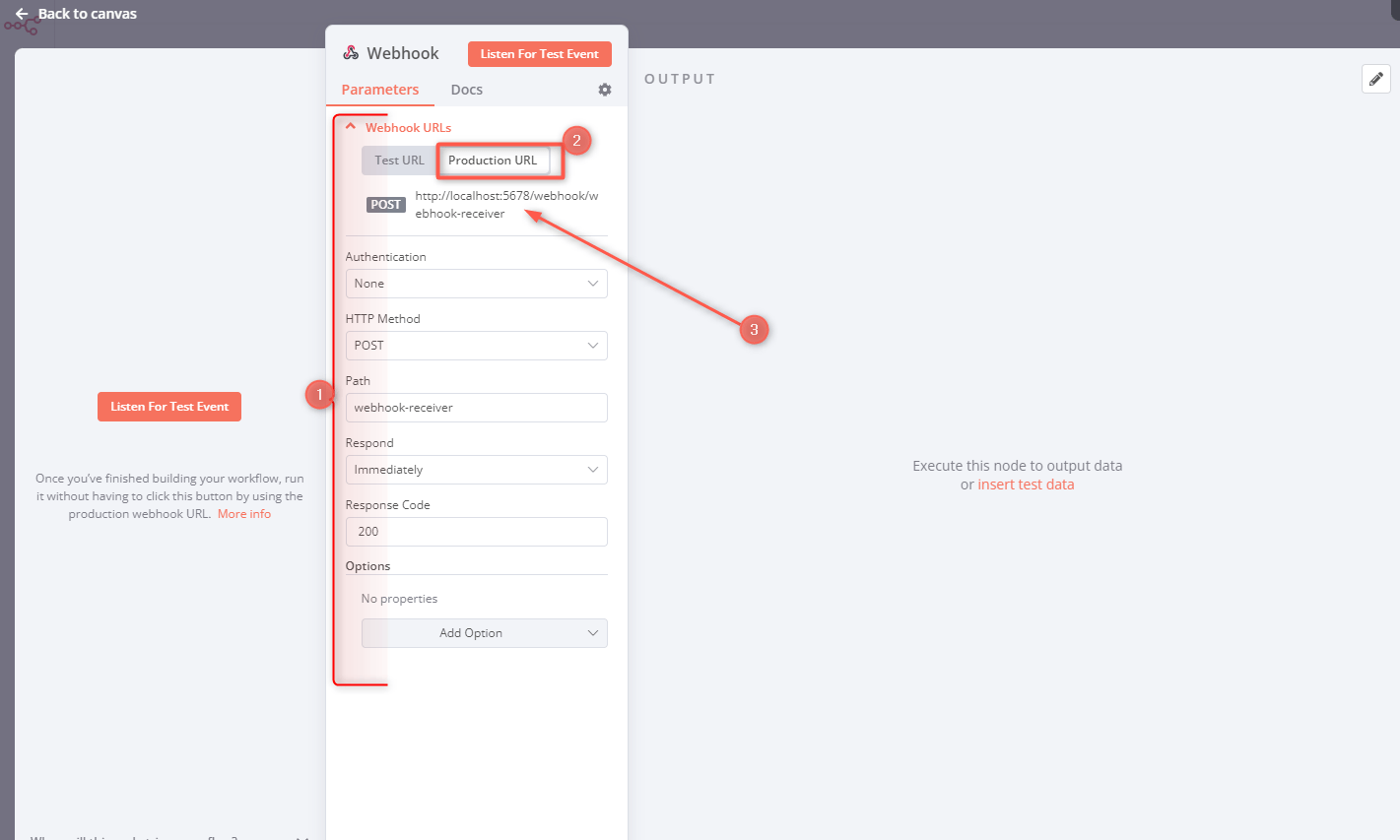
Step 1: Create Your n8n Webhook Workflow
- Log in to your n8n instance (self-hosted or n8n Cloud).
- Create a new workflow or open an existing one.
- Add a Webhook node as the trigger.
- Copy the Production URL from the Webhook node settings. This is the URL you'll configure in Hookdeck.
Step 2: Create a Hookdeck Connection
- Sign up or log in at hookdeck.com.
- Go to the Connections section and click + Create Connection.

- Configure the connection:
- Source: Give it a descriptive name (e.g., "Stripe", "GitHub", "Shopify")
- Destination: Paste your n8n Webhook Production URL
- Save the connection. Hookdeck will generate a unique Source URL.
Step 3: Configure Rate Limiting
This is the critical step that prevents server overload:
- In your Hookdeck connection settings, find the Rate Limiting option.
- Enable delivery rate limiting and set a value appropriate for your n8n instance. Start conservative (e.g., 5-10 requests per second) and increase based on your server's capacity.
- Configure automatic retries. The default settings work well for most use cases.
Step 4: Update Your Webhook Providers
- Copy the Hookdeck Source URL generated in Step 2.
- Go to your webhook provider's settings (Stripe Dashboard, GitHub repository settings, Shopify admin, etc.).
- Replace your n8n webhook URL with the Hookdeck Source URL.
That's it! Hookdeck now receives all webhooks first, queues them, and delivers them to n8n at a controlled rate.
Monitoring and Debugging
Hookdeck provides powerful tools for monitoring your webhook traffic:
- Events Dashboard: View all incoming webhook events in real-time, filter by connection, and see delivery status
- Delivery Attempts: See each attempt to deliver an event, including response codes and timing
- Failed Events: Quickly identify events that couldn't be delivered and understand why
- One-Click Replay: Replay any event for testing or to recover from failures
Benefits of Using Hookdeck with n8n
- Protect your server: Traffic spikes are absorbed by Hookdeck, not your n8n instance
- Never lose events: All webhooks are captured even if n8n is temporarily unavailable
- No workflow changes: Your existing workflows work as-is; just update the webhook URL at the source
- No infrastructure to manage: Hookdeck is fully managed infrastructure, unlike self-hosted RabbitMQ
- Works with any hosting: Whether you're on n8n Cloud or self-hosted, Hookdeck works the same way
- Debugging superpowers: Full visibility into every webhook event and delivery attempt
Conclusion
n8n's parallel webhook processing is great for speed but can lead to server overload during traffic spikes. While n8n offers some concurrency controls and RabbitMQ integration, these solutions require configuration and don't prevent the initial traffic from hitting your server.
By placing Hookdeck in front of n8n, you get a resilient buffer that absorbs traffic spikes, controls delivery rates, retries failures automatically, and ensures no events are lost. The setup takes just a few minutes, requires no workflow changes, and works with both n8n Cloud and self-hosted instances.
Hookdeck's free tier is generous enough for many use cases, making it an easy way to add reliability and protection to your n8n webhook workflows.
Resources
- Hookdeck Documentation
@hookdeck/n8n-nodes-hookdeck: the official Hookdeck community node for n8n (announcement)- n8n RabbitMQ Node Documentation
