 Gareth Wilson
How to Reduce Make.com Credit Usage
Make.com's power lies in its flexibility. You can build automations that would otherwise require custom development, connect tools that don't natively integrate, and create workflows that run 24/7 without intervention. That capability comes with a natural trade-off: the more you use Make.com's potential, the more credits you consume. This guide is for teams who've discovered just how much Make.com can do, and now want to do it more efficiently.
Understanding Make.com's Credit System
How Credits Work
Credits are the currency you buy and consume to use Make.com. Only features triggered by scenario runs (apps, modules, and some in-app features) or AI agent chats use credits.
- Standard modules: 1 operation = 1 credit
- AI modules using Make's provider: Dynamic pricing based on token usage
- AI modules with custom provider: Fixed 1 credit per operation
- Webhook triggers: 1 credit per incoming webhook (see how to solve Make.com webhook rate limit errors)
- Watch modules: 1 credit per check (even when no data is found)
Cost Multipliers
Credit consumption may exceed module count, depending on:
- Iterators, routers, and aggregators that multiply processed bundles
- Data volume—modules processing large datasets consume more
- AI module usage with Make's built-in AI provider
Credit Optimization Strategies
If you're looking to reduce or make better use of your Make.com credits, consider the following strategies:
Filter Early and Filter Often
Add filters as close to your triggers as possible to prevent unnecessary downstream processing. Every module that runs on irrelevant data is a wasted credit.
Implementation: Place filter modules immediately after your trigger. If you're watching for new records but only need to process those matching specific criteria, filter before any data transformation or API calls occur.
Batch Operations Instead of Item-by-Item Processing
Iterators, paginated APIs, and line-item loops can use up multiple credits since each individual item processed counts as a separate operation.
Solutions:
- Use Text Aggregator to compile responses, then update in bulk
- Process rows in groups instead of individually
- Pre-process data before it hits Make.com
- Use array functions to manipulate multiple items at once
Optimize Scheduling and Triggers
Watch modules run on a schedule (default: every 15 minutes) and consume credits even when no new data is found. So this could mean 96 operations being used per day just from the trigger module.
Solutions:
- Switch to webhook triggers when possible—they only fire when data arrives
- Increase polling intervals if real-time updates aren't required
- Consolidate multiple watch scenarios into fewer, more efficient ones
Use Data Stores for Caching
Calling external APIs repeatedly for the same data wastes credits. Make.com's Data Stores provide faster read/write speeds than external services like Google Sheets.
Implementation: Cache common API responses in Make's Data Store instead of calling the endpoint every run. This is particularly effective for stable metadata that doesn't change frequently.
Reduce Module Count and Streamline Workflows
Each module execution is a credit. Review your scenarios for:
- Redundant modules that can be combined
- Unnecessary data transformations
- Modules that run but produce no meaningful output
- Legacy branches that are no longer needed
Optimize AI Module Usage
AI modules can increase credit consumption when using Make's built-in AI provider due to dynamic token-based pricing. Depending on your use case, it may be cheaper to call your AI provider directly.
Implementation: Call your AI provider directly via HTTP/API modules (OpenAI, Anthropic, etc.). You'll pay 1 credit per operation in Make.com, but will still need to handle AI costs separately with your provider at their rates.
Use Hookdeck to Reduce Webhook-triggered Scenario Costs
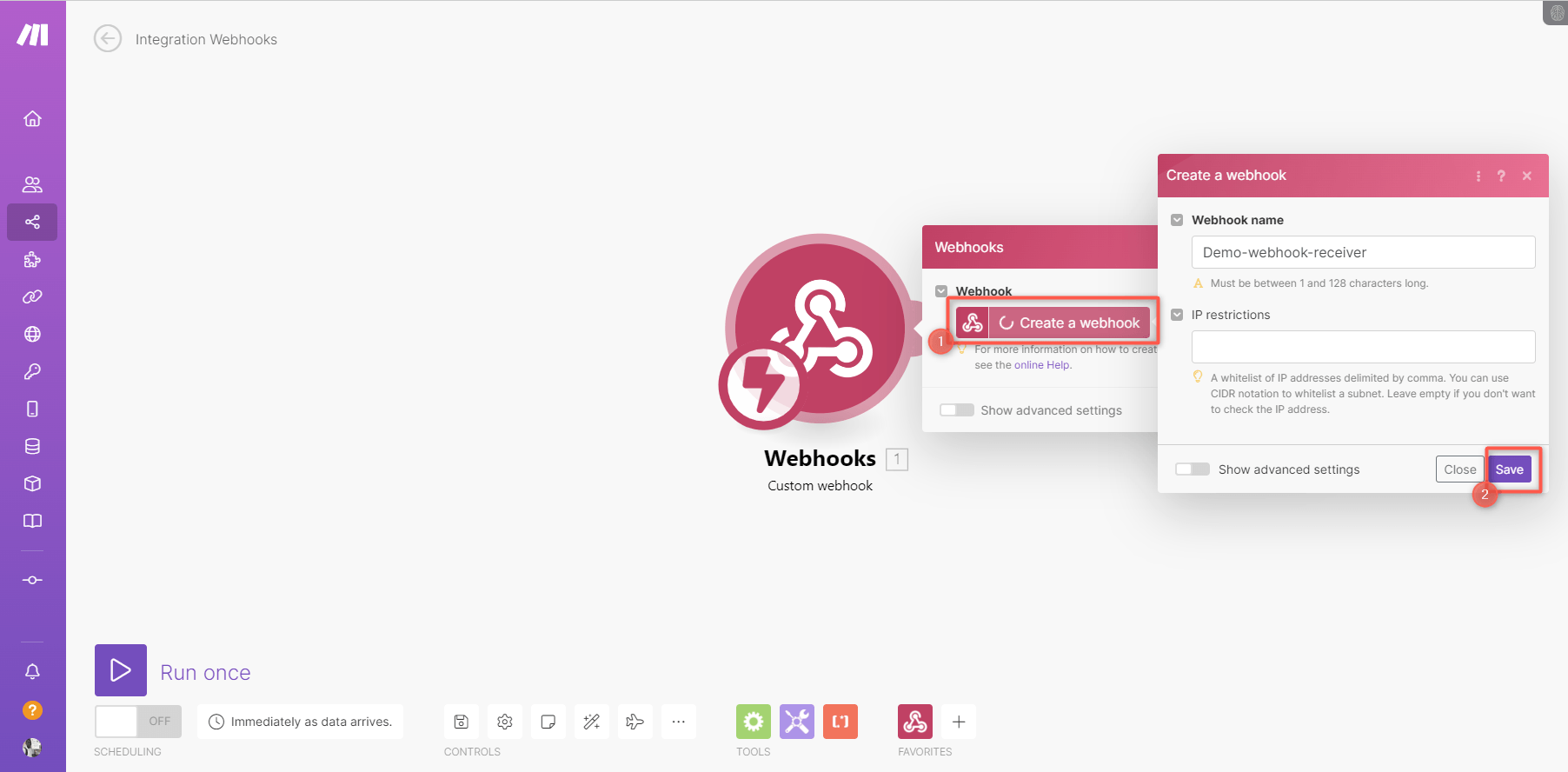
Webhooks can be a significant source of credit consumption in Make.com scenarios. Every webhook that triggers a Make.com scenario costs at least 1 credit, plus all the credits consumed by downstream modules. If you receive high volumes of webhooks but only need to process a subset, you're paying for filtering and routing logic inside Make.com that could be handled more cost-effectively elsewhere.
For example, you can use Hookdeck's Event Gateway between your webhook sources and Make.com. It can filter, transform, and route events before they ever reach your Make.com scenarios, so you only pay Make.com credits for webhooks that actually need processing.
Hookdeck's pricing starts with a free tier for up to 10,000 webhooks/month, and scales to as low as $0.33 per 100,000 events. Compare this to consuming Make.com credits for every incoming webhook—even ones you immediately discard.
Relevant Hookdeck Features:
- Filtering: Block unwanted events using JSON-based rules on headers, body, query, or path
- Transformation: Modify payloads with JavaScript (ES6) before delivery
- Routing: Send events to multiple destinations or route based on content
- Rate Limiting: Smooth out traffic spikes to prevent Make.com 429 errors
- Queueing: Events are stored and released at a pace Make.com can handle
- Automatic Retries: Failed deliveries are retried with configurable linear or exponential backoff
- Manual Replay: Replay failed or missed events on demand from the dashboard
How to Integrate Hookdeck with Make.com

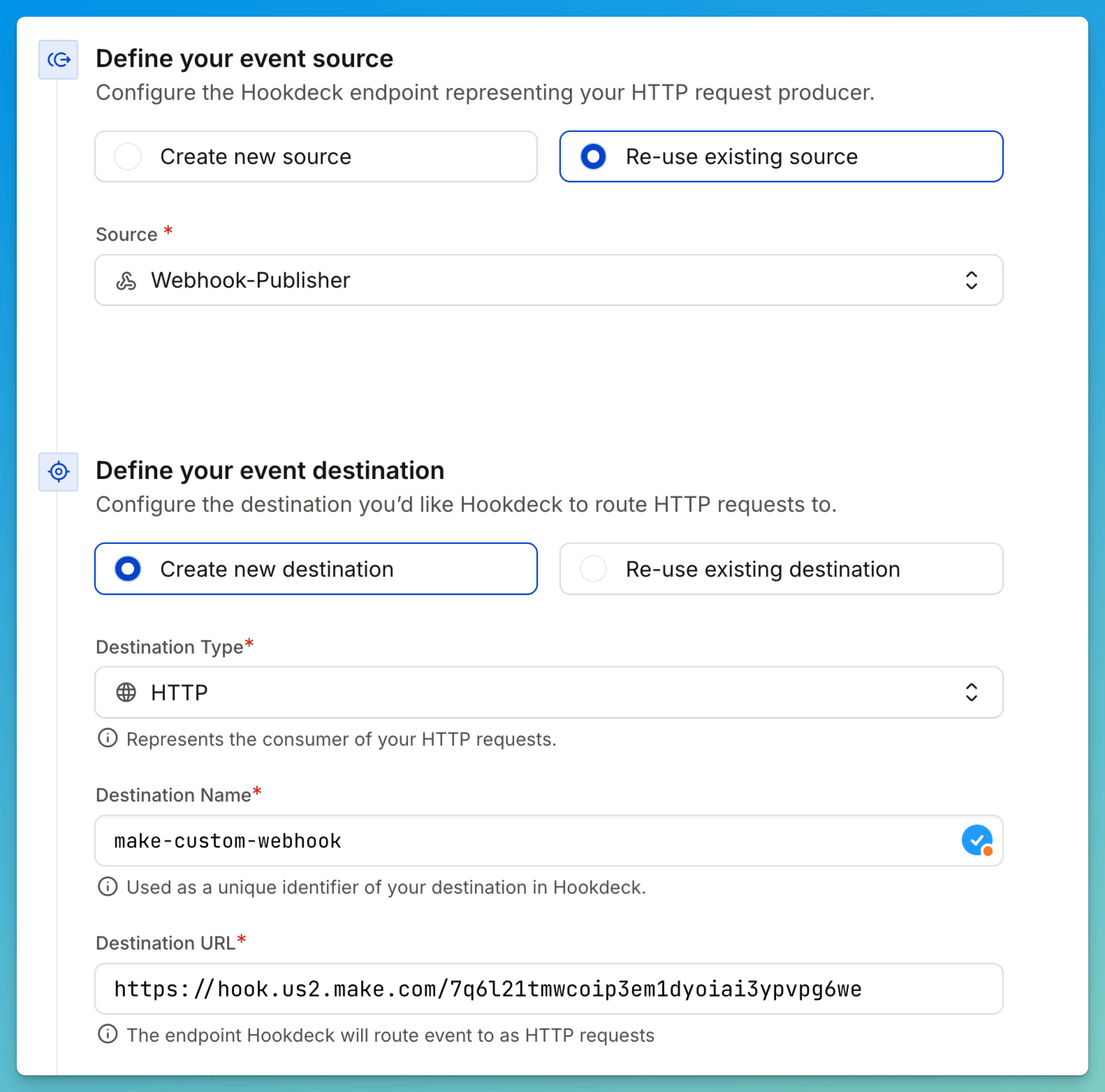
- Create a Hookdeck account and set up a new Connection
- Copy your Make.com webhook URL from the Custom Webhook module
- Set the Make.com URL as your Hookdeck Destination
- Configure filters to only forward relevant events
- Set a Max Delivery Rate (recommended: below 30/second to stay safe)
- Add transformations to reshape data before it reaches Make.com
- Configure retry rules for failed deliveries
- Point your webhook sources to the Hookdeck URL instead of Make.com directly
Monitoring and Maintenance
Track Your Credit Usage
Proactive monitoring prevents billing surprises. Make.com provides several tools, including:
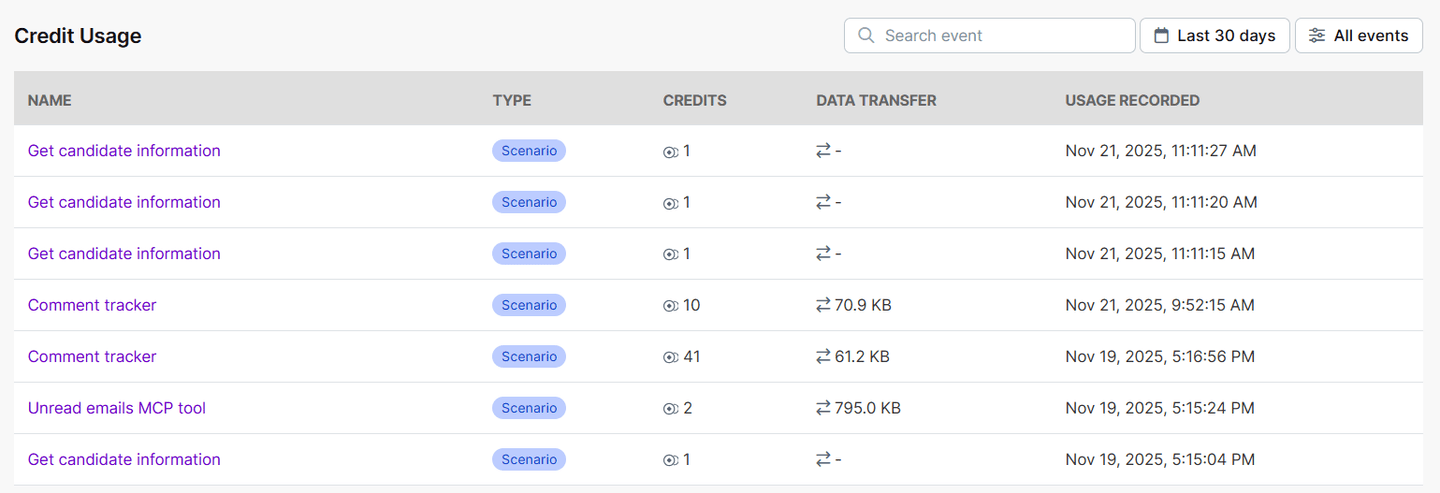
- Credit usage: The credit usage table under My Plan shows all credit consumption. With this table, you get a clear, organization-wide view of your scenario executions and credit consumption across your Make scenarios and features for the last 30 days.
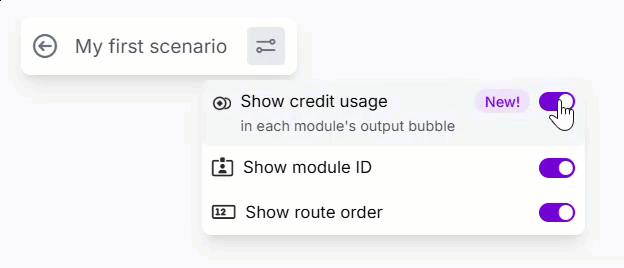
- Scenario builder: Within the scenario builder, you can see credit usage per module and per scenario run. This helps identify which modules are consuming the most credits.
Regular Optimization Reviews
Schedule monthly reviews of your scenarios:
- Identify your top 5 credit-consuming scenarios
- Check for unused modules or obsolete branches
- Review filter effectiveness—are they blocking enough?
- Analyze execution logs for failed runs (they still consume credits)
- Test scenarios with realistic data to measure actual credit impact
Quick Wins Checklist
Implement these changes for immediate credit savings:
| Action | Potential Savings |
|---|---|
| Add filters immediately after triggers | 20-50% per scenario |
| Switch from Watch to Webhook triggers | Up to 96 credits/day per scenario |
| Implement Hookdeck for high-volume webhooks | Up to 80% on webhook costs |
| Batch operations instead of item-by-item | Up to 80% on iterative workflows |
| Use direct API calls for AI instead of Make's provider | Variable (often 50%+) |
| Cache API responses in Data Stores | 10-30% on API-heavy scenarios |
| Remove unused modules and branches | 5-15% overall |
Conclusion
Make.com's credit-based pricing rewards efficient automation design. By implementing the strategies in this article—filtering early, batching operations, using Hookdeck for webhook management, and regularly auditing your scenarios—you can reduce credit consumption while maintaining full functionality.
Start with the quick wins checklist above, then systematically work through your highest-consuming scenarios. The combination of Make.com optimization best practices and external tools like Hookdeck provides a powerful framework for building cost-effective automations at scale.
Resources
Make.com Documentation
Hookdeck Resources
