 Gareth Wilson
Building a Reliable Service for Sending Webhooks
Webhooks are the backbone of modern SaaS integrations, enabling real-time event notifications that keep your customers' systems in sync with yours. Building a webhook system that actually works at scale is surprisingly difficult. A naive implementation that just POSTs webhooks from your main application thread will collapse under load, frustrate customers with unreliable delivery, and create cascading failures across your infrastructure. For teams that don't want to build this from scratch, Hookdeck Outpost handles all of the patterns in this guide (queue-first delivery, multi-tier retries, tenant isolation, HMAC signatures, and OpenTelemetry observability) as a managed service at $10/million events, or self-hosted under Apache 2.0.
This guide covers the architecture patterns, retry strategies, and operational practices you need to build a production-grade outgoing webhook service.
The Core Problem: Webhooks Are Distributed Transactions
When you send a webhook, you're executing a distributed transaction. Your server opens an HTTP connection to your customer's endpoint, their server accepts the message and responds with a 200-level status code, and then you mark the webhook as delivered. Under normal circumstances, this works fine.
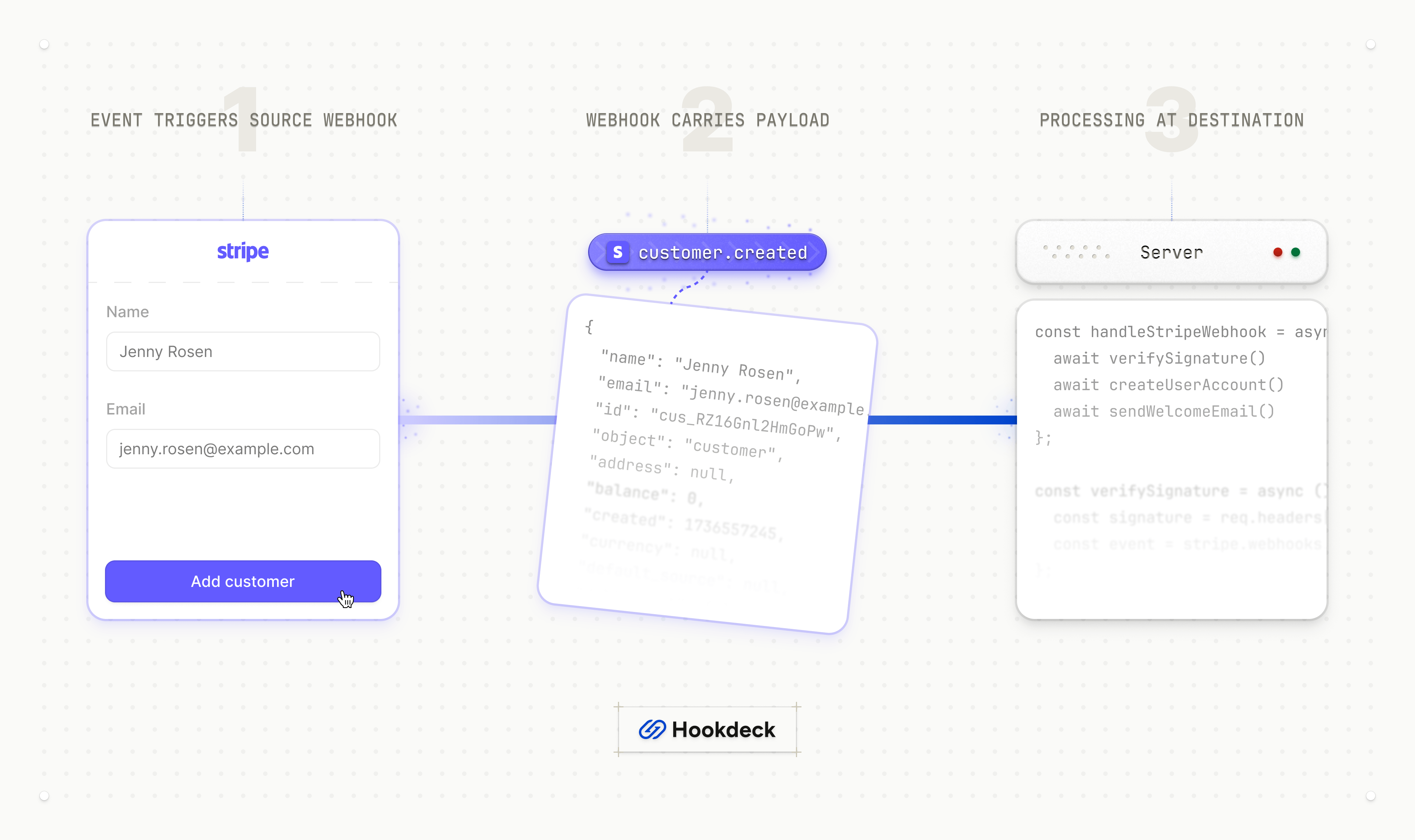
But there are many places this transaction can fail: your server might crash after sending but before recording success, the network might drop the connection, the customer's server might accept the request but crash before responding, or the response might get lost. Any of these failures leaves your system in an inconsistent state: did the webhook get delivered or not?
This is why exactly-once delivery is a myth. Platforms like Stripe, Kafka, and AWS don't implement exactly-once delivery by default. Instead, the industry standard is at-least-once delivery combined with idempotent processing on the receiving end.
Architecture: Queue-First Design
There are many considerations that go into webhook infrastructure requirements and architecture. Perhaps the most important decision you can make, though, is to decouple webhook generation from webhook delivery using a durable queue or message stream.
Why Queue-First Wins
When your application generates an event, it should write that event to a message queue and return immediately. A separate pool of delivery workers pulls events from the queue and handles the actual HTTP delivery. This provides several critical benefits:
Backpressure protection: If customer endpoints slow down or fail, your event producers continue operating normally. The queue absorbs the backlog.
Burst handling: During traffic spikes (think Black Friday), your queue buffers events while workers drain them at a sustainable rate. If your platform generates 250 events per second during peak but workers can only reliably deliver 50 per second, the queue absorbs the difference while workers maintain consistent throughput.
Replayability: Failed deliveries should be retried, you may even want to enable replay of historical events for debugging or customer requests.
Independent scaling: Your webhook delivery workers scale independently from your main application.
Basic Queue Architecture
┌─────────────┐     ┌─────────────┐     ┌─────────────────┐
│  Your App   │────▶│   Queue     │────▶│ Delivery Worker │
│  (Events)   │     │  (Buffer)   │     │    (HTTP)       │
└─────────────┘     └─────────────┘     └─────────────────┘
                           │
                           ▼
                    ┌─────────────┐
                    │  DLQ/Retry  │
                    │   Queue     │
                    └─────────────┘
Your delivery workers should:
- Pull an event from the queue
- Attempt HTTP delivery
- On success: acknowledge the message (remove from queue)
- On failure: route to retry queue or dead-letter queue based on failure type
Critical: Only acknowledge a message after you've successfully persisted the delivery result. This ensures you don't lose events if a worker crashes mid-processing.
Retry Strategy: The Multi-Stage Lifecycle
A good retry strategy handles the reality that failures come at different times. While some resolve in milliseconds, others take days.
The Three-Tier Retry Model
Tier 1: Immediate retries for transient network failures (connection reset, DNS resolution issues). Retry 2-3 times with minimal delay (100-500ms). These catch the majority of temporary blips.
Tier 2: Short-term retries with exponential backoff. If immediate retries fail, schedule retries at increasing intervals: 1 minute, 5 minutes, 15 minutes, 1 hour, 4 hours. This handles temporary outages like deployment-related downtime.
Tier 3: Long-term retry queue for events that need hours or days to resolve. Some customer endpoints have extended maintenance windows. Keep retrying with longer intervals (6 hours, 12 hours, 24 hours) up to a maximum retry period (commonly 3-7 days).
Dead-letter queue (DLQ): After exhausting all retry attempts, move the event to a DLQ. This prevents infinite retry loops while preserving the event for manual investigation or eventual customer recovery.
Exponential Backoff with Jitter
Plain exponential backoff creates a "thundering herd" problem: if many webhooks fail simultaneously (common during an outage), they'll all retry at the same intervals, creating synchronized traffic spikes that can overwhelm a recovering endpoint.
The solution is adding jitter, randomness to your retry intervals. Instead of retrying at exactly 60 seconds, retry at 60 ± 15 seconds (random). This spreads retry traffic more evenly.
Jitter alone can reduce synchronized retry spikes by over 80% in production systems.
Categorizing Failures
Not all failures deserve retries. Categorize them appropriately:
Retriable (5xx errors, timeouts, connection errors): The endpoint had a temporary problem. Retry with backoff.
Permanent (4xx errors, except 429): The request is malformed or the endpoint rejected it. Examples: 400 Bad Request, 401 Unauthorized, 404 Not Found. Move directly to DLQ. Retrying won't help.
Rate-limited (429 Too Many Requests): Respect the Retry-After header if provided. Otherwise, back off aggressively.
Delivery Guarantees and Idempotency
Since you're providing at-least-once delivery, your customers will occasionally receive the same webhook multiple times. This is unavoidable, but you can make it manageable.
Provide Unique Event IDs
Every webhook payload should include a unique, stable identifier e.g. "event_. This event_id must be:
- Unique: No two events should share the same ID
- Stable: Retries of the same event must use the same ID
- Deterministic: Ideally derived from the event content so that identical events produce identical IDs
Customers use this ID as their idempotency key. They store processed event IDs and skip duplicates.
Timestamp-Based Ordering
If your events can arrive out of order (common with retries), include timestamps that let customers determine freshness. Customers can use occurred_at for conflict resolution: if they receive an older event after a newer one, they can discard it.
Tenant Isolation: Don't Punish Everyone for One Bad Endpoint
In a multi-tenant SaaS, one customer's slow or broken endpoint should never impact others. This is the isolation pattern, and it's essential for reliability.
Per-Tenant Queuing
Instead of a single delivery queue, partition by tenant:
tenant_a_queue ───▶ worker_pool
tenant_b_queue ───▶ worker_pool
tenant_c_queue ───▶ worker_pool
When one tenant's endpoint slows down, only their queue backs up. Other tenants continue receiving webhooks at normal speed.
Per-Tenant Circuit Breakers
A circuit breaker prevents cascading failures by temporarily stopping requests to a failing endpoint. Implement circuit breakers per tenant endpoint, not globally.
Circuit breaker states:
- Closed: Normal operation. Requests flow through.
- Open: Endpoint is failing. Requests are rejected immediately without attempting delivery. Events route to a retry queue.
- Half-open: After a cooldown period, allow a single test request. If it succeeds, close the circuit. If it fails, reopen.
Your trigger conditions could be, for example:
- Open the circuit if 5 of the last 10 requests failed
- Or if the 95th percentile latency exceeds 5 seconds
- Stay open for 30 seconds before half-opening
This protects your delivery workers from getting stuck on slow endpoints and ensures resources are available for healthy tenants.
Per-Tenant Rate Limiting
Enforce limits on how many events you'll deliver to each tenant per time window. This:
- Protects customer endpoints from being overwhelmed
- Ensures fair resource allocation across tenants
- Provides predictable behavior during traffic spikes
Security
Webhooks were not built to be secure out-of-the-box, and the entire security burden falls on the developer. Your solution should mitigate the common security vulnerabilities of webhooks.
Signing Your Webhooks
Customers need to verify that webhooks actually came from you and haven't been tampered with. HMAC-SHA256 signatures are the industry standard, used by Stripe, GitHub, Slack, Shopify, and most major platforms.
How HMAC Signing Works
- Generate a unique secret key per customer endpoint
- When sending a webhook, compute
HMAC-SHA256(secret_key, raw_ request_ body) - Include the signature in a header (e.g.,
X-Webhook-Signature) - Customers recompute the signature and compare
Security Best Practices
Use timing-safe comparison: Regular string comparison (==) leaks timing information that attackers can exploit. Always use hmac.compare_digest() or equivalent.
Sign the raw body: Parsing JSON and re-serializing changes whitespace and key ordering, breaking signature verification. Always sign and verify against the raw bytes.
Include timestamps for replay protection: Add a timestamp to your signature calculation e.g. signature = HMAC-SHA256(secret, timestamp + "." + body)
Include the timestamp in a header (e.g., X-Webhook-Timestamp). Customers should reject requests where the timestamp is more than a few minutes old.
Unique keys per endpoint: If a customer has multiple webhook endpoints, each should have its own secret key. This limits blast radius if a key is compromised.
Support key rotation: Provide an API for customers to rotate their webhook secret. During rotation, accept signatures from both old and new keys for a brief window.
Scaling for Traffic Spikes
Production webhook systems need to handle 10x normal traffic without breaking a sweat.
Horizontal Scaling
Your delivery workers should scale horizontally. Run multiple instances that pull from the same queue (using consumer groups or competing consumers). Add more workers during high-traffic periods.
If using Kubernetes, configure Horizontal Pod Autoscaler based on queue depth.
Connection Pooling
Avoid creating a new HTTP connection for every webhook. Use connection pooling with keep-alive. This dramatically reduces latency and resource usage.
Set reasonable timeouts:
- Connection timeout: 5 seconds
- Request timeout: 30 seconds (some endpoints are slow)
- Total timeout: 60 seconds (including retries within a single attempt)
Backpressure Mechanisms
When your system is overwhelmed, gracefully degrade rather than crash:
- Shed load at ingestion: If the queue depth exceeds a threshold, delay accepting new events or return backpressure signals to producers
- Limit concurrency per endpoint: Cap how many simultaneous requests you'll make to any single endpoint (e.g., 10 concurrent)
- Slow down retries: During high load, increase retry delays to reduce queue churn
Observability: You Can't Fix What You Can't See
Webhook delivery is notoriously difficult to debug. In order to minimise operational overhead and support requests, you'll want to invest heavily in monitoring and logging - recording every delivery attempt with enough context to debug issues.
Key Metrics
Track these metrics, broken down by tenant/endpoint:
- Delivery success rate: Percentage of webhooks delivered successfully on first attempt
- Retry rate: How many webhooks require retries
- DLQ rate: Webhooks that exhaust all retries (target: <0.5%)
- Delivery latency: Time from event creation to successful delivery (p50, p95, p99)
- Queue depth: Number of pending webhooks (alert if growing unboundedly)
- Endpoint latency: Response time of customer endpoints (helps identify problematic endpoints)
Customer-Facing Dashboard
Provide customers with visibility into their webhook delivery:
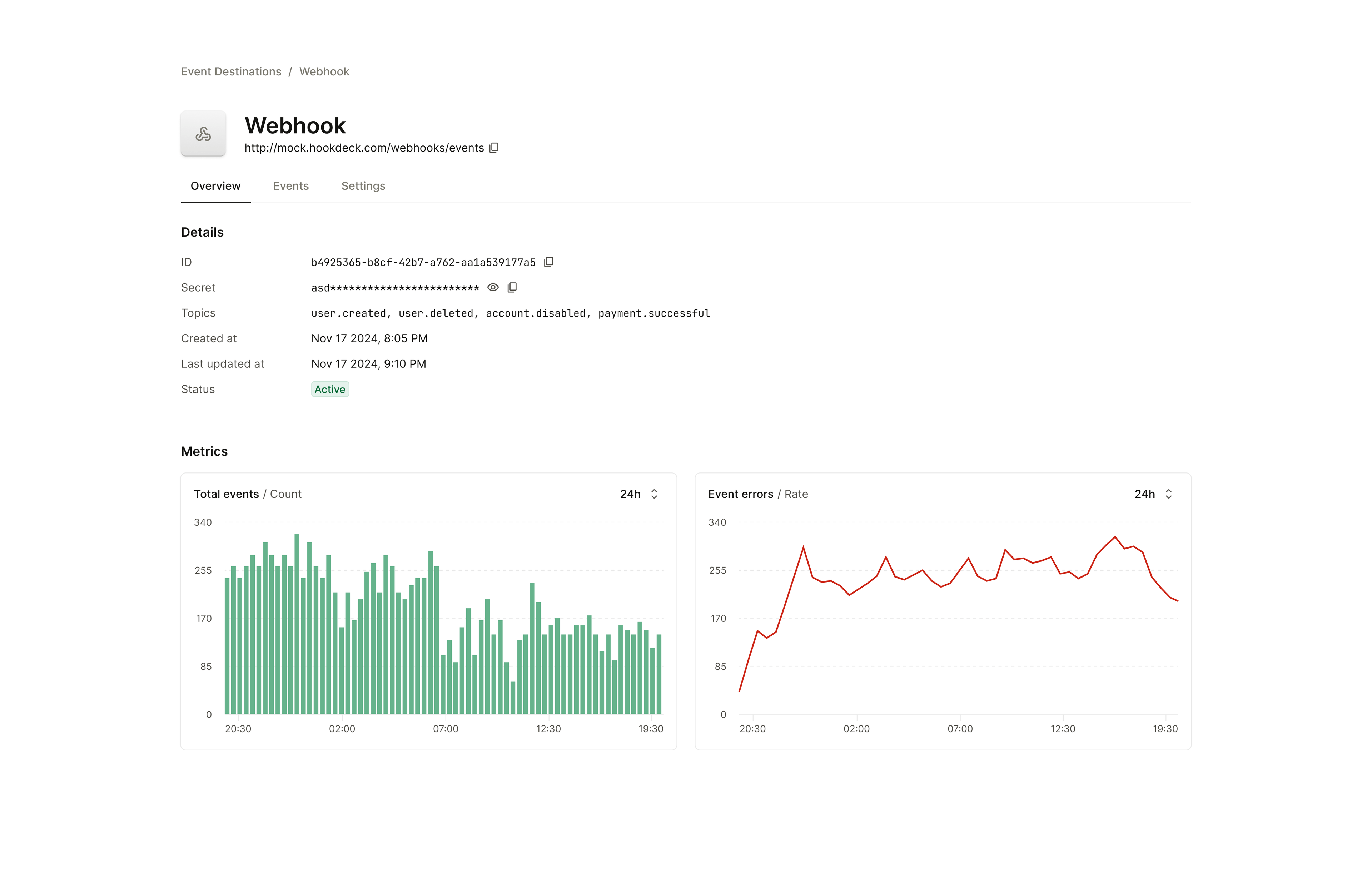
- Recent delivery attempts (successful and failed)
- Failure reasons and status codes
- Retry status for pending events
- Manual retry capability for failed events
- Endpoint health status (circuit breaker state)
This reduces support burden and helps customers debug their own endpoint issues.
Putting It All Together
Building a reliable outbound webhook service requires attention to several interconnected concerns:
- Queue-first architecture decouples event production from delivery, providing durability and scalability
- Multi-tier retry strategy with exponential backoff and jitter handles transient and extended failures gracefully
- At-least-once delivery with unique event IDs enables idempotent processing by customers
- Tenant isolation through per-tenant queues, circuit breakers, and rate limits prevents noisy neighbor problems
- HMAC signatures with timestamp verification provide authentication and integrity
- Horizontal scaling with connection pooling and backpressure handles traffic spikes
- Comprehensive observability enables debugging and proactive issue detection
The upfront investment in these patterns pays dividends in customer trust, reduced support load, and the ability to sleep soundly during traffic spikes.
Alternative: Use Existing Webhook Infrastructure
Building all of this from scratch is a significant engineering investment. If your team would rather focus on your core product, consider using purpose-built webhook infrastructure instead.
Outpost by Hookdeck is an open-source (Apache 2.0) solution designed specifically for outbound webhooks. It handles the hard parts covered in this guide (like queuing, retries with backoff, HMAC signatures, multi-tenant isolation, and observability) out of the box. Written in Go and optimized for high-throughput operation, it runs on PostgreSQL, Redis, and your choice of message queue (Kafka, RabbitMQ, SQS, and others).
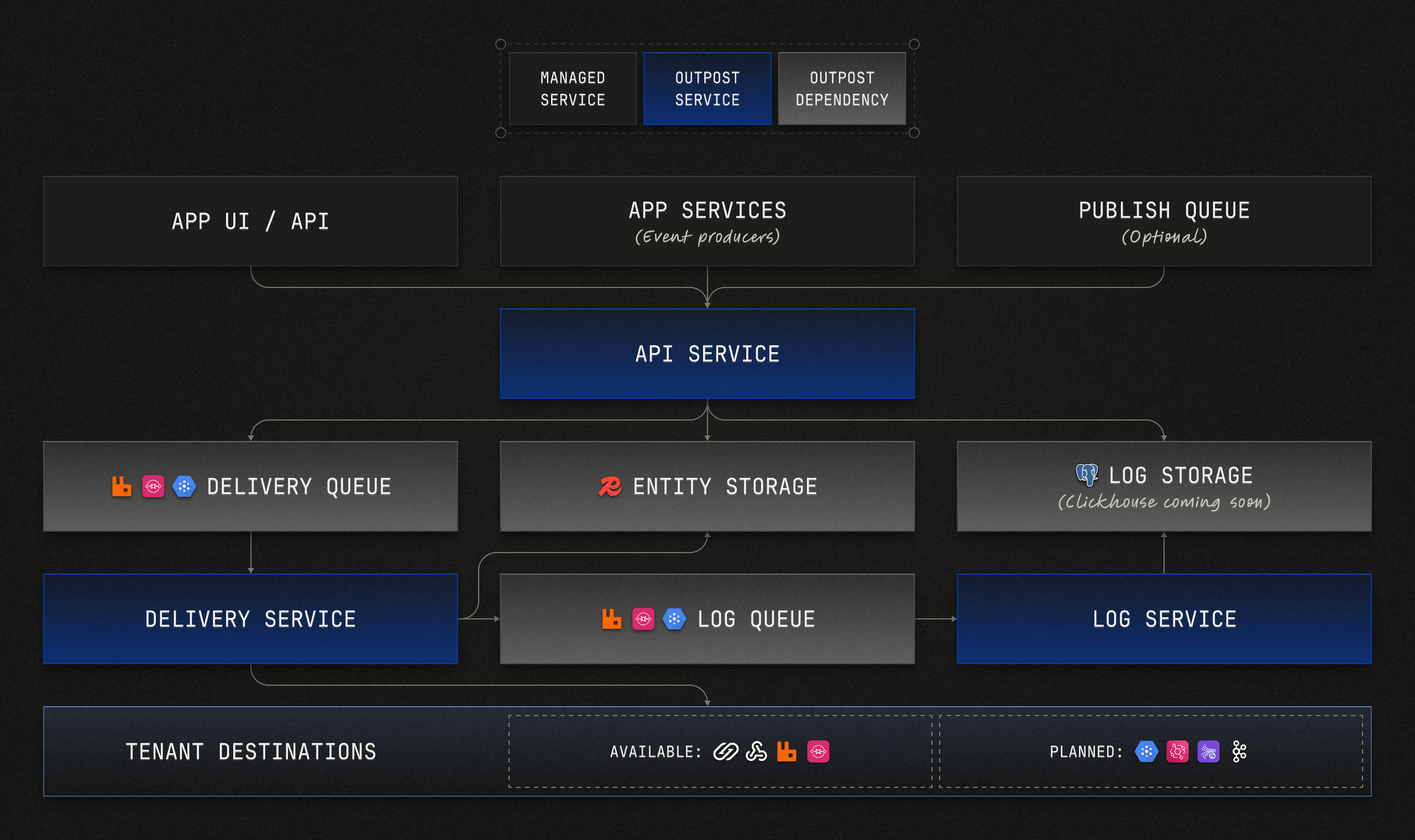
Key features:
- Topic-based pub/sub with multi-tenant support
- Built-in webhook best practices: idempotency headers, timestamps, signatures, and key rotation
- Multiple destination types: Beyond webhooks, it supports Amazon EventBridge, AWS SQS, GCP Pub/Sub, RabbitMQ, and Kafka
- Customer portal: A ready-made UI where your customers can view metrics, manage destinations, and debug delivery issues
- OpenTelemetry integration for traces, metrics, and logs
You can self-host Outpost on any cloud provider (AWS, GCP, Azure, Railway, Fly.io, etc.) using Docker or Kubernetes, or use Hookdeck's managed version with affordable, usage-based pricing. The same codebase powers both options—no proprietary fork.
Check out our guide if you're evaluating webhook sending infrastructure.
For a comparison of outbound webhook platforms, see our guides on Svix Dispatch alternatives, Convoy alternatives for sending, and Hook0 alternatives.