 Phil Leggetter
Hookdeck CLI v2: AI agents can query, inspect, and debug webhooks via MCP
The Hookdeck CLI manages resources, inspects deliveries, and runs hookdeck listen for local webhooks. Hookdeck CLI v2 is out — here's what's new and what you need to know.
The CLI ships with a built-in MCP server for agent workflows and adds issue and metrics commands. Everything new in this release lives under the hookdeck gateway namespace — commands scoped to Event Gateway projects. Outpost commands will follow as a separate namespace in the future.
Event Gateway MCP Server (Beta)
The CLI now ships with a built-in MCP server, started via hookdeck gateway mcp. It's the main reason this is a v2 — the CLI is no longer only a tool for human developers, it's also an integration point for AI agents.
Setting up your MCP client
You don't run the MCP server directly — you configure your MCP client to run it. The mcpServers configuration format is standardized across MCP-compatible clients (Claude Desktop, Cursor, and others):
{
  "mcpServers": {
    "hookdeck": {
      "command": "hookdeck",
      "args": ["gateway", "mcp"]
    }
  }
}
Add this to your client's MCP config file and it will start hookdeck gateway mcp as a subprocess over stdio JSON-RPC when needed. Check your client's documentation for the exact config file location. See the CLI README for full setup details.
If hookdeck isn't in your PATH, replace "hookdeck" in the command field with the full path to the binary. If you're not authenticated, the agent will prompt you with a link to log in.
What the tools cover
Your agent gets 11 tools: projects, connections, sources, destinations, transformations, requests, events, attempts, issues, metrics, and a help catch-all. If you haven't authenticated yet, a login tool appears automatically and removes itself once you're logged in.
The scope is intentional. These are mostly read and inspect tools — the things an agent needs to answer "what's failing and why?" without opening the Dashboard. The connections tool also supports pause and unpause so an agent can act on what it finds during investigation. Full write operations (creating or updating connections, sources, destinations) are handled by the CLI. If an agent needs to make a configuration change, the help tool redirects it to the CLI.
An example of what this looks like in practice
Say your Shopify order webhooks start failing. An agent connected to the MCP can pull overall metrics to spot an elevated failure rate, list failed events to narrow the problem to a specific connection (shopify-orders to fulfillment-service), scope metrics to that connection to confirm it's ongoing, then inspect a failed event and its delivery attempts to find the root cause. In this case: the connection is forwarding all Shopify order topics, but the fulfillment service only handles orders/paid and is returning 422s on everything else. The fix is a filter rule on the connection — a CLI operation, so the agent hands off from MCP to CLI.
That's a full root-cause investigation using 5 tools across 8 calls — metrics, events, connections, attempts, and the destination response — no Dashboard, no manual digging.
See it in Claude Desktop
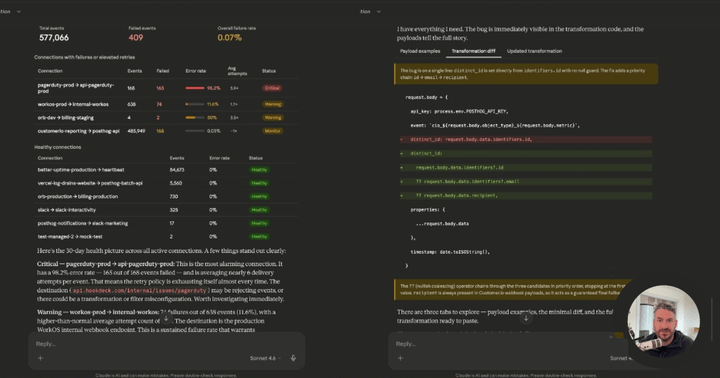
The recording below is the same kind of workflow on a real project: the Hookdeck MCP in Claude Desktop, metrics to spot failure clusters, then event and attempt details to pin down a root cause (HTTP 400 from the destination) and a recommended fix — filter or transform before delivery.
New: hookdeck gateway issue
Issues are Hookdeck's alerting layer — they surface when something is systematically wrong across your pipeline. Three types: delivery (repeated delivery failures), transformation (transformation errors), and backpressure (destination can't keep up). Previously you'd manage these in the Dashboard. Now:
# List open issues
hookdeck gateway issue list

# Get a specific issue
hookdeck gateway issue get <id>

# Count issues by status
hookdeck gateway issue count

# Update issue status
hookdeck gateway issue update <id> --status RESOLVED

# Dismiss
hookdeck gateway issue dismiss <id>
Combined with issue triggers, this gives you CLI-level access to Hookdeck's monitoring and alerting.
New: hookdeck gateway metrics
v2 adds metrics subcommands aligned to the resources they measure:
hookdeck gateway metrics events --start <ISO8601> --end <ISO8601> --measures count,failed_count
hookdeck gateway metrics requests --start <ISO8601> --end <ISO8601> --measures count
hookdeck gateway metrics attempts --start <ISO8601> --end <ISO8601> --measures count,successful_count
hookdeck gateway metrics transformations --start <ISO8601> --end <ISO8601> --measures count
--start, --end, and --measures are required. Available measures include count, successful_count, failed_count, and error_count. Optional --dimensions let you group results — useful for breaking down metrics by source, destination, or connection.
Events metrics give you throughput, attempts metrics give you delivery health, transformations metrics give you execution data. These are the same metrics the MCP server exposes to agents for the investigation workflows described above.
Breaking change: --config renamed to --hookdeck-config
The global --config flag conflicted with source and destination subcommands that use --config to pass JSON configuration objects. We renamed the global flag to disambiguate.
Before:
hookdeck --config /path/to/config.toml login
After:
hookdeck --hookdeck-config /path/to/config.toml login
If you don't use a custom config file path, nothing changes. If you do — in scripts, CI, or aliases — update the flag name.
New: --local flag for authentication
hookdeck login --local and hookdeck ci --local now save credentials to .hookdeck/config.toml in the current working directory instead of the global config location. Useful for project-scoped credentials in CI setups. Cannot be combined with --hookdeck-config.
Telemetry (opt-out available)
v2 adds usage telemetry so we can understand how the CLI is actually used. No event data, no request payloads — just command usage patterns.
To opt out:
hookdeck telemetry disabled
Or set the environment variable:
HOOKDECK_CLI_TELEMETRY_DISABLED=1
Upgrading
# npm
npm install -g hookdeck-cli@latest

# Homebrew
brew upgrade hookdeck

# Or download directly from the GitHub releases page
# https://github.com/hookdeck/hookdeck-cli/releases
Check your version:
hookdeck version
If you use --config in any scripts or CI configs, update it to --hookdeck-config. That's the only migration required.
See the full release notes on GitHub.
What's next
The MCP server is the foundation for a broader investigation and operations layer for Event Gateway. As we see how agents use it in practice, we'll refine the tool surface — improving error handling, expanding the investigation patterns, and adding write operations where they make sense.
If you hit issues or have feedback on the MCP server specifically, open an issue on GitHub or join us in the Hookdeck community Slack.