Outpost Deployment
Outpost Distribution
Outpost is distributed as a binary and as a Docker image.
The binaries are available via GitHub releases.
The Docker image can be found on Docker Hub.
The Outpost repository provides an example helm chart for deployment via Kubernetes.
Outpost Services
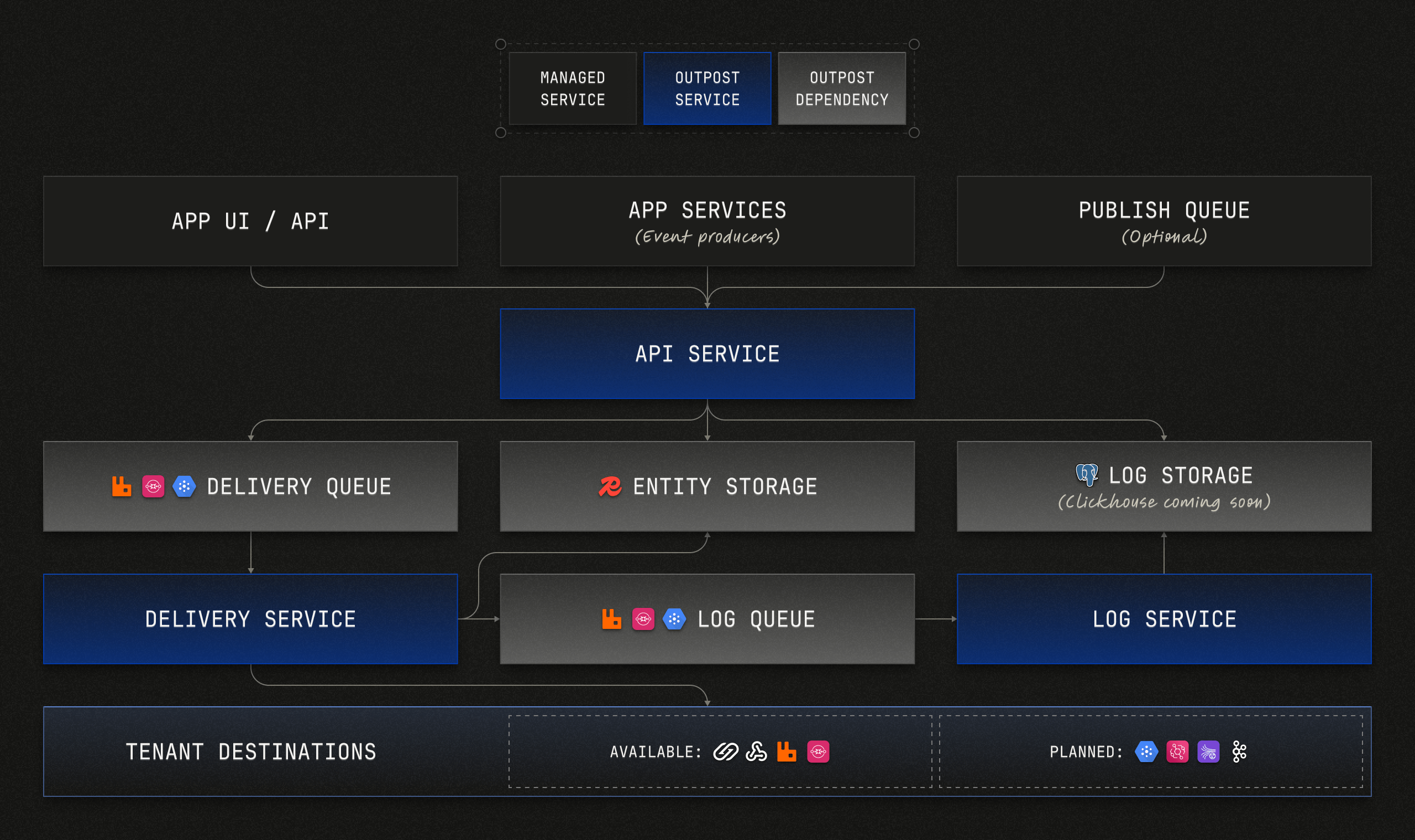
The outpost executable has three entry points:
deliveryapilog
Services and other configuration options are set via a YAML file. See the example Outpost configuration file.
You can omit the service entry point to start all 3 services within the same process. However, this is not recommended.
Service Resource Allocation
Since each service has different usage and performance profiles, it's recommended that each service be operated and scaled independently.
:::info
Once we have completed initial benchmarking, we'll provide guidance on resource allocation based on expected usage and load.
:::
Dependencies
Outpost requires the following dependencies:
- Redis
- PostgreSQL or ClickHouse
- One of the following message queue systems (for the queues listed below): RabbitMQ, AWS SQS, Azure Service Bus, GCP Pub/Sub, or NATS JetStream
- Log queue
- Delivery queue
- Publish queue (optional)
Each of these will need to be provisioned and allocated sufficient resources based on expected usage and load.
Outbound Network Access
Tenants choose where their destinations point, and Outpost stores the response to each webhook delivery. If your tenants are outside your organization, this exposes you to server-side request forgery (SSRF): a tenant could point a destination at an internal service, such as your cloud provider's metadata endpoint, and read the response in its delivery logs. If only your own team creates destinations, you can skip this section.
When tenants are outside your organization, we recommend both of the following.
Restrict outbound traffic
Limit where Outpost can connect at the network level: allow the public internet and Outpost's own dependencies (Redis, the database and the message queues), and deny private ranges (10.0.0.0/8, 172.16.0.0/12, 192.168.0.0/16, fc00::/7) and link-local ranges (169.254.0.0/16, which includes the cloud metadata endpoint, and fe80::/10). On Kubernetes, use a NetworkPolicy on the Outpost pods; elsewhere, use your cloud provider's firewall or security groups. This covers every destination type.
Network rules don't apply to connections to the same machine or pod (localhost), so also enable the setting below.
Block private addresses in Outpost
Set DESTINATIONS_. Outpost then rejects webhook destination URLs that point to a private address when they are created or updated, and fails deliveries to a private address with the error code address_not_allowed, including when the host name's DNS changes after the destination was created.
To let tenants reach specific internal services, list their IPs or ranges in DESTINATIONS_. See Configuration for both settings.
MCP Events subscriptions always apply this check, whatever the setting.
AWS and GCP Pub/Sub destinations can't point at a custom endpoint unless you set DESTINATIONS_; keep it off when tenants are outside your organization.