 Gareth Wilson
Guide to Bitbucket Webhooks: Features and Best Practices
Bitbucket is one of the most popular Git repository management solutions, offering both cloud-hosted and self-managed options through Bitbucket Cloud and Bitbucket Data Center. Its webhook system enables real-time communication between your repositories and external services.
Whether you're building CI/CD pipelines, integrating with project management tools, or creating custom automation workflows, understanding Bitbucket webhooks is essential for modern development teams. This guide covers everything you need to know about Bitbucket webhooks, from core features and configuration to best practices and common limitations. You may also find our articles on how to secure and verify Bitbucket webhooks and how to solve Bitbucket webhook timeout errors helpful.
What are Bitbucket webhooks?
Webhooks in Bitbucket provide a way to configure your repositories to make HTTP POST requests to external URLs whenever specific events occur. Unlike polling-based approaches that repeatedly check for changes, webhooks push notifications in real-time, making them far more efficient for event-driven integrations.
A Bitbucket webhook consists of two primary components:
- Events: The triggers that initiate the webhook (repository push, pull request created, etc.)
- URL: The endpoint where Bitbucket sends the event payload when a matching event occurs
When an event occurs (such as a developer pushing code or opening a pull request) Bitbucket immediately sends a POST request containing detailed information about that event to your configured endpoint.
Bitbucket Cloud vs. Bitbucket Data Center webhooks
Bitbucket exists in two primary forms, each with slightly different webhook capabilities:
| Feature | Bitbucket Cloud | Bitbucket Data Center |
|---|---|---|
| Webhook Scope | Repository-level | Project and repository-level |
| Inheritance | No inheritance | Project webhooks inherited by repositories |
| Authentication | HMAC signature (X-Hub-Signature) | Secret token (HMAC), Basic auth |
| Webhook Limit | 50 per repository | Configurable |
| Request Timeout | 10 seconds | Configurable |
| Circuit Breaking | Limited retry (2 attempts) | Configurable (default: 5 failures triggers skip) |
Bitbucket webhook events
Bitbucket supports a comprehensive set of event types that can trigger webhooks. Understanding these events is crucial for building effective integrations.
Repository events
| Event Key | Description |
|---|---|
repo:push | Triggered when commits are pushed to the repository (default event) |
repo:fork | Triggered when the repository is forked |
repo:imported | Triggered when a repository import completes |
repo:commit_ | Triggered when a comment is added to a commit |
repo:commit_ | Triggered when a build status is created |
repo:commit_ | Triggered when a build status is updated |
Pull request events
| Event Key | Description |
|---|---|
pullrequest:created | A new pull request is created |
pullrequest:updated | A pull request is updated (title, description, reviewers) |
pullrequest:approved | A reviewer approves the pull request |
pullrequest:unapproved | A reviewer removes their approval |
pullrequest:fulfilled | The pull request is merged |
pullrequest:rejected | The pull request is declined |
pullrequest:comment_ | A comment is added to a pull request |
pullrequest:comment_ | A comment on a pull request is edited |
pullrequest:comment_ | A comment is removed from a pull request |
pullrequest:comment_ | A comment thread is marked as resolved |
pullrequest:comment_ | A resolved comment thread is reopened |
pullrequest:changes_ | A reviewer requests changes |
pullrequest:changes_ | A change request is removed |
Issue events (Bitbucket Cloud)
| Event Key | Description |
|---|---|
issue:created | A new issue is created |
issue:updated | An issue is updated |
issue:comment_created | A comment is added to an issue |
Bitbucket Data Center additional events
| Event Key | Description |
|---|---|
repo:refs_changed | Repository references (branches/tags) changed |
pr:merged | Pull request merged |
pr:from_ref_updated | Pull request source branch updated |
project:modified | Project name or settings modified |
mirror:repo_synchronized | Mirror synchronization completed |
Webhook payload structure
All Bitbucket webhook payloads share common entity types with consistent representations:
Common entities
Actor (User): Information about the user who triggered the event
{
  "actor": {
    "display_name": "John Doe",
    "uuid": "{abc123-def456}",
    "account_id": "557058:abc123",
    "type": "user",
    "links": {
      "avatar": { "href": "https://..." }
    }
  }
}
Repository: Details about the affected repository
{
  "repository": {
    "name": "my-project",
    "full_name": "workspace/my-project",
    "uuid": "{repo-uuid}",
    "type": "repository",
    "is_private": true,
    "project": { ... },
    "links": { ... }
  }
}
Example: repo:push payload
{
  "push": {
    "changes": [
      {
        "old": {
          "name": "main",
          "type": "branch",
          "target": {
            "hash": "abc123...",
            "type": "commit"
          }
        },
        "new": {
          "name": "main",
          "type": "branch",
          "target": {
            "hash": "def456...",
            "type": "commit",
            "message": "Fix authentication bug",
            "author": { ... },
            "date": "2025-01-28T10:30:00+00:00"
          }
        },
        "commits": [ ... ]
      }
    ]
  },
  "actor": { ... },
  "repository": { ... }
}
Example: pullrequest:created payload
{
  "pullrequest": {
    "id": 42,
    "title": "Add new feature",
    "description": "This PR adds...",
    "state": "OPEN",
    "author": { ... },
    "source": {
      "branch": { "name": "feature/new-feature" },
      "commit": { "hash": "abc123..." }
    },
    "destination": {
      "branch": { "name": "main" },
      "commit": { "hash": "def456..." }
    },
    "reviewers": [ ... ],
    "created_on": "2025-01-28T10:30:00+00:00",
    "updated_on": "2025-01-28T10:30:00+00:00",
    "links": { ... }
  },
  "actor": { ... },
  "repository": { ... }
}
See Bitbucket webhook payloads in action. Inspect and replay sample Bitbucket webhook payloads in the Hookdeck Console — no account or setup required.
Common use cases
- CI/CD Pipeline Triggers: The most common use case for Bitbucket webhooks is triggering CI/CD pipelines.
- Slack Notification: Send notifications to Slack when pull requests are created or merged.
- Deployment Automation: Trigger deployments when code is merged to specific branches.
Setting up Bitbucket webhooks
Bitbucket Cloud setup
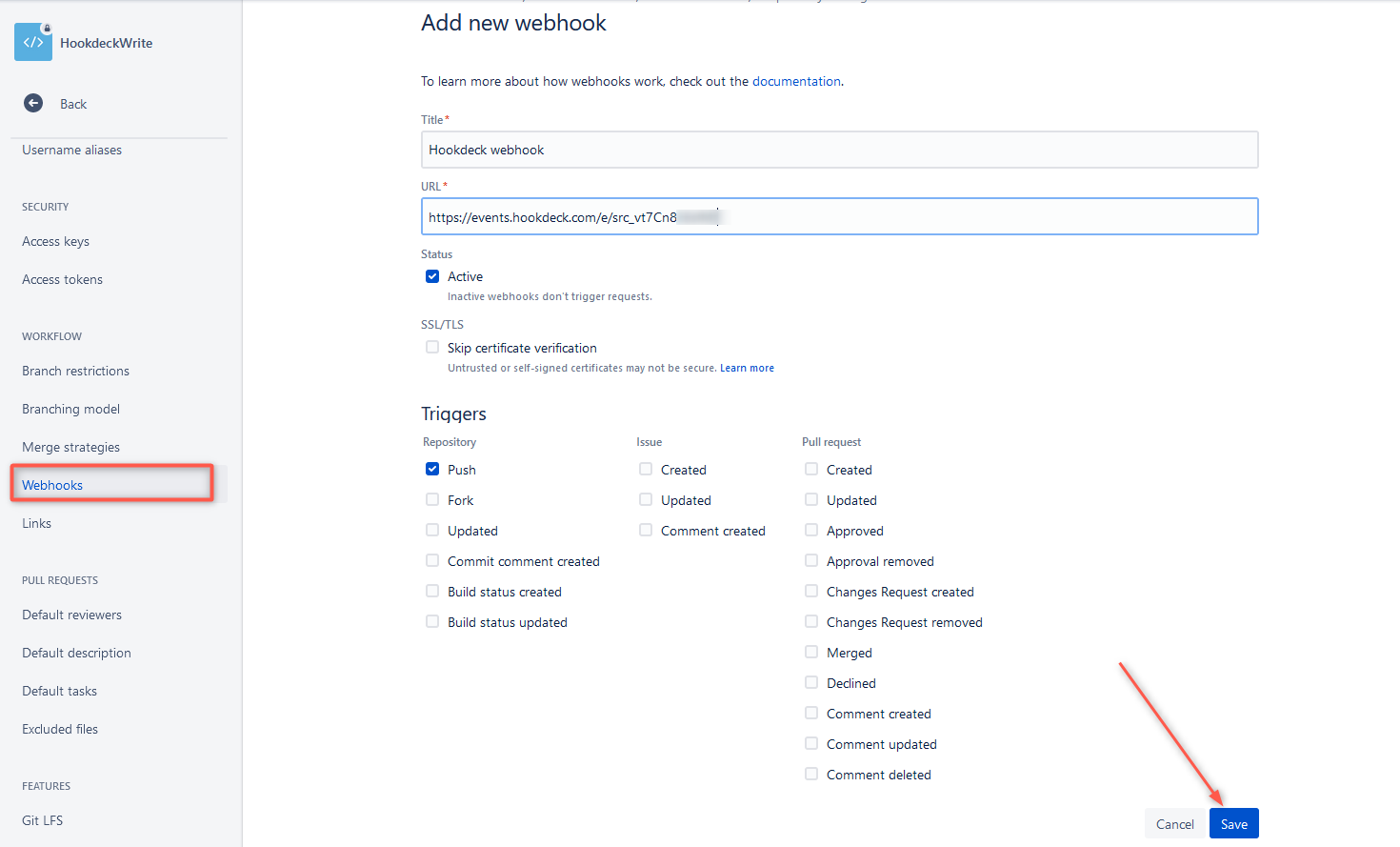
- Navigate to your repository
- Go to Repository settings → Webhooks
- Click Add webhook
- Configure:
- Title: A descriptive name for the webhook
- URL: Your endpoint URL (must be HTTPS for production)
- Triggers: Select specific events or choose "Repository push" (default)
- Secret (optional but recommended): A secret token for HMAC verification
Bitbucket Data Center setup
- Navigate to Project or Repository settings
- Go to Webhooks → Create webhook
- Configure:
- Title: Descriptive name
- URL: Your endpoint URL (supports URL variables)
- Secret: Token for HMAC authentication
- Authentication: Choose between secret token, Basic auth, or other methods
- Events: Select triggers from the available list
Using the REST API
You can also manage webhooks programmatically using the Bitbucket REST API:
# Create a webhook (Bitbucket Cloud)
curl -X POST \
  -H "Authorization: Bearer ${ACCESS_TOKEN}" \
  -H "Content-Type: application/json" \
  -d '{
    "description": "CI/CD Pipeline Trigger",
    "url": "https://your-server.com/webhook",
    "active": true,
    "secret": "your-secret-token",
    "events": ["repo:push", "pullrequest:created", "pullrequest:fulfilled"]
  }' \
  "https://api.bitbucket.org/2.0/repositories/{workspace}/{repo_slug}/hooks"
# List available event types
curl "https://api.bitbucket.org/2.0/hook_events/repository"
Webhook security best practices
Use HMAC signature verification
Always configure a secret token and verify webhook signatures. Bitbucket sends an X-Hub-Signature header with each request containing an HMAC-SHA256 hash of the payload.
Use HTTPS endpoints
Always use HTTPS URLs for webhook endpoints in production. While Bitbucket offers a "Skip certificate verification" option for self-signed certificates, this should only be used in development environments.
Implement idempotency
Webhooks may occasionally be delivered more than once. Design your handlers to be idempotent by tracking processed events.
Respond quickly
Bitbucket has a 10-second timeout for webhook responses. Return a 2XX response immediately and process the webhook asynchronously.
Validate payload content
Beyond signature verification, validate the payload structure and content.
Make Bitbucket webhooks production-ready. Hookdeck Event Gateway handles retries, fan-out, delivery monitoring, and replay so your dev workflows never miss an event.
Debugging and troubleshooting
Viewing webhook request history
Bitbucket Cloud provides a request history feature for debugging:
- Navigate to Repository settings → Webhooks
- Click View requests next to your webhook
- Note: History is only collected for 12 hours after enabling
The request history shows:
- Event type and timestamp
- Request payload and headers
- Response status, headers, and body
- Failed attempts and retry details
Resending webhooks
From the request details page, you can click Resend request to replay a webhook delivery, very useful during development when testing code changes.
Limitations and pain points
Limited retry attempts
Problem: Bitbucket Cloud only retries failed webhooks twice, and there's no exponential backoff between retries. If your endpoint experiences temporary issues, you'll miss events quickly. For more on this challenge, see Webhook Delivery Guarantees.
Why It Happens: Bitbucket prioritizes system stability over delivery guarantees. Excessive retries could overwhelm both Bitbucket's infrastructure and poorly configured endpoints.
Workarounds:
- Implement high availability for your webhook endpoints
- Use a load balancer with health checks
- Monitor your endpoint uptime closely
- Consider implementing your own retry mechanism by storing and reprocessing failed events
How Hookdeck Can Help: Hookdeck provides configurable automatic retries with exponential backoff, allowing up to 50 delivery attempts over a week. Failed events are tracked and can be retried manually or in bulk once issues are resolved.
No manual retry from Bitbucket UI
Problem: When webhooks fail, there's no way to manually trigger a retry from the Bitbucket interface for Cloud users (beyond the "Resend request" option in request history, which requires history to be enabled).
Why It Happens: The request history feature is opt-in and time-limited (12 hours), and bulk retry functionality isn't available natively.
Workarounds:
- Enable request history before debugging sessions
- Store webhook payloads in your own system for replay
- Use the Bitbucket API to query events and manually reconstruct payloads
How Hookdeck Can Help: Hookdeck maintains a complete history of all webhook events. You can browse, search, and retry any event—individually or in bulk—at any time through the dashboard or API.
256KB payload size limit
Problem: Webhook payloads are limited to 256KB. Webhooks may silently fail if the payload exceeds this limit, particularly for push events with large commit messages or many changed files.
Why It Happens: Payload limits prevent excessive resource consumption and protect against potential abuse. Large payloads would increase processing time and storage costs.
Workarounds:
- Keep commit messages concise
- Split large changesets into multiple smaller commits
- Use the webhook as a notification trigger, then fetch full details via the API
- Monitor for silent webhook failures in your logs
How Hookdeck Can Help: While Hookdeck can't increase Bitbucket's payload limit, it provides visibility into all received events, making it easier to identify when payloads are being truncated or failing silently.
10-second response timeout
Problem: Bitbucket expects a response within 10 seconds. Long-running processing causes timeouts, which count as failures and trigger unnecessary retries.
Why It Happens: Timeouts prevent connections from being held open indefinitely, protecting Bitbucket's infrastructure and ensuring timely delivery to other webhooks.
Workarounds:
- Acknowledge webhooks immediately with a 200 response
- Process payloads asynchronously using a message queue (Redis, RabbitMQ, SQS)
- Implement a worker process pattern
How Hookdeck Can Help: Hookdeck acts as a buffer between Bitbucket and your endpoint. It accepts webhooks instantly (satisfying Bitbucket's timeout) and delivers them to your endpoint at a configurable rate, with automatic retries if your endpoint is slow.
Circuit breaking disables webhooks (Data Center)
Problem: In Bitbucket Data Center, webhooks that fail 5 times are marked "unhealthy" and skipped for increasing periods (up to 10 hours). With Cloud's 2-retry limit, endpoints can be effectively disabled after brief outages.
Why It Happens: Circuit breaking protects Bitbucket from wasting resources on consistently failing endpoints and prevents cascading failures.
Workarounds:
- Implement robust monitoring for webhook endpoints
- Set up alerting for failed webhook deliveries
- Use health check endpoints to detect issues early
- In Data Center, adjust circuit breaker thresholds if needed
How Hookdeck Can Help: Hookdeck isolates your endpoint from Bitbucket's circuit breaker. Even if your endpoint goes down, Hookdeck continues accepting webhooks from Bitbucket and queues them for delivery once your endpoint recovers.
Limited visibility and logging (Cloud)
Problem: Request history in Bitbucket Cloud must be manually enabled, only persists for 12 hours, and requires navigating to each webhook individually.
Why It Happens: Storing request history for all webhooks would significantly increase storage and processing costs for Atlassian.
Workarounds:
- Enable history proactively before testing
- Implement your own logging middleware
- Store received payloads in your own database
- Use application logging to track webhook processing
How Hookdeck Can Help: Hookdeck provides comprehensive, always-on logging for all webhook events. You can search, filter, and analyze webhook traffic through a unified dashboard with full payload inspection and delivery tracking.
No built-in rate limiting control
Problem: When many events occur simultaneously (e.g., bulk operations, large merges), Bitbucket sends webhooks immediately. This can overwhelm your endpoint with a sudden spike in traffic.
Why It Happens: Bitbucket's webhook system prioritizes real-time delivery over smooth traffic distribution.
Workarounds:
- Implement rate limiting in your webhook handler
- Use a message queue to buffer incoming webhooks
- Scale your infrastructure to handle traffic spikes
- Implement backpressure mechanisms
How Hookdeck Can Help: Hookdeck provides configurable rate limiting and throttling. You can set maximum requests per second or concurrent connections, and Hookdeck will queue and deliver webhooks at your specified rate.
No webhook filtering
Problem: You receive webhooks for all matching events, even if you only care about specific conditions (e.g., pushes to main branch only). This creates unnecessary traffic and processing overhead.
Why It Happens: Bitbucket's webhook system focuses on event types rather than event content filtering.
Workarounds:
- Filter events in your webhook handler
- Use multiple webhooks with different endpoints for different processing needs
- Implement early-exit logic for irrelevant events
How Hookdeck Can Help: Hookdeck supports content-based filtering rules. You can configure filters to only forward webhooks that match specific criteria (branch names, event types, payload content), reducing unnecessary processing on your end.
Workspace-level webhook limits
Problem: Bitbucket Cloud limits workspaces to 50 webhooks per repository by default. Organizations with complex integration needs may hit this limit.
Why It Happens: Limits prevent abuse and ensure platform performance for all users.
Workarounds:
- Contact Atlassian support to request a limit increase (Standard/Premium plans)
- Consolidate webhooks by having one endpoint handle multiple event types
- Use a webhook aggregation service
How Hookdeck Can Help: By using Hookdeck as a single webhook endpoint, you can fan out events to multiple destinations, effectively multiplying your webhook capacity without hitting Bitbucket's limits.
Conclusion
Bitbucket webhooks are a powerful tool for building integrations and automating development workflows. They support a comprehensive set of events, provide HMAC signature verification for security, and offer debugging tools for troubleshooting.
However, like any webhook system, Bitbucket has limitations around retries, payload sizes, and observability. For production deployments handling critical workflows, consider using a webhook management platform like Hookdeck to add reliability, visibility, and control to your webhook infrastructure.
Additional resources
- Bitbucket Cloud Webhooks Documentation
- Bitbucket Data Center Webhooks Documentation
- Event Payloads Reference
- Bitbucket REST API - Webhooks
- Troubleshooting Webhooks
- Hookdeck Documentation
Get started with Hookdeck for free and handle Bitbucket webhooks reliably in minutes.
