 Gareth Wilson
How to Solve Bitbucket Webhook Timeout Errors
Bitbucket webhooks are essential for automating CI/CD pipelines, triggering builds, syncing repositories, and integrating with third-party services. For a broader overview of the platform's webhook capabilities, see our guide to Bitbucket webhooks features and best practices. However, if your webhook processing takes longer than 10 seconds, you'll encounter timeout errors that can disrupt your entire workflow.
In this guide, we'll explore why Bitbucket webhook timeouts occur, the consequences of failing to respond in time, and how to solve these issues using Hookdeck.
Understanding Bitbucket's webhook timeout behavior
When you configure a webhook in Bitbucket, the platform sends an HTTP POST request to your endpoint whenever a specified event occurs (such as a push, pull request, or merge). Your server must respond within the timeout window, or Bitbucket considers the request failed.
Bitbucket Cloud timeout behavior
Bitbucket Cloud enforces a 10-second timeout for webhook responses. If your server doesn't respond within this window:
- The request times out and is marked as failed
- Bitbucket automatically retries the webhook up to 2 additional times for 5xx errors
- There's no configurable delay between retries
- After all retries fail, the webhook event may be lost
Bitbucket Data Center/Server timeout behavior
Bitbucket Data Center (self-hosted) also defaults to a 10-second timeout, but includes additional protections:
- The timeout can be configured via Bitbucket Server properties
- A circuit breaker activates after 5 consecutive failures
- Failed webhooks are initially skipped for 10 seconds, gradually increasing up to 10 hours
- If 250 webhooks are in flight simultaneously, additional requests are skipped
Common causes of Bitbucket webhook timeouts
Synchronous processing
The most common cause of timeouts is processing webhook payloads synchronously, for example, running database operations, making external API calls, or executing business logic before responding.
Heavy CI/CD workloads
Bitbucket webhooks often trigger resource-intensive operations:
- Starting Jenkins or GitHub Actions builds and waiting for initial response
- Triggering static site generation with Jekyll, Hugo, or Next.js
- Synchronizing repository data or updating deployment records
- Notifying Slack, updating Jira, or triggering downstream services
Traffic spikes
During busy periods (such as release days, large pull request activity, or automated bulk operations) webhook volume can spike dramatically. If your endpoint can't handle the load, response times increase and timeouts occur.
Cold starts on serverless platforms
If you're running webhook handlers on serverless platforms (AWS Lambda, Vercel, Cloud Functions), cold starts can add several seconds to response times, eating into your 10-second budget.
Network latency
Geographic distance between Bitbucket's servers and your endpoint, or network congestion, can contribute to timeouts even when your code executes quickly.
The problem with traditional solutions
Building your own queue
You could implement a message queue (Hookdeck, RabbitMQ, Redis, SQS) to decouple webhook ingestion from processing.
While this works, it requires:
- Setting up and maintaining queue infrastructure
- Building retry logic
- Implementing dead-letter queues for failed messages
- Monitoring queue health and processing latency
- Handling duplicate deliveries
How Hookdeck solves Bitbucket webhook timeouts
Hookdeck is webhook infrastructure that sits between Bitbucket and your endpoint, acting as a managed queue that eliminates timeout issues entirely.
How it works
- Bitbucket sends webhook to Hookdeck: Hookdeck acknowledges receipt in under 200ms (well within Bitbucket's timeout window)
- Hookdeck queues the event: The webhook is stored reliably until your server is ready
- Your server processes at its own pace: Hookdeck delivers events with a 60-second timeout window, giving you 6x more time
- Automatic retries: If your server is temporarily unavailable, Hookdeck retries with configurable backoff
Setting up Hookdeck with Bitbucket
Step 1: Create a Hookdeck connection

Sign up at hookdeck.com and create a new connection:
- Source: Create a new source named
bitbucket - Destination: Enter your actual webhook endpoint URL
Hookdeck provides you with a unique URL like:
https://hkdk.events/xxxxxxxxxx
Step 2: Configure Bitbucket webhook
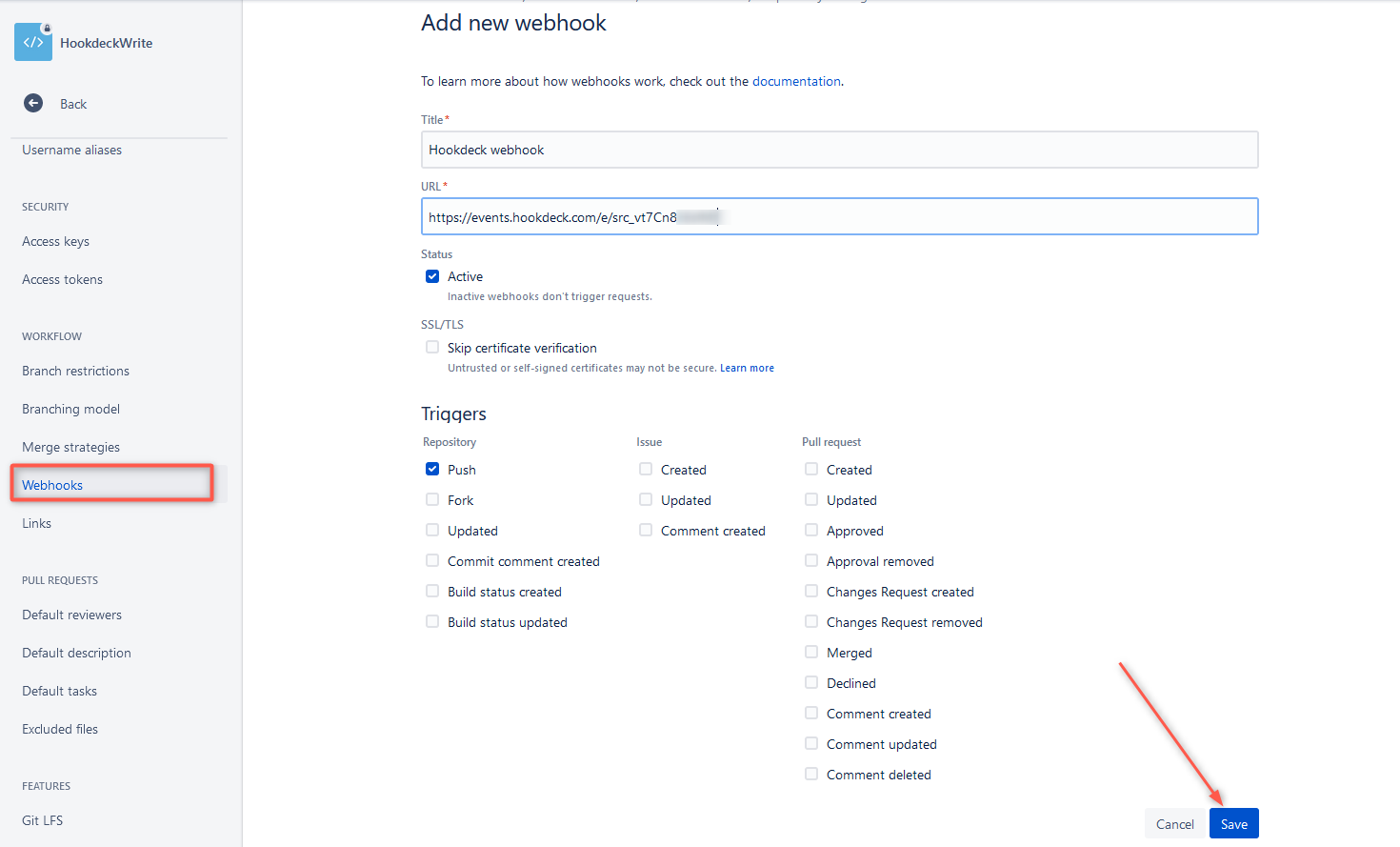
In your Bitbucket repository:
- Navigate to Repository settings > Webhooks
- Click Add webhook
- Enter a title for your webhook
- Enter the Hookdeck URL as the webhook URL
- Select the events you want to receive (Repository push, Pull request events, etc.)
- Click Save
Step 3: Configure your destination
In Hookdeck, configure your destination settings:
// Destination configuration
{
  "url": "https://your-server.com/api/webhooks/bitbucket",
  "rate_limit": {
    "limit": 10,
    "period": "second"
  },
  "retry": {
    "strategy": "exponential",
    "count": 5,
    "interval": 30000
  }
}
Key benefits for Bitbucket webhooks
Never miss a webhook
Hookdeck acknowledges Bitbucket webhooks instantly, so they're never marked as failed due to timeout. Even if your server goes down, webhooks are queued and delivered when it's back online.
Rate limiting
Control how fast webhooks are delivered to your server. This is crucial during:
- Large pull request activity
- Automated testing that generates many pipeline events
- Bulk repository operations
Automatic retries
Configure retry behavior to match your infrastructure.
Event filtering
Process only the webhooks you need. Reduce load by filtering events at the Hookdeck layer.
Visibility and debugging
Hookdeck provides a dashboard showing:
- All webhook deliveries with full request/response data
- Failed deliveries and retry history
- Latency metrics
- Filtering effectiveness
This visibility is invaluable when debugging CI/CD pipeline issues.
Updating your webhook handler
With Hookdeck in place, your webhook handler can focus on business logic without timeout anxiety.
Conclusion
Bitbucket's 10-second webhook timeout is a common source of CI/CD pipeline reliability issues. While you can work around it by building your own queue infrastructure, Hookdeck provides a turnkey solution. By using Hookdeck, you can focus on building your CI/CD workflows instead of managing webhook infrastructure.
Additional resources
