 Gareth Wilson
How to Secure and Verify Bitbucket Webhooks
Webhooks are essential for automating workflows between Bitbucket and your applications. However, without proper security measures, your webhook endpoints are vulnerable to malicious actors who could send fake payloads to trigger unintended actions.
In this guide, we'll explain how to secure your Bitbucket webhooks using signature verification and how Hookdeck can simplify the process. For a comprehensive overview of Bitbucket webhook capabilities, see our guide to Bitbucket webhooks.
Understanding Bitbucket webhook security
When you create a webhook in Bitbucket Cloud, you have the option to add a secret token. This secret enables Bitbucket to sign every webhook payload using HMAC (Hash-based Message Authentication Code), allowing your server to verify that incoming requests genuinely originated from Bitbucket and haven't been tampered with during transit.
How Bitbucket signs webhooks
Bitbucket Cloud uses your secret token to create an HMAC signature that accompanies each webhook payload. The signature appears in the X-Hub-Signature header with the following format:
X-Hub-Signature: sha256=<signature>
The signature is calculated using:
- Your secret token: A high-entropy string you provide when creating the webhook
- The raw request body: The exact payload bytes sent by Bitbucket
- SHA-256 hashing algorithm: Currently the only algorithm Bitbucket uses
Setting up a secure webhook in Bitbucket
Step 1: Create the webhook
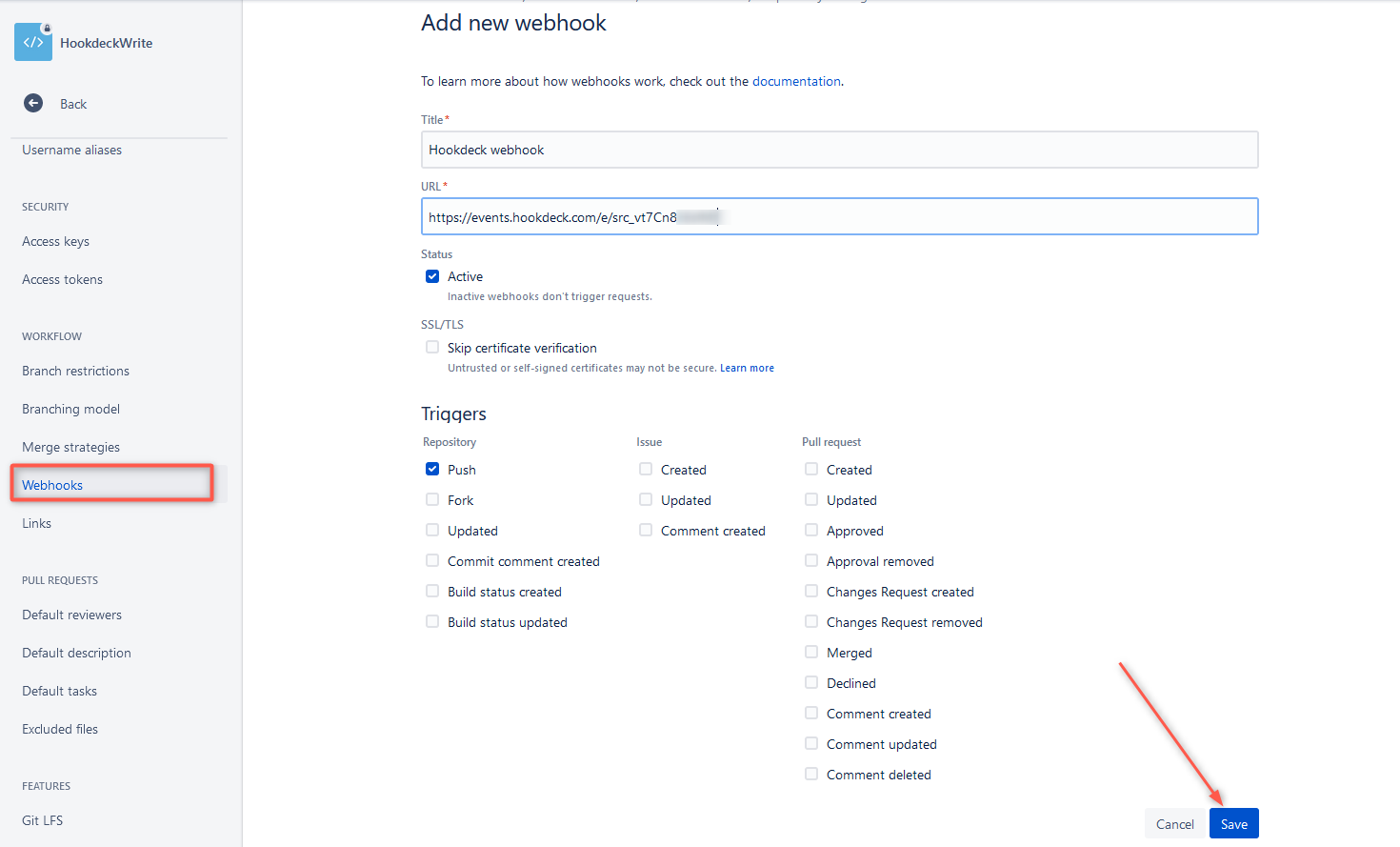
- Navigate to your Bitbucket repository
- Go to Repository settings > Webhooks
- Click Add webhook
- Configure the webhook:
- Title: A descriptive name (e.g., "CI/CD Pipeline Trigger")
- URL: Your webhook endpoint URL
- Secret: Enter a random, high-entropy string or click Generate secret to let Bitbucket create one
Important: Record your secret in a secure location immediately. Once saved, the secret cannot be viewed or retrieved from Bitbucket.
Step 2: Select trigger events
By default, webhooks trigger on repository pushes. To customize:
- Select Choose from a full list of triggers
- Choose the events relevant to your use case
Common Bitbucket webhook events include:
| Event Key | Description |
|---|---|
repo:push | When commits are pushed to the repository |
repo:fork | When the repository is forked |
pullrequest:created | When a new pull request is opened |
pullrequest:approved | When a pull request receives approval |
pullrequest:merged | When a pull request is merged |
pullrequest:rejected | When a pull request is declined |
pullrequest:comment_ | When someone comments on a pull request |
Verifying webhook signatures
To ensure incoming webhooks are legitimate, your server must verify the HMAC signature before processing the payload.
Verification process overview
- Extract the
X-Hub-Signatureheader from the incoming request - Parse the algorithm and signature (format:
sha256=<hex_signature>) - Compute an HMAC of the raw request body using your stored secret
- Compare your computed signature with the one from Bitbucket using a timing-safe comparison
Node.js verification example
const express = require("express");
const crypto = require("crypto");

const app = express();
const WEBHOOK_SECRET = process.env.BITBUCKET_WEBHOOK_SECRET;

// Capture raw body for signature verification
app.use(
  express.json({
    verify: (req, res, buf) => {
      req.rawBody = buf;
    },
  })
);

function verifyBitbucketSignature(req) {
  const signature = req.get("X-Hub-Signature");

  if (!signature) {
    return false;
  }

  // Parse the signature header (format: sha256=<signature>)
  const [algorithm, receivedSignature] = signature.split("=");

  if (algorithm !== "sha256") {
    return false;
  }

  // Compute expected signature
  const hmac = crypto.createHmac("sha256", WEBHOOK_SECRET);
  const expectedSignature = hmac.update(req.rawBody).digest("hex");

  // Use timing-safe comparison to prevent timing attacks
  const receivedBuffer = Buffer.from(receivedSignature, "utf8");
  const expectedBuffer = Buffer.from(expectedSignature, "utf8");

  if (receivedBuffer.length !== expectedBuffer.length) {
    return false;
  }

  return crypto.timingSafeEqual(receivedBuffer, expectedBuffer);
}

app.post("/webhook/bitbucket", (req, res) => {
  if (!verifyBitbucketSignature(req)) {
    console.error("Invalid webhook signature");
    return res.status(401).send("Unauthorized");
  }

  // Process the verified webhook
  const eventType = req.get("X-Event-Key");
  console.log(`Received verified ${eventType} event`);

  // Handle different event types
  switch (eventType) {
    case "repo:push":
      handlePush(req.body);
      break;
    case "pullrequest:created":
      handlePullRequest(req.body);
      break;
    default:
      console.log(`Unhandled event type: ${eventType}`);
  }

  res.status(200).send("OK");
});

app.listen(3000, () => {
  console.log("Webhook server listening on port 3000");
});
Python verification example
import hmac
import hashlib
import os
from flask import Flask, request, abort

app = Flask(__name__)
WEBHOOK_SECRET = os.environ.get("BITBUCKET_WEBHOOK_SECRET")

def verify_bitbucket_signature(payload, signature_header):
    if not signature_header:
        return False

    # Parse signature header (format: sha256=<signature>)
    try:
        algorithm, received_signature = signature_header.split("=", 1)
    except ValueError:
        return False

    if algorithm != "sha256":
        return False

    # Compute expected signature
    expected_signature = hmac.new(
        WEBHOOK_SECRET.encode("utf-8"),
        payload,
        hashlib.sha256
    ).hexdigest()

    # Use timing-safe comparison
    return hmac.compare_digest(expected_signature, received_signature)

@app.route("/webhook/bitbucket", methods=["POST"])
def handle_webhook():
    signature = request.headers.get("X-Hub-Signature")

    if not verify_bitbucket_signature(request.data, signature):
        abort(401, "Invalid signature")

    event_type = request.headers.get("X-Event-Key")
    payload = request.json

    print(f"Received verified {event_type} event")

    # Process the webhook payload
    if event_type == "repo:push":
        handle_push(payload)
    elif event_type == "pullrequest:created":
        handle_pull_request(payload)

    return "OK", 200

if __name__ == "__main__":
    app.run(port=3000)
Critical security best practices
Use timing-safe comparisons
Never use standard equality operators (== or ===) to compare signatures. These can leak timing information that attackers exploit. Always use:
- Node.js:
crypto.timingSafeEqual() - Python:
hmac.compare_digest() - Go:
subtle.ConstantTimeCompare()
Preserve the raw request body
The HMAC signature is computed on the exact bytes Bitbucket sends. Any parsing, reformatting, or beautification of the payload before verification will produce a different signature.
Secure secret storage
- Store secrets in environment variables or a secrets manager
- Never hardcode secrets in source code
- Never commit secrets to version control
- Rotate secrets periodically
Handle UTF-8 encoding
Bitbucket payloads may contain Unicode characters. Ensure your server handles the payload as UTF-8 when computing the HMAC.
Simplifying verification with Hookdeck
Manually implementing and maintaining webhook verification across multiple providers can be complex and error-prone. Hookdeck provides a webhook gateway that handles verification automatically, allowing you to focus on processing events.
What is Hookdeck?
Hookdeck provides an event gateway that sits between webhook providers (like Bitbucket) and your application. It provides:
- Automatic signature verification
- Event queuing and retry logic
- Request logging and debugging tools
- Local development tunneling
Setting up Bitbucket webhooks with Hookdeck
Step 1: Install the Hookdeck CLI
macOS:
brew install hookdeck
Windows:
scoop bucket add hookdeck https://github.com/hookdeck/scoop-hookdeck-cli.git
scoop install hookdeck
Step 2: Authenticate
hookdeck login
This opens your browser for authentication. If you don't have a Hookdeck account, you can create one during this step.
Step 3: Create a connection
hookdeck listen 3000 bitbucket-source --path /webhook/bitbucket
This command:
- Creates a public URL for receiving webhooks
- Forwards events to
http://localhost:3000/webhook/bitbucket - Displays the Source URL to configure in Bitbucket
Step 4: Configure Bitbucket
- Copy the Hookdeck Source URL from the CLI output
- In Bitbucket, create or edit your webhook
- Set the URL to your Hookdeck Source URL
- Add your secret token
- Save the webhook
Step 5: Configure source verification
- Open the Hookdeck Dashboard
- Navigate to Connections and select your source
- Under Advanced Source Configuration, enable Source Authentication
- Select HMAC as the authentication method
- Configure the HMAC settings:
- Algorithm: SHA-256
- Header: X-Hub-Signature
- Encoding: Hex
- Secret: Your Bitbucket webhook secret
How Hookdeck verification works
When verification is enabled:
- Hookdeck receives the webhook from Bitbucket
- Hookdeck validates the
X-Hub-Signatureagainst the payload - Valid requests are forwarded to your endpoint with
x-hookdeck-verified: true - Invalid requests are rejected and logged as "Verification Failed"
This means your application can trust any request from Hookdeck without implementing its own verification logic.
Verifying Hookdeck signatures
For additional security, you can also verify that requests to your endpoint come from Hookdeck by checking the x-hookdeck-signature header:
const crypto = require("crypto");

function verifyHookdeckSignature(req, hookdeckSecret) {
  const signature = req.get("x-hookdeck-signature");

  if (!signature) {
    return false;
  }

  const hmac = crypto.createHmac("sha256", hookdeckSecret);
  const expectedSignature = hmac.update(req.rawBody).digest("base64");

  return crypto.timingSafeEqual(
    Buffer.from(signature),
    Buffer.from(expectedSignature)
  );
}
Note: Hookdeck signatures are Base64-encoded, unlike Bitbucket's hex-encoded signatures.
Troubleshooting common issues
Signature mismatch
If signatures don't match, verify:
- Raw body usage: Ensure you're using the exact bytes received, not a parsed/stringified version
- Secret accuracy: Confirm the secret matches what's configured in Bitbucket
- Encoding: Bitbucket uses hex encoding for signatures
Missing signature header
If X-Hub-Signature is missing:
- Verify a secret is configured for the webhook in Bitbucket
- Check that your proxy or load balancer isn't stripping headers
Webhook not firing
- Check the webhook's Recent deliveries in Bitbucket settings
- Verify your endpoint URL is publicly accessible
- Ensure your server responds within Bitbucket's timeout window
Conclusion
Securing Bitbucket webhooks requires verifying the HMAC signature on every incoming request. While you can implement this verification manually, Hookdeck simplifies the process by providing automatic signature verification, event management, and development tools, allowing you to focus on building your integration rather than infrastructure.
Additional resources
