 Gareth Wilson
Guide to Paddle Webhooks: Features and Best Practices
Paddle is a merchant of record platform that handles payments, subscriptions, taxes, and compliance for SaaS and software businesses. Unlike traditional payment processors, Paddle takes on the complexity of global tax calculations and remittance, allowing developers to focus on building their products. Webhooks are central to integrating Paddle into your application, enabling real-time synchronization between Paddle's billing events and your own systems.
This guide covers everything you need to know about Paddle webhooks, from initial setup to production best practices, along with common limitations developers face and practical solutions to overcome them. You may also find our articles on how to secure and verify Paddle webhooks and how to solve Paddle webhook timeout errors helpful.
Paddle webhook features
| Feature | Details |
|---|---|
| Event Types | 30+ event types covering transactions, subscriptions, customers, addresses, businesses, products, prices, discounts, adjustments, payment methods, payouts, and reports |
| Payload Format | JSON with consistent structure including event_id, event_type, occurred_at, and full entity data |
| Security | HMAC-SHA256 signature verification via Paddle-Signature header |
| Delivery | At-least-once delivery with automatic retries using exponential backoff |
| Retry Policy | Sandbox: 3 retries over 15 minutes · Live: 60 retries over 3 days |
| Timeout | 5-second response requirement |
| Destinations | Up to 10 active notification destinations per account |
| Configuration | Dashboard UI or API-based setup with per-destination event filtering |
| Testing | Built-in webhook simulator for individual events and predefined scenarios |
| Monitoring | Delivery logs and status tracking in dashboard and via API |
| Official SDKs | Node.js, Python, Go, and PHP with built-in signature verification |
What are Paddle webhooks?
Webhooks let you subscribe to events in Paddle. When a subscribed event occurs, Paddle sends an HTTP POST request to a webhook endpoint you specify, delivering a JSON payload containing information about the event and the affected entity. You can use these notifications to keep your application in sync with Paddle, trigger fulfilment workflows, or integrate with third-party systems.
For example, when a subscription cancels, Paddle sends a subscription.canceled webhook. When you receive this notification, you can update your application to revoke access for the canceled customer.
Paddle webhook event types
Paddle Billing organizes webhooks around a centralized event stream. Events follow the format entity.event_type and cover all major entities in Paddle.
Transaction events
Transactions represent individual payment attempts and completions:
transaction.created– A new transaction has been initiatedtransaction.updated– Transaction details have changedtransaction.ready– Transaction is ready for payment collectiontransaction.paid– Payment has been successfully collectedtransaction.completed– Transaction has been fully processedtransaction.billed– Transaction has been marked as billed (for manual collection)transaction.canceled– Transaction has been canceledtransaction.past_due– Payment collection has failed
Subscription events
Subscriptions are the core entity for recurring billing:
subscription.created– A new subscription has been createdsubscription.updated– Subscription details have changedsubscription.trialing– Subscription has entered a trial periodsubscription.activated– Subscription has become activesubscription.paused– Subscription has been pausedsubscription.resumed– Subscription has resumed from a paused statesubscription.canceled– Subscription has been canceledsubscription.past_due– Subscription payment has failedsubscription.imported– Subscription was imported (during migration)
Customer events
customer.created– A new customer record has been createdcustomer.updated– Customer details have changedcustomer.imported– Customer was imported (during migration)
Additional event categories
Paddle also provides webhooks for:
- Addresses:
address.created,address.updated,address.imported - Businesses:
business.created,business.updated,business.imported - Products:
product.created,product.updated,product.imported - Prices:
price.created,price.updated,price.imported - Discounts:
discount.created,discount.updated,discount.imported - Adjustments:
adjustment.created,adjustment.updated(for refunds and credits) - Payment Methods:
payment_method.saved,payment_method.deleted - Payouts:
payout.created,payout.paid - Reports:
report.created,report.updated
You can retrieve the complete list of event types by calling the Paddle API at GET https://api.paddle.com/event-types.
Webhook payload structure
Every Paddle webhook notification follows a consistent structure:
{
  "event_id": "evt_01hv8x2acma2gz7he8kg2s0hna",
  "event_type": "subscription.created",
  "occurred_at": "2024-04-12T10:18:49.621022Z",
  "notification_id": "ntf_01hv8x2af22vrrz7k67g06x1kq",
  "data": {
    "id": "sub_01hv8x29xpj8kp2r6d3fgm5nhk",
    "status": "active",
    "customer_id": "ctm_01hv8wz3k2e6bv9cj7rk4pqn1m",
    "address_id": "add_01hv8wzg6n4m2t8c3k5b7fjp2r",
    "business_id": null,
    "currency_code": "USD",
    "created_at": "2024-04-12T10:18:49.000000Z",
    "updated_at": "2024-04-12T10:18:49.000000Z",
    "started_at": "2024-04-12T10:18:49.000000Z",
    "first_billed_at": "2024-04-12T10:18:49.000000Z",
    "next_billed_at": "2024-05-12T10:18:49.000000Z",
    "billing_cycle": {
      "interval": "month",
      "frequency": 1
    },
    "items": [...],
    "custom_data": null,
    "transaction_id": "txn_01hv8x29wq8j6m2n3k4p5r7s9t"
  }
}
Key fields in the payload:
| Field | Description |
|---|---|
event_id | Unique identifier for the event (prefixed with evt_) |
event_type | The type of event in entity.event_type format |
occurred_at | RFC 3339 timestamp of when the event occurred |
notification_id | Unique identifier for this notification attempt (prefixed with ntf_) |
data | The complete entity object that was created or changed |
Entity IDs use consistent prefixes: sub_ for subscriptions, txn_ for transactions, ctm_ for customers, add_ for addresses, biz_ for businesses, and so on.
See Paddle webhook payloads in action. Inspect and replay sample Paddle webhook payloads in the Hookdeck Console — no account or setup required.
Setting up Paddle webhooks
Creating a notification destination
You can configure webhook endpoints through the Paddle dashboard or via the API.
Using the Dashboard:
- Navigate to Developer Tools → Notifications in your Paddle dashboard
- Click Add Destination
- Enter your webhook endpoint URL (must be HTTPS for production)
- Select the event types you want to receive
- Save the destination
Using the API:
curl -X POST https://api.paddle.com/notification-settings \
  -H "Authorization: Bearer {api_key}" \
  -H "Content-Type: application/json" \
  -d '{
    "description": "Production webhook endpoint",
    "destination": "https://your-app.com/webhooks/paddle",
    "subscribed_events": [
      "subscription.created",
      "subscription.updated",
      "subscription.canceled",
      "transaction.completed",
      "transaction.paid"
    ],
    "active": true
  }'
You can create up to 10 active notification destinations, allowing you to route different event types to different endpoints or services.
Responding to webhooks
Your webhook endpoint must respond with an HTTP 2xx status code within five seconds. Paddle interprets any other status code or a timeout as a delivery failure.
Critical best practice: Such a short response time means you really must respond immediately, then process asynchronously.
Verifying webhook signatures
Every Paddle webhook includes a Paddle-Signature header that you should verify to ensure the request genuinely came from Paddle and hasn't been tampered with.
The signature header format is: ts=1671552777;h1=eb4d0dc8853be92b7f063b9f3ba5233eb920a09459b6e6b2c26705b4364db151
The signature is an HMAC-SHA256 hash of the timestamp concatenated with the raw request body, using your endpoint's secret key.
Getting your secret key:
- Go to Developer Tools → Notifications in your Paddle dashboard
- Edit your webhook destination
- Copy the Secret key value
Important: Do not transform, parse, or modify the raw request body before verification. Any changes (including pretty-printing or reordering JSON fields) will cause signature verification to fail.
Paddle SDKs
Paddle provides official SDKs that handle signature verification and payload parsing:
- Node.js:
@PaddleHQ/paddle-node-sdk - Python:
@PaddleHQ/paddle-python-sdk - Go:
@PaddleHQ/paddle-go-sdk - PHP:
@PaddleHQ/paddle-php-sdk
Retry behavior and delivery guarantees
Paddle implements automatic retries with exponential backoff when webhook delivery fails.
Retry schedule
| Environment | Total Retries | Window |
|---|---|---|
| Sandbox | 3 retries | 15 minutes |
| Live | 60 retries | 3 days |
For live accounts, the retry distribution is:
- First 20 attempts within the first hour
- 47 attempts within the first day
- All 60 attempts within 3 days
After all retry attempts are exhausted, the webhook status is set to failed. You can view delivery attempts and their results in the Paddle dashboard under Developer Tools → Notifications, or via the API using the GET /notifications/{notification_ endpoint.
Delivery guarantees
Paddle provides at-least-once delivery, meaning:
- Events will be delivered at least once
- Events may occasionally be delivered more than once
- Events may arrive out of order
Your webhook handler must be designed to handle these scenarios gracefully.
Best practices for Paddle webhooks
Implement idempotent handlers
Since Paddle may deliver the same webhook multiple times, your handlers must be idempotent, so processing the same event multiple times should have the same effect as processing it once.
Handle out-of-order events
Paddle cannot guarantee the order of webhook delivery. A subscription.updated event might arrive before the corresponding subscription.created event.
Use the occurred_at timestamp to ensure you're processing events in the correct logical order.
Store events before processing
For critical workflows, persist the raw webhook payload before attempting to process it. This provides a fallback if processing fails.
Use the fetch-before-process pattern
For critical operations, treat the webhook as a signal and fetch the current state from the Paddle API rather than relying solely on the webhook payload:
async function handleTransactionCompleted(payload) {
  const { data } = payload;

  // Fetch the current transaction state from Paddle
  const transaction = await paddle.transactions.get(data.id);

  // Use the API response, which is guaranteed to be current
  await fulfillOrder(transaction);
}
This pattern is particularly useful for:
- High-value transactions
- Complex subscription changes
- Scenarios where data consistency is critical
For more detail, check out out Fetch Before Process Pattern guide.
Implement IP allowlisting
Paddle sends webhooks from specific IP addresses. For additional security, configure your firewall or application to only accept webhook requests from Paddle's IP ranges.
Important: IP addresses may change over time. Always refer to the official Paddle documentation for the current list of IP addresses. Paddle provides separate lists for sandbox and production environments.
Subscribe only to events you need
Rather than subscribing to all events, select only the event types your application requires. This reduces unnecessary traffic and processing load. For most SaaS applications, the essential events are:
subscription.createdsubscription.updatedsubscription.canceledtransaction.completedtransaction.paid
Testing Paddle webhooks
Using the webhook simulator
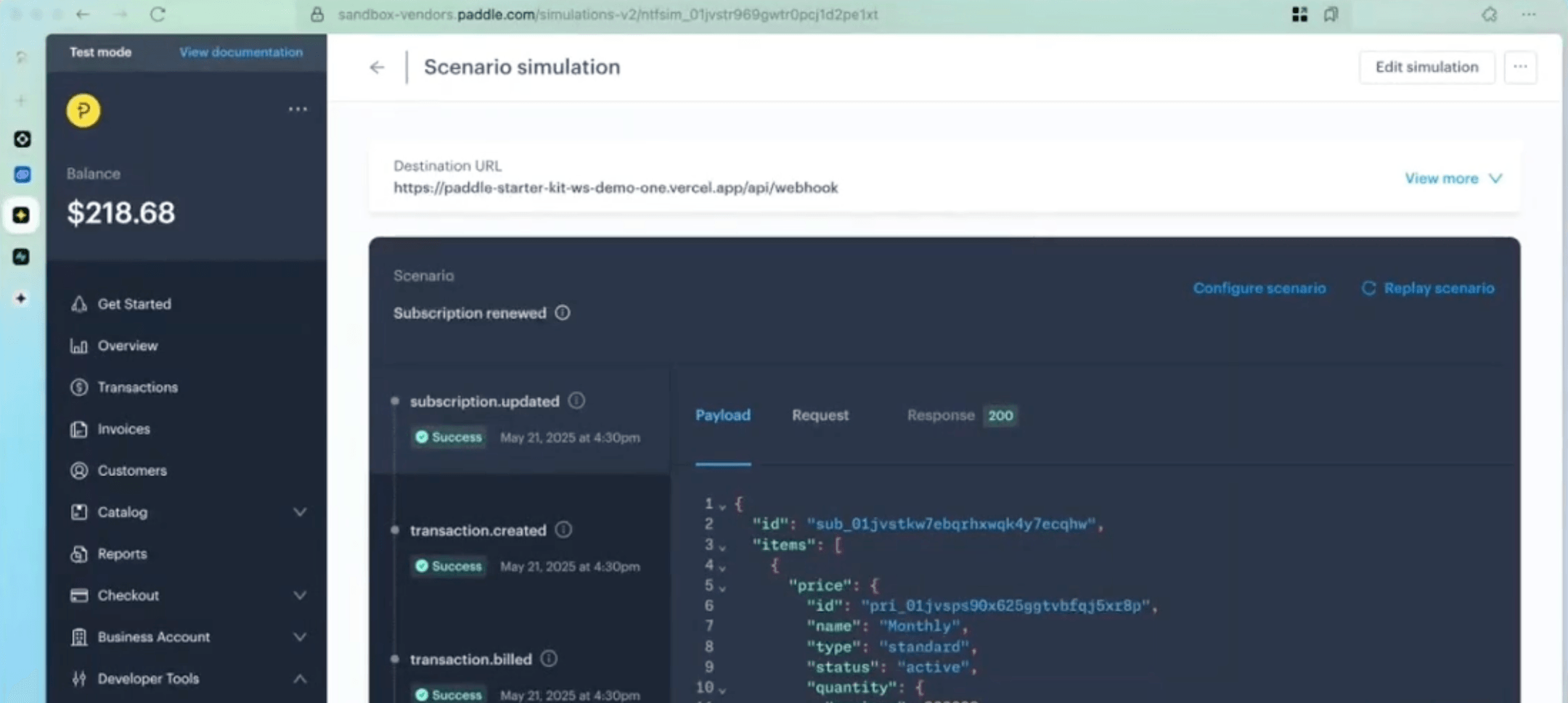
Paddle provides a built-in webhook simulator (which uses Hookdeck's Console under the hood) in the dashboard (Developer Tools → Notifications → Simulate) that sends test webhooks with valid signatures. You can:
- Test individual event types
- Run predefined scenarios (e.g., full subscription lifecycle)
- Verify your endpoint responds correctly
Local development
Since Paddle requires a publicly accessible HTTPS endpoint, local development requires a tunnelling solution, like Hookdeck CLI.
# Install the Hookdeck CLI
npm install -g hookdeck-cli

# Start a tunnel to your local server
hookdeck listen 3000 paddle-source

# Configure the provided URL in Paddle dashboard
The Hookdeck CLI provides additional benefits like request inspection, replay capabilities, and persistent URLs, making it particularly well-suited for webhook development. See our guide on how to test and replay Paddle webhooks locally for a step-by-step walkthrough.
Limitations and pain points
Strict 5-second timeout
Problem: Paddle requires webhook endpoints to respond within 5 seconds, or the delivery is marked as failed and queued for retry. This strict timeout can be challenging for applications with complex processing logic or external service dependencies.
Why It Happens: Paddle's infrastructure is optimized for high throughput and needs to quickly determine delivery success to manage its retry queue efficiently. A longer timeout would tie up resources and slow down delivery to other customers.
Workarounds:
- Queue-based processing: Accept the webhook immediately, store it in a message queue (like Redis, RabbitMQ, SQS), and process asynchronously.
- Database-first approach: Write the raw event to your database, respond, then process.
How Hookdeck Can Help: Hookdeck sits between Paddle and your application, accepting webhooks immediately and providing a configurable delivery window of up to 60 seconds (or more with retries). This gives your endpoint more time to respond while ensuring Paddle sees successful delivery. Hookdeck also handles queuing automatically, so you can focus on business logic rather than infrastructure.
Serverless cold start timeouts
Problem: When running webhook handlers on serverless platforms (AWS Lambda, Vercel Functions, Google Cloud Functions), cold starts can consume a significant portion of the 5-second timeout, causing intermittent failures.
Why It Happens: Serverless platforms deallocate compute resources after a period of inactivity. When a new request arrives, the platform must provision a new instance, load your code, and initialize dependencies—a process that can take several seconds for complex applications.
Workarounds:
- Provisioned concurrency: Configure your serverless platform to keep warm instances.
- Scheduled warming: Use scheduled events to periodically invoke your function.
- Edge functions: Use edge-deployed functions (Cloudflare Workers, Vercel Edge) that have near-zero cold start times.
How Hookdeck Can Help: Hookdeck's infrastructure is always warm and responds to Paddle immediately, then forwards events to your endpoint with configurable retry logic. Even if your first delivery attempt fails due to a cold start, Hookdeck automatically retries, giving your function time to warm up. You can also configure rate limiting to control how quickly events are delivered, preventing your serverless function from being overwhelmed.
No guaranteed event ordering
Problem: Paddle delivers webhooks in the order they're generated, but network conditions and retry logic mean events may arrive at your endpoint out of order. A subscription.updated event might arrive before subscription.created.
Why It Happens: Webhooks are delivered asynchronously over the internet. If one delivery attempt fails and triggers a retry, subsequent events may overtake it. Paddle prioritizes delivery reliability over strict ordering.
Workarounds:
- Timestamp-based ordering: Always check
occurred_atbefore applying updates:
async function handleEvent(payload) {
  const entity = await db.findByPaddleId(payload.data.id);

  if (entity && new Date(payload.occurred_at) <= entity.lastUpdated) {
    return; // Ignore stale events
  }

  await db.upsert({
    paddleId: payload.data.id,
    lastUpdated: payload.occurred_at,
    ...payload.data
  });
}
Event versioning: Track event sequence numbers when available.
Eventual consistency: Design your system to tolerate temporary inconsistency:
async function handleSubscriptionUpdated(payload) {
  const { data } = payload;

  // Upsert pattern handles missing 'created' event
  await db.subscriptions.upsert(
    { paddleSubscriptionId: data.id },
    {
      $set: {
        status: data.status,
        updatedAt: payload.occurred_at
      },
      $setOnInsert: {
        createdAt: data.created_at
      }
    }
  );
}
How Hookdeck Can Help: Hookdeck maintains ordered delivery within a connection by default and provides event deduplication to prevent processing the same event multiple times. You can also use Hookdeck's transformation feature to add sequence numbers or implement custom ordering logic before events reach your endpoint.
Duplicate event delivery
Problem: Due to at-least-once delivery semantics and retry behavior, you may receive the same webhook event multiple times. Without proper handling, this can cause duplicate charges, multiple fulfilment attempts, or corrupted data.
Why It Happens: If your endpoint responds slowly or network issues cause the response to be lost, Paddle may retry delivery even though you successfully processed the event. This is an intentional trade-off to ensure events are never lost.
Workarounds:
- Idempotency keys: Use
event_idornotification_idto detect duplicates:
const processedEvents = new Set(); // Use Redis in production

async function handleWebhook(payload) {
  if (processedEvents.has(payload.event_id)) {
    return { status: 'duplicate' };
  }

  processedEvents.add(payload.event_id);
  await processEvent(payload);
}
- Database constraints: Use unique constraints to prevent duplicate inserts:
CREATE TABLE webhook_events (
  event_id VARCHAR(50) PRIMARY KEY,
  event_type VARCHAR(50),
  processed_at TIMESTAMP DEFAULT NOW()
);
try {
  await db.webhookEvents.insert({ eventId: payload.event_id });
  await processEvent(payload);
} catch (error) {
  if (error.code === 'DUPLICATE_KEY') {
    return; // Already processed
  }
  throw error;
}
How Hookdeck Can Help: Hookdeck provides built-in deduplication that can be configured per connection. It identifies duplicate events based on configurable criteria and ensures each unique event is delivered only once to your endpoint, even if Paddle sends multiple notifications.
Limited debugging and visibility
Problem: When webhooks fail or behave unexpectedly, debugging can be difficult. Paddle's dashboard shows delivery attempts and responses, but provides limited insight into why your handler failed or what the payload contained at the time.
Why It Happens: Paddle's logging is designed for operational monitoring, not developer debugging. Detailed payload inspection and request/response capture require additional tooling.
Workarounds:
Comprehensive logging: Log every incoming webhook with full context.
Structured logging services: Use services like Datadog, LogDNA, or Papertrail for searchable, structured logs.
Request capture middleware: Store raw requests for replay and debugging.
How Hookdeck Can Help: Hookdeck provides comprehensive observability out of the box. Every event is logged with full payload visibility, request/response details, and delivery timing. You can search and filter events, inspect failures, and replay any event with a single click. Hookdeck also supports alerting rules so you're notified when delivery issues occur.
No native webhook replay
Problem: When your handler has a bug or your endpoint is down, you may miss important events. Paddle doesn't provide a built-in way to replay historical webhooks so once retries are exhausted, events are marked as failed.
Why It Happens: Webhook replay at scale requires significant storage and infrastructure. Paddle focuses on reliable initial delivery and leaves replay functionality to external solutions.
Workarounds:
Store all events: Persist every webhook to your database for manual replay.
Use the Paddle API: For subscription and transaction data, you can fetch current state from the API instead of relying on webhook history:
// Resync a subscription from the API
async function resyncSubscription(subscriptionId) {
  const subscription = await paddle.subscriptions.get(subscriptionId);
  await db.subscriptions.upsert({
    paddleSubscriptionId: subscription.id,
    ...subscription
  });
}
How Hookdeck Can Help: Hookdeck stores all events for up to 30 days (depending on your plan) and provides one-click replay for any event. You can replay individual events, bulk replay all failed events, or replay events matching specific criteria. This eliminates the need to build and maintain your own replay infrastructure.
Complex signature verification
Problem: Implementing signature verification correctly requires careful handling of the raw request body, timestamp parsing, and HMAC computation. Many frameworks automatically parse JSON bodies, which breaks verification.
Why It Happens: Signature verification requires the exact bytes that were signed. JSON parsing, whitespace changes, or character encoding differences will produce a different signature.
Workarounds:
- Access raw body in Express:
// Must be configured before JSON parsing
app.use('/webhooks/paddle', express.raw({ type: 'application/json' }));

app.post('/webhooks/paddle', (req, res) => {
  const rawBody = req.body; // Buffer
  const signature = req.headers['paddle-signature'];

  if (!verifySignature(rawBody, signature)) {
    return res.status(401).send();
  }

  const payload = JSON.parse(rawBody);
  // Process...
});
Use official SDKs: Paddle's SDKs handle signature verification correctly.
Body caching middleware:
app.use((req, res, next) => {
  let data = '';
  req.on('data', chunk => data += chunk);
  req.on('end', () => {
    req.rawBody = data;
    try {
      req.body = JSON.parse(data);
    } catch (e) {
      req.body = {};
    }
    next();
  });
});
How Hookdeck Can Help: Hookdeck can verify Paddle webhook signatures on your behalf using its source verification feature. You configure your Paddle secret key in Hookdeck, and it handles all signature validation before forwarding events to your endpoint. This eliminates signature verification complexity from your application code entirely.
Migration between Paddle Classic and Paddle Billing
Problem: Paddle Billing is a complete rewrite with a new API, new webhook events, and new payload structures. Migrating from Paddle Classic requires building an entirely new integration.
Why It Happens: Paddle Billing was designed from the ground up to address limitations in Paddle Classic. While this provides a better long-term foundation, it means the two systems are not compatible.
Workarounds:
Run integrations in parallel: During migration, maintain handlers for both systems.
Use import events: When migrating subscriptions, listen for
subscription.importedandcustomer.importedevents to update your records.Gradual migration: Migrate new customers to Paddle Billing while existing customers remain on Classic.
How Hookdeck Can Help: Hookdeck's transformation feature can normalize payloads between Paddle Classic and Paddle Billing formats, allowing you to maintain a single handler while migrating. You can also use routing rules to direct events from different sources to appropriate handlers based on payload content.
Make Paddle webhooks production-ready. Hookdeck Event Gateway handles verification, retries, payload transformation, and replay so your billing logic stays reliable.
Conclusion
Paddle webhooks provide a powerful mechanism for keeping your application synchronized with billing events in real-time. By understanding the event types, implementing proper signature verification, and following best practices for idempotency and error handling, you can build robust integrations that handle the complexities of subscription billing.
The key challenges (strict timeouts, out-of-order delivery, and limited replay capabilities) are common to many webhook providers and can be addressed through careful architecture and appropriate tooling. Whether you implement your own queuing infrastructure or use an event gateway like Hookdeck, the goal is the same: reliable, observable, and maintainable webhook processing that lets you focus on your core product.
Additional resources
- Paddle Developer Documentation
- Paddle Webhook Signature Verification
- Paddle API Reference
- Hookdeck Paddle Integration Guide
Get started with Hookdeck for free and handle Paddle webhooks reliably in minutes.
