 Gareth Wilson
How to Solve Paddle Webhook Timeout Errors
If you're receiving webhooks from Paddle, you might encounter timeout errors, especially when your webhook handler performs database operations, API calls, or other processing that takes longer than Paddle's strict 5-second limit. For a broader overview of the platform's webhook capabilities, see our guide to Paddle webhooks features and best practices. This article explains why those errors occur and how you can solve them using the Hookdeck Event Gateway.
The problem
Paddle requires your server to respond with an HTTP 200 status code within 5 seconds. If Paddle doesn't receive a response within this window, it assumes delivery failed and triggers retries.
When too many requests timeout, Paddle will:
- Retry using exponential backoff. For sandbox accounts, Paddle retries 3 times within 15 minutes. For live accounts, Paddle retries 60 times over 3 days with 20 attempts in the first hour alone.
- Mark webhooks as failed. After exhausting all retry attempts, the webhook status changes to
failed, requiring manual replay through Paddle's API. - Create duplicate processing risks. If your server processes the webhook but responds too slowly, Paddle retries anyway, potentially causing duplicate operations. Implementing idempotent handlers is essential to protect against this.
The 5-second window is tight. A typical webhook handler that verifies signatures, updates a database, provisions access, and sends a confirmation email can easily exceed this limit, especially during traffic spikes or when third-party services are slow.
The solution: Hookdeck Event Gateway
The Hookdeck Event Gateway sits between Paddle and your application, acting as a buffer, queue, and traffic controller. It ensures your server only receives traffic it can handle and gives you far more time to process each webhook.
Key benefits
- Instant acknowledgment. Hookdeck responds to Paddle in under 200ms, well within the 5-second window. Your processing time no longer affects delivery status.
- 60-second processing window. Hookdeck gives your endpoint up to 60 seconds to respond.
- Built-in queuing. Events are stored and released at a pace your server can handle. No need to build your own message queue infrastructure.
- Rate limiting. Smooth out traffic spikes by setting a maximum delivery rate per destination.
- Flexible retries. Configure retry strategy (linear or exponential), attempt count (up to 50), and retry window (up to 7 days).
- Bulk error recovery. When failures occur, browse affected events and retry them all at once after fixing the issue.
- Connection pausing. Temporarily stop delivery during maintenance while Hookdeck continues accepting and queuing webhooks from Paddle.
Setup guide
Step 1: Get your Hookdeck webhook URL
In Hookdeck, create a new Connection:

- Sign up at hookdeck.com
- Create a Source named "Paddle"
- Create a Destination with your webhook endpoint URL (e.g.,
https://your-app.com/webhooks/paddle) - Copy the generated Source URL
Step 2: Configure Paddle notification destination
In your Paddle dashboard:
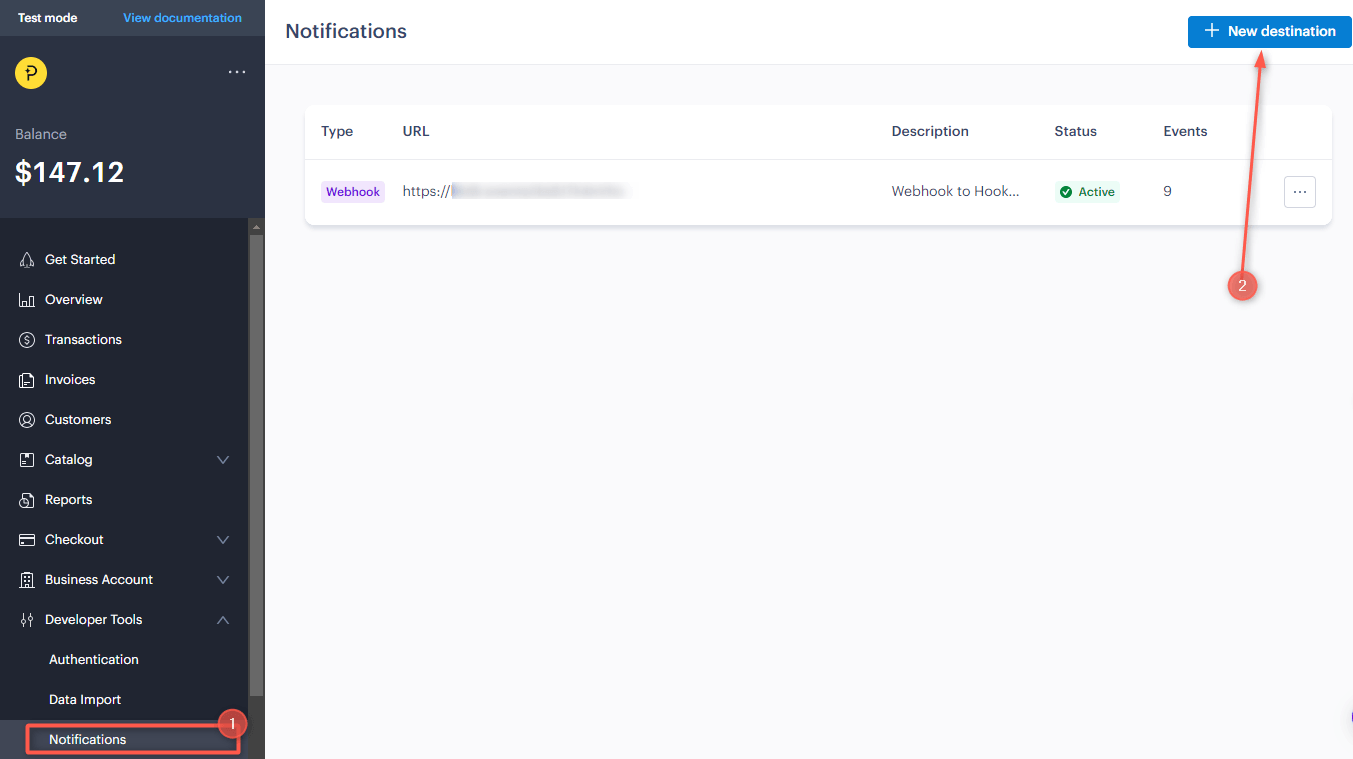
- Navigate to Developer Tools → Notifications
- Click + New destination
- Paste the Hookdeck Source URL as the endpoint
- Select the event types you want to receive
- Save the destination
Step 3: Configure Hookdeck delivery settings
Back in Hookdeck, configure your connection:
Rate limiting: Set a maximum delivery rate appropriate for your infrastructure (e.g., 10 requests/second).
Retry strategy: Configure automatic retries:
- Strategy: Exponential backoff
- Maximum attempts: 30
- Initial interval: 30 seconds
Step 4: Update your webhook handler
With Hookdeck handling acknowledgment, you can process webhooks without racing against Paddle's 5-second clock.
Note on signature verification: Hookdeck preserves the original Paddle-Signature header, so you can continue using Paddle's SDK for verification. Hookdeck also adds its own signature if you want additional verification.
Monitoring and visibility
Hookdeck provides full observability into your webhook traffic:
- Event timeline: See when Paddle sent each webhook, when Hookdeck received it, and when it was delivered to your endpoint.
- Request/response inspection: View complete payloads and your endpoint's responses for debugging.
- Issues dashboard: Failures are categorized by connection and status code, making it easy to identify and resolve problems systematically.
- Alerting: Set up notifications via Slack, Microsoft Teams, PagerDuty, or OpsGenie when issues occur.
Conclusion
Paddle's 5-second timeout is strict, but it doesn't have to cause problems. The Hookdeck Event Gateway solves the timeout challenge by acknowledging Paddle instantly while giving your application the time it needs to process webhooks properly.
With Hookdeck in place, you get reliable delivery, automatic retries, and full visibility without building and maintaining queue infrastructure yourself.
