 Phil Leggetter
Prepare Your Webhooks for Black Friday / Cyber Monday (BFCM) with Hookdeck Event Gateway
You've spent the past few months ensuring you're ready for Black Friday / Cyber Monday (BFCM) because you know that missing a webhook from Shopify, Big Commerce, Stripe, PayPal, etc., means you miss an event representing an important transaction, such as a purchase, inventory change, shipping status change, or payment. These events all equate to revenue or customer experience, which are fundamental to running a successful business.
So, you're ready for a significant increase in traffic and traffic spikes during Black Friday / Cyber Monday. You've minimized your webhook ingestion time by pushing events into a well-resourced queuing service, ensured you have load-balancing in place for horizontal scaling, you're logging all events to ensure you can recover from failure scenarios and perform audits, and your infrastructure code freeze is on the horizon.
You're ready! Right?
Black Friday and Cyber Monday Webhook Traffic Spikes
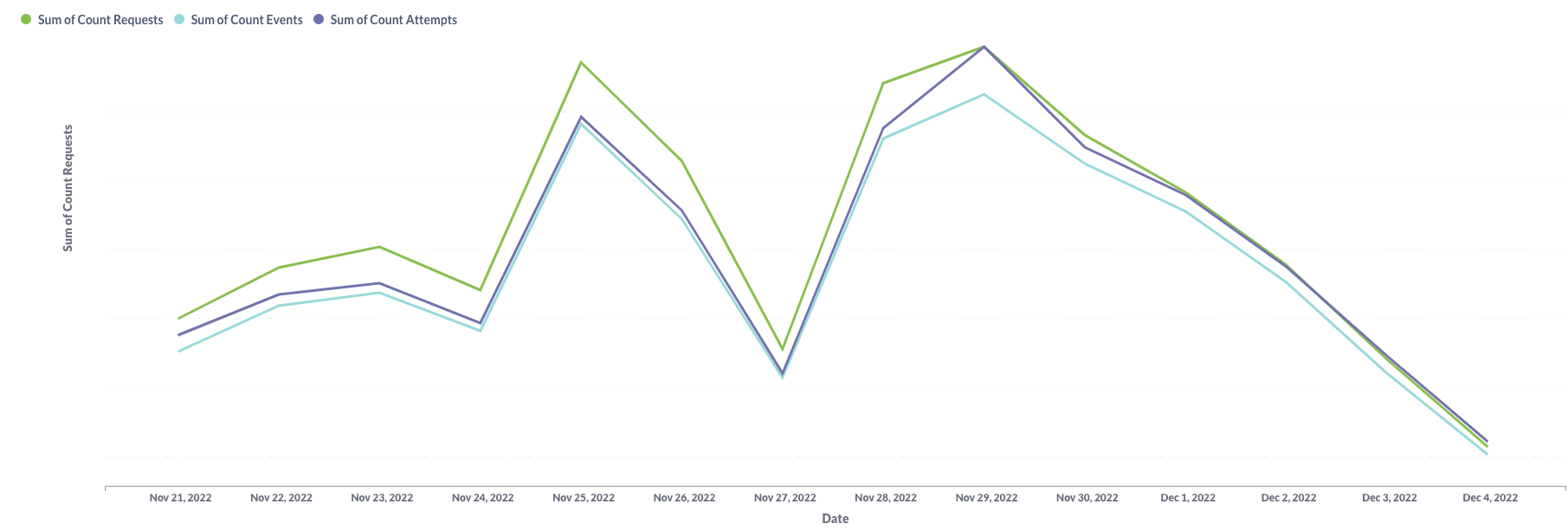
Since campaigns tend to run leading up to and through Black Friday / Cyber Monday, you should expect a consistent increase in traffic throughout the period and slightly beyond. Over BFCM 2022, we saw the number of webhooks that our customers had to ingest and process double.
There may also be considerable traffic spikes if a specific deal or offer goes viral; this is great for the business but a challenge for your infrastructure.
No matter how well you plan, something unexpected can still happen, such as a DNS outage, a third-party component in your stack going down, or an edge case you haven't foreseen. When your endpoint fails, the provider's own retries decide what you keep. Shopify, for example, retries up to 8 times over 4 hours, then stops attempting delivery of that webhook. If the endpoint is still down at that point, the webhook is gone from Shopify's side.
Put Event Gateway in front of the endpoint
Hookdeck Event Gateway sits between the provider and your endpoint. The provider sends to an Event Gateway source URL, and Event Gateway verifies the provider's signature, answers 200, queues the webhook, and delivers it to your endpoint at a rate you set. The provider sees a success for every delivery, so it never retries on top of the surge.
When your endpoint fails, Event Gateway keeps retrying on the retry rule you configured. Recovery is three actions. Pause delivery or lower the rate, retry what failed, and unpause. Peaks above your endpoint's rate queue in Event Gateway instead of reaching it.
Hookdeck's agent skill for this, bfcm-webhook-playbook, covers preparing before the peak and recovering during an incident. Every step is a CLI command, a REST API call or a Terraform resource, so an agent can run it. The rest of this post follows the skill, and you can run each command yourself.
If you can't change where the provider sends before the peak, standby capture is the fallback. If your endpoint is failing right now and there is no Event Gateway in the path yet, go to moving inline mid-incident.
Install the skill and prepare with an agent
Install the skill into your agent (Claude Code, Cursor, Codex and others that support Agent Skills):
npx skills add hookdeck/webhook-skills --skill bfcm-webhook-playbook
Then start with this prompt:
How do we prepare our webhooks for Black Friday?
The agent sets up the Hookdeck CLI for you. It installs the CLI if it's missing and runs hookdeck login, which opens your browser so you can sign in and approve it. If you don't have a Hookdeck account yet, sign up first. The agent then runs hookdeck whoami so you can confirm the organization and project before it changes anything, and works through the skill's preparation checklist.
Some steps, such as bulk retries and rate changes, call the Hookdeck API. When the agent reaches the first one, it asks for the project's API key, which you'll find in the project's settings.
To set up the CLI yourself, or in CI:
brew install hookdeck   # or: npm i -g hookdeck-cli
hookdeck login          # in CI: hookdeck ci --api-key "$HOOKDECK_API_KEY"
hookdeck whoami
Before the peak: what to check
Event Gateway can hold and replay webhooks, but it can't make a slow or non-idempotent handler safe. Check these before BFCM rather than during an incident:
- Fast handlers. Verify the signature, put the webhook on a queue and return
2xx, then do the work asynchronously. Shopify gives each delivery 5 seconds, so a handler doing its work inline under peak load times out and triggers provider retries on top of the surge. - Idempotency and order. Recovery redelivers some webhooks your endpoint already processed. Your handlers should deduplicate by the provider's event or delivery ID and cope with events that arrive out of order, because neither Event Gateway nor providers like Shopify and Stripe guarantee order.
- A safe delivery rate. Load-test the endpoint with a sudden onset at several times your normal peak, and record the sustained rate it handles without errors. That rate becomes the destination's rate limit.
- Signature checks on Event Gateway deliveries. Deliveries to your endpoint come from Event Gateway, not the provider, so the handler verifies the Hookdeck signature. That is safe because the source verifies the provider's signature on the way in. Stripe's libraries also reject signatures older than 5 minutes by default, which a queued or retried webhook can exceed.
- IP allowlists. If the endpoint or a firewall allows only the provider's IP addresses, deliveries from Event Gateway get
403. Allow Hookdeck's outbound IPs. - Retention. You can only retry or replay webhooks within your plan's retention window. It needs to cover the time it takes to notice, fix and drain an outage, which on a holiday weekend is more than a few hours.
- A rehearsal. Run the recovery once against a non-production project and time it, so the first run isn't during a real incident.
Set up the inline connection
Ask the agent for the setup with your endpoint:
Prepare our Shopify webhooks for BFCM with Event Gateway in front of our endpoint at https://api.example.com/webhooks/shopify.
For each provider, the agent creates a connection with a source that verifies the provider's signature, a destination with a rate limit, and a retry rule:
hookdeck gateway connection upsert shopify-orders \
  --source-name shopify --source-type SHOPIFY \
  --source-webhook-secret "$SHOPIFY_SECRET" \
  --destination-name orders-api --destination-type HTTP \
  --destination-url https://api.example.com/webhooks/shopify \
  --destination-rate-limit 50 --destination-rate-limit-period second \
  --rules '[{"type":"retry","strategy":"exponential","count":10,"interval":60000,"response_status_codes":["429","500-599"]}]'
Set the rate to the sustained rate you measured. Then point the provider's subscription at the source URL, which you can read with hookdeck gateway source get shopify --output json | jq -r .url, and remove the old direct subscription so each webhook arrives once. For Stripe, PayPal and WooCommerce, register the new endpoint first and then set the source's secret to that endpoint's own signing secret, because each endpoint signs with its own secret. Update the handler to verify x-hookdeck-signature before you switch the provider over.
Check it by triggering a real test event from the provider and confirming it arrives:
hookdeck gateway event list --connection-id <connection> --limit 1
The skill also sets up two issue triggers through the API, one for a backlog building up and one for failing deliveries. During the peak, freeze changes to Event Gateway configuration along with your code freeze, apart from the recovery actions below.
When the endpoint fails: the inline runbook
Our webhooks are failing and our endpoint is down. What do we do?
The agent follows the inline runbook. It confirms the project and connection, then records the destination's current delivery policy so it can restore it exactly at the end. The runbook uses these variables, with T0 as the time deliveries started failing:
export CONN=web_...              # the live connection
export DEST=des_...              # its destination
export T0=2026-11-27T14:05:00Z
The steps:
Stop hammering the endpoint. If it is completely down, pause the connection and new events queue with status
HOLD. If it is degraded but partly working, lower the delivery rate instead, which keeps webhooks flowing in order while giving the endpoint room to recover.hookdeck gateway connection pause "$CONN" # or, for a degraded endpoint: hookdeck gateway destination update "$DEST" --rate-limit 2 --rate-limit-period secondFix the endpoint. This happens outside Event Gateway. Confirm the endpoint is healthy before delivery resumes.
Set a safe rate. The backlog drains at the destination's rate, alongside live traffic.
hookdeck gateway destination update "$DEST" --rate-limit 20 --rate-limit-period secondRetry what failed, before unpausing. Events that exhausted their retries stay
FAILEDuntil retried. A bulk retry created while the connection is paused delivers even though the connection is paused, while newer events stay onHOLD, so the older failures arrive first. The agent filters onlast_attempt_at, because an event created beforeT0that was still retrying when the endpoint went down also failed in the outage, and it shows you the count from the plan call before it creates the operation:export API=https://api.hookdeck.com/2026-09-01 curl -sS --fail-with-body -G "$API/bulk/events/retry/plan" \ -H "Authorization: Bearer $HOOKDECK_API_KEY" \ --data-urlencode "query[webhook_id]=$CONN" \ --data-urlencode "query[status]=FAILED" \ --data-urlencode "query[last_attempt_at][gte]=$T0" | jq '.estimated_count'If the count is above 0 and you confirm it, the agent creates the bulk retry with
POST /bulk/events/retryand the same query, then waits for the retried events to drain.Unpause. Skip this if you only lowered the rate.
hookdeck gateway connection unpause "$CONN"re-queues held events in blocks of up to 5,000 that share one queue timestamp, so order is shuffled inside each block. If order is the priority, lower the rate next time instead of pausing.Mop up. Restore the delivery policy recorded at the start, reconcile critical objects for the outage window against the provider's API, and record
T0, the bulk retry ID and any events leftFAILED.
The full runbook, including how to retry requests the source rejected during the outage, is incident-inline.md in the skill.
Already down with no Event Gateway: move inline now
Our webhooks are failing and we have no Event Gateway. Can we move onto it now?
If webhooks are failing right now, the provider sends straight to your endpoint, and you can change where the provider sends, the agent follows the skill's move-inline runbook. The steps:
Create the connection and hold it. The agent creates the source and connection with the same
connection upsertas above but a low placeholder rate (--destination-rate-limit 2), then pauses it immediately, so Event Gateway queues webhooks instead of sending them to an endpoint that is still down.hookdeck gateway connection pause shopify-ordersPoint the provider at the source URL. For Shopify, update the subscription's URL, or change the URI in
shopify.app.tomland deploy. If Shopify already deleted an Admin API subscription after repeated failures, create it again against the source URL. For Stripe, PayPal and WooCommerce, add the source URL as a new endpoint and set the source's secret to that endpoint's secret. Then remove the old direct subscription, so every webhook doesn't arrive twice once the endpoint recovers. Genuine webhooks show statusHOLDinhookdeck gateway event list --connection-id "$CONN".Fix the endpoint, then continue with steps 3 to 6 of the inline runbook above. Set a safe rate, retry failures while paused, unpause, and mop up.
Before you point the provider at the source, check that the handler accepts deliveries from Event Gateway (verify x-hookdeck-signature), that no IP allowlist blocks Hookdeck, and that your retention window covers the backlog. Webhooks that failed before the move are not in Event Gateway. Recover those with the provider's resend tools where they exist (Stripe, PayPal), or by reconciling against the provider's API.
The skill states that this sequence reuses commands from the inline setup and runbook but has not been tested from start to finish. Rehearse it before you rely on it.
Fallback: standby capture beside your endpoint
Use standby when you can't change the provider's delivery target before the peak (another team owns the subscription, or a change freeze applies), or when you can't change the handler's verification in time to accept deliveries from Event Gateway. The provider keeps delivering to your endpoint directly, and also delivers to an Event Gateway source that has no connection.
Prepare our Shopify webhooks for BFCM with an Event Gateway standby. Our endpoint is https://api.example.com/webhooks/shopify.
The agent creates a source with signature verification on and no connection:
hookdeck gateway source upsert shopify-standby --type SHOPIFY \
  --webhook-secret "$SHOPIFY_APP_CLIENT_SECRET" --output json
A source with no connection still records every request. Event Gateway checks the provider's signature, stores the webhook and returns 200, so the provider counts the delivery as a success. Requests that fail the signature check get a 401 and are stored as VERIFICATION_FAILED, so a recovery replay never sends forged webhooks to your endpoint. Register the source's https://hkdk.events/... URL at the provider as an additional webhook subscription for the same topics, and keep your existing one.
Standby records webhooks but doesn't protect the endpoint. Live traffic still reaches it at full rate, and your direct subscription can still fail. Shopify deletes subscriptions created through the Admin API after repeated failures, while subscriptions declared in shopify.app.toml aren't deleted, so check that your direct subscription still exists once you're back up. If you start on standby, plan to move inline when you can.
Recover from standby with a recovery lane
The agent also pre-provisions a recovery lane. It is a separate connection with its own source that sits idle until an incident and delivers to your endpoint at a rate limit.
hookdeck gateway connection upsert bfcm-recovery \
  --source-name bfcm-recovery --source-type WEBHOOK \
  --source-config "{\"auth_type\":\"API_KEY\",\"auth\":{\"header_key\":\"x-api-key\",\"api_key\":\"$(openssl rand -hex 32)\"}}" \
  --destination-name orders-api-recovery --destination-type HTTP \
  --destination-url https://api.example.com/webhooks/shopify \
  --destination-rate-limit 10 --destination-rate-limit-period second \
  --rules '[{"type":"retry","strategy":"exponential","count":10,"interval":60000,"response_status_codes":["429","500-599"]}]'
The backlog goes through this lane rather than a connection added to the standby source, because live webhooks would flow through that connection ahead of the older backlog, each would also arrive directly from the provider, and the standby source has to stay without a connection to keep capturing. The recovery source requires an API key that nobody is given, because its connection delivers straight to production. Replays skip source authentication, so the key doesn't get in their way.
After the endpoint is fixed, you and the agent agree on T0 (the time of the last webhook your system definitely processed) and T1 (when live delivery resumed, plus a few minutes of margin). The agent replays the oldest captured request on its own into the recovery lane as a canary, then asks the API how many requests the full replay would cover and shows you the count. Filter on rejection_ only, because adding status=rejected would widen the replay to forged requests, and bound the window with created_at[gte] and created_at[lte], because the API ignores gt and lt.
You then choose how to replay:
- Ordered replay sends the requests one at a time, oldest first, in exact capture order at about 4 to 5 requests a second (around 14,000 an hour).
- Bulk replay is a single API call that is much faster for large backlogs. It works through requests oldest first in batches of 100, but order within each batch is effectively random.
When the replay finishes and the recovery lane has no queued events, the agent resets any rate limit it changed. Check orders, payments and refunds for the outage window against the provider's API as well, because the replay restores what Event Gateway captured and reconciliation catches anything that never reached it. The full runbook, including the canary, the dry run and the emergency capture path for teams with no Event Gateway at all, is incident-standby.md in the skill.
Doing it in the dashboard
You can run the inline recovery from the Hookdeck dashboard instead of the CLI. Open the connection from the Connections section of your project. Bulk retry doesn't keep webhooks in their original order, so use this version only if your handlers don't depend on order.
Pause the connection so no more delivery attempts are made while you fix the endpoint:
Retry what failed. In the Events section, filter by the connection and the time period since the outage began, then click Bulk Retry followed by Retry All. Your endpoint receives the events at the rate limit set on the destination.
When the retried events have been delivered, unpause the connection to resume delivery of the held events:
What this adds up to
We hope you don't need any of this. Putting Event Gateway in front of your endpoint before the peak means a failing endpoint costs you delayed webhooks that retry, and the provider's retries and subscription clean-up never come into play. If you can't do that in time, standby capture keeps a verified copy so you can replay the outage window, and if you're already mid-incident, moving inline stops the loss from the moment the provider points at the new URL.
Install the skill with the command above and ask your agent how to prepare for Black Friday. If it picks a path that doesn't fit your setup, tell us where it went wrong. If you're reading this during BFCM and scrambling for a solution to your webhooks problems, get in touch and we'll help.
Further reading: