 Phil Leggetter
Bring the whole web to your apps and agents with Apify webhooks
Kevin Lewis, Team Lead for Developer Advocacy at Apify, joined us to show how Apify turns websites that don't have an API into tools your apps and agents can call, and how a webhook tells your code when the results are ready. In the demo, Kevin starts a run of an Apify Actor (Apify's name for a packaged scraper or automation), points its webhook at a Hookdeck Console URL, which is a free in-browser webhook inspector, and we look at what arrives when the run finishes.
This is episode 3 of Webhooks by Example, where we talk through how webhooks are used on a real platform. Episode 1 was the consumer side, with Knock ingesting Orb's usage webhooks to send upgrade nudges, and episode 2 the producer side, with GitLab webhooks driving a virtual pet for repo health. This one is about a different kind of webhook, a job-completion callback.
Apify Actors: an API for websites that don't have one
Plenty of useful data sits on sites with no API, and the scrapers people write for them tend to break. Kevin put it this way:
“If you've ever built a web scraper, that is wonderful until you hit so many pages and then it breaks, or until some markup changes and it breaks. And that's kind of the gap that Apify fills.”
Kevin Lewis
Team Lead for Developer Advocacy @ Apify
Apify calls these tools Actors, and Apify Store lists tens of thousands of them, built by Apify and by community creators. Each Actor takes input in a fixed schema. You can run one from Apify Console (Apify's web app), from the API, on a schedule, or from an agent through Apify's MCP server. Apify's Instagram Post Scraper, for example, takes Instagram usernames and returns their posts.
A friend of Kevin's who wants to move to Ireland wanted job alerts from sites that had every filter she needed in their UI but no API. Kevin built an Actor for those sites with Apify's skill for AI coding agents and put it on a schedule. She now gets a daily summary of new matching jobs, and the Actor is public in Apify Store.
Kevin's advice is to treat Actors as building blocks: "The use case isn't scrape Instagram. The use case is I wanna find the influencers that post with this hashtag." The Actor collects the posts. Deciding who counts as an influencer is up to your app or agent.
Workflows that stay inside Apify
Apify's integrations run when an Actor run finishes, and plenty of workflows never need to leave Apify. You can chain Actors, including ones that don't scrape anything, such as an Actor that calls an LLM through OpenRouter. You can send results to Google Drive, Gmail, Slack, or GitHub issues, or hand them off to n8n, Make, or Zapier.
Kevin's example was a crawl comparison: "Compare this data set of a website crawl versus the last one and tell me what's changed... and then send it off to Slack. That can all be done within the Apify platform." For automation with human approval steps and timeout paths, he'd reach for n8n.
You need a webhook when the results have to reach your own app or database, or trigger something Apify's integrations don't cover.
Why the results end up in your own database
Every run writes to Apify's storage:
- Datasets hold the run's results.
- Key-value stores hold inputs, outputs, screenshots, and crawl state.
- Request queues hold the URLs a crawl still has to process.
Each run gets its own unnamed dataset, key-value store, and request queue, and unnamed storage is deleted after your plan's data retention period. Named storage stays until you delete it. Any run can open a named dataset and add to it, so results from repeated runs can collect in one place.
Datasets are append-only. You can add items, but you can't edit or delete them, which is why Kevin doesn't count a dataset as a database. Reading one back with GET /v2/datasets/:datasetId/items gives you a list. You can choose fields with fields and omit, and page through items in the order they were stored with offset and limit (desc reverses the order). There's no filtering by value, no sorting by field, and no way to join with your own data or other datasets. If a later run finds an updated version of a record, the new item sits next to the old one.
So if your app needs to query the results, combine them with its own data, or update them, copy them into your own database. For a SaaS app that needs fresh data, Kevin suggests running an Actor on a schedule. When the run finishes, something has to move the results into the app, and that's the webhook's job.
Where the webhook fits
If you're building an app on Apify data, a run starts in one of two ways.
A schedule can start it, for example a daily crawl. Your app didn't ask for anything, so the webhook is how it learns there's new data.
Or your app or agent starts it with POST /v2/actors/:actorId/runs, which returns a 201 with the run ID straight away. Runs can take tens of minutes, so instead of waiting, your code attaches an ad-hoc webhook to the run and gets called back when it finishes.
Once the run is going, the flow is the same either way:
The payload contains the run object, including its dataset ID, and you use that ID to fetch the items and write them to your database. The diagram hands the fetch to a worker. If you can fetch and store the dataset well within Apify's 2-minute response timeout, your endpoint can do it inside the request instead.
Setting up the webhook
You add a webhook on the Integrations tab of an Actor, or of an Actor task, which is a saved input configuration for an Actor. Its settings:
- Event types. Run events are created, succeeded, failed, timed out, aborted, and resurrected (a finished run restarted with its existing storage). A webhook can subscribe to several. Build events are for Actor creators.
- URL. For testing, a Hookdeck Console URL works without an account.
- Payload template. The default includes
userId,createdAt,eventType,eventData, andresource. - Headers template. Optional, and where a shared secret goes.
- Retries. On by default.
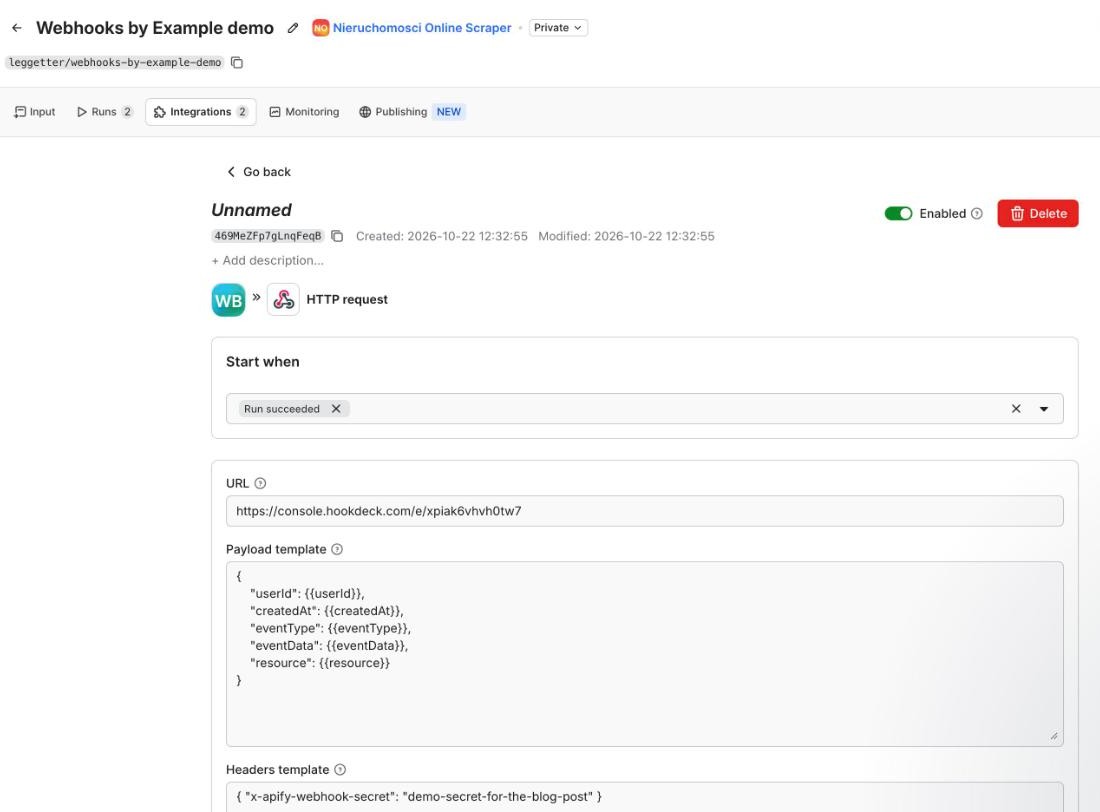
We captured a real payload for this post by adding a run-succeeded webhook to an Actor task in our own account, with a demo secret in the headers template. The screenshot and the payload below come from that run.
What the run-succeeded payload contains
The payload doesn't include the scraped data. For run events, resource is the run object, the same thing GET /v2/actor-runs/:runId returns. Here's the payload from our test run, trimmed. The full resource also has fields such as stats, options, usage, and storages.
{
  "userId": "HHTa2sBXLRWHxLkXL",
  "createdAt": "2026-10-22T17:34:07.701Z",
  "eventType": "ACTOR.RUN.SUCCEEDED",
  "eventData": {
    "actorId": "ZFu38Eo37fSVt38MS",
    "actorTaskId": "Ytf7pEGaaGiH5XhF2",
    "actorRunId": "HjzQ9U87uu5jlBTif"
  },
  "resource": {
    "id": "HjzQ9U87uu5jlBTif",
    "actId": "ZFu38Eo37fSVt38MS",
    "userId": "HHTa2sBXLRWHxLkXL",
    "status": "SUCCEEDED",
    "startedAt": "2026-10-22T17:33:56.133Z",
    "finishedAt": "2026-10-22T17:34:01.220Z",
    "defaultDatasetId": "8sZqDlfJ7GhufUdEZ",
    "defaultKeyValueStoreId": "uFhshAh5MKFjg7o7C",
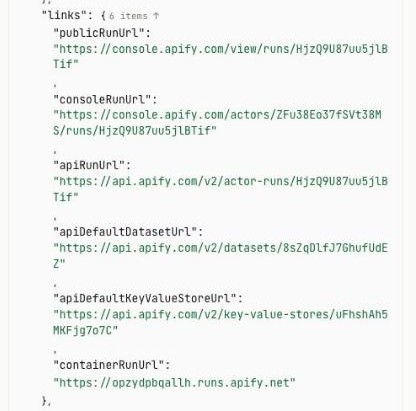
    "links": {
      "consoleRunUrl": "https://console.apify.com/actors/ZFu38Eo37fSVt38MS/runs/HjzQ9U87uu5jlBTif",
      "apiRunUrl": "https://api.apify.com/v2/actor-runs/HjzQ9U87uu5jlBTif",
      "apiDefaultDatasetUrl": "https://api.apify.com/v2/datasets/8sZqDlfJ7GhufUdEZ",
      "apiDefaultKeyValueStoreUrl": "https://api.apify.com/v2/key-value-stores/uFhshAh5MKFjg7o7C"
    }
  }
}
The dataset ID is resource.defaultDatasetId, and its items are at https://api.apify.com/v2/datasets/<defaultDatasetId>/items. resource.links has ready-made URLs such as apiDefaultDatasetUrl, which help when you're debugging. In a handler, build the URL from the ID and use your own token, rather than following a link from the payload.
This is the thin events pattern. The payload stays small however many items the run produced, and you read the data as it's stored when you fetch it.
Whether those URLs need an API token depends on your account's general resource access setting. With the default, Restricted, runs and storages need a token. In our test, the run, dataset, and items URLs all returned 403 insufficient-permissions without one, even in a browser signed in to Apify Console. If you switch the setting to Anyone with ID can read, the IDs in a payload are enough to read your data, so treat payloads as sensitive.
Securing Apify webhooks
Apify doesn't sign its webhooks, so anyone who finds your endpoint URL can send it a request. Because the payload holds IDs rather than results, a forged request only does damage if your handler trusts it blindly.
What Apify gives you
Apify's webhook actions docs describe four things that help:
- A shared secret. Put a token in the webhook URL, or send it in a custom header with the headers template, as Kevin suggested.
- Static IPs. Webhooks come from a published list of IP addresses you can allow-list. Our test delivery came from 13.216.180.86, which is on it.
- System headers. Every delivery has
X-Apify-Webhook,X-Apify-Webhook-Dispatch-Id, andX-Apify-Request-Origin. They identify the delivery and aren't secrets. - Retries. Failed deliveries (non-2xx responses) are retried with exponential backoff, up to 11 times over about 32 hours. Apify waits 2 minutes for a response, and a webhook can occasionally arrive twice.
What your handler should check
- Send the secret in a header rather than the URL, because URLs end up in proxy, load balancer, and APM logs. Apify recommends the same for its own API tokens. A shared secret shows the caller knows it, but with no signature or timestamp it doesn't stop someone replaying a request they've captured.
- Look the run up before trusting the event. Fetch it by
resource.idwith your token, check thatuserIdis your account, and, for a run-succeeded event, check thatstatusisSUCCEEDED. TheuserIdcheck matters because other accounts' runs that use Anyone with ID can read are readable with your token, so a forged payload could point at someone else's run. - Treat the IP allow-list as an extra check. Every Apify account's webhooks come from the same addresses, so an allowed IP doesn't prove the webhook is yours.
- Deduplicate on
resource.idandresource.finishedAt, pluseventTypeif one handler takes several events. IncludingfinishedAtkeeps a resurrected run that finishes again from being dropped. Apify doesn't document whetherX-Apify-Webhook-Dispatch-Idstays the same across retries, so don't key on it. - Fetch inside the request only if it fits comfortably in 2 minutes. Otherwise, acknowledge straight away and do the work in a worker, as the code below does.
Set the webhook's headers template to { "x-apify-webhook-secret": "<long random value>" }. We picked the header name, and Apify doesn't define one. Here's the logic as an Express handler and a worker. queue, alreadyProcessed, markProcessed, and upsertItems stand in for your own queue and database code.
import express from "express";

const apify = { Authorization: `Bearer ${process.env.APIFY_TOKEN}` };
const app = express();

app.post("/webhooks/apify", express.json(), async (req, res) => {
  // Use a constant-time comparison in production.
  if (req.get("x-apify-webhook-secret") !== process.env.APIFY_WEBHOOK_SECRET) {
    return res.sendStatus(401);
  }
  const { eventType, resource } = req.body;
  if (eventType === "ACTOR.RUN.SUCCEEDED") {
    await queue.add({ runId: resource.id, finishedAt: resource.finishedAt });
  }
  res.sendStatus(202);
});

async function processRun({ runId, finishedAt }) {
  const key = `${runId}:${finishedAt}`;
  if (await alreadyProcessed(key)) return;

  const runRes = await fetch(`https://api.apify.com/v2/actor-runs/${runId}`, { headers: apify });
  if (runRes.status === 403 || runRes.status === 404) return; // not a run your token can see
  if (!runRes.ok) throw new Error(`Run lookup failed: ${runRes.status}`); // retry the job
  const { data: run } = await runRes.json();
  if (run.userId !== process.env.APIFY_USER_ID || run.status !== "SUCCEEDED") return;

  // One request for brevity. Page with offset and limit for large datasets.
  const itemsRes = await fetch(
    `https://api.apify.com/v2/datasets/${run.defaultDatasetId}/items?clean=true`,
    { headers: apify },
  );
  if (!itemsRes.ok) throw new Error(`Dataset fetch failed: ${itemsRes.status}`);

  // Upsert on a stable field in each item, so a retried job doesn't store duplicates.
  await upsertItems(await itemsRes.json());
  await markProcessed(key);
}
Where Hookdeck Event Gateway helps, and where it doesn't
Hookdeck Event Gateway has no Apify source type, but a generic Webhook source works. Configure API key authentication on the source with the header name and value from Apify's headers template, and requests without it get a 401 at the edge. Event Gateway then signs each delivery to your endpoint with an HMAC SHA-256 x-hookdeck-signature, so your handler verifies a signature instead of comparing a shared secret. It also adds an x-hookdeck-original-ip header with the IP of the original sender, so you can still check Apify's IP list after verifying the signature.
The source acknowledges Apify immediately and queues the event, so Apify's 2-minute limit no longer applies to your handler. Delivery to your endpoint has its own retry rules and a delivery timeout that defaults to 60 seconds and goes up to 15 minutes. The default is shorter than Apify's 2 minutes, so raise it to at least that if you move an in-request handler behind Event Gateway, and higher if fetching and storing takes longer. That can save you building a worker at all.
A max delivery rate on the destination limits how fast your handler fetches and writes, so set it to what your database can absorb. A deduplication rule with include_fields of body.resource.id, body.eventType, and body.resource.finishedAt drops repeats within its window.
Deduplication is best-effort, so keep your handler's own idempotency check. The run lookup stays in your handler too, since it's what ties an event to your account.
Calling back apps and agents with ad-hoc webhooks
Runs that research a topic across many sources and compile a report can take a while.
“Remember also that runs can take some time, sometimes tens of minutes, depending on what the Actor does and the size of it.”
Kevin Lewis
Team Lead for Developer Advocacy @ Apify
The waitForFinish query parameter holds a request open for at most 60 seconds, whether you pass it when starting a run (POST /v2/actors/:actorId/runs) or fetching one (GET /v2/actor-runs/:runId). The run-sync endpoints, which start a run and return its results in one request, wait up to 300 seconds and then return 408.
For longer runs you either poll or get called back, and ad-hoc webhooks do the calling back. They're single-use webhooks attached to one run, passed as a base64-encoded JSON array in the webhooks query parameter of the call that starts it. Because it's an array, one run can register several, such as separate URLs for success and failure.
const webhooks = Buffer.from(JSON.stringify([{
  eventTypes: ["ACTOR.RUN.SUCCEEDED", "ACTOR.RUN.FAILED", "ACTOR.RUN.TIMED_OUT", "ACTOR.RUN.ABORTED"],
  requestUrl: `https://example.com/webhooks/apify/${jobId}`,
  headersTemplate: JSON.stringify({ "x-apify-webhook-secret": jobSecret }),
}])).toString("base64");

await fetch(`https://api.apify.com/v2/actors/${actorId}/runs?webhooks=${encodeURIComponent(webhooks)}`, {
  method: "POST",
  headers: { ...apify, "Content-Type": "application/json" },
  body: JSON.stringify(input),
}); // 201 Created; the callback arrives when the run finishes
Giving each run its own URL and secret limits the damage if one leaks. Route /webhooks/apify/:jobId, and compare the header with the secret you stored for that job. When a run fails, times out, or is aborted, mark the job failed and tell whoever is waiting on it.
For an agent, the service that runs it does the waiting. When it starts the run, it stores the agent's conversation or thread ID against the job ID. When the callback arrives, it looks up the thread and resumes the agent with the dataset ID as the tool result. Nothing holds a connection open while the Actor runs.
An agent that works only through Apify's MCP server doesn't get a callback. The call-actor tool waits up to 45 seconds (30 by default) and returns the run's status and storage IDs, and the agent reads the results with get-dataset-items. MCP Events is a draft extension to the Model Context Protocol that would let an MCP server notify an agent, so a finished run could reach the agent directly. It's still a proposal and isn't in the spec yet. Kevin said Apify is aware of it and looking into it.
Try it with Hookdeck Console
- Copy a URL from Hookdeck Console. You don't need an account.
- In Apify Console, open an Actor's Integrations tab, add a run-succeeded webhook with that URL, and run the Actor with a small input. Apify's Free plan includes $5 of usage a month for Store Actors or your own. The Creator plan limits Store Actors to Apify's universal ones, so use one of those or your own.
- Open the event in Hookdeck Console and fetch the results with your Apify token:
curl -H "Authorization: Bearer $APIFY_TOKEN" https://api.apify.com/v2/datasets/<defaultDatasetId>/items
To receive the webhook on your machine instead, run npx hookdeck-cli listen 3000 apify --path /webhooks/apify with the Hookdeck CLI, then replace the webhook URL in Apify with the source URL the CLI prints.
Apify gives you an API for sites that don't have one, and the run-succeeded webhook tells your app when there's something to fetch. Your handler checks the secret, looks the run up with your own token, and copies the dataset into your database. If you run Actors on a schedule and poll for results today, add a run-succeeded webhook to one of them and point it at Hookdeck Console to see what arrives.
Resources
- Apify webhook events
- Apify webhook actions: templates, IPs, and retries
- Apify API reference
- Let your AI agent pay for Actor runs, with no Apify account
- Actor quality score: how Apify Store ranks Actors
- How to implement webhook idempotency
Thanks to Kevin for giving us an overview of Apify and walking through his demo. The full conversation, including Actor schemas as contracts and how Apify ranks Actors by quality, is in the video at the top of this post and on YouTube. The next episode of Webhooks by Example is coming soon.