 Phil Leggetter
Building a virtual pet for repo health with GitLab webhooks
Webhooks by Example is a Hookdeck series where we sit down with practitioners shipping real webhook implementations and walk through one use case end to end: the example, the architecture, the development workflow, and the key tips along the way.
Episode 1 was the consumer side: Knock ingesting Orb's usage webhooks in production to send upgrade nudges. Episode 2 is the producer side. Colleen Lake, Developer Advocate at GitLab, walks through GitLab's webhook platform using a demo she built: Tanukigotchi, a virtual pet whose mood is your repo's health.
Tanukigotchi: a repo health monitor driven by GitLab webhooks
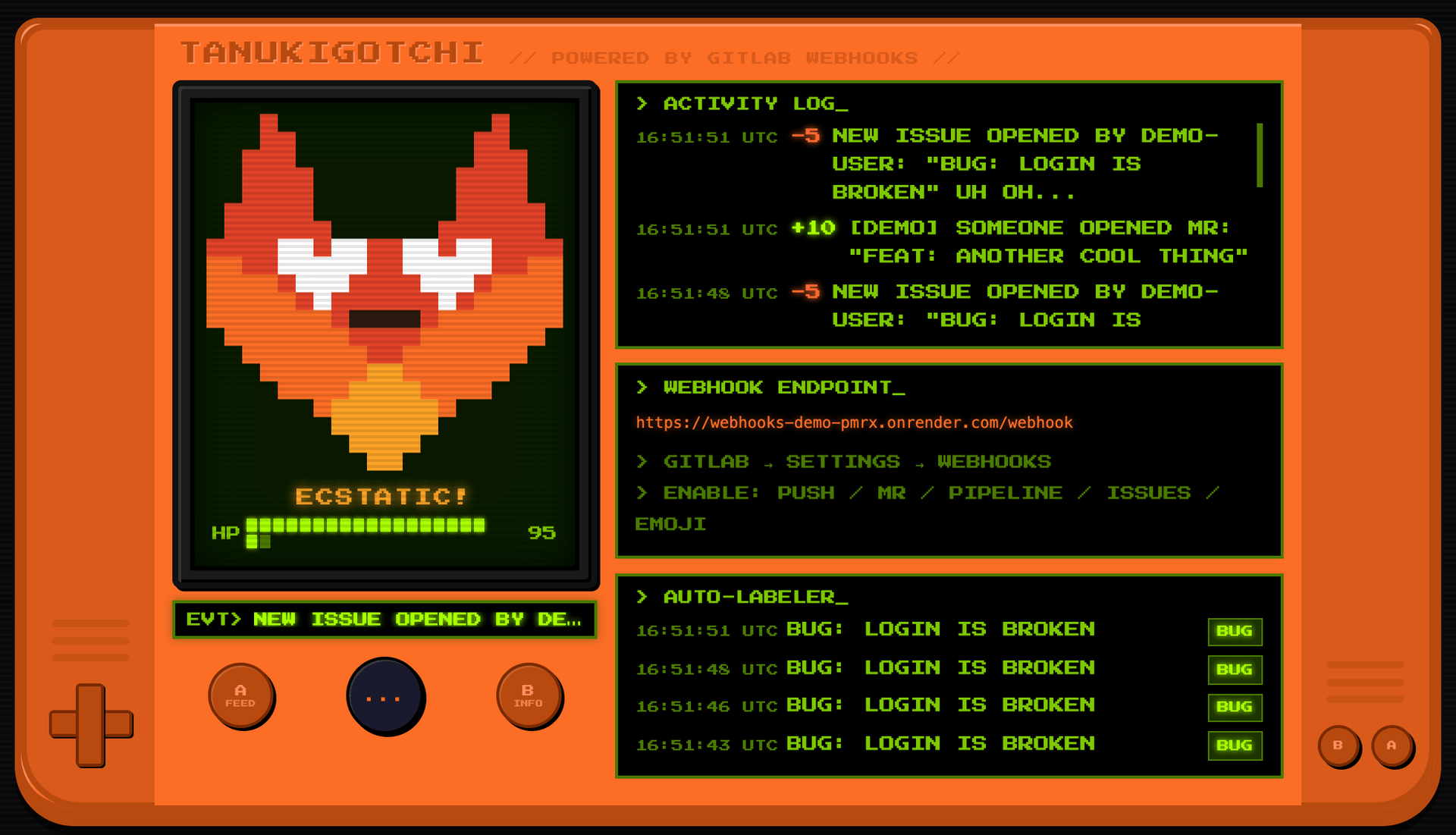
Without the pixel art, Tanukigotchi is a repo health monitor: failed pipelines, force pushes, and open issues combined into one signal you can read at a glance. The repo has a README for cloning it and pointing it at your own project, or at a whole group, which is the version a team would actually run.
Tanukigotchi is a Flask app hosted on Render with a single job: receive GitLab project webhooks at POST /webhook and turn them into a pet's health:
- Normal push: +15 HP
- Merged MR: +30 HP
- Passing pipeline: +25 HP
- Failed pipeline: -20 HP
- Force push: -40 HP, and the tanuki gets angry
HP decays a point per minute, and 24 hours with no activity kills the pet. Mood updates reach the browser over Server-Sent Events, so the tanuki reacts as soon as an event arrives. There is no database: state lives in memory, and a restart resets the pet.
There is also an auto-labeler on the same webhook endpoint: when an issue opens, the title is scanned for keywords (bug, security, urgent, docs, perf) and matching labels are applied via the GitLab API from a background thread, so the labeling call never blocks the webhook response.
Configuring a GitLab project webhook
A GitLab project webhook is configured with a URL, a signing token, and a set of event triggers. Tanukigotchi subscribes to:
- Push events
- Work item events
- Confidential work item events
- Merge request events
- Pipeline events
Push events can be filtered by branch name, including wildcard patterns, so a webhook only fires for the branches you care about.
GitLab also supports custom webhook templates, which let you reshape the payload GitLab sends, and custom headers. The demo uses neither, but if the receiving system expects a specific body shape or auth header, you can often meet it without an intermediary.
GitLab also keeps a per-webhook delivery log: recent events, response status, and full request detail. When a delivery fails, that log is where debugging starts. GitLab doesn't retry a failed delivery on its own; you can resend one manually from the delivery log. After four consecutive failures, GitLab temporarily disables the webhook, for one minute at first and longer after each further failure, and events that fire while it's disabled aren't delivered later.
Everything above is also available via the API, and mid-episode, after deleting the webhook live and rebuilding it by hand, Colleen confirmed that plenty of teams manage webhooks that way.
Verifying GitLab webhooks with signing tokens
GitLab signs webhook payloads with a signing token. Colleen's advice while generating one:
“Whenever you generate a signing token, save it, because you can only access it once.”
Colleen Lake
Developer Advocate @ GitLab
The token is displayed at creation and never returned by the API afterwards. GitLab follows the Standard Webhooks specification: an HMAC-SHA256 signature delivered in a webhook-signature header as v1,{base64_signature}, computed over {webhook-id}.{webhook-timestamp}.{raw_. Signing tokens arrived in GitLab 19.0 (generally available in 19.1) and coexist with the older secret-token mechanism, so existing webhooks keep working while you migrate. Hookdeck's GitLab source type can be configured to verify either one.
The /webhook route in app.py reads the raw body and checks the signature before anything else. Trimmed:
@app.route("/webhook", methods=["POST"])
def webhook():
    raw = request.get_data()  # raw bytes, before any JSON parsing

    if TOGGLES["verify"] and not verify_signature(raw, request.headers):
        return "", 401
    ...


def verify_signature(raw_body: bytes, headers) -> bool:
    msg_id = headers.get("webhook-id", "")
    timestamp = headers.get("webhook-timestamp", "")
    sig_hdr = headers.get("webhook-signature", "")

    secret = base64.b64decode(SIGNING_TOKEN.removeprefix("whsec_"))
    signed = f"{msg_id}.{timestamp}.".encode() + raw_body
    expected = base64.b64encode(
        hmac.new(secret, signed, hashlib.sha256).digest()
    ).decode()

    for part in sig_hdr.split(" "):
        version, _, sig = part.partition(",")
        if version == "v1" and hmac.compare_digest(sig, expected):
            return True
    return False
It gets two things right that real handlers often get wrong:
- Read the raw request bytes before parsing JSON, because re-serializing changes the bytes and breaks the signature.
- Compare with
hmac.compare_digest()rather than==. A==comparison stops at the first mismatched character, so in principle response times leak how much of a forged signature is correct.compare_digest()takes the same time however many characters match.
During the video, Colleen deletes the webhook and has to create a new one with a new signing token. The reason this doesn't break the demo is that verification in the app is a runtime toggle, off by default. Colleen flagged it herself:
“This is more of a do as I say, not as I demo moment, because in a real implementation, I would highly advise not making your signing tokens so optional.”
Colleen Lake
Developer Advocate @ GitLab
In production, verify every request before your handler does anything else with it. If you would rather not maintain that code per platform, Hookdeck has built-in verification for GitLab webhooks, and the same applies across other providers: each source is verified with its own secret, and your handler checks a single Hookdeck signature.
Routing GitLab events by X-Gitlab-Event
Once a request is verified, the handler reads the X-Gitlab-Event header and dispatches each event to its own function:
@app.route("/webhook", methods=["POST"])
def webhook():
    ...  # signature verification, above

    event_type = request.headers.get("X-Gitlab-Event", "")
    payload = json.loads(raw) if raw else {}
    handle_event(event_type, payload)
    return jsonify({"status": "ok"}), 200


def handle_event(event_type: str, payload: dict):
    if event_type == "Push Hook":
        handle_push(payload)
    elif event_type == "Merge Request Hook":
        handle_merge_request(payload)
    elif event_type == "Pipeline Hook":
        handle_pipeline(payload)
    elif event_type == "Issue Hook":
        handle_issue(payload)
    elif event_type == "Emoji Hook":
        handle_emoji(payload)
Each handle_* function applies the HP changes listed above, so adding an event type means adding a branch and a function.
Building an emoji reaction handler with GitLab Duo
GitLab webhooks can fire on emoji events. An emoji reaction added or removed on an issue, MR, or comment is a webhook trigger like any other.
A lot of team communication happens in reactions, so a specific emoji on an MR can trigger a workflow. My suggestion in the episode: use it for voting, where something progresses only after three thumbs-up reactions.
Tanukigotchi did not handle emoji events at the start of the recording. Rather than write the handler off-camera, Colleen handed the task to GitLab Duo Agent Platform during the episode: add emoji reactions as an input to the happiness score.
Duo produced a merge request that added an Emoji Hook branch to the same dispatch and a handle_emoji() function with an emoji-to-delta map, with dozens of entries in both directions:
- Positive: thumbs up +5, heart +8, tada +10, tanuki +10
- Negative: thumbs down -5, rage -10, skull -10
Colleen's developer flow is set to always open MRs in draft state, so she reviews the agent's changes before she marks the MR ready and merges it. Her position:
“If an agent writes, I will have a human review, or vice versa. If it is something going into prod, I think that's very important to have a human in the loop.”
Colleen Lake
Developer Advocate @ GitLab
The pipeline also ran on the MR like any other. After the merge and a manual deploy on Render, reactions on a work item moved the dashboard in real time. Two +5 reactions and a -10 skull added up to zero, then a tada pushed the tanuki back toward ecstatic.
Preventing webhook loops when the handler writes back to GitLab
The auto-labeler calls the GitLab API to add a label to an issue. That API call fires an issue update event. If your webhook is subscribed to work item events, that update arrives back at your own handler, which is how webhook consumers end up processing their own side effects in a loop.
The auto-labeler shares the webhook endpoint with the mood tracker, and the dashed edge is where the loop closes:
Tanukigotchi's fix is a loop guard with two checks:
- Skip anything where the issue action is not
open. - Skip events where the actor is the bot user.
The second check only works if the bot is a separate identity, which is why the app uses a project access token rather than a personal one. If the token is yours, the username check has nothing to match against.
Recreated webhooks, new tokens, and cold starts
Recreating a webhook means a new signing token, which means updating the secret wherever the consumer runs, which means a redeploy or a config change. It's toil that gets skipped under pressure, which is how verification ends up optional.
That is the argument for automating webhook setup even when you only have one webhook: a small script against the GitLab API that creates the webhook, captures the token, and updates the consumer's environment is better than repeating the same steps in the UI at a worse moment. Colleen's framing of webhook complexity:
“You can do eighty percent of the webhook functionality very, very quickly and very simply. And then the last twenty percent, that's going to make you question your life decisions sometimes.”
Colleen Lake
Developer Advocate @ GitLab
Render's free tier sleeps the app after 15 minutes of inactivity, and GitLab's webhook delivery times out at 10 seconds, so the first delivery after a cold start fails. The repo's workaround is a scheduled CI keepalive job that pings the app every 10 minutes. It's a toy constraint, but it has the same shape as any consumer that cannot always answer within the producer's timeout, and that is the case a queue in front of the endpoint handles.
Webhooks for external systems, built-in flows inside GitLab
I floated running sentiment analysis on new issues, and Colleen pointed out that for automation living entirely inside GitLab, you may not need a webhook: GitLab's AI Catalog covers a growing set of in-platform workflows, and custom flows can handle cases like that directly.
Webhooks are the right tool when the event needs to leave the platform: your own services, external systems, anything GitLab cannot see. For automation that starts and ends inside GitLab, the built-in path can be less to build and less to operate.
Run Tanukigotchi locally with the Hookdeck CLI
Clone the repo and install its dependencies:
git clone https://gitlab.com/gitlab-da/playground/colleencodes/webhooks-demo.git
cd webhooks-demo
pip install -r requirements.txt
Set the environment variables listed in the repo README, then start the app on port 5000:
python app.py
In a second terminal, use the Hookdeck CLI to give the app a public URL:
npx hookdeck-cli listen 5000 gitlab --path /webhook
Set the Source URL the CLI prints as the webhook URL in GitLab. Hookdeck forwards the original request headers, so the app's signature check still runs against GitLab's webhook-signature header. Push a commit or add an emoji reaction, and the event appears in the CLI. After changing the handler, press r to retry the event instead of triggering another push.
Without logging in, the CLI runs as a guest and Hookdeck does not verify the GitLab signature. To verify at the edge instead, sign up for a free Hookdeck account and configure GitLab verification on the source in the Event Gateway.
Key takeaways from episode two
- Receive every event on one endpoint and dispatch on event type to per-type handlers. In this episode, the pattern held when an agent added a new event type.
- Save the signing token at creation. GitLab shows it once and the API never returns it.
- Verify the signature before an event reaches your per-type handlers. The signing token is what proves a payload came from GitLab and wasn't tampered with.
- Emoji reactions are webhook events, so a reaction on an MR or issue can trigger a workflow.
- Put agent-written changes through the same pipeline and human review as any other MR. Opening them as drafts, as Colleen's flow does, blocks the merge until someone marks the MR ready.
- If your handler writes back to the platform, guard against consuming your own side effects.
- Automate webhook setup, even for a single webhook. Recreating a webhook means a new token, and that is when manual setup hurts.
- Use a webhook when the event needs to reach something outside GitLab. For automation that stays inside GitLab, a built-in or custom flow can be less to build and operate.
Tanukigotchi is a demo, but it already covers most of the last 20% Colleen described: a loop guard, a cold-start keepalive, and signature verification. Verification is the one piece left switched off, and turning it on takes two steps: set GITLAB_SIGNING_TOKEN and flip the verify toggle. Clone the repo, point it at your own project, and switch it on.
Resources
- Tanukigotchi repo (clone it and make your own)
- Tanukigotchi live demo
- GitLab webhooks documentation
- GitLab webhook events reference
- How GitLab delivers webhooks internally
- GitLab forum
- Hookdeck's GitLab webhook guides
Thanks to Colleen for building Tanukigotchi and walking through it with us. The full conversation is in the video at the top of this post. Next episode of Webhooks by Example coming soon.