 Gareth Wilson
How to Solve GitLab Webhook Timeout Errors
GitLab webhooks are essential for modern CI/CD workflows, enabling real-time notifications when events like code pushes, merge requests, or pipeline completions occur. For a broader overview of the platform's webhook capabilities, see our guide to GitLab webhooks features and best practices. However, GitLab's strict 10-second timeout limit can cause significant problems when your webhook endpoint needs more time to process events.
In this guide, we'll explore why GitLab webhook timeouts occur, the consequences of failing to respond in time, and how to solve these issues using Hookdeck.
Understanding GitLab's webhook timeout behavior
When GitLab sends a webhook, it expects your endpoint to respond within 10 seconds. This timeout is non-negotiable on GitLab.com, though self-managed GitLab administrators can adjust this limit in /etc/gitlab/gitlab.rb.
If your endpoint doesn't respond in time, GitLab assumes the webhook failed and initiates its retry mechanism. This can quickly spiral into bigger problems.
What happens when webhooks timeout
GitLab's timeout handling follows a progressive disabling pattern:
- Initial timeout: GitLab marks the delivery as failed and schedules a retry
- Temporary disabling: After 4 consecutive failures, the webhook is temporarily disabled for 1 minute
- Escalating backoff: Each subsequent failure extends the disabled period, up to 24 hours
- Permanent disabling: After 40 consecutive failures, the webhook is permanently disabled and won't automatically re-enable
When a webhook is disabled, GitLab displays status badges:
- "Failed to connect": The webhook is misconfigured and must be manually re-enabled
- "Fails to connect": The webhook is temporarily disabled and will auto-retry after the timeout period
Common causes of GitLab webhook timeouts
Synchronous processing
The most common cause of timeouts is processing webhook payloads synchronously, for example, running database operations, making external API calls, or executing business logic before responding.
Heavy CI/CD workloads
GitLab webhooks often trigger resource-intensive operations:
- Starting build pipelines
- Deploying applications
- Running integration tests
- Synchronizing with external systems like Jira or Slack
Traffic spikes
During busy periods (such as release days, large merge request activity, or automated bulk operations) webhook volume can spike dramatically. If your endpoint can't handle the load, response times increase and timeouts occur.
Cold starts on serverless platforms
If you're running webhook handlers on serverless platforms (AWS Lambda, Vercel, Cloud Functions), cold starts can add several seconds to response times, eating into your 10-second budget.
Network latency
Geographic distance between GitLab's servers and your endpoint, or network congestion, can contribute to timeouts even when your code executes quickly.
The problem with traditional solutions
Increasing the timeout (self-managed only)
Self-managed GitLab administrators can increase the timeout in /etc/gitlab/gitlab.rb, but this approach has limitations:
- Not available on GitLab.com
- Doesn't solve the underlying architectural problem
- Longer timeouts still fail under heavy load
- Ties up GitLab's resources waiting for responses
Building your own queue
You could implement a message queue (RabbitMQ, Redis, SQS) to decouple webhook ingestion from processing:
# Better, but requires significant infrastructure
@app.route('/webhook', methods=['POST'])
def handle_webhook():
    payload = request.json
    queue.enqueue(payload)  # Quick enqueue
    return 'OK', 200        # Immediate response

# Separate worker processes the queue
def worker():
    while True:
        payload = queue.dequeue()
        process_webhook(payload)
While this works, it requires:
- Setting up and maintaining queue infrastructure
- Building retry logic
- Implementing dead-letter queues for failed messages
- Monitoring queue health and processing latency
- Handling duplicate deliveries
How Hookdeck solves GitLab webhook timeouts
Hookdeck is webhook infrastructure that sits between GitLab and your endpoint, acting as a managed queue that eliminates timeout issues entirely.
How it works
- GitLab sends webhook to Hookdeck: Hookdeck acknowledges receipt in under 200ms (well within GitLab's timeout window)
- Hookdeck queues the event: The webhook is stored reliably until your server is ready
- Your server processes at its own pace: Hookdeck delivers events with a 60-second timeout window, giving you 6x more time
- Automatic retries: If your server is temporarily unavailable, Hookdeck retries with configurable backoff
Setting up Hookdeck with GitLab
Step 1: Create a Hookdeck connection

Sign up at hookdeck.com and create a new connection:
- Source: Create a new source named
gitlab - Destination: Enter your actual webhook endpoint URL
Hookdeck provides you with a unique URL like:
https://hkdk.events/xxxxxxxxxx
Step 2: Configure GitLab webhook
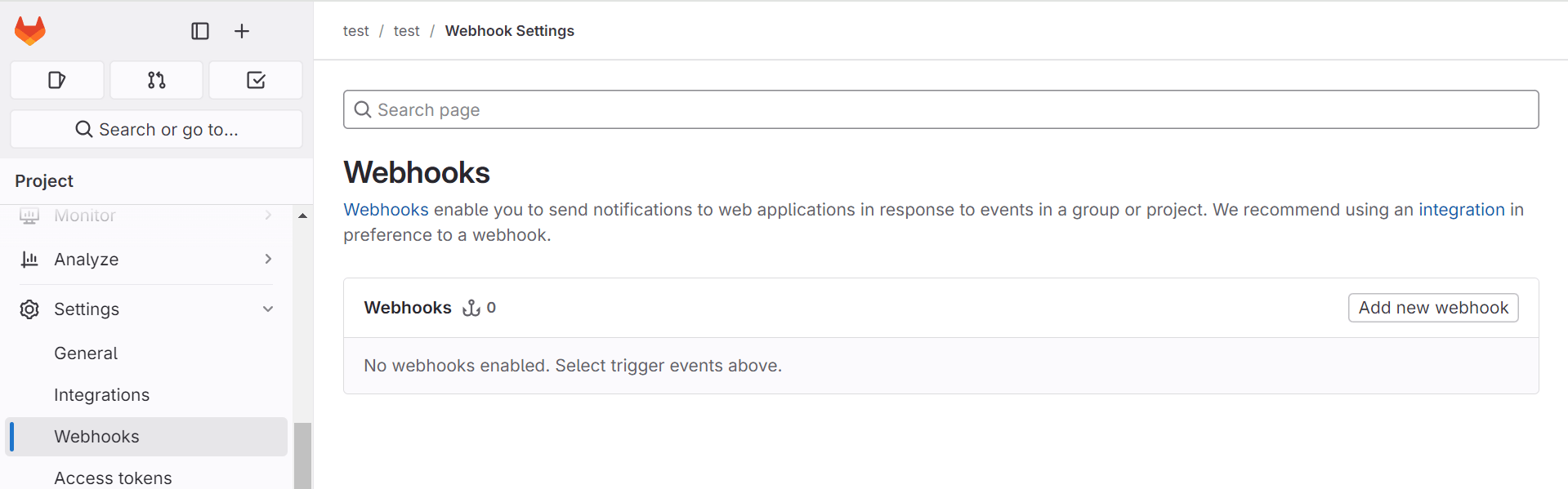
In your GitLab project:
- Navigate to Settings > Webhooks
- Click Add new webhook
- Enter the Hookdeck URL as the webhook URL
- Select the events you want to receive (Push events, Merge request events, Pipeline events, etc.)
- Add a secret token for verification (optional but recommended)
- Click Add webhook
Step 3: Configure your destination
In Hookdeck, configure your destination settings:
// Destination configuration
{
  "url": "https://your-server.com/api/webhooks/gitlab",
  "rate_limit": {
    "limit": 10,
    "period": "second"
  },
  "retry": {
    "strategy": "exponential",
    "count": 5,
    "interval": 30000
  }
}
Key benefits for GitLab webhooks
Never miss a webhook
Hookdeck acknowledges GitLab webhooks instantly, so they're never marked as failed due to timeout. Even if your server goes down, webhooks are queued and delivered when it's back online.
Rate limiting
Control how fast webhooks are delivered to your server. This is crucial during:
- Large merge request activity
- Automated testing that generates many pipeline events
- Bulk repository operations
// Limit to 5 webhooks per second
{
  "rate_limit": {
    "limit": 5,
    "period": "second"
  }
}
Automatic retries
Configure retry behavior to match your infrastructure:
// Retry failed deliveries with exponential backoff
{
  "retry": {
    "strategy": "exponential",
    "count": 5,
    "interval": 30000  // Start with 30 seconds
  }
}
Event filtering
Process only the webhooks you need:
// Only process merge requests to main branch
{
  "filters": [
    {
      "path": "$.object_attributes.target_branch",
      "operator": "equals",
      "value": "main"
    }
  ]
}
Visibility and debugging
Hookdeck provides a dashboard showing:
- All webhook deliveries with full request/response data
- Failed deliveries and retry history
- Latency metrics
- Filtering effectiveness
This visibility is invaluable when debugging CI/CD pipeline issues.
Updating your webhook handler
With Hookdeck in place, your webhook handler can focus on business logic without timeout anxiety.
Conclusion
GitLab's 10-second webhook timeout is a common source of CI/CD pipeline reliability issues. While you can work around it by building your own queue infrastructure, Hookdeck provides a turnkey solution. By using Hookdeck, you can focus on building your CI/CD workflows instead of managing webhook infrastructure.
Additional resources
