 Gareth Wilson
Guide to GitLab Webhooks: Features and Best Practices
GitLab webhooks allow you to connect GitLab to external applications and automate your development workflow. When specific events occur in GitLab (like code pushes, merge requests, pipeline completions, deployments) webhooks send HTTP POST requests with detailed information to your configured endpoints. This enables automated processes that react to repository changes without manual intervention or API polling.
This guide covers GitLab webhook features, configuration options, security considerations, common limitations, and best practices for building reliable integrations. See also how to solve GitLab webhook timeout errors and prevent automatic webhook disabling.
How GitLab webhooks work
When you configure a webhook in GitLab, you specify a URL endpoint and select which events should trigger notifications. Each time a selected event occurs, GitLab sends an HTTP POST request to your endpoint containing a JSON payload with details about the event.
GitLab supports webhooks at multiple levels:
- Project webhooks receive events from a single repository
- Group webhooks receive events from all projects within a group (available on Premium and Ultimate tiers)
- System hooks receive events across the entire GitLab instance (administrator access required)
The webhook request includes custom headers that help your endpoint identify and verify the source:
X-Gitlab-Event— The event type (e.g.,Push Hook,Merge Request Hook)X-Gitlab-Token— The secret token you configured for verificationX-Gitlab-Instance— The GitLab instance URLX-Gitlab-Webhook-UUID— A unique identifier for the webhook configurationX-Gitlab-Event-UUID— A unique identifier for this specific event delivery
GitLab webhook features
| Feature | Details |
|---|---|
| Webhook configuration | GitLab UI or API |
| Verification method | Plaintext secret token in header |
| Timeout | 10 seconds |
| Retry logic | No configurable retries |
| Auto-disable | After 4 consecutive failures (temporary) or 40 (permanent) |
| Manual retry | Available via UI for recent events |
| Browsable log | 2 days in UI, 7 days via API |
Supported webhook events
GitLab provides a comprehensive set of event triggers covering most development workflow activities.
Code events
Push events fire when commits are pushed to the repository. The payload includes the list of commits, branch name, before and after commit SHAs, and information about who pushed the code. Note that push events have a default limit of 3 branches per push, which if exceeded means no webhook fires.
Tag push events trigger when tags are created or deleted, useful for release automation workflows.
Merge request events
Merge request events fire on creation, updates, approvals, merges, and closures. The object_attributes.action field indicates the specific action:
open— New merge request createdupdate— Merge request modifiedapproval/approved— Individual or full approval addedunapproval/unapproved— Approval removedmerge— Merge request mergedclose— Merge request closed
Some merge request events are system-triggered rather than user-initiated. These include a system boolean field and system_action field (e.g., approvals_reset_on_push when approvals reset due to new commits).
CI/CD events
Pipeline events fire when pipelines start, succeed, fail, or are canceled. The payload includes pipeline status, stages, and associated commit information.
Job events provide granular notifications for individual CI/CD jobs within pipelines.
Deployment events trigger when deployments start, succeed, fail, or are canceled. The payload includes environment information and the deployable (CI/CD job) details.
Collaboration events
Issue events fire on issue creation, updates, and state changes. Confidential issues have a separate event type for access control.
Comment events (note events) trigger when comments are added to commits, merge requests, issues, or code snippets. The payload includes the comment content and information about the target object.
Wiki page events fire when wiki pages are created, updated, or deleted.
Other events
- Release events — When releases are created
- Feature flag events — When feature flags are toggled
- Member events — When project/group membership changes
- Subgroup events — When subgroups are created or removed
- Resource access token events — When access tokens are created, expire, or are revoked
See GitLab webhook payloads in action. Inspect and replay sample GitLab webhook payloads in the Hookdeck Console — no account or setup required.
Configuring webhooks
Creating a project webhook
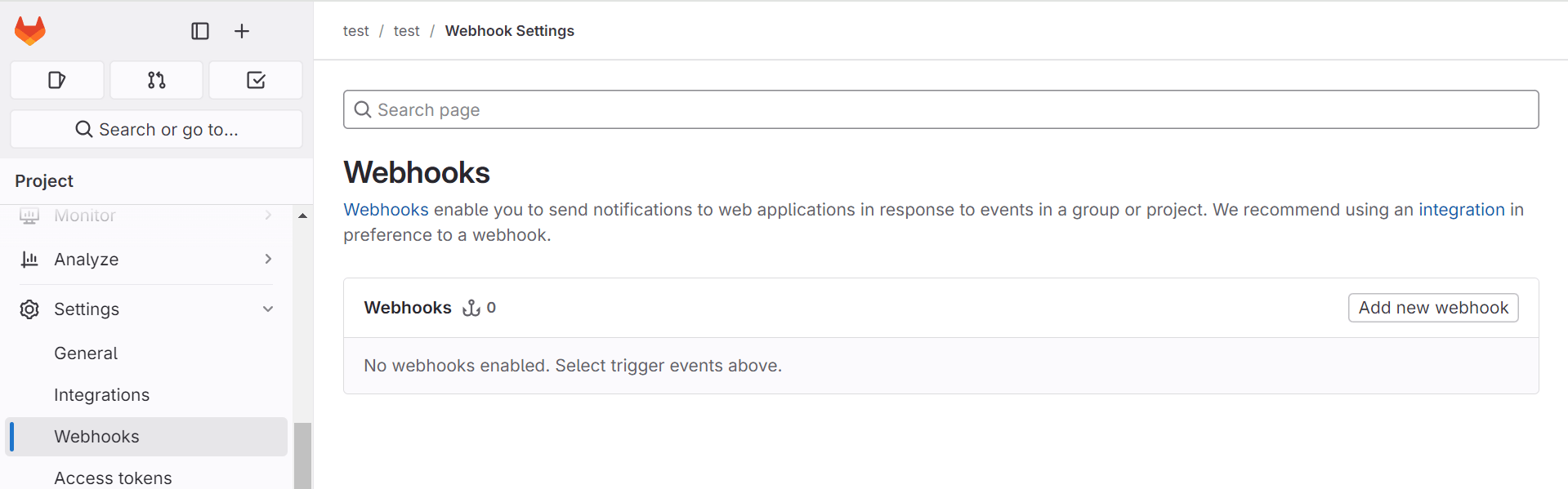
- Navigate to your project's Settings > Webhooks
- Enter your endpoint URL
- Optionally add a Secret token for verification
- Select the Trigger events you want to receive
- Configure SSL verification (enabled by default)
- Click Add webhook
Configuration options
URL: The endpoint that receives webhook payloads. Must be accessible from your GitLab instance.
Secret token: A string sent in the X-Gitlab-Token header. Your endpoint should verify this value matches your configured secret before processing the webhook.
SSL verification: When enabled, GitLab verifies the SSL certificate of your endpoint. Disable only for testing with self-signed certificates.
Custom headers: Add up to 20 custom HTTP headers to webhook requests. Useful for authentication with downstream services or adding routing metadata.
URL variables: Define variables that can be used in the webhook URL, allowing dynamic endpoint configuration.
Branch filtering
You can filter push events to specific branches using Push events branch filter. This supports:
- Wildcard matching (e.g.,
feature/*) - Regular expressions (when wrapped in forward slashes)
- Exact branch names
Using the API
Create webhooks programmatically using the Project Webhooks API:
curl --request POST \
  --header "PRIVATE-TOKEN: <your_access_token>" \
  --header "Content-Type: application/json" \
  --data '{
    "url": "https://your-endpoint.com/webhook",
    "token": "your-secret-token",
    "push_events": true,
    "merge_requests_events": true,
    "enable_ssl_verification": true
  }' \
  "https://gitlab.example.com/api/v4/projects/:id/hooks"
Security considerations
Verifying webhook authenticity
GitLab sends the secret token in the X-Gitlab-Token header as a plaintext string. Your endpoint should compare this value against your stored secret:
from flask import Flask, request, abort

app = Flask(__name__)
GITLAB_SECRET = "your-secret-token"

@app.route('/webhook', methods=['POST'])
def handle_webhook():
    token = request.headers.get('X-Gitlab-Token')

    if token != GITLAB_SECRET:
        abort(401)

    # Process the webhook
    payload = request.json
    # ...
Important: GitLab does not use HMAC signature verification like GitHub. The secret is sent directly in the header rather than being used to sign the payload. While this is secure over TLS, it means the secret is transmitted with every request rather than being used cryptographically. Here's more details on securing GitLab webhooks.
Network security
GitLab blocks webhook requests to local network addresses by default to prevent server-side request forgery (SSRF) attacks. Blocked addresses include:
127.0.0.1,::1,0.0.0.0- Private network ranges:
10.0.0.0/8,172.16.0.0/12,192.168.0.0/16 - IPv6 site-local addresses
For self-managed GitLab instances that need to send webhooks to internal services, administrators can:
- Enable "Allow requests to the local network from webhooks and integrations" in Admin > Settings > Network > Outbound requests
- Add specific IPs or domains to the allowlist
Recursive webhook protection
GitLab detects and blocks recursive webhooks that could create infinite loops. The maximum number of chained webhook requests is 100. If your webhook calls the GitLab API and triggers another webhook, be aware of this limit.
GitLab webhook limitations and pain points
Understanding GitLab webhook limitations helps you design more robust integrations. This section covers the most significant pain points developers encounter, along with workarounds and how dedicated webhook infrastructure can help.
Short timeout window
The Problem: GitLab waits only 10 seconds for your endpoint to respond. If no response is received within this window, the delivery is marked as failed. Network latency counts against this timeout, leaving even less time for actual processing.
Impact: Synchronous processing that involves external API calls, database queries, or any computation risks timeout failures. Even brief network congestion can push response times over the limit, causing legitimate requests to fail.
Workarounds:
- Acknowledge webhooks immediately and process them asynchronously
- Use a message queue to decouple reception from processing
- Ensure your endpoint infrastructure has low latency to GitLab's servers
How Hookdeck Can Help: Hookdeck responds to GitLab within 200ms, well under the timeout threshold. Your actual endpoint can then take as long as needed to process the webhook, since Hookdeck handles the time-sensitive acknowledgment to GitLab.
Aggressive automatic disabling
The Problem: GitLab automatically disables webhooks that fail repeatedly: 4 consecutive failures triggers temporary disabling (starting at 1 minute, extending up to 24 hours), and 40 consecutive failures results in permanent disabling. A failure includes any 4xx/5xx response, connection timeout, or HTTP error.
Impact: Brief endpoint downtime during a busy period can quickly accumulate failures. A 5-minute outage during active development could permanently disable your webhook, and you won't know until you notice missing events. Re-enabling requires manual intervention via the GitLab UI or API.
Workarounds:
- Implement health monitoring for your webhook endpoints
- Set up alerts for webhook failures before reaching the disable threshold
- Use highly available infrastructure for critical webhook receivers
- Periodically check webhook status via the GitLab API
How Hookdeck Can Help: Since Hookdeck always responds successfully to GitLab, your failure counter never increments. Even if your actual endpoint is down for hours, GitLab continues sending webhooks to Hookdeck, which queues them for delivery once your endpoint recovers.
No configurable retry queue
The Problem: GitLab does not have a traditional retry mechanism that attempts delivery multiple times with exponential backoff. While GitLab may retry on timeouts and re-enables temporarily disabled webhooks after backoff periods, if your endpoint returns an error or is unavailable, that specific event delivery fails immediately.
Impact: A single failed delivery means a lost event. Unlike platforms like Shopify (19 retries over 48 hours) or Stripe (multiple retries with exponential backoff), GitLab offers no second chances. For critical workflows like CI/CD triggers or deployment automation, this can cause significant problems.
Workarounds:
- Build redundant, highly available webhook receivers
- Implement reconciliation jobs that poll the GitLab API to detect missed events
- Log all expected events and compare against received webhooks to identify gaps
How Hookdeck Can Help: Hookdeck provides configurable automatic retries with exponential backoff (up to 50 attempts over a week). Failed deliveries are queued and retried until successful, ensuring no events are permanently lost due to transient failures.
Duplicate webhook deliveries
The Problem: Several scenarios cause the same event to be delivered multiple times:
- Group and project webhooks: Configuring identical webhooks at both levels causes both to fire
- Pipeline stages: Pipeline webhooks fire once per stage completion, not once per pipeline
- Timeout-related retries: If GitLab doesn't receive your response in time, it may retry
- Multiple triggers: A single action can trigger multiple event types (e.g., merge triggers both merge request and push events)
Impact: Without idempotent handlers, duplicate webhooks cause duplicate processing. See Webhook Ordering: Why It's Hard and How to Handle It for strategies that also apply to duplicate scenarios. That means double notifications, duplicate database entries, or repeated API calls to external systems.
Workarounds:
- Design all webhook handlers to be idempotent
- Track processed event IDs and skip duplicates
- Use database unique constraints to prevent duplicate records
- Implement deduplication logic based on
X-Gitlab-Event-UUIDheaders
How Hookdeck Can Help: Hookdeck offers configurable deduplication that filters duplicate events before they reach your endpoint. You can deduplicate based on the entire payload or specific fields, with time windows from 1 second to 1 hour.
Limited log retention
The Problem: GitLab's "Recent Events" view in the UI only shows webhook deliveries from the last 2 days. The API provides access to 7 days, but no longer.
Impact: Debugging intermittent issues or investigating problems that occurred last week is impossible using GitLab's native tools. By the time you notice a pattern of failures, the relevant logs may already be gone.
Workarounds:
- Log all received webhooks on your receiving end with full payloads
- Export webhook logs to external logging systems (ELK, Datadog, etc.)
- Set up monitoring dashboards to track webhook patterns over time
How Hookdeck Can Help: Hookdeck retains webhook events for up to 30 days (depending on plan), with full request/response data, searchable logs, and the ability to replay any historical event.
Push event branch limits
The Problem: By default, push events only fire when a push includes changes to 3 or fewer branches. If a single push updates more than 3 branches, no webhook fires at all.
Impact: Repository migrations, bulk branch operations, and automated tools that update multiple branches can fail silently. You won't receive any notification that the webhook didn't fire.
Workarounds:
- Self-managed GitLab administrators can increase the
push_event_hooks_limitsetting - Break bulk operations into smaller pushes (3 branches or fewer each)
- Implement polling-based reconciliation for operations that might exceed the limit
- For GitLab.com users, there's no workaround, you must work within the limit
How Hookdeck Can Help: Hookdeck cannot work around GitLab's internal limits on when webhooks fire. However, for pushes that do trigger webhooks, Hookdeck ensures reliable delivery. Consider combining webhooks with periodic API polling for complete coverage.
Rate limiting
The Problem: GitLab.com enforces rate limits on webhook deliveries. Exceeding these limits results in failed deliveries with "Webhook rate limit exceeded" errors.
Impact: High-activity periods (such as major releases, bulk merges, or automated processes) can trigger rate limiting, causing webhook failures precisely when you have the most events to process.
Workarounds:
- Monitor GitLab logs for rate limit messages
- Spread automated operations over time to avoid bursts
- Implement backoff logic in automated systems that trigger many GitLab events
How Hookdeck Can Help: Since Hookdeck responds instantly to GitLab, webhook processing completes faster, reducing the chance of hitting rate limits. Hookdeck also provides its own rate limiting to protect your downstream endpoints from being overwhelmed.
Make GitLab webhooks production-ready. Hookdeck Event Gateway handles verification, retries, deduplication, and replay so your CI/CD and automation never miss an event.
Best practices
Respond quickly and process asynchronously
Return a 2xx response as fast as possible, ideally within milliseconds. Never perform significant processing before responding. Use Hookdeck or a message queue (Redis, RabbitMQ, SQS) to decouple reception from processing.
This architecture ensures fast responses to GitLab, provides durability if your processor crashes, allows independent scaling, and enables retry logic for failed processing.
Implement idempotent handlers
Design your webhook handlers to produce correct results regardless of how many times they receive the same event:
def process_merge_request_webhook(payload):
    mr_id = payload['object_attributes']['id']
    action = payload['object_attributes']['action']

    # Check if we've already processed this event
    cache_key = f"mr_{mr_id}_{action}"
    if cache.get(cache_key):
        return  # Already processed

    # Process the event
    do_processing(payload)

    # Mark as processed with TTL
    cache.set(cache_key, True, ex=3600)
Validate payloads
Don't assume webhook payloads are well-formed. Validate the structure before processing:
def process_push_event(payload):
    # Validate required fields exist
    required = ['ref', 'commits', 'project']
    if not all(key in payload for key in required):
        logger.warning(f"Malformed push event: {payload}")
        return

    # Process with confidence
    branch = payload['ref'].replace('refs/heads/', '')
    # ...
Build your own observability
Since GitLab's logging is limited to 2-7 days, implement comprehensive logging on your end: log all received webhooks with timestamps and event IDs, track success/failure rates, alert on elevated failure rates, and monitor for gaps in expected events.
Test with real events
Use GitLab's "Test" button to send sample payloads during development. For more realistic testing, use webhook inspection tools like Hookdeck's Console to capture real payloads, then replay them against your local environment. The Hookdeck CLI can tunnel webhooks to localhost for development. Here's more details on testing and replaying GitLab webhooks with Hookdeck.
Conclusion
GitLab webhooks provide powerful automation capabilities for development workflows, but they come with significant reliability limitations. The 10-second timeout, aggressive auto-disabling after just 4 failures, lack of configurable retries, and limited log retention mean that production integrations require careful architecture.
For simple, non-critical integrations, GitLab's native webhook system works adequately. For workflows where missed events cause real problems (like CI/CD triggers, deployment automation, compliance logging, external system synchronisation) you'll need to build additional reliability into your architecture.
The key principles for reliable GitLab webhook integrations are: respond immediately, process asynchronously, handle duplicates gracefully, and monitor continuously. For critical systems, consider routing webhooks through dedicated infrastructure like Hookdeck to gain automatic retries, extended logging, deduplication, and protection against GitLab's auto-disabling behaviour. With these practices in place, GitLab webhooks become a dependable foundation for your development automation.
Get started with Hookdeck for free and start handling GitLab webhooks reliably in minutes.
