 Phil Leggetter
Turn any webhook into an MCP event with the MCP Events bridge
MCP Events is a draft MCP extension, SEP-3415, that lets an agent subscribe to an MCP server's events. ChatGPT was the first major platform to add support for it, even though it's still in development. In ChatGPT, you can ask to be told when something happens, and a Monitoring task runs each time an event arrives. An agent can only subscribe to servers that implement the extension, and few do yet.
I have not seen near enough excitement about MCP Events https://t.co/tlWV1jyuxX
— Nathan Baschez (@nbaschez)October 3, 2026
Right now, the only way most people's agents can wake up and do something is either A) cron, or B) you decide to message it
Event-driven triggers are a huge deal
In response to a post discussing the power of MCP Events, a reply wished Resend supported MCP Events, so their agent could have its own inbox and wake up when they emailed it.
This got us thinking... what if Event Gateway provided MCP Events for providers who have yet to add support yet? Afterall, Resend sends an email.received webhook when a message arrives at an inbound address. GitHub and Stripe send webhooks too, as do most services an agent might want to hear from.
So we created the MCP Events bridge to turn those webhooks into MCP events. It's an open-source (MIT) MCP server built on Hookdeck Event Gateway. In the video, an email reaches ChatGPT, a new GitHub issue reaches an agent built with the Vercel AI SDK, and a comment wakes Claude Code.

What the MCP Events bridge does:
- Turns webhooks into MCP events. Resend inbound email and GitHub are built in, and
setupregisters their webhooks for you. Stripe, Slack and many more services work through Event Gateway's source types, and your own services through signed or authenticated webhooks. - Verifies every webhook. Event Gateway checks each webhook's signature or credentials before it becomes an event.
- Lets subscribers choose what wakes them, with filters such as an email's sender, or a GitHub repository and action.
- Delivers to ChatGPT and other MCP Events clients by webhook. Event Gateway signs each delivery with the subscriber's secret, drops duplicates and retries failures.
- Wakes Claude Code through a plugin, including while Claude is idle between prompts.
- Offers poll tools for other MCP clients, and callback URLs from the Hookdeck CLI for agents on your laptop.
- Replays missed events from a cursor, read back from Event Gateway's history.
- Keeps no database. Each subscription is an Event Gateway connection, so deliveries continue while the bridge restarts.
- Sets up with a coding agent, through the bridge's Agent Skill.
How a webhook becomes an MCP event
MCP Events has three delivery modes. In webhook mode, the MCP server POSTs each event to a callback URL the client gives it when it subscribes. In poll mode, the client calls events/poll. Push mode streams events over events/stream. The bridge supports webhook and poll, and this is how a webhook delivery works:
- The service sends its usual webhook to the Event Gateway source URL that the bridge's
setupcommand created. - Event Gateway checks the service's signature and keeps the request. A request that fails verification goes no further.
- Event Gateway turns the webhook into an MCP event with a transformation that the bridge sets up. Events are named
{source}.{event}, such asresend.email.receivedorgithub.workflow_run, wheresourceis the source's ID in your config andeventis the service's own name for the event. Each one includes an ID, a timestamp and the webhook's data, which is a summary for Resend and GitHub, and the JSON body, or the fields you choose, for other sources. - Event Gateway delivers the event to each subscriber whose filters it matches, through one connection per subscription. It signs every attempt with the secret the subscriber gave when it subscribed, drops repeats and retries on failure.
Services that send webhooks reach Hookdeck Event Gateway, which turns each one into an MCP event and delivers it to the subscribed agent. The MCP Events bridge sets up each subscription in Event Gateway.
- Few MCP servers offer events yet, but many services already send webhooks.
- The MCP Events bridge: an open-source MCP server, built on Hookdeck Event Gateway.
- Event Gateway turns the webhook into an MCP event and delivers it, with retries.
- No public URL? Poll the bridge, or use a callback URL through the Hookdeck CLI.
The bridge is the MCP server beside Event Gateway. It lists the events on offer, takes subscriptions and sets each one up as an Event Gateway connection with its own filter, dedupe and retry rules. It keeps no database, and Event Gateway doesn't relay events through it, so deliveries continue while it restarts or redeploys.
A bridge that stored subscriptions and delivered events itself would need a database, a queue and a retry scheduler next to every deployment. Event Gateway already runs those, so the bridge is an MCP server that configures Event Gateway, and little else.
Event Gateway's record of every request also serves the bridge's poll mode, replay, and its get_event and list_events tools. Each delivery includes a cursor, and a client that subscribes again with its latest cursor gets the events it missed, as far back as Event Gateway keeps requests (3 days on the Developer plan).
Sources for Resend, GitHub, Stripe and your own services
Sources are listed in bridge.config.ts:
import { defineConfig, env } from '@hookdeck/mcp-events-bridge';
import { github, resend, source } from '@hookdeck/mcp-events-bridge/sources';

export default defineConfig({
  sources: [
    resend({ apiKey: env('RESEND_API_KEY') }),
    github({
      // only setup uses the token; a deployed bridge runs without it
      token: env('GITHUB_TOKEN', { optional: true }),
      scope: { repos: ['your-org/your-repo'] },
    }),
  ],
});
- Resend: inbound email, offered as
resend.email.received, with the sender, recipients and subject. The body stays in Resend; the agent reads it with Resend's own tools. Subscribers filter byfromandto. - GitHub: 26 webhook types, such as
github.issues,github.pull_requestandgithub.workflow_run, filtered by repository, action or sender. Seven are on by default (issues, issue comments, pull requests, reviews, pushes, releases and workflow runs); choose others withevents: [...], or['*']for all.setupadds the repository webhooks with a fine-grained token, or you add them by hand. - Stripe, Slack, Shopify, Linear and many more:
source({ type })uses Event Gateway's own source type for the service. Event Gateway checks the service's signatures, including the timestamped ones Stripe and Slack send, and answers Slack's URL verification when you register the URL, so neither needs code. You name the events, say where the service puts each event's type and ID, and paste the URLsetupprints into the service's webhook settings. The TypeScript types list each type's credentials, so a config with a missing or unknown one doesn't compile. We've tested it with requests signed as Stripe and Slack sign them, and authenticated as Postmark does, but not yet from accounts at those services. - Your own services: a
webhooksource takes any sender that signs the request body with HMAC or Standard Webhooks, or sends Basic auth or an API key. Event Gateway verifies every request, and there's no unverified option, because anyone with the URL could otherwise wake your agent with whatever they sent.
Stripe, for example, is one more entry in sources, and its events are offered as stripe.invoice.paid and stripe.customer.subscription.deleted:
source({
  type: 'stripe',
  secret: env('STRIPE_WEBHOOK_SECRET'), // the signing secret, whsec_...
  events: {
    'invoice.paid': { description: 'A Stripe invoice was paid.' },
    'customer.subscription.deleted': {
      description: 'A Stripe subscription ended.',
    },
  },
  eventType: { field: 'type' }, // where Stripe names the event
  eventId: { field: 'id' },     // evt_..., stable across Stripe's retries
  occurredAt: { field: 'created' },
}),
Once the bridge is installed (see the next section), you can also add a source from the command line. A trading server that sends a webhook when an order fills, for example, becomes fills.order.filled, and an agent subscribes to fills for the symbols it trades:
npx mcp-events-bridge sources add fills --type webhook \
  --event order.filled --event-id-header x-delivery-id \
  --filter symbol --filter side
That creates the Event Gateway source, prints its URL to register with the sender, adds an empty credential variable to .env (here FILLS_WEBHOOK_SECRET=), and prints the source({...}) entry for your config. Put the secret the sender gives you in .env and run setup again; until then, serve won't start. --type stripe and the other source types work the same way.
When those options aren't enough, for example for a payload that needs summarizing, you can write your own source with defineSource. It sets how each event is recognized and summarized, and which filters subscribers can use. Its functions run inside Event Gateway, so they have to be self-contained.
The README's Sources section covers every option.
Set up the MCP Events bridge
You need Node 22.12 or later and a free Hookdeck account with a project for the bridge (its API key and signing secret). To run the bridge locally, install the Hookdeck CLI. You also need at least one source, such as a Resend or GitHub account, or any service that signs or authenticates its webhooks, including your own.
mkdir my-bridge && cd my-bridge
npm init -y && npm pkg set type=module
npm install @hookdeck/mcp-events-bridge
# .env and .hookdeck/ hold credentials
printf 'node_modules/\n.env\n.hookdeck/\n' > .gitignore
- Choose sources in
bridge.config.ts, as above. - Add
HOOKDECK_API_KEY,HOOKDECK_SIGNING_SECRETand each source's credentials to.env. - Run
npx mcp-events-bridge setup. It creates the Event Gateway sources and their transformations, and registers the Resend and GitHub webhooks for you. The first run generates an MCP secret, which you add to.envasBRIDGE_MCP_SECRET. - Run
npx mcp-events-bridge serve. Locally, it also startshookdeck listen, so Event Gateway's notifications about failing callbacks reach the bridge on your laptop.
A coding agent can do this for you with the bridge's Agent Skill:
npx skills add hookdeck/mcp-events-bridge
Then ask it to set up the bridge. The README covers every option and deploying to Fly.io, the documented host.
Subscribe to Resend and GitHub events from ChatGPT
ChatGPT supports MCP Events with webhook delivery, in Work chats (ChatGPT's Work mode). To connect the bridge:
- Run the bridge where ChatGPT can reach its MCP endpoint. Deploy it to Fly.io, or expose a local bridge with a tunnel. The Hookdeck CLI can't replace the tunnel here, because ChatGPT needs the bridge's responses to its MCP requests, and Event Gateway answers each request itself rather than passing back the bridge's. Events don't need the tunnel, because Event Gateway delivers them to ChatGPT directly.
- With Developer mode on (ChatGPT Plus or above), go to Plugins, choose Add > Create MCP App, paste
https://<your bridge>/mcp/<BRIDGE_, and choose No Authentication.MCP_ SECRET> - In a Work chat, ask to be told about events, such as "Tell me about every new inbound email to the Resend address, with the sender and subject" or "Tell me when someone opens an issue in your-org/your-repo."
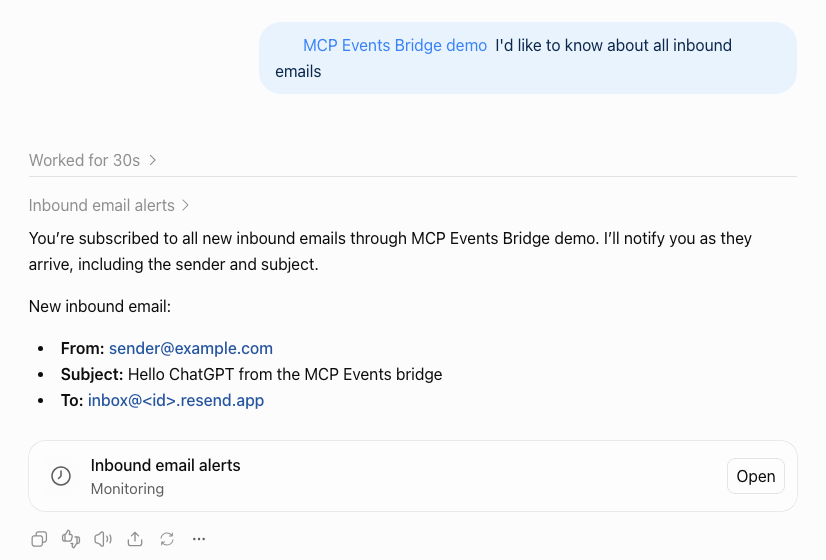
ChatGPT subscribes and creates a Monitoring task.
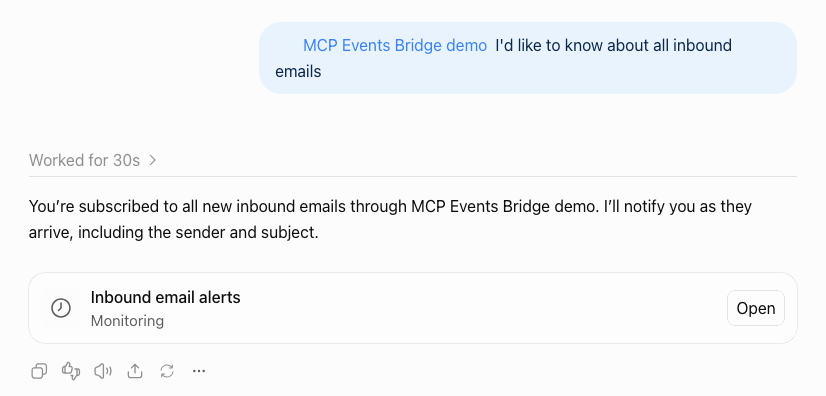
Each event that arrives runs the task with the event's data.
ChatGPT can't send a custom header (it offers OAuth or no authentication), so it takes the bridge's secret in the URL. Treat that URL as a credential (a capability URL).
An email's subject can say anything, and the agent reads it, so treat event content as untrusted input (a prompt-injection risk). In our tests, the task prompt ChatGPT wrote told it to treat email metadata as untrusted. Filter by sender where you can, though an email's from can be forged.
Claude Code, through a plugin
Claude doesn't support MCP Events yet (there's an open feature request for Claude Code), so the bridge comes with a Claude Code plugin that polls for events instead:
/plugin install mcp-events-bridge --marketplace hookdeck/mcp-events-bridge
The plugin asks for the bridge's MCP endpoint (https://<your bridge>/mcp) and its secret, which it sends as an Authorization: Bearer header, and keeps both in Claude Code's secure storage. Plugin monitors can't read that storage, so the plugin also writes a copy to ~/.claude/plugins/data/mcp-events-bridge-hookdeck/, readable only by you, and uninstalling the plugin deletes it.
Then ask Claude for what you want to hear about, such as "watch <owner>/<repo> for new issues and comments" or "tell me when an email arrives". The plugin keeps a watch list per project and runs the bridge's watch command as a Claude Code monitor for the whole session, so each event wakes Claude, including while it's idle between prompts.
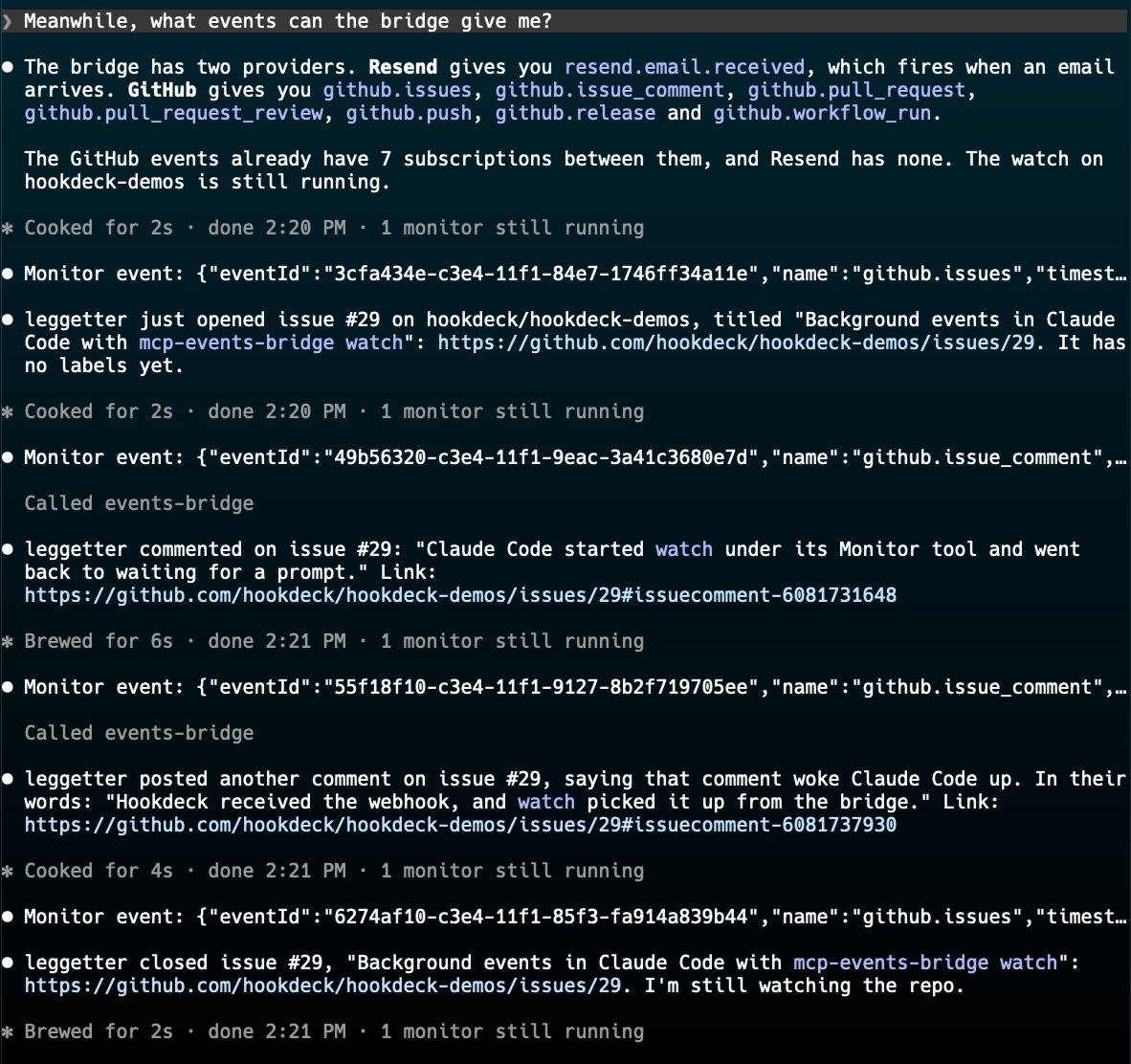
A new session first catches up on events it missed, up to 24 hours back. The plugin needs no public URL, so it works with a bridge on your laptop. Its monitors run in interactive sessions, not with claude -p.
Other MCP clients and agents
Outside ChatGPT, experimental support has shipped in an agent and three client libraries:
- Hermes Agent, with webhook delivery.
- The Vercel AI SDK (
@ai-sdk/mcp), with webhook delivery. - Mastra (
@mastra/mcp), with poll or webhook delivery. - TanStack AI (
@tanstack/ai-mcp), with webhook delivery.
It isn't in the official MCP SDKs yet, and OpenClaw has it only in beta builds, which we haven't tested.
ChatGPT reads an earlier, top-level events capability, and newer clients read SEP-3415's extension capability, so the bridge declares both. We've tested the bridge with ChatGPT, Hermes Agent, the Vercel AI SDK, Mastra and TanStack AI. The README lists the supported MCP clients. The bridge's Agent Skill has setup guides for Claude Code, Hermes Agent and the client libraries, with working code for the AI SDK, Mastra and TanStack AI.
An agent without MCP Events support, or without a public URL for webhook delivery, can still use the bridge:
- The
wait_for_eventandpoll_eventstools.wait_for_eventreturns as soon as there are events, or after up to 50 seconds without any. We've used them in Claude Code, and haven't yet tested them in Cursor, Codex or other clients. events/poll, for clients that implement MCP Events' poll mode.- A callback URL for an agent on your laptop. A bridge running on the same machine gives the agent a public callback URL (its
create_callback_urltool), through Event Gateway and the Hookdeck CLI, so the agent can use webhook delivery without a public address of its own. Hermes Agent, v0.22.5 or later, works with the bridge this way. Hermes and the client libraries use a pass-through callback URL, which Event Gateway doesn't verify, so the agent has to check each delivery's signature itself.
Clients that can send a header connect to /mcp with the secret as a bearer token, because a URL is easily logged or saved in a client's files, and a header much less so. In Claude Code, without the plugin:
claude mcp add --transport http events-bridge https://<your bridge>/mcp \
  --header "Authorization: Bearer <BRIDGE_MCP_SECRET>"
Then ask Claude to wait for an event, such as "wait for fills.order.filled for AAPL and tell me about each fill".
What the MCP Events bridge doesn't do yet
- The bridge tracks a draft. SEP-3415 is still in review and not yet voted on, so details can change, and the bridge's config and tools may change with it. Known gaps are in the bridge's conformance table.
webhook-idfollows today's clients, not SEP-3415's latest revision. SEP-3415's October 23 revision gives each delivered message its ownwebhook-id, separate from the event'seventId. Today's clients expect the opposite. OpenAI's guide for ChatGPT sayswebhook-idmust equaleventId, and the Vercel AI SDK and TanStack AI reject deliveries where they differ. The bridge follows the clients for now, and we'll update it once they take on the change.- Webhook and poll delivery only. There's no push mode (
events/stream). - ChatGPT uses a secret URL. OAuth in the bridge is planned.
- One owner per bridge. Anyone with the secret has full access; there are no per-user accounts.
- One Hookdeck project per bridge. Bridges in the same project share sources, subscriptions and callback URLs, so give each bridge its own project.
What we're building into Event Gateway
The bridge takes webhooks from any service that signs or authenticates them, and turns them into MCP events for ChatGPT and other MCP Events clients, and for Claude Code through the plugin. We're building the same capability into Event Gateway itself, so that an agent's MCP client can subscribe to Event Gateway directly, without a bridge to run. What you tell us about the bridge goes into that work.
What we're building into Hookdeck Event Gateway: services send webhooks to Event Gateway, an agent's MCP client subscribes to Event Gateway directly, and Event Gateway turns each webhook into an MCP event and delivers it, with retries. Planned, not yet available.
What we're building: an agent subscribes to Event Gateway directly, and Event Gateway turns each webhook into an MCP event and delivers it.
One team that has built MCP Events into its own agent platform already routes the webhooks it receives from other services through Event Gateway. It asked for three things, and the bridge has all of them:
- A fresh signature on every retry, which Event Gateway's Standard Webhooks destination auth now does.
- Filters on subscription arguments.
- Replay from a cursor.
More on MCP Events
- What Is MCP Events?: how subscriptions, delivery modes and signing work, with step-through diagrams and a six-minute video.
- Use Event Gateway as a forward proxy for MCP Events: receive MCP events in your own agent runtime with Event Gateway's MCP Events source type.
- Send MCP Events webhooks with Outpost: if you're building an MCP server and want to send MCP events reliably.
- MCP Events resources: every guide, demo and video in one place.