 Gareth Wilson
Using Hookdeck with Grok Bot: Reliable Webhook Triggers for Your AI Teammate
Grok Bot is an always-on AI teammate from xAI and Cursor. Each Bot has its own persistent cloud computer with a browser, a filesystem, and a terminal, and it keeps working after you close your laptop.
Cursor recently added a Webhook trigger to Grok Bot, so any system that can send an HTTP POST can now wake your Bot. But what the trigger doesn't give you is any way to check who sent the request, any filtering over which events wake the Bot, or a record of what arrived beyond the last 20 runs.
Hookdeck's Event Gateway sits in between. It verifies that events come from the provider you expect, filters out the ones that shouldn't wake your Bot, retries when delivery fails, and keeps a searchable log of everything that arrived. This guide covers how the webhook trigger works, and how to wire it up behind the Event Gateway.
What Grok Bot webhook triggers are
Repeatable work in Grok Bot lives in routines: a named instruction that runs whenever a trigger fires. Until this week, a routine could run on a schedule or in response to one of the built-in integrations (Slack messages, Git events, Teams, Linear issues, Sentry alerts, PagerDuty incidents). When you create a routine, click Add trigger, pick Webhook, and Grok Bot gives you a URL and a key.
Eric Zakariasson's launch post lists the kind of thing people are wiring up: a WhatsApp message from a specific contact, a Notion page change, a temperature sensor crossing a threshold, a physical button on a desk, a GitHub Action finishing, an error-rate spike on a server. The common thread is that none of those sources are Cursor integrations. The webhook trigger is what opens the door for everything else.
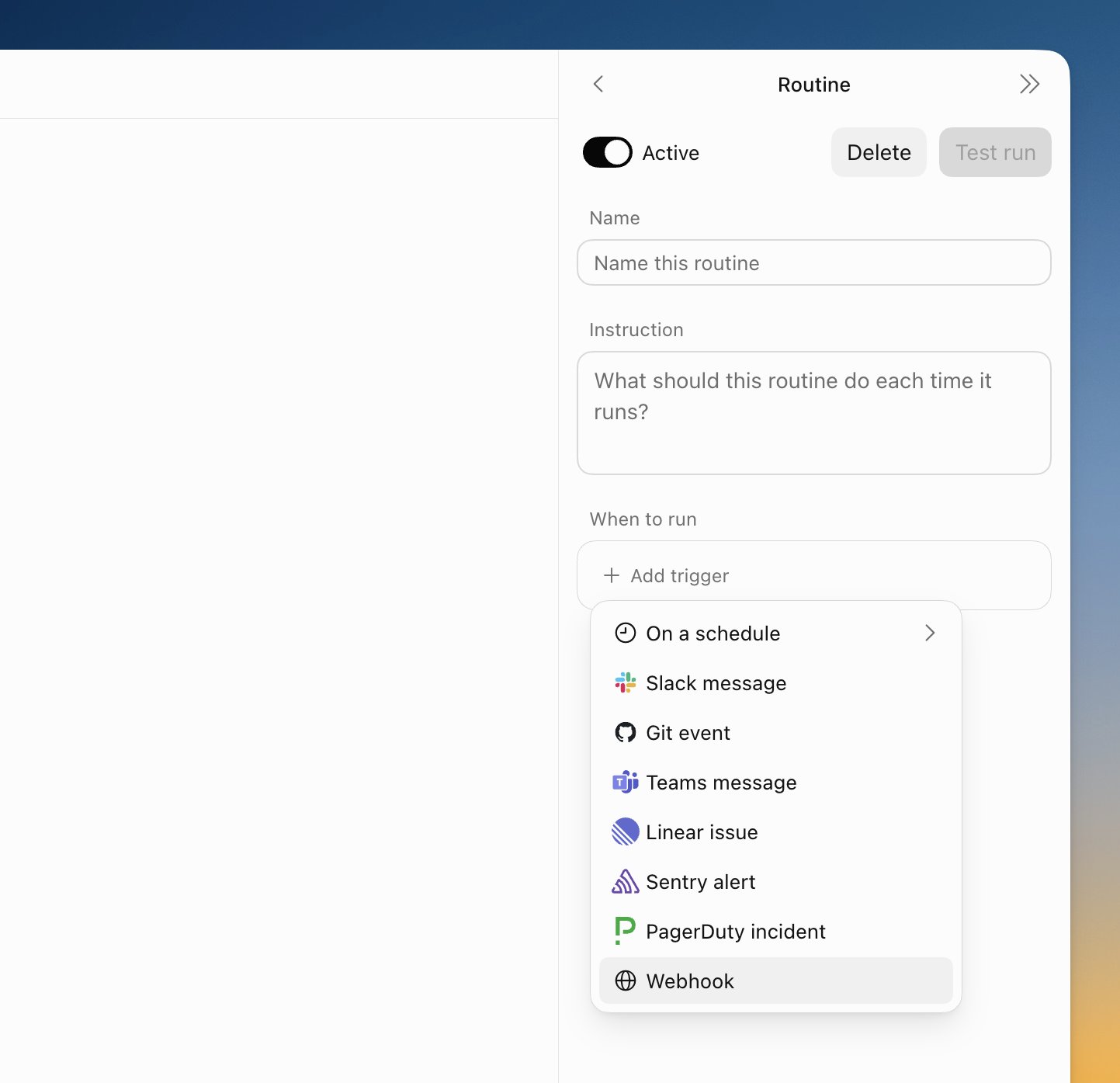
How the Grok Bot webhook trigger works
A webhook-triggered routine has three parts you configure in the Grok Bot app.
Name and instruction. The name identifies the routine. The instruction is what the Bot does each time the trigger fires, in plain language e.g. "Summarise the failed deployment and post it in #ops", "Check whether this Stripe dispute matches an order we've already refunded", and so on.
Trigger URL. Grok Bot generates a unique endpoint for the routine:
https://api2.cursor.sh/automations/webhook/<routine-id>
Key. Alongside the URL you get a secret key prefixed crsr_. Requests must carry it as a Bearer token:
Authorization: Bearer crsr_xxxxxxxxxxxxxxxxxxxxxxxxxxxxxxxxxxxxxxxxxxxxxxxxxxxxxxxxxxxxxxxx
Waking the routine from a terminal looks like this:
curl -X POST "https://api2.cursor.sh/automations/webhook/<routine-id>" \
  -H "Authorization: Bearer $GROK_BOT_WEBHOOK_KEY" \
  -H "Content-Type: application/json" \
  -d '{"event":"deploy.failed","service":"checkout","region":"eu-west-1"}'
Once the routine is saved and toggled Active, the endpoint accepts the request and starts a run. The response comes back immediately with the ID of the run it started, rather than waiting for the Bot to finish:
HTTP/2 200
content-type: application/json; charset=utf-8

{"success":true,"runUuid":"e7559758-ff13-4130-ba30-70fb0bb02a76"}
The endpoint refuses requests it can't act on rather than queueing them. These are the responses observed so far:
| Situation | Status | Response body |
|---|---|---|
| Routine active, key valid | 200 | {"success":true,"runUuid":"..."} |
| Routine's Active toggle is off | 400 | {"success":false,"error":"Automation <routine-id> is disabled"} |
| Wrong or missing key | 401 | {"code":"error","message":"Invalid API key"} |
Two things follow from this. A provider that sends while the routine is paused gets a 400, and that event is gone unless the provider retries on its own. And the two error shapes differ (success/error for a disabled routine, code/message for a bad key), so anything that inspects responses should go by the status code, or treat any body without "success":true as a failed wake.
Use Test run after creating or editing a routine to check the instruction does what you expect. Grok Bot keeps the 20 most recent run records per routine and allows up to 50 routines per Bot.
The request body is handed to the Bot as the input for that run. A routine whose instruction is simply "output the payload" replies with the JSON exactly as it was sent.
So the payload is what the routine acts on, and the more structured it is, the less the Bot has to guess. Most third-party webhooks are not shaped for an agent to read, and many of them fire far more often than you'd want a Bot to wake up.
Why put an Event Gateway between your providers and Grok Bot
Pointing Stripe, Shopify, Notion, or Home Assistant directly at the Grok Bot URL works for a demo, but it has a few problems in practice:
- The endpoint authenticates the caller with a static Bearer key, but it has no way to verify that a request really came from Stripe or GitHub. Anyone who learns the URL and key can wake your Bot with a fabricated payload, and the Bot will act on it.
- Every request wakes the Bot. Providers don't know or care that you only want the routine to run for
payment_and not the forty other event types on that endpoint. Each unwanted run costs usage, adds noise to the run history, and increases the chance the Bot does something you didn't intend.intent.payment_ failed - Providers retry. Stripe, Shopify, and GitHub all resend webhooks they think failed, so a slow response or a brief outage on Cursor's side turns one event into several runs of the same routine.
- You can't see what arrived. With 20 run records per routine and no request log, the moment something goes wrong you're reconstructing what happened from the provider's dashboard.
The Event Gateway sits in front of the Grok Bot URL and handles each of these. Providers send to a Hookdeck URL; Hookdeck verifies the signature, drops or routes events based on rules you set, deduplicates retries, reshapes the payload if you want it to, and delivers to Grok Bot with the Bearer header attached. Every request, event, and delivery attempt is logged and replayable.
Setting up the Event Gateway with Grok Bot
Step 1: Install the Hookdeck CLI
npm install hookdeck-cli -g
yarn global add hookdeck-cli
brew install hookdeck
-
scoop bucket add hookdeck https://github.com/hookdeck/scoop-hookdeck-cli.git -
scoop install hookdeck
-
Download the latest release's tar.gz file.
-
tar -xvf hookdeck_X.X.X_linux_x86_64.tar.gz -
./hookdeck
Step 2: Authenticate
hookdeck login
This opens a browser to sign in or create a free account. For CI or a server, use an API key instead:
hookdeck ci --api-key $HOOKDECK_API_KEY
Step 3: Look at the real payload before you write the instruction
You can skip this step, but it's the one that makes the rest easier. Before you decide what the routine's instruction should say, see what the provider actually sends.
hookdeck listen 3000 grok-bot-stripe
The CLI prints a persistent Event URL. Paste it into Stripe (or whichever provider) as the webhook endpoint, trigger a test event, and the request appears in the terminal. Press d on any event to see the full headers and body, or o to open it in the dashboard. You don't need a local server running for this; the CLI shows you the request even if nothing answers on port 3000.
Ten minutes of this tells you which event types you care about, which fields identify a unique event, and what the Bot will need to read. Write the routine's instruction with the real field names in front of you.
Step 4: Create the connection to Grok Bot
A connection joins a source (where the provider sends) to a destination (the Grok Bot URL). Export the key from the Grok Bot routine, then:
export GROK_BOT_WEBHOOK_KEY="crsr_..."
export GROK_BOT_WEBHOOK_URL="https://api2.cursor.sh/automations/webhook/<routine-id>"

hookdeck gateway connection upsert stripe-to-grok-bot \
  --source-name stripe --source-type STRIPE \
  --source-webhook-secret "$STRIPE_WEBHOOK_SECRET" \
  --destination-name grok-bot-payments --destination-type HTTP \
  --destination-url "$GROK_BOT_WEBHOOK_URL" \
  --destination-auth-method bearer \
  --destination-bearer-token "$GROK_BOT_WEBHOOK_KEY" \
  --rule-filter-body '{"type":{"$in":["payment_intent.payment_failed","charge.dispute.created"]}}'
Three things happen here. The STRIPE source type with the webhook secret means Hookdeck checks Stripe's signature before accepting anything. The bearer flags mean Hookdeck adds the Authorization header on delivery, so the key lives in Hookdeck rather than in every provider you connect. The body filter means only failed payments and new disputes wake the Bot; everything else is accepted from Stripe, logged, and not delivered.
For a provider without a pre-configured source type, use --source-type WEBHOOK and add verification in the dashboard. Hookdeck has 800+ source types with signature verification built in, including GitHub, Shopify, Twilio, Notion, Linear, and Sentry.
Each Grok Bot routine has its own URL and key, so one connection per routine is the natural shape. If several providers should wake the same routine, create several connections that share the destination:
hookdeck gateway connection upsert github-to-grok-bot \
  --source-name github --source-type GITHUB \
  --source-webhook-secret "$GITHUB_WEBHOOK_SECRET" \
  --destination-name grok-bot-payments \
  --rule-filter-headers '{"x-github-event":{"$eq":"workflow_run"}}'
Step 5: Register the Hookdeck URL with the provider
Each source gets a URL of the form https://hkdk.events/<source-id>. Put that URL, not the Grok Bot URL, in the provider's webhook settings. In Stripe that's Developers > Webhooks > Add endpoint; in GitHub it's the repository's Settings > Webhooks; for a Home Assistant automation or a Shortcuts button it's the URL in the HTTP action.
Step 6: Test the whole path
Trigger a real event from the provider. In the Hookdeck dashboard you'll see the request arrive, the filter decision, and the delivery attempt to api2.cursor.sh with the response Cursor returned, including the runUuid. In Grok Bot, the routine's run history shows that same run. If the Bot did something surprising, the runUuid ties the two together: the payload Hookdeck delivered on one side, what the Bot did with it on the other.
Common Hookdeck CLI commands
| Command | What it does |
|---|---|
hookdeck login | Sign in or create an account |
hookdeck listen <port> <source> | Receive events locally and inspect payloads |
hookdeck gateway connection upsert <name> [flags] | Create or update a connection idempotently |
hookdeck gateway connection pause <name> | Stop delivering to Grok Bot without losing events |
hookdeck gateway connection unpause <name> | Resume delivery; queued events are sent |
hookdeck gateway event list | List recent events and their status |
hookdeck ci --api-key <key> | Authenticate non-interactively |
Grok Bot webhook trigger limitations and how the Event Gateway handles them
The webhook trigger wakes a routine. The gaps below are the ones you'll hit once the trigger is connected to real systems rather than a curl command.
No verification of who sent the request
The problem. The trigger URL accepts any request with the right Bearer key. It can't tell a real Stripe event from a POST someone crafted after finding the key in a config file or a screenshot. Because the routine acts on the payload, a forged request is an instruction injection with a Bearer token as the only guard.
Workarounds without the Event Gateway. Keep the key out of client-side code, rotate it periodically, and write the routine's instruction defensively ("only act if the payload matches an order in our system").
With the Event Gateway. Providers send to Hookdeck, which verifies each provider's own signature scheme (Stripe's Stripe-Signature, GitHub's HMAC-SHA256, Shopify's X-Shopify-Hmac-Sha256, and so on). Requests that fail verification are rejected and logged. Only verified events are forwarded, with the Bearer key added at delivery time. The Grok Bot key is stored once, in Hookdeck, instead of in every provider you connect.
Every request is a run
The problem. There is no filtering on the trigger. If a provider sends 40 event types to the endpoint, the Bot wakes 40 ways. Each run consumes usage, appears in a run history that only keeps 20 entries, and gives the Bot an opportunity to misread an event you never meant it to see.
Workarounds. Configure the provider to send fewer event types where that's possible (Stripe and GitHub allow it; many providers don't), or tell the routine to ignore irrelevant payloads and accept the wasted runs.
With the Event Gateway. Filters run before delivery. Match on the body, headers, query string, or path, with operators like $eq, $in, $gte, and $exist. Filtered events are still accepted and logged, so you keep the record without waking the Bot. This is also how you get Eric's "message from a specific contact" example: a filter on the sender field, and the routine only ever sees messages from that person.
{ "from": { "$eq": "+447700900123" } }
Duplicate runs from provider retries
The problem. Providers retry when they don't get a fast 2xx. If Cursor's endpoint is slow or briefly unavailable, one event becomes two or three runs, and the Bot posts the same Slack message three times or opens three Linear issues.
Workarounds. Ask the routine to check whether it has already handled this event, which works only if the Bot has somewhere to look.
With the Event Gateway. Hookdeck responds to the provider immediately and durably stores the event, so providers rarely retry in the first place. When they do, deduplication rules drop the repeat: match on the provider's delivery ID (X-GitHub-Delivery, Stripe's id), on the full payload within a window, or on a composite key you define. One event, one run.
Webhook storms
The problem. A bulk import, a mass price update, or a misbehaving upstream system can send hundreds of webhooks in a minute. Each one wakes a Bot that then goes off to do real work in a browser and a terminal.
Workarounds. None on the Grok Bot side. Toggling the routine off stops the runs, but the endpoint then answers every request with a 400 and the events are gone.
With the Event Gateway. Set a rate limit on the Grok Bot destination and Hookdeck queues the rest, delivering them at the pace you chose. Nothing is lost, and the Bot handles one thing at a time. If you do need to stop the Bot entirely, hookdeck gateway connection pause holds events in Hookdeck instead of letting the Grok Bot endpoint reject them, and unpause delivers the backlog when you're ready. And if you forget and toggle the routine off in Grok Bot instead, the 400s show up as failed attempts in Hookdeck: with a retry rule on the connection they're retried automatically, and either way the events are kept, so you can retry them in bulk from the dashboard once the routine is back on.
hookdeck gateway connection upsert stripe-to-grok-bot \
  --destination-rate-limit 5 \
  --destination-rate-limit-period minute
Payloads the Bot has to decode
The problem. Provider payloads are built for code, not for a routine instruction. A Shopify order webhook is several hundred lines of JSON; a Sentry alert nests the useful message four levels deep. The Bot can work through it, but every field it has to hunt for is a chance to get it wrong and a few more seconds of run time.
Workarounds. Write a longer instruction that tells the Bot where to look.
With the Event Gateway. A transformation is a small JavaScript function that runs on each event before delivery. Use it to pull out the six fields the routine needs and send those, or to add a plain-language summary field the Bot can read first.
addHandler("transform", (request, context) => {
  const o = request.body;
  request.body = {
    summary: `Order ${o.name} for ${o.total_price} ${o.currency} from ${o.email}`,
    order_id: o.id,
    email: o.email,
    total: o.total_price,
    line_items: o.line_items.map(i => ({ sku: i.sku, qty: i.quantity }))
  };
  return request;
});
Twenty run records and no request log
The problem. Grok Bot keeps the 20 most recent runs per routine, and a run record tells you what the Bot did, not what arrived at the endpoint. If a webhook was rejected, dropped, or never sent, there is nothing to look at.
Workarounds. Check the provider's own delivery log, if it has one, and correlate by timestamp.
With the Event Gateway. Every request Hookdeck receives is logged with its headers, body, verification result, filter outcome, and each delivery attempt to Grok Bot with the response, so every event that woke the Bot has its runUuid next to the payload that caused it. Search by source, status, date, or payload content. Delivery failures surface as Issues, with notifications to Slack or email. When Cursor's endpoint is unavailable, events queue and retry automatically, and you can bulk-retry from the dashboard once it's back.
One key per routine, shared with every provider
The problem. Each routine has one URL and one key. If five providers wake the same routine, all five hold the same key, and rotating it means updating all five.
Workarounds. Keep a list of where each key lives.
With the Event Gateway. Providers never see the Grok Bot key. They hold a Hookdeck source URL and their own signing secret. Rotating the Grok Bot key is one change on the destination, and the providers don't notice.
Get started
The Hookdeck CLI and Event Gateway are free to start. hookdeck listen works without an account for a temporary session, and Hookdeck Inspect lets you inspect webhook requests with no signup at all. Create a free account to keep connections, history, and filters.
If you're already running Grok Bot routines, the quickest win is Step 3 above: point one provider at hookdeck listen, look at what it actually sends, and write your next routine instruction against the real payload. From there, the connection in Step 4 is one command.
