 Phil Leggetter
Handling the subscription lifecycle with Paddle webhooks
Michael McGovern, Staff Developer Advocate at Paddle, showed us how Paddle's webhooks carry a subscription through its lifecycle, from checkout through renewals, failed payments, pauses, and cancellation, and how your app turns them into access decisions. The example app is Paddle's Next.js starter kit, a SaaS template with a pricing page, Paddle Checkout, and a billing screen, using Supabase for auth and data. Its webhook handler stores each subscription's status and plan in Supabase for access checks to read.
This is episode 4 of Webhooks by Example, where we talk through how webhooks are used on a real platform. The first three covered the consumer side, with Knock ingesting Orb's usage webhooks to send upgrade nudges, the producer side, with GitLab webhooks driving a virtual pet for repo health, and a job-completion callback, with Apify webhooks telling apps and agents when scraped data is ready.
Paddle is a billing provider sending webhooks to the businesses that sell through it. If your app processes these webhooks out of order, handles one twice, or misses some, its record of a subscription drifts from Paddle's. A customer whose card was declined keeps using the product, or a customer who just renewed gets locked out.
Paddle as merchant of record, and the events nobody is present for
Paddle is a merchant of record for SaaS, AI, mobile app, and digital product companies. As the seller of record, Paddle handles the parts of a billing stack around payments: subscription billing, metrics, retention, dunning (recovering failed payments), and tax and compliance.
For a subscription business, the checkout is the only moment the customer is present. Everything after it happens on Paddle's schedule.
“If you think about a checkout, I'm present there and I'm signed up for a subscription. But when my subscription renews, or when I cancel my subscription at the end of the billing period, or when I accept an upgrade offer, that all happens from the Paddle side and pushes to your app. And your app needs to respond to that. If my subscription cancels because my card declines, you need to be able to stop my access.”
Michael McGovern
Staff Developer Advocate @ Paddle
Paddle's CRUD events, convenience events, and full-entity payloads
Every entity in the Paddle API has a corresponding set of webhooks, mostly created and updated events: customer.created, address.updated, transaction.created, and so on. Paddle's webhook docs list them by entity.
Paddle also sends dedicated events for some state changes, so an integration that only cares about one change doesn't have to inspect every subscription.updated. Michael calls them convenience webhooks. When a subscription cancels, Paddle sends subscription.updated and also subscription.canceled, so "if you wanna plug that into like a Slack workflow or something that pings every time a subscription cancels, you don't need to do any processing on the updated event." subscription.past_due, subscription.paused, transaction.paid, and transaction.past_due work the same way. Paddle's docs describe subscription.updated as the catch-all, covering "renewals, upgrades, downgrades, pauses, resumes, and cancellations."
Each notification, Paddle's name for a webhook delivery, carries the whole entity. The data object is a snapshot of it at the time of the event, so a subscription.created webhook contains the subscription itself rather than an ID to fetch. That's the opposite of the ID-only payload in the Apify episode. Webhooks leave out related entities. As Michael described it, the API can include a transaction's customer when you fetch the transaction, but webhooks don't. The customer arrives in its own customer.created or customer.updated event, as the checkout sequence below shows.
One checkout sends a dozen or so webhooks
Paddle's how webhooks work page documents a typical sequence for a subscription checkout:
- Opening the checkout creates a transaction:
transaction.created. - Entering an email and address creates the customer and address:
customer.created,address.created, plusbusiness.createdif the customer enters business details. - Paying marks the transaction paid, and Paddle creates a subscription for recurring items:
transaction.paid, thensubscription.created. Michael added that the subscription starts astrialingif the price has a trial, andactiveotherwise. - The transaction finishes:
transaction.completed.
Paddle's webhook simulator models the same checkout as 13 deliveries; a real one varies with what the customer enters and whether the price has a trial. Around those steps, the transaction gets four transaction.updated events and a transaction.ready as it gains a customer, an address, and a payment, the new subscription gets subscription.activated, and payment_method.saved comes last. Here's where they go in an app that stores access state from webhooks, as the starter kit does:
Most of those events are for systems other than your app.
“If you are building an integration like this, you probably would just listen to subscription created and updated. But you might integrate Paddle with a CRM solution or Slack, or have some sort of BI tooling where those webhooks would be useful. So you might want to track how many transactions were created or opened that didn't go to ready, so the customer abandoned.”
Michael McGovern
Staff Developer Advocate @ Paddle
For provisioning, Paddle's guide to provisioning access with webhooks names subscription.created and subscription.updated, and adds: "You don't need to listen for separate events for renewals, upgrades or downgrades, or status changes."
Verifying webhooks and storing access state
In the starter kit, the webhook route route.ts reads the raw body and the Paddle-Signature header and hands both to the Paddle Node SDK:
const signature = request.headers.get('paddle-signature') || '';
const rawRequestBody = await request.text();
const privateKey = process.env['PADDLE_NOTIFICATION_WEBHOOK_SECRET'] || '';

const paddle = getPaddleInstance();
const eventData = await paddle.webhooks.unmarshal(rawRequestBody, privateKey, signature);
unmarshal computes an HMAC-SHA256 over the ts value from the header, a colon, and the raw body, then compares it with h1, as Paddle's signature verification docs describe. The Node SDK also rejects a signature whose ts is more than five seconds old. That's the default tolerance Paddle documents for its SDKs, and the Node SDK doesn't let you change it. On failure it throws, and the starter kit's route returns a 500. Paddle's SDKs for Node, Go, PHP, and Python all include verification.
“Don't skip it 'cause there's money on the line here. You need to be sure that these events definitely came from Paddle. Use the SDKs to do that.”
Michael McGovern
Staff Developer Advocate @ Paddle
Its process-webhook.ts upserts state from four event types into Supabase and ignores the rest:
switch (eventData.eventType) {
  case EventName.SubscriptionCreated:
  case EventName.SubscriptionUpdated:
    await this.updateSubscriptionData(eventData);
    break;
  case EventName.CustomerCreated:
  case EventName.CustomerUpdated:
    await this.updateCustomerData(eventData);
    break;
}
The subscriptions row holds the subscription ID, status, price ID, product ID, the effective date of any scheduled change (such as a cancellation at the end of the billing period), and the customer ID. The customers row holds the customer ID and email.
Billing history and payment details aren't cached; the billing screen fetches them from the Paddle API when the customer opens it. Access is different, because "you might need to check that on every page load," Michael said, "or periodically. And that needs to be quite quick."
The five-second window and retry schedule
Paddle expects a 200 within five seconds. If it doesn't get one, it retries:
- Sandbox: 3 attempts in total, all within about two minutes.
- Live: up to 60 attempts over about two days, around 10 of them in the first hour.
Michael's advice was to "respond with that 200 and then start processing on your side. Don't do the processing and then do the 200." A handler that writes one row before it returns, as the starter kit does, fits inside five seconds. One that also updates a CRM, sends a welcome email, or provisions seats in another service may not. For that, verify the signature, enqueue the event, return 200, and do the work in a worker. (If you'd rather keep the processing in the handler, Hookdeck Event Gateway answers Paddle straight away and lets you give your endpoint up to 15 minutes to respond.)
Paddle gives you two controls on the producer side:
- Filtered destinations. Each notification destination subscribes to a chosen set of event types, so a Slack integration can receive only
subscription.canceled. You can have up to 10 active destinations. - Replay. A delivered or failed notification can be resent with
POST /notifications/{notification_, after you've fixed a handler bug. A replay is a new notification for the same event.id}/replay
Event IDs, notification IDs, and out-of-order events
Paddle treats an event and its delivery as separate things. In Michael's words, "an event is the sort of canonical thing that happened, and a notification is an instance of that event being sent." Each payload carries an event_id prefixed evt_ and a notification_id prefixed ntf_ (ntfsimevt_ and ntfsimntf_ for simulated events).
Paddle guarantees at-least-once delivery, and its docs say to use event_id as the deduplication key. Duplicates come from a retry after your handler finished but responded too late, from replays, which get a new notification ID, and from two destinations pointed at the same handler, which each get their own. Deduplicating on notification_id catches the retry but misses the other two.
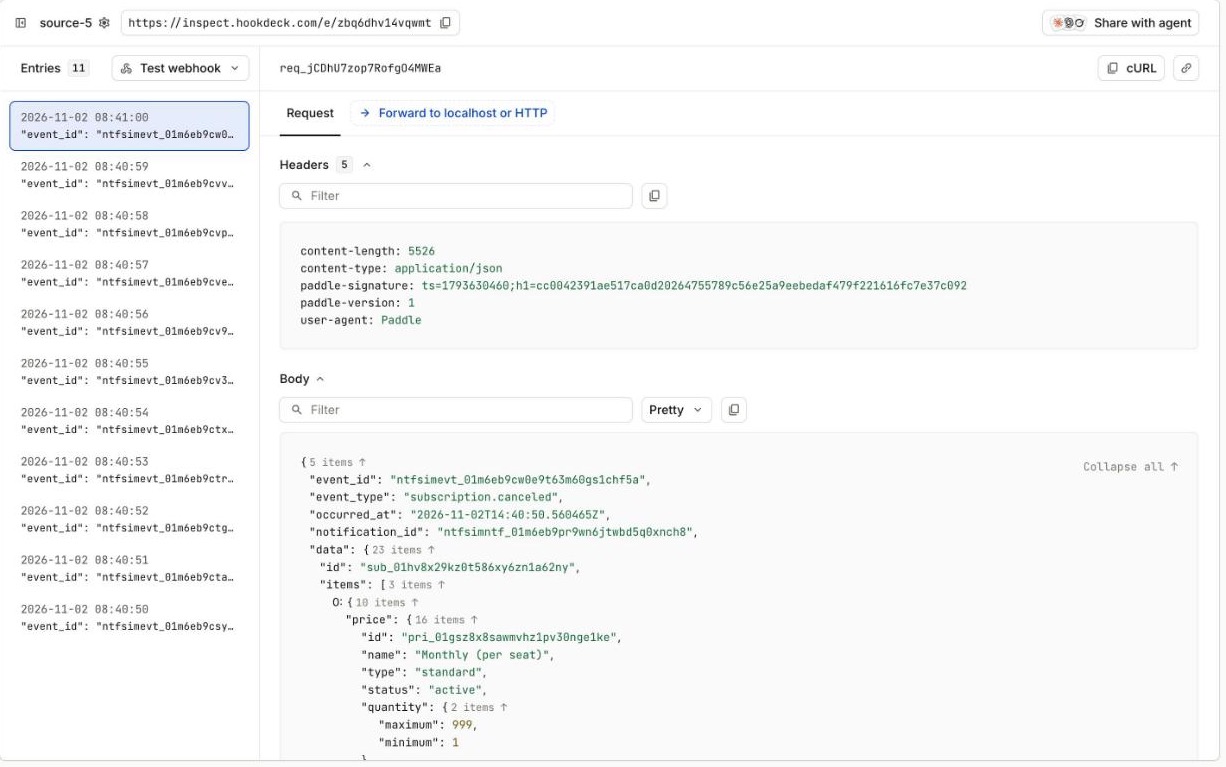
Order isn't guaranteed either, and the docs recommend using occurred_at rather than arrival time. That is the bigger risk for stored access state. An upsert keyed on the subscription ID, as in the starter kit, makes a duplicate subscription.updated harmless, because it rewrites the same values. A stale one is different. In our simulated failed renewal, the subscription got three subscription.updated events, carrying active, then past_due, then canceled; in production those arrive over days of payment recovery. If the active one arrives last, the row ends up active, and a customer whose payment failed keeps access.
Before going to production, store the occurred_at of the last event applied to each subscription and skip any incoming event that is older. The starter kit leaves this out to stay minimal. Keep a table of processed event_id values for handlers with side effects that a snapshot upsert doesn't absorb, such as emails or CRM updates.
Reconciling against the event stream
Retries and replays cover a failed delivery. They don't cover an endpoint that was down longer than the retry schedule, or a bug that wrote the wrong value for a day before anyone noticed.
For those, use GET /events. It returns a paginated list of everything that happened in the last 90 days, which Paddle's docs say is sometimes called the event stream. Events older than 90 days aren't retained.
Michael described teams running a cron against it that "checks against this and updates anything that's fallen out of sync." The same endpoint handles recovery after an outage. Page through the events for the window you missed and run them through the processing logic your handler uses after verification, such as the starter kit's processEvent. Events from GET /events carry no Paddle-Signature, so they can't go through the verifying route. Deduplicating on event_id and comparing occurred_at are what make this safe, because the recovery run will overlap with events you already processed.
Simulating a failed renewal with the webhook simulator
You can't wait a billing period for each renewal, failed payment, or cancellation you want to test.
Paddle's webhook simulator sends a single event or a scenario: subscription_creation, subscription_renewal, subscription_pause, subscription_resume, or subscription_. A renewal scenario sends the events a real renewal produces: subscription.updated for the new billing period, then a transaction that is created, billed, paid, and completed. You can configure the outcome:
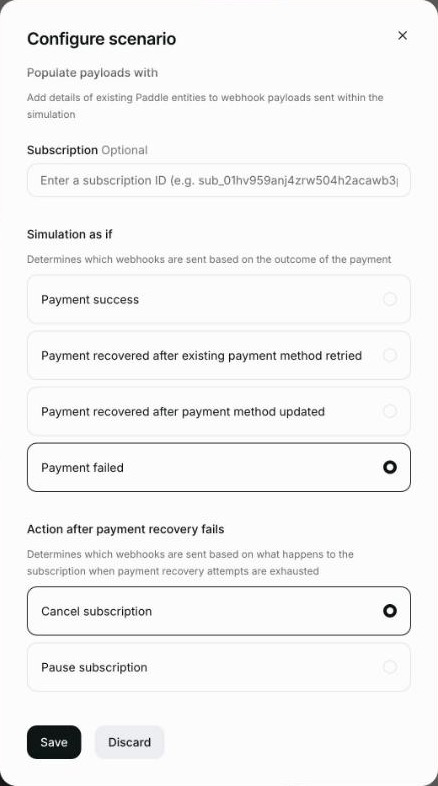
payment_outcome:success,failed,recovered_, orexisting_ payment_ method recovered_.updated_ payment_ method dunning_exhausted_action:subscription_canceledorsubscription_paused, used when the payment fails.
We ran a failed renewal that ends in cancellation in a Paddle sandbox account, pointed at a Hookdeck Inspect URL. It sent 11 webhooks, ending in subscription.canceled.
A scenario can also take a real subscription ID, so the payloads carry that subscription's data. Run a failed renewal that ends in cancellation against your app, and its stored status changes to canceled while the subscription in Paddle stays active, because a simulation doesn't create real transactions. Any screen that reads from the Paddle API, such as the starter kit's billing page, still says active.
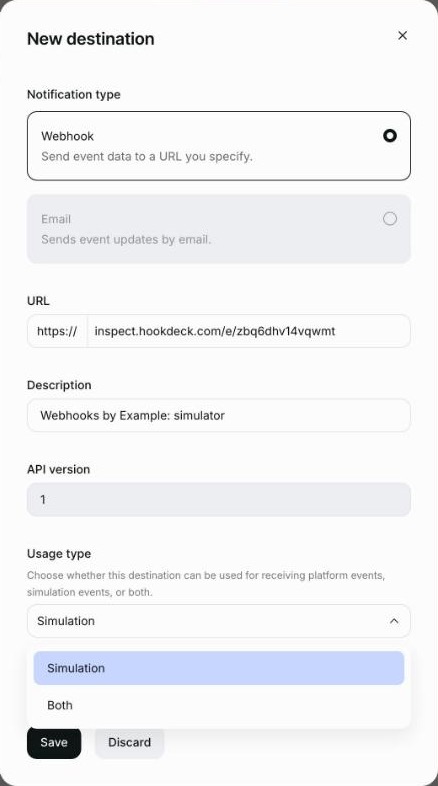
That gap is why simulated traffic has its own destination setting. Each destination has a traffic_source of platform, simulation, or all, and the default is platform. The dashboard calls it Usage type and shows it on the destination form the simulator opens, not the one under Notifications. In our sandbox, a destination created under Notifications didn't appear in the simulator's list. Paddle's docs say platform destinations "can only receive traffic for real events to avoid sending simulated data to production endpoints." Keep your real endpoint on platform and run the simulator against a separate test destination.
Simulations can be run again with POST /simulations/{simulation_, so you can rerun a scenario while you build the handling for a specific flow, or in CI, where an end-to-end test runs the failed-renewal scenario and asserts that the subscription row is canceled and the app revokes access.
Access decisions and subscription status
Before your app lets a customer use the product, it checks whether they've paid, which plan they're on, and whether their subscription is current, past due, or paused.
The check reads the subscription's product ID and status from your own database on every request that needs them. The product ID tells you the plan, and the status tells you whether the customer should get in. The starter kit stores both fields but leaves the check to you. An upgrade or downgrade arrives as a subscription.updated with a new product ID.
Paddle's provisioning guide has a table of what each status usually means for access:
trialing: full access, treated the same asactive.active: full access.past_due: for automatically collected subscriptions, full access, with a banner and a link to the customer portal so the customer can update their payment method.paused: none or read-only. Michael's suggestion is limited access, such as read-only or export but no writes, so the customer can see what they're missing and resume.canceled: revoke access. If a scheduled change is set, keep access until it takes effect, which is why the scheduled change's effective date is worth storing.
The mistake Michael sees most from teams new to Paddle is granting access from the browser.
“Checkout completes on the front end, Paddle.js will say checkout completed, and PSPs have similar things, and they'll take that as a grant access. It's unreliable to do that on the front end, to make those access decisions.”
Michael McGovern
Staff Developer Advocate @ Paddle
checkout.completed is a Paddle.js event that fires in the customer's browser when the checkout finishes. That makes it frontend state, which the person using the browser can fake. Paddle's checkout.completed docs also note that for deferred capture payment methods, payment is only authorized at that point and still pending capture. Use the event to show a success page, and grant access from backend state, when subscription.created reaches your server.
Verifying and processing behind Hookdeck Event Gateway
Hookdeck Event Gateway can sit between Paddle and your handler. It receives Paddle's webhooks on a source and delivers them to your endpoint.
Verification at the edge
The Node SDK's five-second signature window limits replayed requests, and it also fails any delivery that waits in a queue. A retry from a queue, or a manual retry from the Hookdeck CLI, still carries Paddle's original Paddle-Signature header. More than five seconds after Paddle signed it, the Paddle Node SDK's unmarshal throws, and a handler like the starter kit's returns 500 on every attempt.
Event Gateway has a Paddle source type. Configure the source with the destination's secret key from Paddle, and Hookdeck verifies Paddle-Signature when the request arrives. Requests that fail are rejected with VERIFICATION_FAILED and never reach your endpoint. Verified events are delivered with an x-hookdeck-verified: true header and an x-hookdeck-signature, an HMAC SHA-256 of the body signed with your project secret. That signature has no timestamp, so it still verifies on a retry hours later.
Your handler checks the Hookdeck signature instead of calling the SDK's unmarshal. It then builds the same typed event with the SDK's Webhooks.fromJson, so the starter kit's processEvent works unchanged. Here's our adaptation of the starter kit's route:
import crypto from 'node:crypto';
import { NextRequest } from 'next/server';
import { Webhooks } from '@paddle/paddle-node-sdk';
import { ProcessWebhook } from '@/utils/paddle/process-webhook';

const webhookProcessor = new ProcessWebhook();

export async function POST(request: NextRequest) {
  const rawRequestBody = await request.text();
  const expected = crypto
    .createHmac('sha256', process.env['HOOKDECK_SIGNING_SECRET'] || '')
    .update(rawRequestBody)
    .digest('base64');

  // Production code should compare in constant time and also accept
  // x-hookdeck-signature-2 while a rolled secret is still active.
  if (request.headers.get('x-hookdeck-signature') !== expected) {
    return Response.json({ error: 'Invalid signature' }, { status: 401 });
  }

  const eventData = Webhooks.fromJson(JSON.parse(rawRequestBody));
  await webhookProcessor.processEvent(eventData);
  return Response.json({ received: true });
}
Hookdeck's Paddle verification guide covers the source setup.
Processing inside the handler
The source acknowledges Paddle immediately and queues the event, so Paddle's five-second limit applies to Hookdeck rather than to your handler. Delivery to your endpoint has its own delivery timeout, 60 seconds by default and configurable up to 15 minutes, and its own retries. With that window, the handler can finish work that takes minutes rather than seconds before it responds, such as chaining several external API calls to provision a new account or running an AI agent task, instead of handing it to a queue and worker of your own.
Keep your own event_id and occurred_at checks. Hookdeck delivers at least once too, and it can't know which subscription state is newer.
What Paddle's LLM benchmark grades in a webhook handler
Paddle publishes an LLM benchmark that scores models on building a Paddle integration from a one-shot prompt. The October 2026 table covers 29 models across 10 tasks, each run with a baseline prompt, with Paddle's agent skills, and with the Paddle docs MCP server.
Two of the tasks grade the patterns in this post. Webhook setup checks include verifying before processing side effects, passing the raw body unchanged, reading the webhook secret rather than the API key, and staying idempotent across Paddle retries. Sync subscriptions checks upserts keyed on the subscription ID that are safe under out-of-order delivery, and granting access to trialing customers.
The mistakes Michael sees tripping up smaller models overlap with those criteria: signature verification, event ordering, and slow 200 responses. On the baseline table, webhook setup scores between 83 and 100 across all 29 models. Paddle notes that a one-shot test understates what skills and MCP add in an agent loop.
Try it with Hookdeck Inspect
- Copy a URL from Hookdeck Inspect. You don't need a Hookdeck account.
- In a Paddle sandbox account, open the webhook simulator and create a simulation. Use Add new destination to add the Inspect URL with Usage type set to Simulation, and select the subscription and transaction events.
- Choose the Subscription renewed scenario. Under Configure scenario, select Payment failed and Cancel subscription, then run it.
- Open the events in Hookdeck Inspect. Compare each payload's
event_id,notification_id, andoccurred_at, and check the order they arrived in.
To receive the webhooks in an app instead, such as the starter kit on port 3000, start the Hookdeck CLI with npx hookdeck-cli listen 3000 paddle --path /api/webhook, the command Paddle's own respond to webhooks docs suggest for local development. Then set the source URL the CLI prints as the destination URL in Paddle. Hookdeck forwards the original request headers, so your handler's own signature check still runs. To verify at the edge, sign up for a free Hookdeck account and set the source type to Paddle.
After checkout, the subscription lifecycle runs on Paddle's side, and webhooks are how your app keeps up. Store the status and plan from subscription.created and subscription.updated, keep that copy correct with signature verification, an occurred_at guard, and the event stream, and use the simulator for the renewals and failures you can't wait for. If your app grants access from the browser's checkout event today, move that decision to subscription.created, then run a failed-renewal simulation against your handler to see what it does with a cancellation.
Resources
- How Paddle webhooks work
- Provision access with webhooks
- Paddle webhook simulator
- Paddle Next.js starter kit, with a landing page at billing.new
- Paddle MCP server for your account, and the Paddle docs MCP server
- Hookdeck's guide to Paddle webhooks
- How to implement webhook idempotency
Thanks to Michael for walking us through Paddle's webhooks and the starter kit. The full conversation, including how Paddle works as a merchant of record and the AI tooling in Paddle's docs, is in the video at the top of this post and on YouTube. The next episode of Webhooks by Example is coming soon.