Delivery Groups
A delivery group is a Destination sub-queue identified by a value from an event headers, body or query. Each group gets an independent delivery rate, so a burst from one tenant, account, topic or other property does not delay the others.
The destination's maximum delivery rate and your project throughput remain the ceilings across all groups. Delivery groups control how that capacity is shared.
Use delivery groups to:
- Prevent a high-volume tenant from creating a backlog for every other tenant.
- Stay within downstream per-account or per-store API rate limits.
- Give priority customers a higher rate, or throttle a known high-volume group.
- Segment volume by priority such as per topic or criticality level.
How delivery groups work
Configure one dot-notation field path on a destination. Hookdeck evaluates that path for every event after its connection rules run, then uses the resolved value as the delivery group identifier.
| Event data | Example field path |
|---|---|
| JSON body | body.customer_id |
| Header | headers.x-tenant-id |
| Query string | query.account_id |
| Request path | path |
Each distinct value gets its own queue and the default group delivery rate. Events whose field cannot be resolved are collected in an Unknown group and use the default rate.
When several groups have queued events, Hookdeck rotates across the active groups while respecting both the group rates and the destination-wide ceiling. Idle groups do not reserve capacity.
If different sources use different field names, add a transformation that writes a common field before grouping. This trick also enabled composite values to serve as delivery groups.
Delivery groups uses fair delivery scheduling, in the case where the destination as a whole is at limit, the delivery rate for each group is impacted proportionally. The rate is a guranteed limit, not a guarantee throughput.
Overrides
Overrides enables setting a custom delivery rate for specific values, such as important customers.
Overrides are capped to 100 per destination. Contact us if you need more.
Configure delivery groups
Choose a stable field that identifies the tenant, account, store, or other unit whose traffic should be isolated. Then set a default rate for every value and optional overrides for specific values.
- Open the Connections page and select the destination.
- Open the Settings tab and find Delivery policy.
- Enable Delivery rate by group.
- Set the Field Key and the default Group Max Delivery Rate.
- Optionally add Field Value Overrides for groups that need a different rate.
- Click .
This example limits the destination to 100 events per second, each customer to 5 events per second, and the cus_priority customer to 50 events per second.
{
  "name": "my-new-api"
}{
"id": "des_TU9ioCk5EHUU",
"team_id": "tm_lbhzBKgFOUnB",
"updated_at": "2026-01-14T13:36:41.816Z",
"created_at": "2026-01-14T13:35:55.263Z",
"name": "my-new-api",
"description": null,
"type": "HTTP",
"config": {
"url": "https://mock.hookdeck.com/example",
"delivery_policy": {
"rate": 5,
"period": "second",
"groups": null
},
"http_method": null,
"path_forwarding_disabled": false,
"auth": {},
"auth_type": "HOOKDECK_SIGNATURE"
},
"disabled_at": null
}curl -X PUT "https://api.hookdeck.com/2026-09-01/destinations/des_123456789" \
-H "Authorization: Bearer YOUR_API_KEY" \
-H "Content-Type: application/json" \
-d '{
"config": {
"delivery_policy": {
"rate": 100,
"period": "second",
"groups": {
"key": "body.customer_id",
"rate": 5,
"rate_period": "second",
"overrides": {
"cus_priority": {
"rate": 50,
"rate_period": "second"
}
}
}
}
}
}'
Use the same configuration when creating a destination with POST /destinations or updating one with PUT /destinations/:id. For connections, include it under destination.config with POST /connections or PUT /connections/:id.
You can change the key, default rate, and overrides, or disable delivery groups later. Changes apply only to events received after you save them; existing events keep the group assigned when they were received.
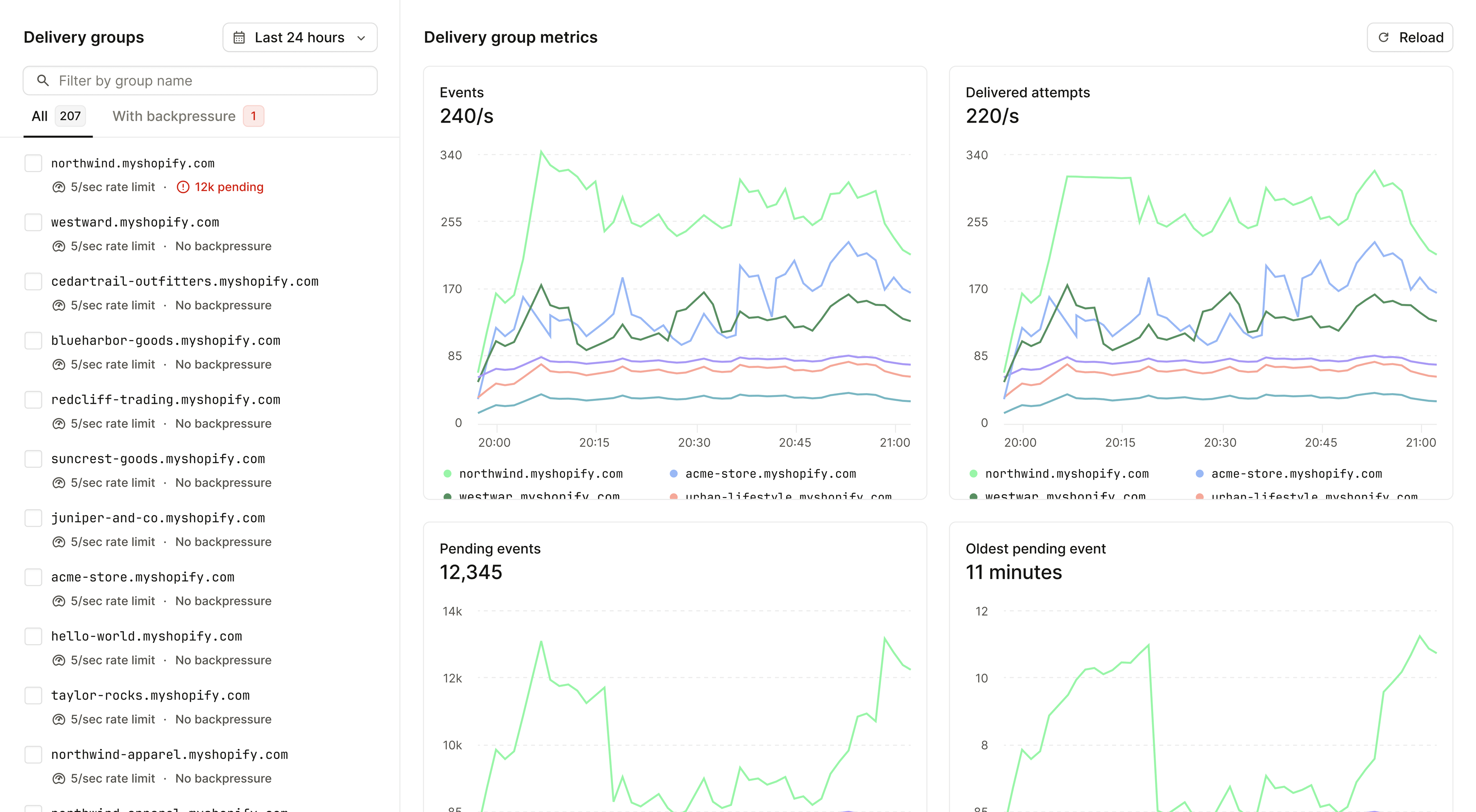
Monitor delivery groups
Open a destination's Delivery groups tab to search its groups and compare:
- Incoming event rate
- Delivered attempt rate
- Pending events
- Oldest pending event
Select one or more groups to compare their metrics or edit their rate overrides. The Events API also returns a delivery_group field and accepts it as a filter, while the Metrics API supports delivery_group as a filter and dimension.
Backpressure issue triggers detect backlogs at the group level. Hookdeck maintains one backpressure issue per destination, lists the affected groups on that issue, and resolves it once the destination and all of its groups recover. Your configured issue notifications use the same channels as other Hookdeck issues.
Limitations
- Delivery groups are available for HTTP and Mock API destinations, not CLI destinations (yet).
- A destination can group by one field path. Field paths are limited to 256 characters, and longer group identifiers are truncated.
- Group rates support per-second, per-minute, and per-hour periods. They do not support concurrent limits, although the destination-wide limit can use
concurrent. - A destination can have up to 100 group-specific rate overrides. Contact us if you need more.
- Enabling or changing delivery groups is not retroactive. Previously received events keep their original group, and events received before grouping was enabled appear in the Unknown group when retried.
- Group scheduling can slightly increase baseline delivery latency (up to 0.99s).
- Metrics exports does not support group-level metrics as it's a high cardinality dimension and could lead to cost issues. Use the dashboard or Metrics API for group-level metrics; API queries grouped by
delivery_groupmust filter to one destination.